Kaniko: Kaniko build failing on Kubernetes with simple node project calling npm install
I'm trying to build a basic node application (https://github.com/johnmcollier/nodetest) using Kaniko. Using an NFS volume mount, I've mounted in its Dockerfile and build context under /workspace. The arguments I pass the Kaniko container are:
          args: [ "--dockerfile=/workspace/nodetest/Dockerfile",
                  "--context=/workspace/nodetest",
                  "--skip-tls-verify",
                  "--cache=true",
                  "--destination=myregistry/nodetest" ]
However, the build fails at the npm install step, saying:
Unhandled rejection Error: EROFS: read-only file system, mkdir '/root/.npm'

npm ERR! cb() never called!

npm ERR! This is an error with npm itself. Please report this error at:
npm ERR!     <https://npm.community>
error building image: error building stage: waiting for process to exit: exit status 1
To Reproduce
Steps to reproduce the behavior:
- Mount the Dockerfile and build context into Kaniko
- Build the image using
/kaniko/executor
Additional Information
- Dockerfile:
```
FROM ibmcom/ibmnode
WORKDIR "/app"
# Install app dependencies
COPY package.json /app/
RUN apt-get update \
&& apt-get dist-upgrade -y \
&& apt-get clean \
&& echo 'Finished installing dependencies'
RUN cd /app; npm install --production
COPY . /app
ENV NODE_ENV production
ENV PORT 3000
EXPOSE 3000
CMD ["npm", "start"]
```
- Build Context:
See https://github.com/johnmcollier/nodetest
Can be built with docker with a simpledocker build -t nodetest . - Kaniko Image (fully qualified with digest):
```
Image: gcr.io/kaniko-project/executor:debug
Image ID: docker-pullable://gcr.io/kaniko-project/executor@sha256:23820df3cf2812da0f4c03a25e6bb7d65ad3af11386f49306eec22b0bf7bdbd0
Edit: I've attached the full build logs from the Kaniko pod:
kaniko_logs.txt
 johnmcollier
All 9 comments
I'm experiencing the same issue on our Jenkins CI (read-only error accessing /root/.npm) when launching Kaniko in a kubernetes pod as per the examples here https://github.com/jenkinsci/kubernetes-plugin/tree/master/examples
I am however able to successfully build a NodeJS docker image if I run Kaniko locally on my machine.
Update
I managed to fix this on my side. I was mounting the docker secret incorrectly. I had previously mounted to the /root/ directory as per the example in the Jenkins kubernetes plugin. Changing it to /kaniko/ as per the official Kaniko docs fixed the issue.
    volumeMounts:
      - name: jenkins-docker-cfg
        mountPath: /kaniko/.docker
Here's my pod spec -
kind: Pod
metadata:
  name: kaniko
spec:
  containers:
  - name: kaniko
    image: gcr.io/kaniko-project/executor:debug
    imagePullPolicy: Always
    command:
    - /busybox/cat
    tty: true
    volumeMounts:
      - name: jenkins-docker-cfg
        mountPath: /kaniko/.docker
  volumes:
  - name: jenkins-docker-cfg
    projected:
      sources:
      - secret:
          name: regcred
          items:
            - key: .dockerconfigjson
              path: config.json
Check your volume mounts :)
 chickenbeef
on 21 Jan 2019
chickenbeef
on 21 Jan 2019
Hey @johnaoss , are you still seeing this issue?
 priyawadhwa
on 25 Jul 2019
priyawadhwa
on 25 Jul 2019
@priyawadhwa I think you pinged the wrong person 😅
 johnaoss
on 28 Jul 2019
johnaoss
on 28 Jul 2019
Haha oops, thanks @johnaoss! @johnmcollier are you still seeing this issue?
priyawadhwa
on 29 Jul 2019
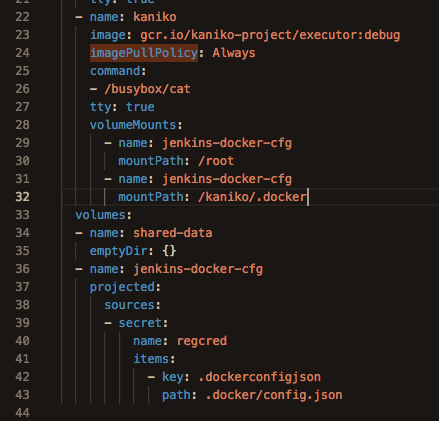
I am facing similar issue. I tried mounting regcred in both root and /kaniko/.docker
PodTemplate
In jenkins file:
 container('kaniko') {
              sh '''#!/busybox/sh
      /kaniko/executor -f `pwd`/api/Dockerfile -c `pwd`/api --insecure --skip-tls-verify --cache=true --destination=registryid.dkr.ecr.ap-southeast-2.amazonaws.com/apiservice:kanikov1'''
        }
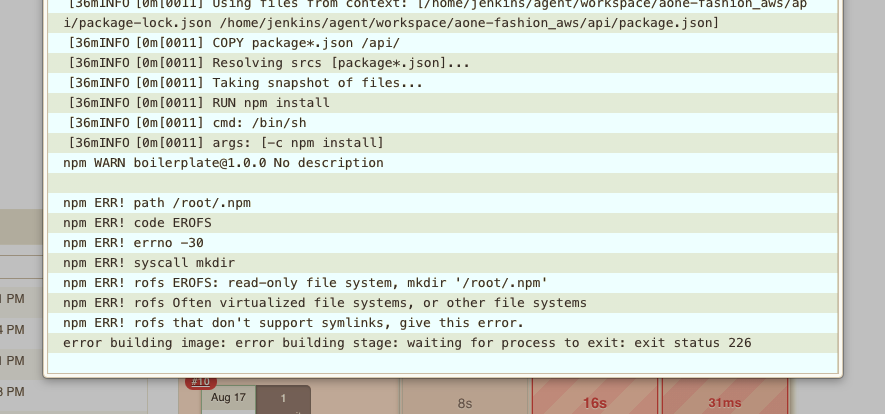
Error log:
 arunramachandran15
on 16 Aug 2019
arunramachandran15
on 16 Aug 2019
Running into this, too.
 kyounger
on 20 Aug 2019
kyounger
on 20 Aug 2019
The supplied Dockerfile is now failing due to the image using the V1 registry format which kaniko does not support. If this issue can be repo'd using a V2 registry format image I'm happy to further investigate.
unsupported MediaType: "application/vnd.docker.distribution.manifest.v1+prettyjws"
 cvgw
on 16 Nov 2019
cvgw
on 16 Nov 2019
Closing this issue, but feel free to re-open if there is case of this with the V2 registry format
cvgw
on 21 Nov 2019
I think this is just a bug in the kaniko example here. It is mounting to /root which makes /root a read only filesystem. Instead it should be mounting the docker credentials directly to /root/.docker or /kaniko/.docker.
 jsravn
on 10 Feb 2020
jsravn
on 10 Feb 2020
Related issues
 HoiPangCHEUNG
·
4Comments
HoiPangCHEUNG
·
4Comments
 PatrickXYS
·
4Comments
priyawadhwa
·
4Comments
PatrickXYS
·
4Comments
priyawadhwa
·
4Comments
 BenHizak
·
4Comments
BenHizak
·
4Comments
 fkorotkov
·
3Comments
fkorotkov
·
3Comments