K9s: Confused about headings at bottom of k9s
Describe the bug
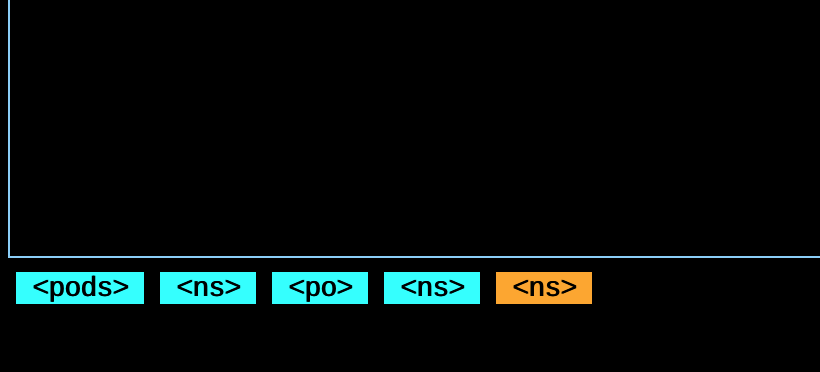
After issuing a 'command' in k9s, such as: po, ing, ns etc , a new "heading" is created at the bottom of the view: <pods><ns><po><ns> for example. The most recently created and thus active "heading" is a different color from the rest. Intuitively, I would think this means a new tab/buffer has been created and that one should be able to toggle back and forth between these views or buffers.
I may be being dense, but I just can't figure out what the reason for these heading are. Is it simply a command history? I have no found any way to "toggle" back to previous ones, or delete one either. Typing the same command such as :ns multiple times just creates more of these headings, rather than switching back to the one which is already created. Probably not a bug, I'm just wondering if I am missing something or if this is like not-yet-implemented behavior I am expecting.
Very cool tool though, thanks.
To Reproduce
Any command in k9s creates on of these and I am just wanting clarification on what the purpose is.
Expected behavior
NA
Screenshots
Versions (please complete the following information):
osx - k9s 0.9.3
Additional context
NA
 kevinlong206
All 4 comments
Hey @kevinlong206, thanks for your very detailed report.
This is indeed a breadcrumb, you can use it to return to the last view using the p shortcut. You can see this and other shortcuts in the help view that can be accessed by the ? shortcut.
Hope this answers your question.
 paivagustavo
on 26 Nov 2019
paivagustavo
on 26 Nov 2019
Ah yes, it does. I feel dumb I thought I had tried 'p' but I guess not. Might be neat to have both previous and next (rather than delete breadcrumb). But now I understand at least, thanks!
kevinlong206
on 26 Nov 2019
I think there are room for improvement with this feature, I also did have the same questions when I started to use k9s.
I'll create a new issue for this if there is not any.
 sgandon
on 26 Nov 2019
sgandon
on 26 Nov 2019
@kevinlong206 @sgandon Thank you all for your feedback! I've rework this functionality in 0.10.1 and introduced hotkeys. Hopefully it's a bit better...
 derailed
on 30 Dec 2019
derailed
on 30 Dec 2019
Related issues
 krysopath
·
3Comments
krysopath
·
3Comments
 mimizone
·
4Comments
mimizone
·
4Comments
 signaleleven
·
3Comments
signaleleven
·
3Comments
 lfundaro
·
4Comments
lfundaro
·
4Comments
 stk0vrfl0w
·
3Comments
stk0vrfl0w
·
3Comments
Most helpful comment
I think there are room for improvement with this feature, I also did have the same questions when I started to use k9s.
I'll create a new issue for this if there is not any.