K9s: System color mappings from terminal emulator are not respected

Describe the bug
Prior to 0.8.0, the skin colors were respecting my terminal emulator's color scheme (for the first 16 colors, i.e. system colors). Now they are not (see screenshots, left: 0.7.13, right: 0.8.2, both using the same skin file below). My terminal emulator is guake but it also happens with gnome-terminal.
Screenshots

Skin
k9s:
  # General K9s styles
  body:
    fgColor: green
    bgColor: black
    logoColor: olive
  # ClusterInfoView styles.
  info:
    fgColor: white
    sectionColor: green
  frame:
    # Borders styles.
    border:
      fgColor: white
      focusColor: green
    # MenuView attributes and styles.
    menu:
      fgColor: white
      keyColor: purple
      # Used for favorite namespaces
      numKeyColor: purple
    # CrumbView attributes for history navigation.
    crumbs:
      fgColor: black
      bgColor: green
      activeColor: olive
    # Resource status and update styles
    status:
      newColor: white
      modifyColor: olive
      addColor: white
      errorColor: maroon
      highlightcolor: teal
      killColor: purple
      completedColor: gray
    # Border title styles.
    title:
      fgColor: teal
      bgColor: black
      highlightColor: olive
      counterColor: white
      filterColor: green
  # TableView attributes.
  table:
    fgColor: white
    bgColor: black
    cursorColor: olive
    # Header row styles.
    header:
      fgColor: white
      bgColor: black
      sorterColor: orange
  views:
    # YAML info styles.
    yaml:
      keyColor: teal
      colonColor: white
      valueColor: white
    # Logs styles.
    logs:
      fgColor: white
      bgColor: black
 Gerrit-K
All 19 comments
@Gerrit-K Great catch!! Thank you for reporting this! I'll take a look...
 derailed
on 24 Aug 2019
derailed
on 24 Aug 2019
@Gerrit-K I had updated the terminal emulator in 0.8.2. I've reverted to an older version. I am hoping this will fix this issue in 0.8.3. If not please reopen. Thank you!!
derailed
on 27 Aug 2019
@derailed thanks for looking into this. Unfortunately the colors are still messed up. The issue was probably introduced in 0.8.0, I should've used that version for the screenshots, sorry ...
PS: I would reopen the issue, but I don't have permission to do so.
PPS: Although I report an issue, I'm still a very happy k9s user! Thank you for the effort you put into this, it's really appreciated.
Gerrit-K
on 28 Aug 2019
@Gerrit-K Rats! Thank you for you kind words and for reporting back!
derailed
on 28 Aug 2019
Hey, I know this is silly, but one of the biggest things putting me off towards using k9s is the high contrast color scheme. It'd be fantastic if it obeyed system colors. I can only get it to do this when I ssh to another machine and run it there.
 angelichorsey
on 25 Oct 2019
angelichorsey
on 25 Oct 2019
The tcell lib didn't have the colors I was interested in so I made this small change and rebuilt so I could specify hex values in skin.yml.
```diff --git a/internal/config/style.go b/internal/config/style.go
index cb27613..014088f 100644
--- a/internal/config/style.go
+++ b/internal/config/style.go
@@ -329,5 +329,5 @@ func AsColor(c string) tcell.Color {
return color
}
- return tcell.ColorPink
- return tcell.GetColor(c)
}
```
Might help others.
angelichorsey
on 25 Oct 2019
Thanks @angelichorsey! This looked promising at first, but doesn't work exactly as expected, as I'll try to show along this screenshot:
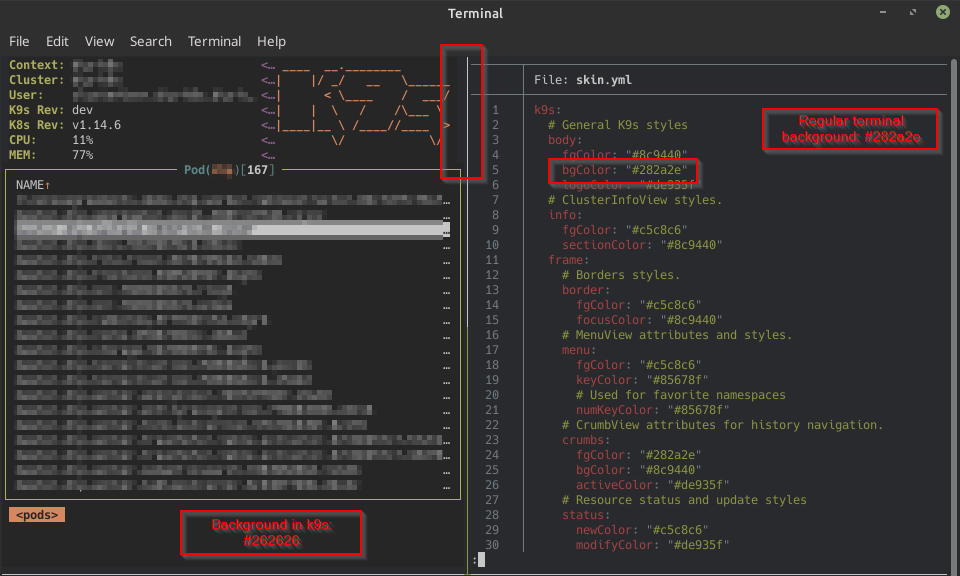
I've compiled k9s with your suggested fix and updated my skin.yml as seen on the right. My terminal emulator (GNOME Terminal) is configured to display the system color "0" (i.e. "black") using the color #282a2e which is also the color I've then assigned to k9s.body.bgColor. In k9s (or tcell) however this is displayed as #262626. In addition, there's a small portion of the screen which apparently is not covered by k9s and therefore "transparent" (i.e. the default terminal background is used here). I've marked this section with the red rectangle second from the left, but it's hard to see without zooming in.
Playing around with this also made me test different versions of tcell. In my initial issue description I mentioned that this appeared since k9s v0.8.0, which introduced a tcell upgrade from 1.1.1 to 1.1.2. Rolling back to 1.1.1 interestingly fixed it for me without having regression. An upgrade to the latest version (1.3.0) still shows this issue. @derailed was there a specific reason for this upgrade? Is a downgrade considerable? Otherwise I guess we have to dig deeper into tcell.
Gerrit-K
on 29 Oct 2019
@Gerrit-K @angelichorsey Thank you both for your help and reports! I'll have to take a closer look as I am not sure what actually changed in with the color support. As of 0.9.3 I've updated both dependent libs and guessing this problem is not going to be fixed per @Gerrit-K report. Could you still give it a try and see if anything changed in your experimentations? I think @angelichorsey change is reasonable as it would allow the use of hex colors in skins. We could make the change permanent in K9s if this yields to a better experience with custom skins.
derailed
on 30 Oct 2019
Yes, I also think that @angelichorsey change is reasonable (I believe I've also seen hex colors as a feature request to k9s at some time, but I might be wrong). And downgrading before understanding the issue should actually also never be considered, so forget about my last comment. I'll try to find out why there are those subtle color differences though.
Edit: so it appears to me that my theme uses hex colors from outside the 256-color palette and my terminal emulator approximates them with the nearest color from within the palette. Reading more and more about this I think I'm going to switch to a base16 theme ...
Gerrit-K
on 30 Oct 2019
I would also love me some system colors. Or at least the ability to use color-codes.
 MikaelElkiaer
on 18 Dec 2019
MikaelElkiaer
on 18 Dec 2019
Is it just me or did this just started working again in one of the latest versions?
MikaelElkiaer
on 23 Jan 2020
Not for me, but that might be related to different skin.yml files. Are you also using the named colors as I do?
Gerrit-K
on 23 Jan 2020
Not for me, but that might be related to different
skin.ymlfiles. Are you also using the named colors as I do?
I'm not using a skin at all.
Actually, what I did to get it work was fiddle with my .Xresources.
So now that I think back on it, it probably worked the whole time, just had to fix my .Xresources first.
MikaelElkiaer
on 23 Jan 2020
Do you exactly know what you've fixed?
I admit that I didn't know about .Xresources and your comment made me hope, so I've created the file in my home directory with the following content:
! special
*.foreground: #c5c8c6
*.background: #1d1f21
*.cursorColor: #c5c8c6
! black
*.color0: #282a2e
*.color8: #373b41
! red
*.color1: #a54242
*.color9: #cc6666
[... remaining colors omitted]
Unfortunately this doesn't change anything (in k9s v0.13.3) either with or without a skin file.
Gerrit-K
on 23 Jan 2020
ggGgg
Do you exactly know what you've fixed?
I admit that I didn't know about
.Xresourcesand your comment made me hope, so I've created the file in my home directory with the following content:! special *.foreground: #c5c8c6 *.background: #1d1f21 *.cursorColor: #c5c8c6 ! black *.color0: #282a2e *.color8: #373b41 ! red *.color1: #a54242 *.color9: #cc6666 [... remaining colors omitted]Unfortunately this doesn't change anything (in k9s v0.13.3) either with or without a skin file.
Here's my .Xresources: https://github.com/MikaelElkiaer/dotfiles/blob/master/.Xresources
If that's not useful, it might be a gnome-terminal thing - everything works fine in URxvt for me.
MikaelElkiaer
on 28 Jan 2020
Unfortunately this didn't seem to help. k9s still displays pitch black (#000000) instead of the system color 0 for sections where my skin specifies black. I even installed rxvt but it's showing the same behaviour.
After the latest patch though this issue is less significant to me since I now have the ability to use hex colors as well as default for the backgrounds, which allows me to achieve the same appearance as pre-0.8 without losing any of the current functionality.
Gerrit-K
on 24 Feb 2020
This project is rapidly becoming one of my preferred day to day cli tools.
There is only one thing that still bugs me now, is this pitch black background that clashes with my (default ubuntu) theme.
It seems all the other colours are my terminal's default (I guess from .Xresources).
Until this is fix, I use this skin.yml, its easier on the eyes :)
k9s:
  body:
    bgColor: default
  frame:
    crumbs:
      bgColor: default
    title:
      bgColor: default
  views:
    table:
      bgColor: default
      header:
        bgColor: default
    xray:
      bgColor: default
    logs:
      bgColor: default
      indicator:
        bgColor: default
    charts:
      bgColor: default
 pierredavidbelanger
on 11 May 2020
pierredavidbelanger
on 11 May 2020
@Gerrit-K I think adding "default" as the skin colors should fix this issue. If this is not the case please reopen. Tx!!
derailed
on 2 Aug 2020
@derailed Yes, thanks. In my last comment I also noted that, but I've left this issue open for the couple of others who got involved along the way. I'm perfectly fine with closing it ;-)
Thanks for your work!
Gerrit-K
on 3 Aug 2020
Related issues
 lfundaro
·
4Comments
lfundaro
·
4Comments
 krysopath
·
3Comments
krysopath
·
3Comments
 steffen-geissinger-by
·
3Comments
steffen-geissinger-by
·
3Comments
 cdunford
·
3Comments
cdunford
·
3Comments
 dalgibbard
·
3Comments
dalgibbard
·
3Comments
Most helpful comment
This project is rapidly becoming one of my preferred day to day cli tools.
There is only one thing that still bugs me now, is this pitch black background that clashes with my (default ubuntu) theme.
It seems all the other colours are my terminal's default (I guess from .Xresources).
Until this is fix, I use this
skin.yml, its easier on the eyes :)