K-9: K-9 doesn't show the subject line for some e-mails
Expected behavior
K-9 should show the mail subject.
Actual behavior
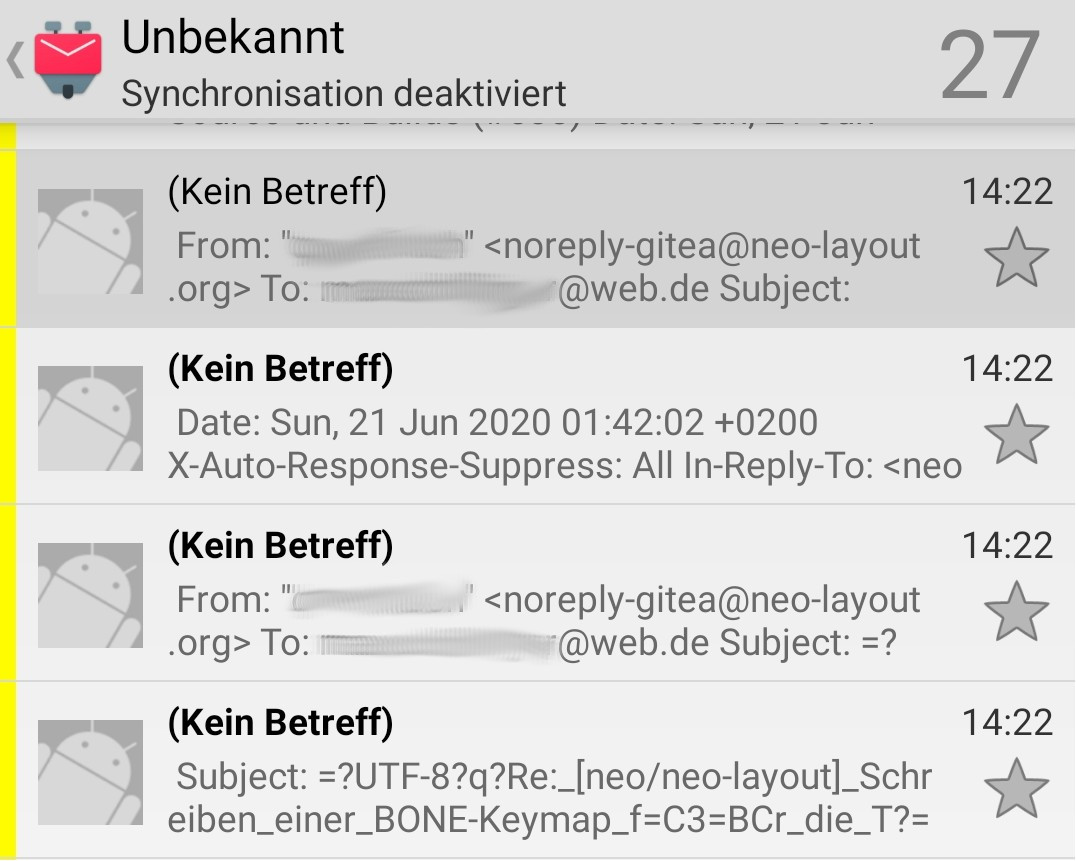
It's saying _(Kein Betreff)_ = _(No subject)_ for all e-mail notifications from a Gitea project.
Steps to reproduce
- You could login to https://git.neo-layout.org/neo/neo-layout with your GitHub account.
- Click on "watch" and wait for some days.
- You should receive some e-mail notifications.
Environment
K-9 Mail version: 5.600
Android version: 9
Account type (IMAP, POP3, WebDAV/Exchange): IMAP
Please take some time to retrieve logs and attach them here:
k9-log.txt
Here some examples, it's saying _No subject_:
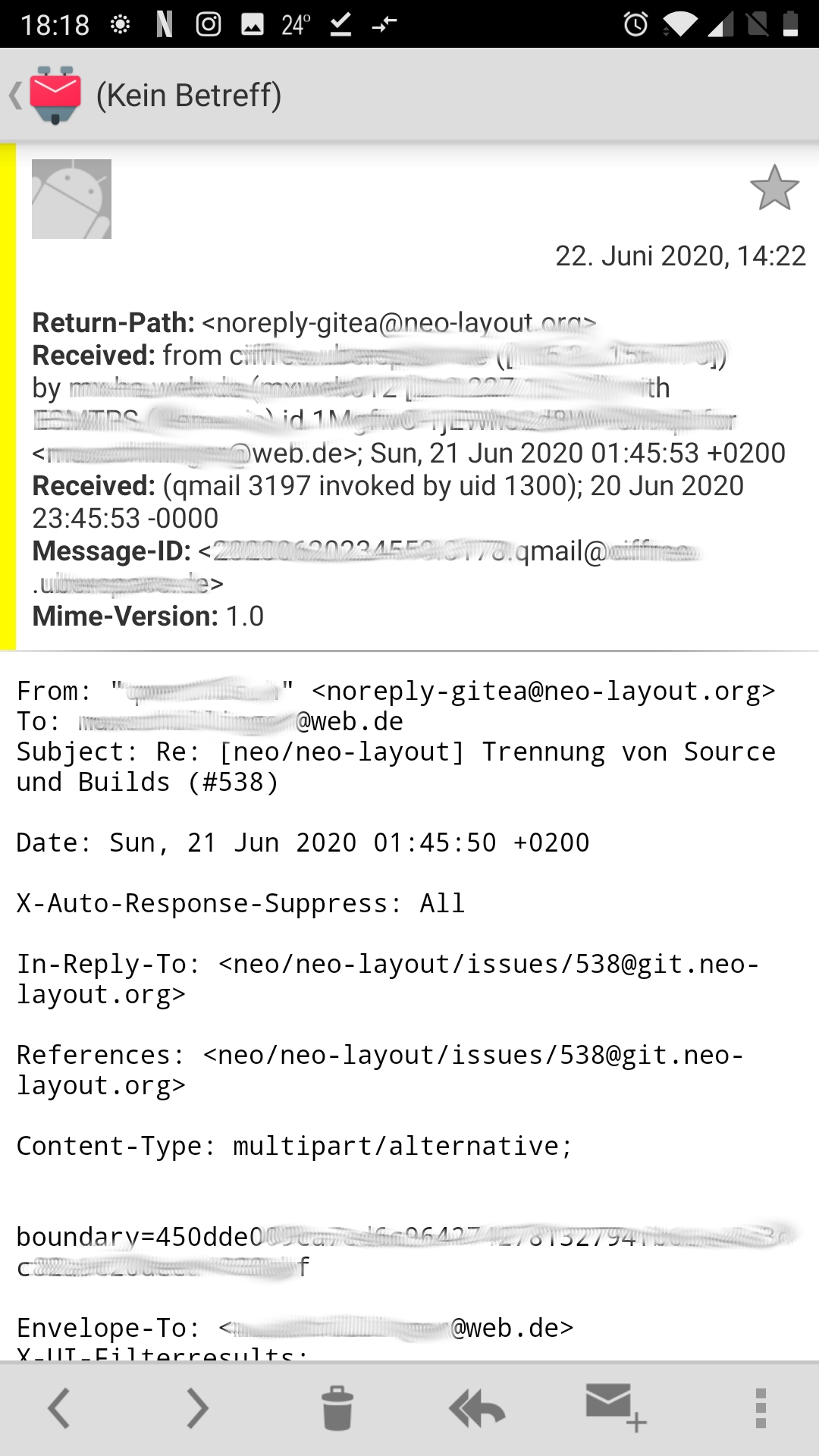
Here you can see that the e-mail contains a subject line:
 MaxGyver83
All 27 comments
Also have this for emails coming from my Wordpress installation when notifying me that the Wordpress version has been updated.
K-9 version: 5.716
 simontb
on 23 Jun 2020
simontb
on 23 Jun 2020
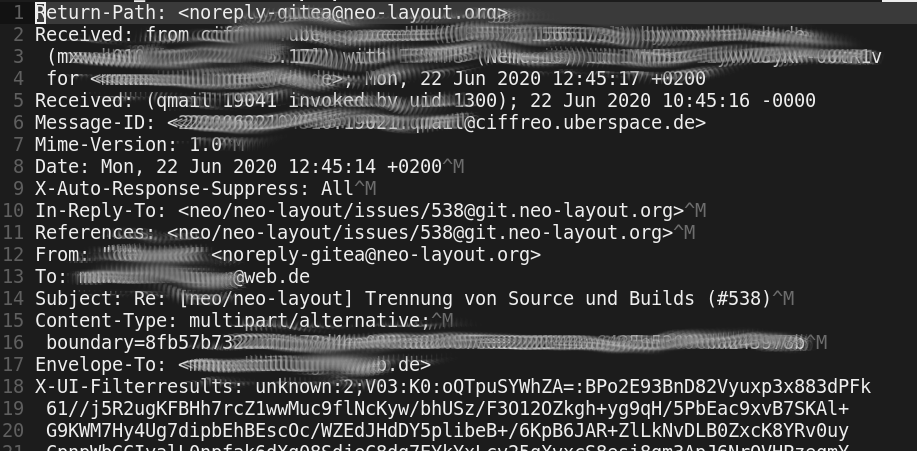
Maybe it's about the line endings? Some lines have a ^M at the end, some others don't:
@simontb : Do your emails from Wordpress also mix line endings?
MaxGyver83
on 23 Jun 2020
Please provide the source of such a message including the original line endings. If you have to redact the content please use a hex editor to do so.
 cketti
on 23 Jun 2020
cketti
on 23 Jun 2020
Here it is:
example_xxx.txt
MaxGyver83
on 23 Jun 2020
@MaxGyver83: Thanks. You went a bit overboard with the redacting and broke the MIME boundary strings. After manually fixing them up the message displayed fine for me with both K-9 Mail 5.717 and K-9 Mail 5.600.
But the message does contain some lines that don't end with CRLF. That's not a standard-compliant message, even though most parsers will read the message fine anyway. You should investigate where this is coming from. Does the source send out a broken message or is a mail server in between the source of the wrong line endings? To me it looks like the sending mail server seems to introduce the problem.
That might explain the issue you're seeing, but it might not. The example message with fixed up boundaries displays fine for me.
cketti
on 23 Jun 2020
@cketti : Thanks for your analysis!
After copying that mail into my maildir folder (in Linux) and synching again with offlineimap it looked fine in K-9 Mail. Now I can't find it anymore. Or maybe this mail was never affected. I need to do some more testing.
MaxGyver83
on 23 Jun 2020
I've created an account at that gitea instance and received an email that displayed the observed behavior. The problem does seem to be related to line endings. In the email I read via IMAP the initial header lines are properly terminated with CRLF. But after that it gets wild. Some examples:
CRLFCRLFCRCRLF
CRCRLF
CRCRLFCRCRLF
I'm guessing at least one system this message has traveled through tried to fix up wrong line endings and made things worse.
cketti
on 24 Jun 2020
Which e-mail service provider do you use? I use web.de. I already have the suspicion that they destroy soft line breaks (in "format=flowed" e-mails).
I'll test it with another e-mail address.
MaxGyver83
on 24 Jun 2020
Nevertheless it would be nice if K-9 Mail could just ignore mixed/superfluous line endings. For example, Thunderbird doesn't complain about these mails.
MaxGyver83
on 24 Jun 2020
How do I extract the message source?
Apart from the header information like subject and sender not being displayed, I also noticed that German umlauts (ä, ö, ü) are not being displayed correctly. Instead two replacement characters (�) are shown. The mail provider in this case is GMX and in their app everything works.
simontb
on 24 Jun 2020
I've created an account at that gitea instance and received an email that displayed the observed behavior. The problem does seem to be related to line endings. In the email I read via IMAP the initial header lines are properly terminated with CRLF. But after that it gets wild.
I'm guessing at least one system this message has traveled through tried to fix up wrong line endings and made things worse.
Hi, I am the administrator of mentioned server (or in this case an Uberspace, which means the servers are managed by the Uberspace team, while I manage the software running on it).
I have also checked on some mails I received via that Gitea instance. In my case they are formatted with LF for all initial header lines, then CRLF for all content lines. I am not firm with e-mail protocols: e.g. the defined boundary ends with LF in the header but with CRLF on every occurence. I don’t know if this is (should be) ignored by mail clients? Roundcube never has a problem with it, in fact it changes the header line endings to CRLF when I save a message.
The server should be fine, I just use sendmail and trust the Uberspace guys to configure everything properly. Or the Gitea team for that matter.
@MaxGyver83 If you would like to discuss more, either message me directly (github, email) or better join the Neo chat (see homepage).
 qwertfisch
on 24 Jun 2020
qwertfisch
on 24 Jun 2020
@simontb This is to be expected. If the header line containing the subject is not parsed due to wrong line ending, then also the MIME part boundary and therefore the charset definition (UTF-8) will be interpreted just as text.
qwertfisch
on 24 Jun 2020
@simontb: It sound to me like the behavior you're seeing is different from this one. Please create a new issue. Desktop clients often have a feature to view the message source. You could also forward the message as attachment to yourself using K-9 Mail. Then you can save the attachment of that forwarded email and attach it to a GitHub issue.
This advice doesn't really apply when broken line endings are involved because every other piece of software seems to rewrite the original data in such a case (including Thunderbird and K-9 Mail).
cketti
on 24 Jun 2020
Hi qwertfisch! Nice to see you here ;-)
I'll join the Neo chat after work!
MaxGyver83
on 24 Jun 2020
The issue in my case was that the line break after the boundary is CRCRLF. I don't see how a sensible parser would read that as just one line break and not two. Reading it as two line breaks leads to the part's headers being read as part of its body.
Like I said, there's probably not one piece of software that inserted CRCRLF, but it's the product of at least one broken fixup mechanism. The correct way to fix this is to make sure standard-compliant messages are being sent in the first place. Then no fixup code needs to run that might make things worse.
We certainly won't add code to treat CRCRLF as just one line break to work around this issue.
PS: I dumped the bytes K-9 Mail received from my IMAP server for this analysis. So while K-9 Mail also fixes up broken line endings in some cases, it's not causing this issue.
cketti
on 24 Jun 2020
I have also checked on some mails I received via that Gitea instance. In my case they are formatted with LF for all initial header lines, then CRLF for all content lines. I am not firm with e-mail protocols: e.g. the defined boundary ends with LF in the header but with CRLF on every occurence. I don’t know if this is (should be) ignored by mail clients? Roundcube never has a problem with it, in fact it changes the header line endings to CRLF when I save a message.
Interesting. If the email arrived like that at K-9 Mail it would probably be able to parse it properly, too.
I can see how a naive fixup algorithm encounters a single LF and then assumes the whole message is like that. If then every instance of LF is replaced with CRLF you can easily end up with CRCRLF when the message also contained CRLF line endings.
cketti
on 24 Jun 2020
I have created another account using my university e-mail address and I see the same issue (in K-9 Mail). So the wrong line endings seem not to be injected by web.de.
MaxGyver83
on 24 Jun 2020
But the message does contain some lines that don't end with CRLF. That's not a standard-compliant message, even though most parsers will read the message fine anyway. You should investigate where this is coming from. Does the source send out a broken message or is a mail server in between the source of the wrong line endings? To me it looks like the sending mail server seems to introduce the problem.
This looks like the definition of correct e-mail line endings: https://tools.ietf.org/html/rfc2821#section-2.3.7
So CRLF is the only correct line ending both for the header and the mail content?
MaxGyver83
on 24 Jun 2020
RFC 2821 was obsoleted by RFC 5321 (shouldn't make a difference in this case). It's the specification for the SMTP protocol. SMTP also uses CRLF to end command lines. But that's not the issue here.
In this issue we're talking about the internet message format (the data format of emails), see RFC 5322. Here, too, lines need to end with CRLF. Everything else is broken and it's up to luck whether or not such a message is transported or displayed correctly.
Since big mail providers typically don't introduce bare CR or LF characters to received messages that are using the proper format, there's a very high chance the problem is caused by the sending host. Either the Gitea instance, the MTA, or anything in between.
cketti
on 24 Jun 2020
@cketti Thanks for this! So I need to find the reason for the mixed line endings.
But I still think it would be nice if K-9 was able to display these mail anyway.
It should be possible by ...
- replacing all CRLF by LF,
- again replacing all CRLF by LF,
- replacing all LF by CRLF.
Or similar :-)
MaxGyver83
on 24 Jun 2020
This will only mask the problem. And every client out there will have to add support for it. The right thing to do is to fix software that generates such messages.
cketti
on 24 Jun 2020
Of course it's best to send mails correctly formatted. It's just that Thunderbird (and probably others) can handle this, so it feels like I'm the only one complaining about e-mails without a subject. Most (or many) people don't even notice that something is wrong with these mails.
MaxGyver83
on 24 Jun 2020
In my opinion all of these clients are contributing to the problem. Not adding a workaround is a) less work for us and b) will benefit the ecosystem in the long run because bugs will actually have to be fixed rather than worked around.
cketti
on 24 Jun 2020
Yes, that's a good point!
MaxGyver83
on 24 Jun 2020
OK, I made an interesting test:
- I created a new folder named "Test" (in Thunderbird) and copied one of these e-mails into it (in order to be sure I'm not mixing up e-mails)
- I fetched mails in K-9 Mail and had that folder "Test" containing one e-mail with no subject and only source code as content.
- I fetched mails in my linux terminal using
offlineimap. I had this single e-mails with mixed line endings in the header. - I copied that mail (new name "copy.txt") and run
offlineimapagain. - Then I fetched mails again in K-9 and I had two mails: the old one plus the same mail but with a subject and formatted content.
- I fetched mails again with
offlineimap.copy.txthad been renamed matching the usual e-mail naming pattern. - When I compare these two e-mails, the content is identical! I even made an octal dump of both and compared them (identical) to be sure.
So now I've got two identical e-mails: one can be read by K-9 mail, the other cannot. I just don't understand why.
MaxGyver83
on 24 Jun 2020
Another test:
- I have created a new maildir folder (in Linux) and synched all mails from the "Test" folder.
- This time I got two different mails: one with some CRLF line endings, the other only containing LF line endings.
My theory: offlineimap has fixed the wrong line endings during uploading the copy. But the original has not been uploaded (and fixed) because it was already present on the mail server.
MaxGyver83
on 24 Jun 2020
I create an issue to display an error indicator when we encounter such a message. See #4859.
cketti
on 27 Jun 2020
Related issues
 digitalcraftsman
·
3Comments
digitalcraftsman
·
3Comments
 Kareem-Ahmed
·
3Comments
Kareem-Ahmed
·
3Comments
 SpatMan05
·
3Comments
SpatMan05
·
3Comments
 j-ed
·
3Comments
j-ed
·
3Comments
 frederiiiic
·
3Comments
frederiiiic
·
3Comments
Most helpful comment
I create an issue to display an error indicator when we encounter such a message. See #4859.