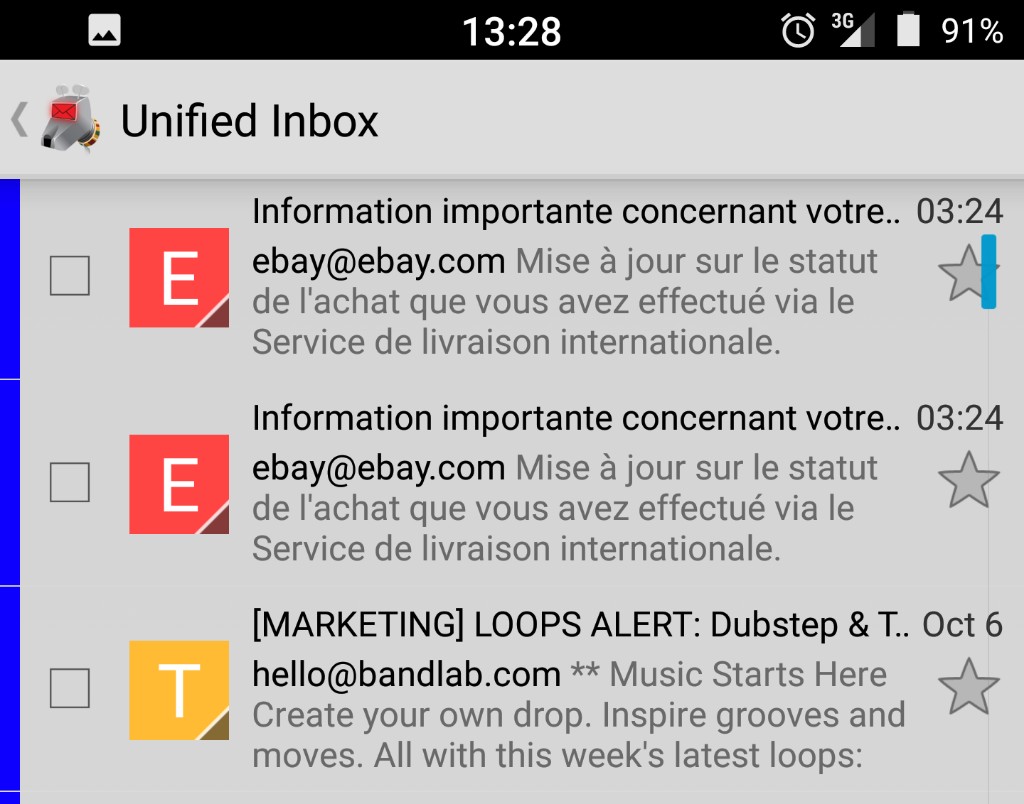
A feature exists where its possible to toggle the star next to a message in folder view. Unfortunately on my 4.5" screen on generic Android 5.0 it's almost impossible to use - most of the time you hit the scroll bar thing instead, also on the RHS, which is doubly bad as the message you're interested it then disappears off-screen.
Solutions:
1) Add an option to disable the scroll bar - it's almost redundant anyway.
2) Add an option to move the star to the LHS (personally, this is where I'd always put flags).
I know this issue has been raised on Google Code (e.g. Issue 6058) but I can't find anything to show it made it to Github.
Thanks, Frank.
 fjl-london
All 13 comments
More an annoyance than a major problem, but it would be great if it could be fixed. Attaching a screenshot of an offending scroll-bar overlapping star icons.
 cosminribo
on 7 Oct 2017
cosminribo
on 7 Oct 2017
I removed comments that added no substance to this issue. The original error description is clear enough for us developers.
If you feel the need to discuss the effect of this bug on your usage of the app, please use the mailing list.
 cketti
on 7 Oct 2017
cketti
on 7 Oct 2017
I discovered something more a few days ago. If you select a message first, tapping toggles the star and ignores the scroll bar. If it's not selected it's very difficult to hit the star as the scrollbar takes priority.
For all I know, this may be the intended functionality, although counter-intuitive. I use K9 every day and it's taken me several years to figure it out.
It's really important that you select the message by swiping-left just before you toggle the star. If you scroll (by swiping up or down) then it won't work any more. It's a bit odd - I suspect this may be a "feature".
Although this serves as a work-around, I'd still rather I was able to remove the scroll bar completely. On a small screen it's not useful to have one.
fjl-london
on 1 Feb 2018
Disabling the scroll bar completely would be IMHO an acceptable option indeed.
 dewi-ny-je
on 5 Feb 2018
dewi-ny-je
on 5 Feb 2018
for some reason, lately the star has been working correctly most of the time (but not always... the scroll bar still gets in the middle every now and then). I have version 5.403 installed.
Disabling the scroll bar completely would be IMHO an acceptable option indeed.
I agree, maybe not by default but there should be an option to do it. I mean, the scroll bar is useful, but starring messages is far more useful!
An alternative: I've seen that the thick, clickable scroll bar (the one involved in this bug) appears only if the folder contains more than 25-30 messages. Under that number only a thin, non clickable scroll bar appears (just to show how far you are from the bottom of the list). Well, the option we are suggesting could just always force the thin bar to show instead of the thick one, instead of disabling it completely.
Hope you will fix this bug or at least use one of these workarounds.
Thanks for your work
 fedcas
on 6 Feb 2018
fedcas
on 6 Feb 2018
It would be really great to have an option in the settings to change the scrollbar, not only because of the star-feature.
It would be good to select, if it should be on the left or right side or hidden completely.
I always scroll through mails with my thumb on the right side. But due to the scrollbar it happens very often that the cursor jumps to a completely different position in the list, because my thumb was scrolling in the middle of screen for exemple.
Please introduce a fix for the scrollbar behaviour. Thank you in advance.
 Thorbur
on 10 Mar 2018
Thorbur
on 10 Mar 2018
I personally fixed this issue by switching to Aquamail. Among other features, it allows moving the scroll thumb device to either side or disabling it completely. Because it's just a scroll thumb (handle) instead of a full length bar (so, hidden scroll track), there's no chance of interference with other ui elements. It also only appears when you start scrolling by dragging the list, so it's not obtrusive in the common case where the user is not fast scrolling. That's an alternative that might also work well in K9.
 dannysauer
on 10 Mar 2018
dannysauer
on 10 Mar 2018
Now it was also enough time for me to switch to professional mail client - R2Mail2, which I can recommend so far. K9 user experience is just horrible and regarding feature set it's way behind.
Thorbur
on 25 May 2018
It is still annoying. How can I disable the scroll bar @cketti?
 tasmo
on 11 Dec 2018
tasmo
on 11 Dec 2018
I don't have direct problem with clicking star but with overall navigation see my reasons here #3984
 skironDotNet
on 27 Mar 2019
skironDotNet
on 27 Mar 2019
There is a constantly present scroll 📜 bar right 👉🏻 ➡️ next to the star 🌟, so unless you are extremely accurate, you'll hit the invisible scroll 📜 bar that will make the list 📃 of emails jump and the email you were looking at will not be 🐝 visible anymore, you'll have to scroll 📜 back 🔙 to it. Turn on the Layout Bounds in the developer options and you'll see the scroll 📜 bar.
 life777eternal
on 20 Jan 2020
life777eternal
on 20 Jan 2020
Turn on the Layout Bounds in the developer options and you'll see the scroll bar.
You mean in Android, not in k9mail, right?
 torantal
on 20 Jan 2020
torantal
on 20 Jan 2020
Note: It should be much easier to hit the star in K-9 Mail versions 5.7xx. There's still room for improvement, though.
cketti
on 11 Sep 2020
Related issues
 asbach2
·
3Comments
asbach2
·
3Comments
 Immortalin
·
3Comments
Immortalin
·
3Comments
 ByteHamster
·
3Comments
ByteHamster
·
3Comments
 Agno94
·
3Comments
Agno94
·
3Comments
 digitalcraftsman
·
3Comments
digitalcraftsman
·
3Comments
Most helpful comment
Disabling the scroll bar completely would be IMHO an acceptable option indeed.