Jupytext: Maintain cell metadata for RISE
I wanted to use jupytext to have a paired md+ipynb notebook that I also use for presentation with the RISE plugin https://github.com/damianavila/RISE
Unfortunately, every time I reload the browser all the metadata information about whether a cell is a slide, fragment, or should be skipped, gets lost.
 boazbk
All 57 comments
Hi @boazbk . Thanks for reporting. I am afraid that RISE notebooks have metadata information in cells of every type (code, markdown, raw). At this stage,
- markdown format has no support for cell metadata
- Python, Julia and R scripts, as well as R markdown, only support cell metadata for code cells.
I was thinking of adding support of cell metadata to generic cell types for all cell types in scripts. For markdown documents however,
- we would have to choose a representation of metadata on code cells. Are you aware of any standard way of representing such metadata?
- I am not sure yet how cell metadata could be represented on markdown paragraphs. Any suggestion is welcome!
For now I regret to tell that you can't use Jupytext yet with such documents. Indeed the text version does not store the cell metadata, and that's the cause of the issue you're hitting.
By the way - but I'm not sure you like the idea - have you ever tried RStudio's ioslides? That may sound unexpected to you if you're already using RISE. It works for python as well, but not many people are aware. It is well documented (see previous link), offers a great control of plot size, which code to show, etc. Have a look at this example (an extension that you can open in Jupyter as well), and the resulting HTML5 slides, that include plotly JS graphs generated in python.
 mwouts
on 10 Sep 2018
mwouts
on 10 Sep 2018
Thanks - I didn't know about ioslides - will look into it. They do have some syntax for markdown metadata inside { ... } in the form
#section { .class1 .class2 }
Perhaps you could use something like
[]{ .slide }
[]{ .fragment }
to have per-cell metadata in markdown, but one should verify this parses correctly (in the sense that it is ignored) in standard markdown parsers such as pandoc.
boazbk
on 11 Sep 2018
I think that cell metadata for plain markdown paragraphs should be commented. I think you suggest something similar, right?
I have found that interesting stackoverflow post on markdown comments. The comment says:
[//]: # "Comment" and [//]: # (Comment) seem to work on a wider variety of [Markdown] implementations.
Now, we have to find a convincing representation of metadata inside the comment. I was thinking of JSON, as it is simple to parse... (all that way from Jupyter notebooks, to come back again to JSON !? 😄)
Indeed we will have to check that the choosen syntax is ignored by
- pandoc
- RStudio
- GitHub
A similar question holds for the code cells in markdown. Language is often found, but we'll also have to represent cell metadata there...
mwouts
on 12 Sep 2018
I was looking at the following example from ioslides:
## Getting up {.smaller}
Seems that .smaller here is a metadata that is applied to the section
But anyway I did not want to cause you much trouble - thanks so much for doing this project!
boazbk
on 13 Sep 2018
You're welcome. No worries, having full support for metadata does matter to me.
In the ioslides example, I think .smaller is a class defined in the CSS file, and it indeed applies to the current section.
Still I am afraid we need a more generic way of representing Jupyter cell metadata. When time permits I will try a prototype that represent cell metadata as JSON in markdown comments.
mwouts
on 13 Sep 2018
Why not a _YAML_ (we already have YAML?) header before each markdown cell (that requires it)?
You'd just have to strip the space between # and --- as --- is already a rule in markdown.
 kernc
on 18 Sep 2018
kernc
on 18 Sep 2018
Why not a YAML (we already have YAML?) header before each markdown cell (that requires it)?
Well, @kernc , the reason for which I have a preference for JSON for cell metadata is that it fits on one line... and then, it is it probably easier to _comment_ so that the generated markdown file remains compatible with markdown converters.
@boazbk , the upcoming version v0.7.0 has full cell metadata support for two python formats: light (i.e. the one already available in v0.6) and percent (the format used by Hydrogen, etc). The branch is still going to evolve a bit, but if you want you can already test it.
mwouts
on 19 Sep 2018
the generated markdown file remains compatible with markdown converters.
How do the markdown converters fare with inline, say, global (e.g.) Python code? :stuck_out_tongue:
kernc
on 19 Sep 2018
Metadata support is available for python formats (light and double percent) in the release candidate. Install it with
pip install jupytext==0.7.0rc0
and read the documentation on the v0.7.0 branch.
@boazbk , could you please test the RC, and close the issue if you are satisfied with the cell metadata support in python scripts?
mwouts
on 22 Sep 2018
@mwouts I'm not quite sure what I'm doing wrong, but jupytext --to=py:light <ipynbfile> does not seem to give me cell metadata in the generated python file (v0.8.6)
In any case, for --to=md, I would definitely go with single-line json encoding. For code cells, taking the metadata example
~
{
"attributes": {
"classes": ["myclass"],
"id": "",
"n": "2"
},
"trusted": false,
"tags": [
"mytag"
],
"slideshow": {
"slide_type": "skip"
}
}
~
I would read that into data, and then generate
~
" ".join(["%s=%s" % (key, json.dumps(val)) for (key, val) in data.items()])
~
which then goes as metadata on the first line of the fenced code block, as e.g.
~~~
```python attributes={"classes": ["myclass"], "id": "", "n": "2"} trusted=false tags=["mytag"] slideshow={"slide_type": "skip"}
x = 1
~~~
I think `attributes` might be standard, actually, and could be stripped out of `data` before generating the json string, except maybe that classes (I'm assuming these are css classes) should extracted, leading to

~~~
 ```python .myclass trusted=false tags=["mytag"] slideshow={"slide_type": "skip"}
x = 1
~~~
This syntax is compatible with a wide variety of Markdown parsers (pandoc, Github), see also e.g. https://python-markdown.github.io/extensions/fenced_code_blocks/#emphasized-lines
For markdown cells, I don't really know what a good syntax is for metadata that gets ignored by the parsers, but the metadata should probably be encoded similarly to the above.
 goerz
on 31 Dec 2018
goerz
on 31 Dec 2018
Hello @goerz , thanks for your comment. I will try implementing metadata for the markdown format, following your suggestion.
An example of a notebook will cell metadata, represented in the py:light format, is available here. A possible reason for which you may not see some cell metadata is the default filtering of cell metadata - see the last paragraph of this section.
mwouts
on 31 Dec 2018
Actually, there's the completely obvious solution for the markdown cell metadata! Just use HTML comments, which is the canonical way to do comments in markdown.
See my sample_rise_notebook_66.md gist (especially the raw markdown) for how this might look like.
goerz
on 31 Dec 2018
Hey guys, I'm also interested in jupytext's markdown support and, in particular, helping to ensure that it can due true round trip conversions for ipynb <--> md.
I have been looking into the matter of including markdown-comments (i.e. rendering text as invisible to markdown renderers). I think a suggestion that @mwouts made back in September is the right answer.
This stackoverflow thread provides rather conclusive analysis that the following is the canonical way for including markdown-comments:
some text

[I am invisible text]: #
some more text
Note that the blank line preceding the [comment-text]: # pattern is important.
The aforementioned stackoverflow thread used BabelFish2 to analyze the compatibility of various syntaxes for markdown-comments across Markdown implementations.
- It found that the HTML comment is not a good way to do markdown comments: it is only supported by one Markdown implementation, and is known to be incompatible with 25 Markdown implementations.
- It found that the
[comment-text]: #(with a preceding blank line) is the most widely-supported syntax for markdown comments. It is supported by 23 Markdown implementations, and is incompatible with only one.
- It found that the
Thus we could do something like:
````
I am a markdown cell
# I am python-formatted code within the markdown cell
# I am a python code cell
x = 1
I am a cell with metadata
````
Note, however, that square-bracket characters have to be escaped within the comment field.
 rsokl
on 6 Mar 2019
rsokl
on 6 Mar 2019
just a quick note here that as of January Pandoc supports direct ipynb reading/writing. It would be great to see cell metadata in jupytext standardize with what pandoc uses for this.
 choldgraf
on 7 Mar 2019
choldgraf
on 7 Mar 2019
It would be great to see cell metadata in jupytext standardize with what pandoc uses for this.
Sure, I agree! @choldgraf , do you have any further information on how pandoc does encode these cell metadata? Or even cell breaks? Anyway I will also give a try to this latest version of pandoc...
Also, I have to mention that I would prefer the new implementation to be also compatible with rstudio, e.g. cell metadata should not be visible in the html file generated by knitr.
mwouts
on 11 Mar 2019
I'm trying to figure out all of this now (the pandoc feature is extremely new)...I will let you know as soon as there's something helpful to look at :-)
And note that I believe RMarkdown is already compatible with pandoc (since it is using pandoc under the hood for many conversions)
choldgraf
on 12 Mar 2019
@choldgraf , it was indeed inspiring to give a look at the pandoc format. I have taken a simple notebook made of three cells (markdown, raw, and code):

Pandoc has the following representation for this notebook:
::: {.cell .markdown}
This is a very simple notebook that starts with a **Markdown** cell
:::

::: {.cell .raw}
:::

::: {.cell .code execution_count="1"}
``` {.python}
a = 1
b = 2
a + b
``` `

::: {.output .execute_result execution_count="1"}
    3
:::
:::
The cell markers like ::: {.cell .raw} seem to be ignored by rstudio, so we could indeed use these markers. However, I think I will try to design a lighter text representation than that of pandoc, and in particular
- use cell markers for Markdown cells only when required (i.e. if the cell has some metadata, or if not marking the cell would break the cell on a round trip)
- store the code cell metadata in a slightly more concise way, as suggested by @goerz above
- and, maybe, skip the cell end marker
:::when immediately followed by another cell marker
That would give the following representation for the notebook above:
This is a very simple notebook that starts with a **Markdown** cell

::: {.cell .raw key="value"}
THIS IS A RAW CELL
:::

```python tags=["parameters"]
a = 1
b = 2
a + b
``` `
Another option would be to follow @rsokl 's recommendation on Markdown comments and represent the raw cell as
[raw]: # {"key":"value"}
THIS IS A RAW CELL
[]: #
Anyone has a preference on this, or further recommendations on the format drafted here?
mwouts
on 13 Mar 2019
@mwouts a couple of minor corrections on the markdown-comment syntax:
- The comment actually occurs within the square bracket, not after the
# - There needs to be a blank line preceding the end-tag
- There must be something inside the square bracket, an empty one does not get parsed as a comment
so the raw cell that you posted might look like:
[raw {"key":"value"}]: #
THIS IS A RAW CELL

[end]: #
An easy way to test this is to view it right here in GitHub's markdown previewer and verify that the comments are invisible 😄
If we are speaking specifically about jupytext's markdown format, then I vote for using markdown-comment syntax. It would promote maximum compatibility with markdown editors/previewers.
Towards that end, things like raw cells could be coerced into rendering in a sensible way in markdown. E.g.
````
md5-a473b384a39d0b3947380c4990feb60b
````
would render as a literal block in a markdown viewer, which is quite nice.
rsokl
on 13 Mar 2019
I think it is worth discussing our next format with Pandoc contributors. To this end, I have created this topic on _pandoc-discuss_.
mwouts
on 16 Mar 2019
that's great! I believe the latest version of pandoc (2.7.1) added cell metadata export as classes...would be a good idea to play around with this, think about what can be improved, etc
choldgraf
on 16 Mar 2019
Pandoc uses fenced divs, which look great, but are not understood by any of the Markdown editors I use. For now I have a preference for the Markdown comments recommended by @rsokl .
More generally: I have started documented the next format for Markdown notebooks in Jupytext here. Please let me know if the draft seems OK to you...
The remaining questions are
- What should be the explicit cell marker? Pandoc div or not pandoc div?
- Which characters have to be escaped in the metadata (square brackets in Markdown comments, double quotes when metadata is added to a code cell?)
mwouts
on 19 Mar 2019
just a quick note that I believe that Pandoc can also convert from other flavors of markdown as well, so perhaps there's another one that doesn't have the fenced blocks
choldgraf
on 19 Mar 2019
I found an interesting discussion about markdown divs that dates back to 2016 here: https://talk.commonmark.org/t/div-block-syntax/2283/28 . I will have a look and see if some of the ideas there were implemented in other markdown renderers.
mwouts
on 20 Mar 2019
Hello everyone, we're getting closer to having cell metadata supported in the Markdown format. In branch 1.1.0 we have a tentative implementation. I have used
- key=value in JSON format for raw and code cell metadata, as suggested by @goerz
[region]: #or[region (metadata)]: #and[endregion]: #markers for markdown cells, where metadata is in JSON format, with square brackets escaped.
Could you please review the sample representation here? Note that you won't see the metadata in the GitHub viewer :smile: - use the raw view for that! And the original notebook is here.
mwouts
on 24 Mar 2019
I see that vscode understands Markdown regions defined through HTML comments (cf. #199)... That's one additional point for HTML comments! It's hard to choose between HTML and Markdown comments...
<!-- #region Title {"key":"value"} -->
Foldable region
<!-- #endregion -->
So if the user provides their own link called [region], the link in markdown is no longer as well defined?
Supposedly, not many markdown converters support HTML comments (though they all should).
kernc
on 24 Mar 2019
So if the user provides their own link called [region], the link in markdown is no longer as well defined?
I am not sure to follow. I would say that neither the markdown nor the HTML comment define a link target. At least in vscode links to #region (or #[region]) continue to work:
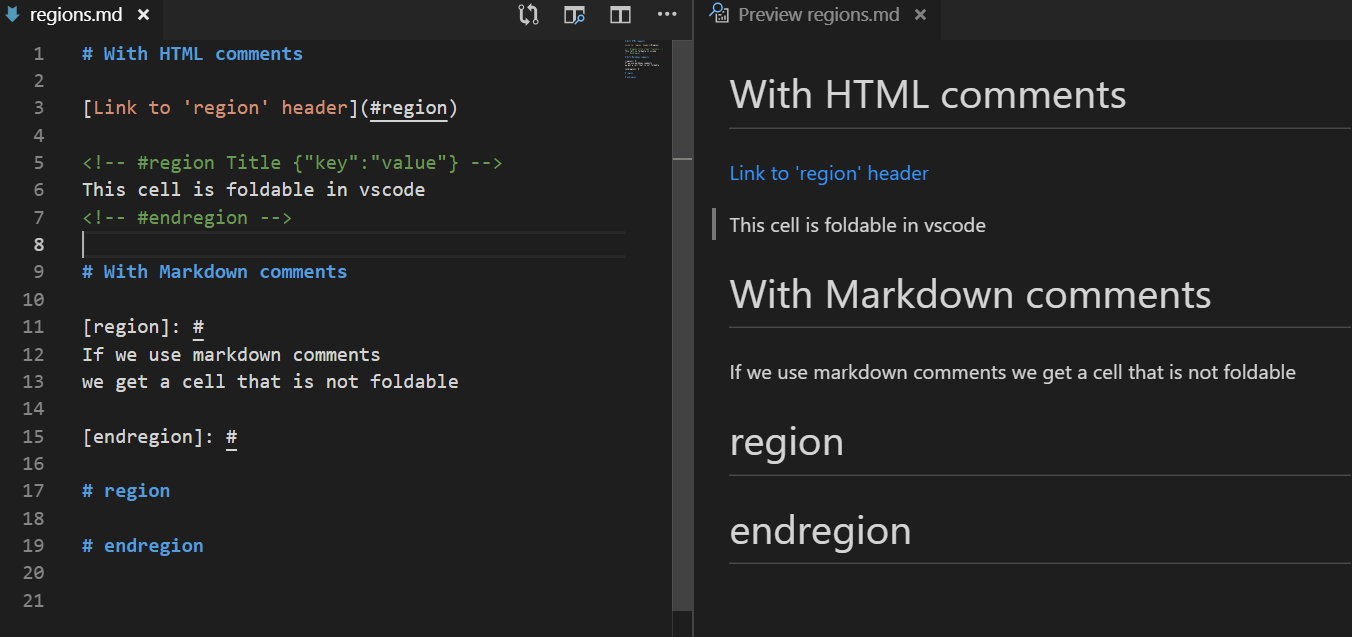
Supposedly, not many markdown converters support HTML comments (though they all should).
I think @rsokl would agree with that. But in practice I have not seen any issue yet with HTML comments. When people say that HTML comments are not supported, do they mean that the comments get included in the resulting HTML file (this wouldn't be an issue here)? Are you aware of more severe issues?
mwouts
on 25 Mar 2019
I mean:
... bla bla in this statistical [region].

[region]: https://user.custom.link
When markdown with cell metadata is later converted to e.g. HTML, the [region] link might be overridden to point to #.
kernc
on 25 Mar 2019
I see ! So we may want to replace [region]: # with more specific markers like [jupytext_cell]: #.
Anyway I think I will now give a try to cell markers made with HTML comments. If that works well I may use them by default, and provide an option to use Markdown comments instead.
@rsokl , would that be OK for you? Which marker name would you recommend? Note that we need the marker only for Markdown cells; for raw and code cells we can append the metadata directly after the tripple backticks.
mwouts
on 25 Mar 2019
This looks like great progress!
To summarize what I have to say:
- I have a preference for markdown-comments over HTML, because it is more natural for users who are writing markdown
- It seems that requiring explicit delimiters for every cell might have some big nice advantages, despite it being a bit cluttered. (Edit: I removed end-delimiters from this as I realized that they were redundant, so this really isn't so cluttered)
HTML vs Markdown
Regarding HTML vs markdown, I have a mild preference for markdown. Here is why:
Taking the perspective of someone who would be writing jupytext-markdown directly as my source material, it would be ideal to keep the experience as simple as possible. I.e. keeping things pure-markdown where possible would be nice; using a markdown comment for the cell separator is an intuitive syntax that is easy to remember in this context - it is something that a user would come across in reading a markdown guide/cheatsheet.
On the other hand, there is no reason to expect people who are writing markdown to be able to make sense of <!-- #region Title {"key":"value"} -->, which they would never encounter when learning markdown. There is the added complexity that <!-- and <!--- are both valid HTML comments, so the user would be at risk of writing an html-comment that is appropriately invisible in their preview, but is not recognized by jupytext (unless you want to support both).
The HTML comment may buy you section-folding in vscode. That is definitely nice, but I do think it is a bit of a hack. The fact that you can fold on markdown sections is the real champion here, imo, which we get either way.
Cell-tag
I think [jupytext_cell]: # is a great marker. It is self-evident, and unlikely to collide with any markdown that people will naturally be writing.
Reviewing the current implementation
This is looking good, and I think this will be an awesome change to jupytext :smile:. My critique is that I am an advocate for requiring jupytext-delimiters for every cell.
A common fail case for newline delimiters
Using newlines to implicitly delimit new cells seems like it is a recipe for disaster. For instance, suppose I copy some code with function definitions in it and paste it into my jupytext-markdown document. PEP8 calls for two blank lines between each definition:
````
# This innocuous-looking cell just broke jupytext unless I have enough
# specialized knowledge to include cell-delimiters
def f(x):
    return x


def g(x):   #
    return x
````
This innocuous copy-paste leads to a broken notebook. For many users they might not even know that newlines are the issue, and will think this is a bug in jupytext.
We really ought not put such a harsh requirement on the user to so carefully peruse their code for this sort of thing. People who run into this would naturally overcome it by simply putting delimiters everywhere, which leads me to my proposal.
Arguments in favor of explicits delimiters
When I create a jupyter notebook, I have to create every cell explicitly and I have to decide whether each cell is markdown/code/raw etc. It seems to me that it would be natural to have parity with this in jupytext-markdown. That is: every cell would get its own start / stop delimiter.
My perspective here, again, is: what would it be like for me to write/edit these markdown documents myself? A new user would likely learn about jupytext-markdown by converting a notebook to markdown and looking at it. I would argue that the current proposed format is not straight-forward to understand:
````
Hello world
2+2
Hello world
2+2
````
That three cells are present here, two markdown cells and a code cell is not salient, imo.
This is how things would look with explicit delimiters:
````
Hello world
2+2
Hello world
1+1
````
This has complete parity with how I created my notebook: I created a markdown cell, then a code cell, and then a markdown cell. This is explicit in this format. Furthermore, there are no glaring gotchyas: I can edit this freely, and add newlines within any cell without breaking the markdown-notebook roundtrip.
Clearly this is a bit more cluttered (however you no longer need to delimit the end of cells), but it affords the user a much more obvious experience that is clear of pitfalls. It is also highly readable, and anyone new to jupytext could look at this text and infer how it would translate to a notebook.
Here is @mwouts 's proposed implementation, reworked with explicit delimiters.
rsokl
on 25 Mar 2019
Thanks @rsokl for your detailed feedback !
You have two important points here, with which I do agree:
- some people will prefer Markdown comments over HTML for cell markers. I'll implement an option for that, plus an automatic detection of whether you are using this syntax in the Markdown file.
- breaks cannot occur inside a code block. I'll implement a detection of code blocks that are not Jupyter cells (say, code blocks that are indented, or code blocks starting with
```{.python}, etc)
But... I am not a fan of _explicit markers everywhere_, because they make the Markdown file longer and uneasy to read (cf. your example, or also pandoc's one).
Also, non-optional markers would break the identity in the round trip conversion when we start from a Markdown file with no markers. I am afraid that many users would complain if Jupytext started transforming their existing Markdown files in an unexpected way.
mwouts
on 25 Mar 2019
using a markdown comment for the cell separator is an intuitive syntax that is easy to remember in this context - it is something that a user would come across in reading a markdown guide/cheatsheet.
Disagree. There is, clearly, no such thing as a markdown comment. We seem to be looking to resort to a confusing workaround using the link syntax.
kernc
on 26 Mar 2019
Sure, these "markdown comments" are nothing else than empty links. I am in favor of using HTML comments by default (i.e. the vscode region delimiters, and only when cells need to be marked). But I will also implement an option for using markdown comments, as they are much shorter to type.
@rsokl , following your input I have updated the parser to avoid breaking code blocks found in markdown text. Also, as we were discussing another name than region for the link, can I ask you what you think of [+]: # and [-]: # as cell delimiters? (sample notebook is here)
mwouts
on 26 Mar 2019
Delimiters
@mwouts I think that [+]: # and [-]: # are okay. People might confuse them as being relics from the Jupyter notebook - they almost look like execution counts next to cells. There is something to be said about being a bit more explicit; i.e. [jupytext_begin]: # and [jupytext_end]: #. I'm ultimately indifferent though.
Flavors of raw cells
This may already be completely covered by your raw cell + metadata capabilities, but just a reminder that there are several "Raw NBConvert" cell types that need to be accomodated:

On required delimiters (no more after this, I promise 😃 )
I realize that you are making the final call on this, and I will happily use whatever you decide on, but I do feel the need to push back slightly on your preference for optional delimiters. As I mentioned above, the imperative delimiters case:
````
Hello world
2+2
Hello world
2+2
````
has some very nice properties, which I don't feel were addressed:
- It matches exactly the workflow of creating cells in a Jupyter notebook, and thus is immediately intuitive to write for markdown users
- This format is effectively self-documenting
- One of the objectives of jupytext is to be able to version control and share human-readable/writable text files. The form that I posted above is entirely obvious to someone who writes notebooks but is not familiar with jupytext.
On the otherhand, one has to hazard a guess at what is going on here:
````
Hello world
2+2
Hello world
2+2
````
This is borderline cryptic, in my mind. Without additional context, I would have no idea what was going on here.
I can certainly say that I would have a much much harder time teaching the latter to my students than the former. On the other hand, the former requires next to no explanation.
the Markdown file longer and uneasy to read
I'm not sure that having slightly shorter markdown files is worth the less-intuitive syntax. And "easy to read" has to be weighed against "easy to interpret".
non-optional markers would break the identity in the round trip conversion when we start from a Markdown file with no markers
It seems strange that this can even be supported. What expectation is there that a non-jupytext markdown file should be able to be converted to a notebook, lest it was just a trivial notebook with a single markdown cell?
This is the last I'll say about this unless you want to discuss further. I hope that the tone of this comes across appropriately: I just want to express these items clearly. I am a big fan of this project, and will be excited to use it and support it regardless 😄
rsokl
on 26 Mar 2019
@rsokl , thanks for your input. Sure, I do enjoy the discussion, let's continue.
- I agree that
[+]: #and[-]: #were cryptic. So we won't use those ! - The cell markers act as a _protection_ against implicit cell breaks, maybe we should make that clear in the name.
- Anyway, for now I have switched to vscode's HTML folding markers.
- I have not yet seen a Markdown tool that has issues with HTML comments, are you aware of one? I would prefer to have a good reason to provide the Markdown comment cell breaks.
- Pandoc has a format for Jupyter notebooks with explicit cell markers on every cell. Would you like to have that format implemented in Jupytext ? (Please comment at #208).
mwouts
on 27 Mar 2019
maybe @jgm has some thoughts on metadata storage from the pandoc experience
choldgraf
on 29 Mar 2019
@choldgraf , we are working on pandoc in Jupytext at #208 . Rather than re-implementing pandoc's format, I though we could simply call pandoc itself. The resulting of the conversion of the test notebooks can be found in this folder.
mwouts
on 29 Mar 2019
@mwouts thanks for the response.
- You should just do the html folding markers. I think supporting different styles of cell breaks is more trouble than it is worth
- I'm glad you found that pandoc can mutate markdown files during a roundtrip - this makes me want to avoid their tooling for now!
I am on-board with your proposal (html-delimiters to enforce protection again implicit line breaks in a markdown block). Please let me know when the branch is in a state for testing - I can run my materials through it and let you know if I hit any snags. It will be a nice integration test :smile:
rsokl
on 29 Mar 2019
@mwouts perfect - just wanted to make sure y'all were communicating on this, these are two awesome projects and I want to make sure they can try to interoperate as much as possible :-)
choldgraf
on 29 Mar 2019
@rsokl pandoc's round-trip issues are now fixed in master.
 jgm
on 29 Mar 2019
jgm
on 29 Mar 2019
@jgm awesome - thanks for the heads-up
rsokl
on 29 Mar 2019
@rsokl , a release candidate is available:
pip install jupytext==1.1.0rc0
Please let me know when the branch is in a state for testing - I can run my materials through it and let you know if I hit any snags. It will be a nice integration test
Yes, please test it, feedback is much welcome!
Especially, could you please test the transition between version 1.0 and 1.1? I mean, when you open a paired notebook md + ipynb generated with Jupytext 1.0, Jupytext should still pick the metadata in the ipynb, while for a paired notebook generated with version 1.1, the metadata should come only from the md file. I have a unit test for this, yet more extensive testing would be nice!
mwouts
on 2 Apr 2019
@mwouts I gave 1.1.0rc0 a whirl, and everything seems to be working great!
I did not have paired notebooks handy to test, unfortunately. The process I went through was:
jupytext 1.0 md -> ipynb -> jupytext 1.1.0rc0 md -> ipynb
My jupytext-markdown files are much easier to read/write now! I also tested inserting raw cells reST cells, and they work nicely. 🙌
rsokl
on 3 Apr 2019
Thanks @rsokl for the feedback! That was fast!
I also tested inserting raw cells reST cells, and they work nicely.
That's great! By the way, I see that I forgot to check about the various flavors of raw cells. I see that this is documented at nbsphinx. Let me see how they are rendered in the Markdown file...
mwouts
on 3 Apr 2019
Here is the markdown rendering for raw cell mimetypes:
```raw_mimetype="text/latex"
$1+1$
```

```raw_mimetype="text/restructuredtext"
:math:`1+1`
```

```raw_mimetype="text/html"
<b>Bold text<b>
```
Metadata for the markdown format are available in the latest release of Jupytext (Version 1.1.0).
mwouts
on 14 Apr 2019
Hello here, I just wanted to let you know that we are considering changing how the cell metadata is represented in Jupytext for the next release (version 1.3): we may be using "key=value" (value in its JSON representation) for all the Jupytext formats, and all the cell types, see #344 . And for the files that already use the JSON form, we plan to implement an option to keep the JSON form, to avoid causing diffs to these files. Is this OK with everyone?
mwouts
on 16 Oct 2019
@mwouts so what would a rst cell look like now? E.g.,
```raw_mimetype="text/restructuredtext"
some text here
```
Also, what, in general, is your recommended pathway for staying concurrent with Jupytext? I am a bit of an extreme case because I have a ton of jupytext-markdown that I manage for my website. Accordingly, upgrades are a relatively risky/costly prospect for me since I can't easily manually inspect everything for consistency.
Right now, I envision doing:
- (jupytext 1.1) convert all md to ipynb
- (jupytext 1.3) test ipynb-md-ipynb roundtrip
- (jupytext 1.3) convert all ipynb to md
Are there any other safeguards or useful mechanisms that I might consider?
rsokl
on 27 Oct 2019
Hello @rsokl , thanks for pointing at your use case, that's very interesting. My expectation is that you _won't have to do anything_. Indeed, Jupytext 1.3 will know that the format used to encode the notebook is the previous one, thanks to the YAML header which includes a format version number.
In order to make sure that this really works, I'll add a few additional unit tests, and prepare a release candidate so that we can test the upgrade on a few repos, maybe yours and the plotly documentation. The test on that repo could be
- A: convert the
.mdfiles to.ipynbnotebooks using a previous version of Jupytext (1.1 or 1.2) - B: convert the
.mdfiles to.ipynbnotebooks Jupytext 1.3rc1
and make sure that the .ipynb files are identical in A and B. I'll add the unit tests now, and let you know when the release candidate gets ready.
mwouts
on 27 Oct 2019
Hello again @rsokl , the new test is here: when reading a file in Jupytext Markdown version 1.1, Jupytext parses raw cells like yours:
When it writes it back to .md in format version 1.2 (to be shipped with Jupytext 1.3, sorry we have version numbers for both the program and the format), the raw cells are encoded with <!-- #raw --> and <!-- #endraw --> HTML comments (this improves the compatibility with jupyter nbconvert, see #321):
mwouts
on 27 Oct 2019
@mwouts that sounds great! Thank you for adding the test case. I tested round-tripping a ipynb generated from markdown version 1.1, via markdown version 1.2, and everything looks to be in order.
Here is the current PR that would update all of my jupytext-markdown. Indeed it looks like only the raw cells are being updated.
rsokl
on 3 Nov 2019
Excellent! Thank you @rsokl . I have more questions, sorry...
- was it easy to prepare the PR above? Can we use something like
jupytext --to md *.md? - would you be open to testing with another RC? I hope to be able to publish
1.3.0rc1soon, and there have been many changes since1.3.0rc0...
mwouts
on 3 Nov 2019
I had to write some custom tooling for crawling all of my files, converting back and forth between notebooks, deleting all markdown/notebooks, etc. With these in place, prepping that PR was quite straight forward
I do think that a
jupytext --to md *.mdwould be useful, although I probably would end up taking the "longer" route via notebooks - that way I can test round tripping. Ultimately the state of the notebook is my gold-standard since this is whatnbsphinxis looking at to build my html.It wouldn't be a problem at all for me to repeat the process for
1.3.0rc1
rsokl
on 5 Nov 2019
I see! Very interesting. Well, I just released the rc1, so if you can give it a try that would be very nice (pip install jupytext==1.3.0rc1).
On my side I tested jupytext --to md Python/*/*/md on your repository, it seems to work as expected.
Thanks for sharing your script. Note that if you like, you can call the jupytext.cli.jupytext fonction directly (no need for subprocess), like here:
mwouts
on 8 Nov 2019
Wow all of the conversions are much (~100x) faster when I call from jupytext.cli.jupytext instead of subprocess! That's great.
I have a PR open where I did the direct md -> md conversion, and it looks clean (like what you have in your PR).
One thing to note is that things are slightly different when I do
md -[jupytext 1.1.0]-> ipynb -[jupytext 1.3.0rc1]-> md
For example, the diff for Python/Module2_EssentialsOfPython/Basic_Objects.md reveals that some region-blocks are removed. I commented one instance of this in a separate PR so that it is easy to see.
I tested the ipynb roundtrip - via markdown - and everything seemed to be okay. But it would probably be good for you to look at the instance to see if everything is behaving as you expect. On my end, I believe everything looks okay.
rsokl
on 9 Nov 2019
Hello @rsokl , thanks for paying that much attention to the details! That's a precious feedback.
I think that the removal of the region/endregion markers when you do md -> (1.1) -> ipynb -> (1.3) -> md is caused by the code blocks. For example, in the first instance the markdown cell contains a ```shell code block, and in the second one it contains a ``` block. In Jupytext < 1.3 these code blocks had to be escaped in a region, while now it's not the case any more, as only code blocks with a language known to Jupytext are classified as code blocks.
mwouts
on 10 Nov 2019
@mwouts Great! Everything looks good then. Thanks so much for the help / advice - keeping my project in sync with jupytext is quite straightforward now!
rsokl
on 11 Nov 2019
Related issues
 LukasMasuch
·
4Comments
mwouts
·
6Comments
LukasMasuch
·
4Comments
mwouts
·
6Comments
 rcshubhadeep
·
9Comments
mwouts
·
10Comments
rcshubhadeep
·
9Comments
mwouts
·
10Comments
 kaarelmand
·
7Comments
kaarelmand
·
7Comments
Most helpful comment
@rsokl , thanks for your input. Sure, I do enjoy the discussion, let's continue.
[+]: #and[-]: #were cryptic. So we won't use those !