Jupytext: Jupytext commands not showing up in Jupyterlab
I installed python 3.7.6, Jupyterlab 1.2.4, and Jupytext 1.3.2 through Conda, but when I restart Jupyterlab and search for Jupytext commands, none are showing up (see attached image). I also tried rebuilding Jupyterlab manually, but that didn't help. I am reasonably sure that I'm using the same Conda environment I installed Jupytext to, to launch Jupyterlab.
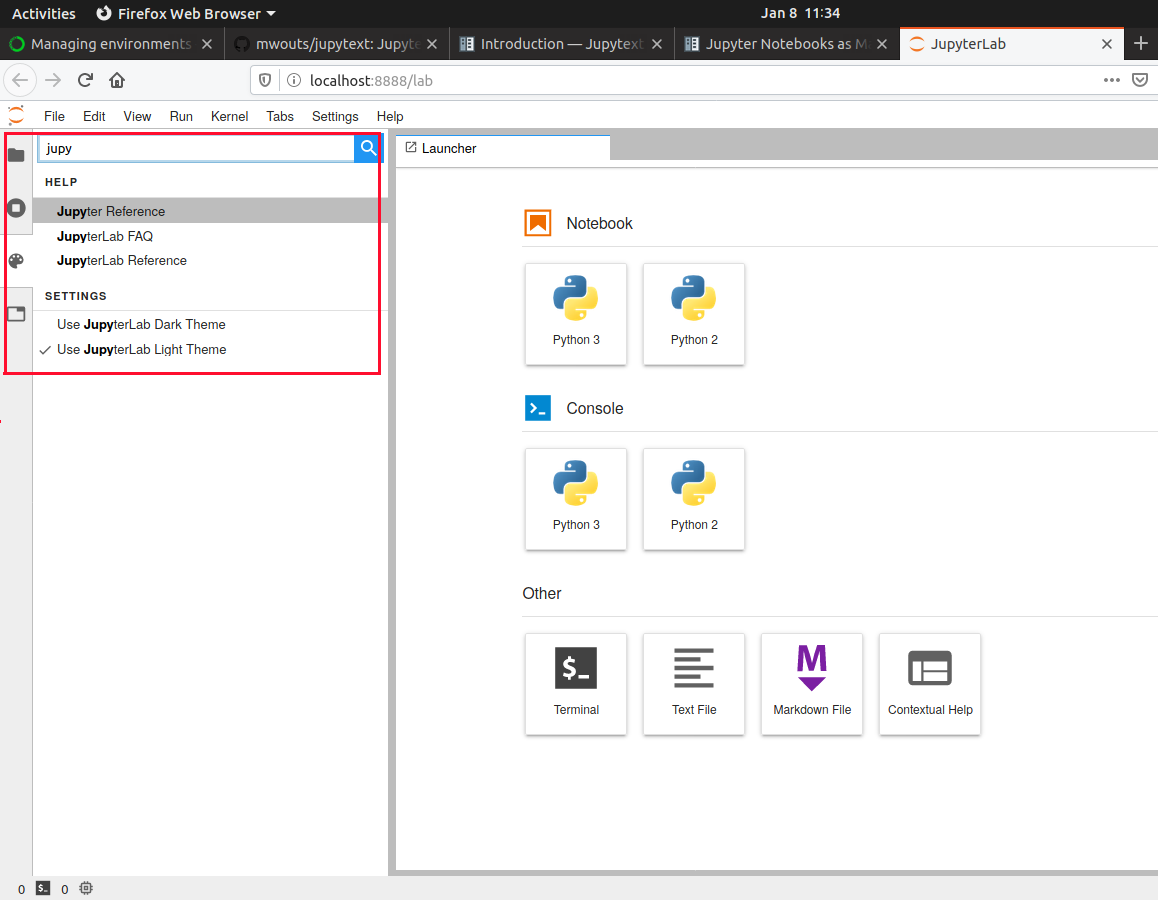
Is there an incompatibility with the latest Jupyterlab, or is this an installation error on my part? Log given below:
> jupyter lab
[I 11:56:29.342 LabApp] JupyterLab extension loaded from /home/user/.local/lib/python3.7/site-packages/jupyterlab
[I 11:56:29.342 LabApp] JupyterLab application directory is /home/user/.local/share/jupyter/lab
[I 11:56:29.429 LabApp] [Jupytext Server Extension] Deriving a JupytextContentsManager from LargeFileManager
[W 11:56:29.432 LabApp] JupyterLab server extension not enabled, manually loading...
[I 11:56:29.434 LabApp] JupyterLab extension loaded from /home/user/.local/lib/python3.7/site-packages/jupyterlab
[I 11:56:29.434 LabApp] JupyterLab application directory is /home/user/.local/share/jupyter/lab
[I 11:56:29.436 LabApp] Serving notebooks from local directory: /home/user
[I 11:56:29.436 LabApp] The Jupyter Notebook is running at:
[I 11:56:29.436 LabApp] http://localhost:8888/?token=2ba776ad6225318b0537d4f1cca5fa19808b7afb419b29bb
[I 11:56:29.436 LabApp] Use Control-C to stop this server and shut down all kernels (twice to skip confirmation).
[C 11:56:29.502 LabApp]

    To access the notebook, open this file in a browser:
        file:///run/user/1000/jupyter/nbserver-23010-open.html
    Or copy and paste one of these URLs:
        http://localhost:8888/?token=2ba776ad6225318b0537d4f1cca5fa19808b7afb419b29bb
[I 11:56:32.836 LabApp] 301 GET /lab/workspaces/auto-U/?clone (127.0.0.1) 1.12ms
[I 11:56:37.383 LabApp] Build is up to date
If this isn't the place to post such questions, sorry; I found no mention of other support channels in the Jupytext documention or website.
 kaarelmand
All 7 comments
Managed to fix the issue by removing all of jupyter, jupyterlab, jupytext, rerunning conda install anaconda, conda update --all and reinstalling jupytext.
kaarelmand
on 8 Jan 2020
Hello @kaarelmand , thanks for reporting this, no worries, for me it's useful to know what works and what may cause trouble...
I was having a look at this, and I found that
- the binder link provides an example where jupytext 1.3.2 works with JupyterLab 1.2.4 (they are installed with pip, however)
- when I create an environment from this
environment.ymlfile withconda env create --file environment.yml:
name: jupytext_413
channels:
  - default
  - conda-forge
dependencies:
  - jupytext==1.3.2
  - jupyterlab==1.2.4
  - python==3.7.6
then, when I execute jupyter lab I get the following warning: Could not determine jupyterlab build status without nodejs, and no Jupytext commands
- so I added
nodejs=13.0.0to the requirements, and thenjupyter labsuggested to rebuild the extension:
[W 21:06:24.882 LabApp] Build recommended
[W 21:06:24.883 LabApp] jupyterlab-jupytext needs to be included in build
[I 21:06:30.419 LabApp] Building jupyterlab assets (build:dev)
[I 21:09:05.237 LabApp] Build is up to date
and after that I did get the Jupytext commands in Jupyter Lab.
Hope that helps!
 mwouts
on 8 Jan 2020
mwouts
on 8 Jan 2020
I seem to be having this issue as well. The icons for .py files have changed (meaning jupytext is somewhat working), but I see no commands on the menu in jupyterlab. I also have nodejs updated to >=13.0.0, so that is apparently not the issue. I'm in a situation where uninstalling and reinstalling everything is not viable, or very improbable.
It should be helpful to note that the jupytext menu shows up on notebooks, and that jupytext still works if I manually add the metadata onto the .ipynb file. However, not having the commands in jupyterlab would honestly be a big turnoff for me 😞.
Finally, this shows up when starting jupyter lab:
[I 19:50:29.850 LabApp] [Jupytext Server Extension] Deriving a JupytextContentsManager from LargeFileManager
Any help would be appreciated!
 richardso21
on 3 Jul 2020
richardso21
on 3 Jul 2020
Hi @richardso21 , thanks for your report.
Let me ask you a few more questions:
- Was there any mention of
jupyterlab-jupytextin the server logs when you restarted it? - What is the outcome of
jupyter lab build? - Also, does it help if you explicitely install the extension from npm, cf. the link at https://github.com/mwouts/jupytext#jupytext-commands-in-jupyterlab?
mwouts
on 6 Jul 2020
Hey there, I have the same issue as @richardso21 here.
 mhmulati
on 3 Oct 2020
mhmulati
on 3 Oct 2020
Hello
Removing the file build_config.json cited in https://discourse.jupyter.org/t/extension-shows-up-as-both-installed-and-uninstalled-and-doesnt-work/2688/4 and https://github.com/jupyterlab/jupyterlab/issues/8122 solved the issue. I guess that is why the approach of @kaarelmand has worked.
Then I guess the issue appears when the extension is installed, removed, and reinstalled.
Hope it helps.
mhmulati
on 3 Oct 2020
Sorry for the very late response. Thank you @mwouts and @mhmulati for helping me with this. Turns out that this wasn't an issue on jupytext's end, but on jupyter lab and its bug with build_config.json. Jupytext works great now!
richardso21
on 23 Oct 2020
Related issues
 danieltomasz
·
5Comments
mwouts
·
7Comments
mwouts
·
4Comments
mwouts
·
6Comments
danieltomasz
·
5Comments
mwouts
·
7Comments
mwouts
·
4Comments
mwouts
·
6Comments
 lebigot
·
10Comments
lebigot
·
10Comments
Most helpful comment
Hello
Removing the file build_config.json cited in https://discourse.jupyter.org/t/extension-shows-up-as-both-installed-and-uninstalled-and-doesnt-work/2688/4 and https://github.com/jupyterlab/jupyterlab/issues/8122 solved the issue. I guess that is why the approach of @kaarelmand has worked.
Then I guess the issue appears when the extension is installed, removed, and reinstalled.
Hope it helps.