Jupyterhub: [ENH] Customize the login page
What would be a good, maintainable way of making the jupyterhub login page be an informative portal? I'm thinking with items like help links, news, etc. It seems that just editing the login template would not be a good idea.
 dsblank
All 23 comments
I was also wondering about adding a couple elements to the login template. Like a div plus an additional javascript tag that could execute some code to fill it dynamically. This could be done wrong, I'd like to avoid that.
 rcthomas
on 31 Aug 2017
rcthomas
on 31 Aug 2017
Indeed, editing the login template will work once, but isn't a maintainable solution in the long run. At the very least, we could create a few blocks that you could use, such that a custom template would be a well-supported {% extends 'login.html' %}.
What sort of content are you thinking of, and where would you like it? It would be great if defining the right blocks in the default template(s) is enough.
 minrk
on 4 Sep 2017
minrk
on 4 Sep 2017
Here is what we ended up with:
https://jupyter.brynmawr.edu/hub/login
which looks ok, but has one big downside (other than editing the source): you can only see it when you aren't logged in. Here is the source template:
https://github.com/BrynMawrCollege/jupyterhub/blob/master/login.html
It would be nice if there was some work done to allow jupyterhub to be dropped into a system that includes such information when logging in, and when already logged in (as a prominent link to "Help", "About", or something customizable).
Thanks!
dsblank
on 4 Sep 2017
Thanks @dsblank and nice page too.
@minrk It probably makes sense to do something like Sphinx which documents that you can extend or override the Jinja templates. I'm going to label this as a future enhancement.
Please let us know if there are particular blocks, in addition to these, that would be most useful:
- [ ] link to a Help page
- [ ] link to an About page
 willingc
on 5 Sep 2017
willingc
on 5 Sep 2017
See also #1481
dsblank
on 30 Oct 2017
In my case just having some subtle tweaks below the login box to include organization name, logo and an internal support link. Also, having just a simple footer on each page with similar information would be nice to have.
Just some simple branding helps users know they are in the right place and feel more comfortable about entering their login credentials.
 hansen-m
on 7 Dec 2017
hansen-m
on 7 Dec 2017
Agree that this ability would be great. Specifically in my case, some organizational branding, plus some short instructions on what user name to login with, how to request access, etc. would be what I'm after.
 spencerogden
on 5 Oct 2018
spencerogden
on 5 Oct 2018
@spencerogden or @hansen-m I think this would be a good issue to get your feet wet in terms of contributing to the JupyterHub code base, is either of you interested in working on this?
https://github.com/jupyterhub/jupyterhub/issues/1385#issuecomment-326955310 and https://github.com/jupyterhub/jupyterhub/issues/1385#issuecomment-327236607 have some ideas to get started with in an initial PR.
 betatim
on 8 Oct 2018
betatim
on 8 Oct 2018
Has there been any work on this? I have been playing around with something similar and found it is not too difficult to modify the templates/login.html page to get it to do what I want in terms of branding, but I found that I did have to override some of the style.min.css code. For my use case I needed some branding as well as a disclaimer (screenshot below).
It feels like the scope is pretty minimal to accomplish this. Perhaps adding a new config variable that would allow /path/to/logo and an additional_text argument which would feed into a jinja template that would extend templates/login.html as necessary?
I'd be happy to work on contributing this, but I'm not sure where to start. For example, should this be an extension, or added to the main code base?

How I modified the templates/login.html
{% extends "page.html" %}
{% block login_widget %}
{% endblock %}
{% block main %}
{% block login %}
<head>
<style>
#login-main img {
margin-left: auto;
margin-right: auto;
display: table;
}
#login-main p {
margin-left: auto;
margin-right: auto;
display: table;
}
#login-main form {
display: table;
vertical-align: middle;
margin: auto auto 5% auto;
width: 350px;
font-size: large;
}
</style>
</head>
<div id="login-main" class="container">
<img src="https://weblogin.albany.edu/idp2/images/Single_Sign_On_Login_Hello.jpg" alt="Hello"></img>
<p> </p>
<img src="https://weblogin.albany.edu/idp2/images/UA_logo.gif" alt="University at Albany Logo"></img>
{% if custom_html %}
{{ custom_html | safe }}
{% elif login_service %}
<div class="service-login">
<a role="button" class='btn btn-jupyter btn-lg' href='{{authenticator_login_url}}'>
Sign in with {{login_service}}
</a>
</div>
{% else %}
<form action="{{login_url}}?next={{next}}" method="post" role="form">
<div class="auth-form-header">
Sign in
</div>
<div class='auth-form-body'>
<p id='insecure-login-warning' class='hidden'>
Warning: JupyterHub seems to be served over an unsecured HTTP connection.
We strongly recommend enabling HTTPS for JupyterHub.
</p>
{% if login_error %}
<p class="login_error">
{{login_error}}
</p>
{% endif %}
<label for="username_input">Username:</label>
<input id="username_input" type="text" autocapitalize="off" autocorrect="off" class="form-control"
name="username" val="{{username}}" tabindex="1" autofocus="autofocus" />
<label for='password_input'>Password:</label>
<input type="password" class="form-control" name="password" id="password_input" tabindex="2" />
<input type="submit" id="login_submit" class='btn btn-jupyter' value='Sign In' tabindex="3" />
</div>
</form>
<p>The University at Albany computer system is reserved for authorized use only.
By using this system, you represent that you are an authorized user and agree to protect and maintain the security, integrity, and confidentiality of the system and data stored on it consistent with the University at Albany policies and all legal requirements.
Certain activities are monitored in the course of normal system operations and maintenance.
Unauthorized use will be reported to the appropriate authorities.
Learn more about <a href="http://www.albany.edu/its/authorizeduse.htm">authorized use</a>.</p>
</div>
{% endif %}
{% endblock login %}
{% endblock %}
{% block script %}
{{super()}}
<script>
if (window.location.protocol === "http:") {
// unhide http warning
var warning = document.getElementById('insecure-login-warning');
warning.className = warning.className.replace(/\bhidden\b/, '');
}
</script>
{% endblock %}
 nschiraldi
on 7 Jan 2019
nschiraldi
on 7 Jan 2019
I think that would be added to the main codebase if we go with the limitted :
- logo/text
- footer
- Some custom CSS
- Maybe a button in the Jupyter top bar ?
I believe is anything more complicated, we should require an extension.
 Carreau
on 21 Feb 2019
Carreau
on 21 Feb 2019
Also note that you can use the following:
$ can config.py
c.JupyterHub.template_paths=['.']
with
$ cat login.html
{% extends "templates/login.html" %}
{{ super()}}
And now redefine any block you like from the default template. So it's just a question of defining the right blocks.
Carreau
on 21 Feb 2019
@Carreau do you mean that there's currently a better way to do something like this by writing a JupyterHub extension to avoid modifying the source? (Is there such a thing as a JupyterHub extension?)
 OliverEvans96
on 21 Feb 2019
OliverEvans96
on 21 Feb 2019
Take a look at this page: https://jupyterhub.readthedocs.io/en/stable/reference/templates.html#extending-templates
Source modification not needed, just make a new directory for overriding the templates (wherever you want) and the inherit from originals (using power of jinja2 templates). But if you just want some text about the login box, see the "announcement" stuff at the bottom. It could be enough for some pictures and text, links to instructions, and so on. And the announcement variables don't even require making new templates.
 rkdarst
on 21 Feb 2019
rkdarst
on 21 Feb 2019
avoid modifying the source
Take a look at this page:
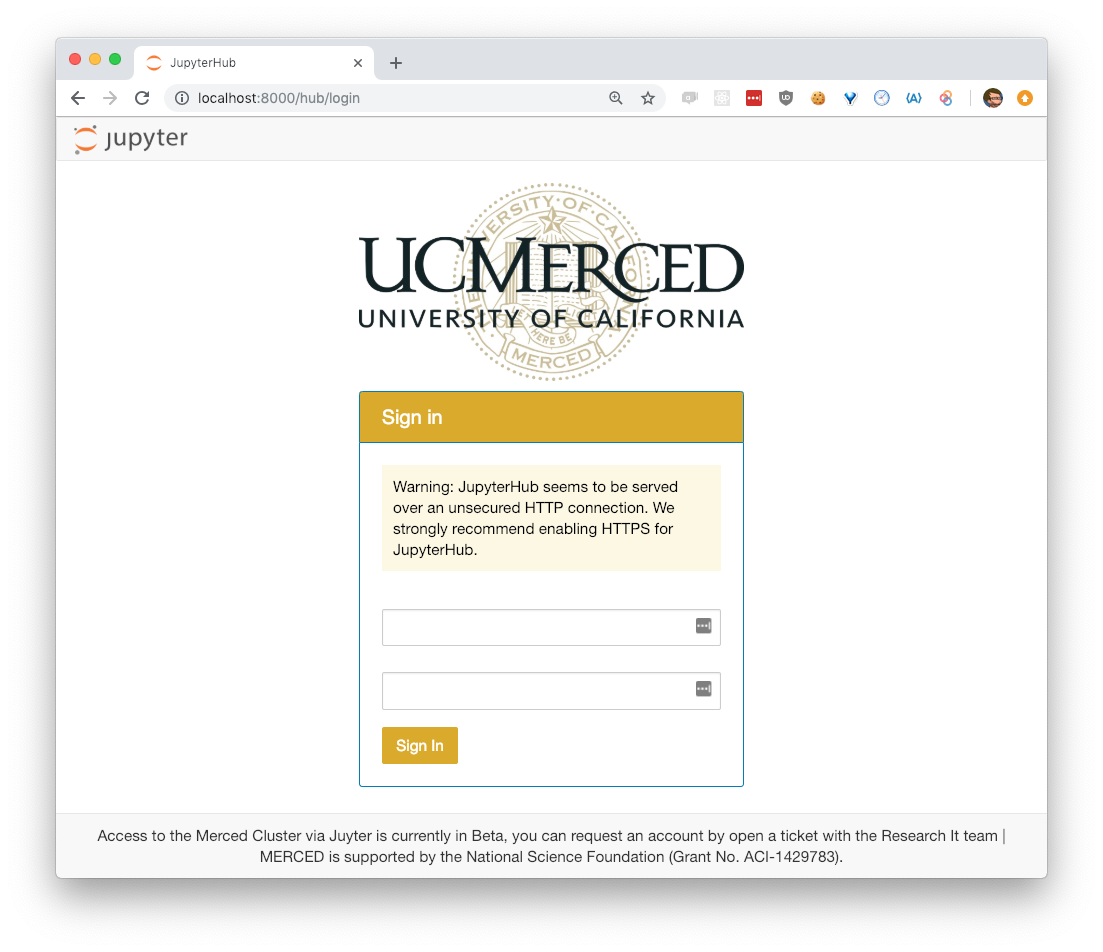
Correct for both of you, here is what I currently have without source modification (don't mock my design skill; I could do better and I am working on it).
$ git status
On branch master
Your branch is ahead of 'origin/master' by 1 commit.
  (use "git push" to publish your local commits)

Untracked files:
  (use "git add <file>..." to include in what will be committed)

    config.py
    login.html
And here are the exact files that are not tracked in git:
https://gist.github.com/Carreau/4b08dde37004be60db9fac0c9224a6c3
One thing which is unclear is how to host extra resources like logos. Either you can put them in /share/ (system wide or in my case in miniconda directory), or if you have a reverse proxy like apache you can should be able to set it up to server these extra resources.
I believe it would be nice to have this in an example folder to make it easier to find.
Carreau
on 21 Feb 2019
Thank you! @nschiraldi @Carreau
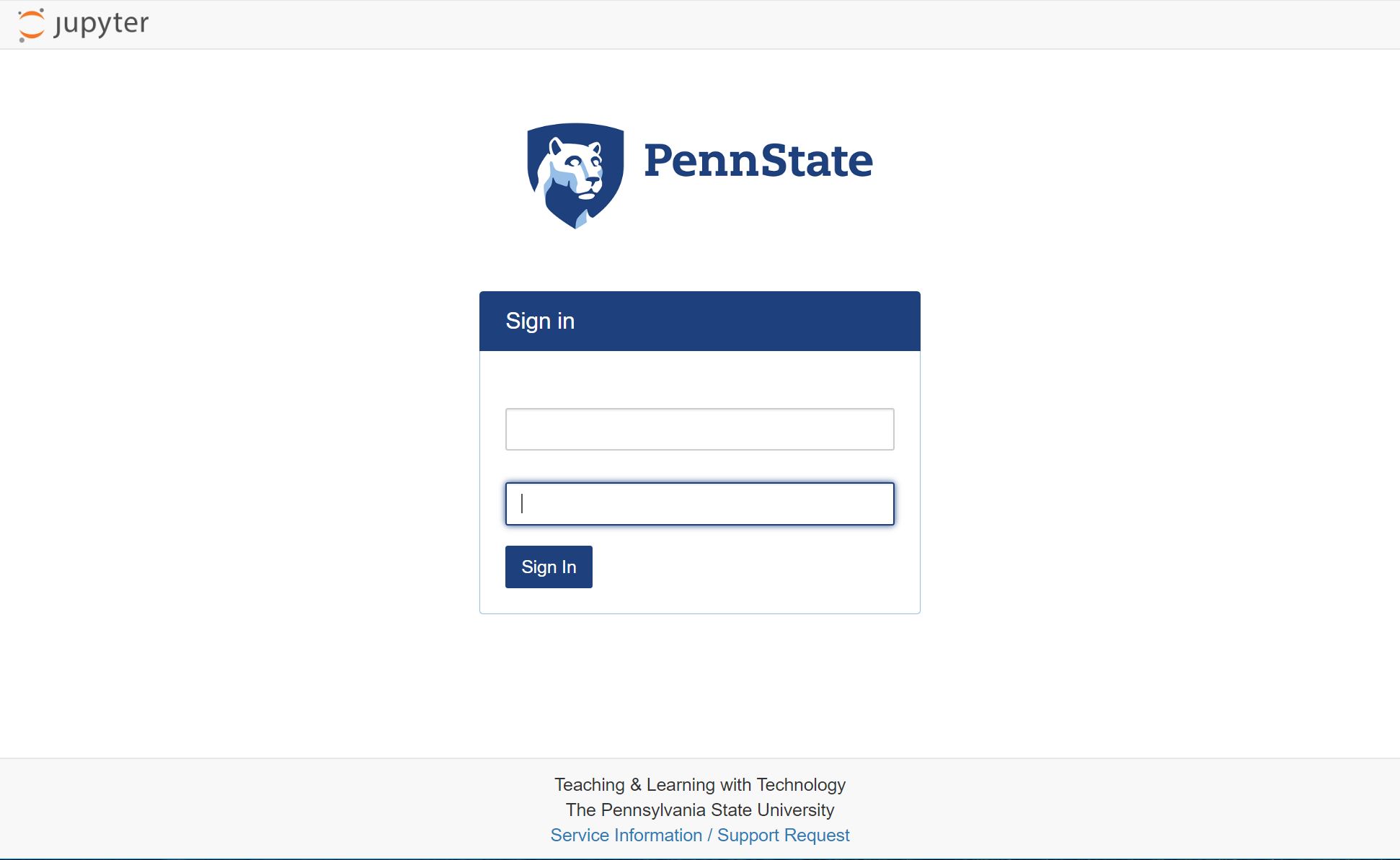
Wish I would have known about this before. Here are my modifications:
hansen-m
on 28 Feb 2019
that's good; you have better design skills than I :-) Maybe we could push jupyterhub to use css-variables, it may help overriding the colors without retyping everything.
Carreau
on 1 Mar 2019
here's my modification, comments are welcome:)

 leewi9
on 22 Sep 2019
leewi9
on 22 Sep 2019
Also note that you can use the following:
$ can config.py
 c.JupyterHub.template_paths=['.']
with
$ cat login.html
{% extends "templates/login.html" %}
{{ super()}}
And now redefine any block you like from the default template. So it's just a question of defining the right blocks.
Are those two files in the same folder? I installed the jupyterhub on Google kubernetes and I added "c.JupyterHub.template_paths=['.']" in config.yaml. Then I created a new login.html file with my customized modification in the same folder as config.yaml, but it is not working...
Any kind suggestions:) ?
 missedMahattanhenge
on 30 Sep 2019
missedMahattanhenge
on 30 Sep 2019
@missedMahattanhenge,
If you're deploying jupyterhub on kubernetes, you'll need to modify the config.yaml with:
jupyterhub:
  hub:
    extraConfig:
      templates: |
        c.JupyterHub.template_paths = ['/path/to/custom/templates']
Since the default image will not contain customized templates, you'll have to find a way to upload them to the hub image or bake them into the image. I recommend using the following approach:
jupyterhub:
  hub:
    # clone custom JupyterHub templates into a volume
    initContainers:
      - name: git-clone-templates
        image: alpine/git
        args:
          - clone
          - --single-branch
          - --branch=master
          - --depth=1
          - --
          - https://github.com/your/repo.git
          - /etc/jupyterhub/custom
        securityContext:
          runAsUser: 0
        volumeMounts:
          - name: custom-templates
            mountPath: /etc/jupyterhub/custom
    extraVolumes:
      - name: custom-templates
        emptyDir: {}
    extraVolumeMounts:
      - name: custom-templates
You'll have to change https://github.com/your/repo.git.
These code snipets were taken from https://discourse.jupyter.org/t/customizing-jupyterhub-on-kubernetes/1769/3
If you're really feeling adventurous, you can mount a nfs volume and then edit them on the fly.
https://discourse.jupyter.org/t/customizing-jupyterhub-on-kubernetes/1769/4
 akaszynski
on 15 Oct 2019
akaszynski
on 15 Oct 2019
i have a noob question but where would i host this new login page on the server? could i host it anywhere and point to it with c.JupyterHub.template_paths? never used html (besides myspace) so i'm not sure if my login screen is fully functional just looking at it locally.
 stevenhurwitt
on 5 Mar 2020
stevenhurwitt
on 5 Mar 2020
With a little bit css, easy to do on kubernetes.
https://github.com/motionlife/k8s-jhub
 motionlife
on 30 Sep 2020
motionlife
on 30 Sep 2020
@motionlife
Your login page is very beautiful. Would you mind providing the source template?
Thank you so much.
 arang129
on 12 Oct 2020
arang129
on 12 Oct 2020
Just extending upon akaszynski's comment - the GitHub repo where my custom templates were stored was a private repo. Therefore I had to create a GitHub Personal Access Token and included the PAT inside the url in the git clone command as follows
hub:
  initContainers:
    - name: git-clone-templates
      image: bitnami/git:latest
      args:
        - clone
        - --single-branch
        - --branch=develop
        - --depth=1
        - https://<GITHUB_PAT>@github.com/<REPO_NAME>/
        - ~/jupyterhub/custom
      securityContext:
        runAsUser: 0
      volumeMounts:
        - name: hub-templates
          mountPath: ~/jupyterhub/custom
  extraVolumes:
    - name: hub-templates
      emptyDir: {}
  extraVolumeMounts:
    - name: hub-templates
      mountPath: /home/jovyan/jupyterhub/custom
  extraConfig:
    customLoginTemplates.py: |
      c.JupyterHub.template_paths = ['/home/jovyan/jupyterhub/custom/<PATH_TO_HTML_TEMPLATES>']
Using Custom CSS
As for using custom css, you could do it a few different ways:
- Method 1: Create a head tag inside the main block
Here is the structure of my login.html file
{% extends "page.html" %}
{% if announcement_login %}
  {% set announcement = announcement_login %}
{% endif %}

{% block login_widget %}
{% endblock %}

{% block main %}

<head>
  <style>
  INSERT CUSTOM CSS HERE
  </style
</head>

{% block login %}
INSERT CUSTOM HTML HERE
{# Just make sure you preserve this 'a' tag inside the login block somewhere inside the login block. This is the jupyterhub redirect link to whatever oauth provider you chose #}
<a class="button-login-link" href='{{authenticator_login_url}}'>
{% endblock login %}

{% endblock main %}

{% block script %}
{{ super() }}
INSERT CUSTOM SCRIPTS HERE
{% endblock script %}
- Method 2: Add link tag inside head tag in page.html
A second way you could use custom css is by adding additional tags inside the in page.html. For example, I used MaterializeCSS to style my login page and AnimateCSS for easy component transitions.
<head>
  {% block stylesheet %}
  <link rel="stylesheet" href="{{ static_url("css/style.min.css") }}" type="text/css"/>
  <!-- MaterializeCSS -->
  <link rel="stylesheet" ref="https://cdnjs.cloudflare.com/ajax/libs/materialize/1.0.0/css/materialize.min.css"/>
  <!-- AnimateCSS -->
  <link rel="stylesheet" href="https://cdnjs.cloudflare.com/ajax/libs/animate.css/4.1.1/animate.min.css"/>
  {% endblock stylesheet %}
</head>
<body>
...
{% block script %}
<!-- MaterializeCSS scripts -->
<script src="https://cdnjs.cloudflare.com/ajax/libs/materialize/1.0.0/js/materialize.min.js"></script>
{% endblock %}
</body>
- Method 3: Pull custom stylesheet from cloud storage
This will get you the same result as Method 1, but with the simplicity of Method 2. I did not try this method and only contemplated it, but theoretically you should be able to upload a stylesheet to (for example) an S3 bucket, and use Method 2 to load in the custom css.
<head>
  {% block stylesheet %}
  <link rel="stylesheet" href="{{ static_url("css/style.min.css") }}" type="text/css"/>
  <!-- Custom stylesheet from S3 bucket -->
  <link rel="stylesheet" ref="LINK_TO_YOUR_PUBLICLY_ACCESSIBLE_S3_OBJECT"/>
  {% endblock stylesheet %}
</head>
Replacing the spawn pending loader
If for whatever reason you want to hide details of the server spawning loading bar from users, you can replace the content of spawn_pending.html with something of this format. For my project, I just inserted a generic css preloader in the middle of the page.
{% extends "page.html" %}
{% block main %}

<head>
  <style>
  INSERT RELEVANT CUSTOM CSS HERE
  </style>
</head>

INSERT CUSTOM HTML HERE

{% endblock %}

{% block script %}
{{ super() }}
INSERT RELEVANT SCRIPTS HERE
{% endblock %}
Inserting images/videos on login page
I wasn't able to find a simple method for sourcing extra resources such as images and videos using the existing JupyterHub settings. What I ended up doing was creating a publicly accessible S3 bucket to host images, videos, icons, etc. If anyone knows of a way please let me know. Otherwise, hopefully there will be some native JupyterHub support for this in the future.
Changing the browser tab title/name
While you're here, you might as well change the browser tab title/name from "JupyterHub" to something custom. The title of the browser tab is located inside the title tab on page.html
<head>
    <meta charset="utf-8">
    <title>{% block title %}YOUR_CUSTOM_BROWSER_TAB_TITLE{% endblock %}</title>
   ...
</head>
Final thoughts
- This might be a good place to insert a terms and conditions of using your JupyterHub deployment. For example, you could insert some additional html in the login.html file that pops up a modal containing your terms and conditions as well as a signature box etc.
- I hope these notes find useful to someone in the future as I spent many hours fooling around with this stuff.
 peterrmah
on 4 Dec 2020
peterrmah
on 4 Dec 2020
Related issues
 AndreWin
·
23Comments
AndreWin
·
23Comments
 beeva-luisgonzalez
·
34Comments
beeva-luisgonzalez
·
34Comments
 elgalu
·
47Comments
elgalu
·
47Comments
 SteveFelker
·
38Comments
SteveFelker
·
38Comments
 nayan1247
·
27Comments
nayan1247
·
27Comments
Most helpful comment
Correct for both of you, here is what I currently have without source modification (don't mock my design skill; I could do better and I am working on it).
And here are the exact files that are not tracked in git:
https://gist.github.com/Carreau/4b08dde37004be60db9fac0c9224a6c3
One thing which is unclear is how to host extra resources like logos. Either you can put them in /share/ (system wide or in my case in miniconda directory), or if you have a reverse proxy like apache you can should be able to set it up to server these extra resources.
I believe it would be nice to have this in an example folder to make it easier to find.