Jupyter-themes: Toolbar missing
The toggle toolbar is missing. Nothing happens when clicking View - Toggle Toolbar:

When I restore the default theme, the toolbar is visible again:

Any tips?
 ainaosk
All 14 comments
Just installed this and have the same issue.
 onyekaa
on 1 Aug 2018
onyekaa
on 1 Aug 2018
You can use the "-T" flag to enable the toolbar.
jt -t gruvboxd -T
 mattmagic149
on 3 Aug 2018
mattmagic149
on 3 Aug 2018
Thanks. Had the same issue and your reply helped.
 whatsupiens
on 17 Jul 2019
whatsupiens
on 17 Jul 2019
I'm still having the issue of toolbar missing even after trying all the recommended steps. Any help is greatly appreciated, please. The toolbar doesn't seem to return even after I reset using jt -r
 manojselvakumar
on 21 Nov 2019
manojselvakumar
on 21 Nov 2019
I am having the same problem. forcing the toolbar to visible (-T) is not working. Actually it is not changing the themes any more. I tried to uninstall Anaconda and reinstall it again. Didn't work. I tried to upgrade jupyter notebook. Didn't work either. Strange that it worked at first but after I realized the problem of the toolbar it stop working.
 ldariva
on 30 Jan 2020
ldariva
on 30 Jan 2020
The Title Bar is missing too. That was pretty convenient to rename a file in the original jupyter theme.
 vvthakral
on 25 Mar 2020
vvthakral
on 25 Mar 2020
run this line to enable the toolbar, .
jt -t oceans16 -T -N
 sankeashok
on 18 Apr 2020
sankeashok
on 18 Apr 2020
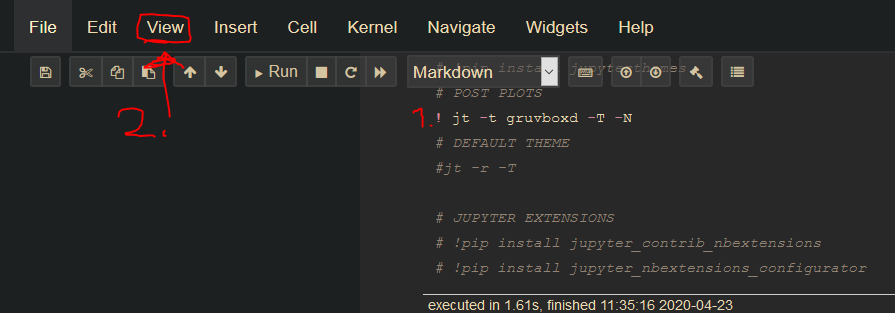
Remember to activate it after adding -T option
- !jt -t [THEME] -T
- Refresh Page
- View -> Toggle Toolbar
 WP-LKL
on 23 Apr 2020
WP-LKL
on 23 Apr 2020
for the toolbar the following command worked for me
!jt -t gruvboxd -T
however when I run the same command without '!' in front of jt , it doesn't work ,it is same for all jupyterthemes command. Can some one please help me understand why is it so ?
 AvinashChandrana
on 27 May 2020
AvinashChandrana
on 27 May 2020
for the toolbar the following command worked for me
!jt -t gruvboxd -T
however when I run the same command without '!' in front of jt , it doesn't work ,it is same for all jupyterthemes command. Can some one please help me understand why is it so ?
@AvinashChandrana, when you prefix with "!" Jupyter executes the command outside python.
So similarly you can execute "!pip install [PACKAGE_NAME]", but "jt -t gruvboxd -T" and "pip install" will fail as they are not recognized by the Python interpreter.
WP-LKL
on 27 May 2020
I have nbextensions enabled in my notebook and i have enabled the Table of Contents 2 extension
When I enable toolbar it overlaps the table of contents on the left hand side of the notebook
 kapoorutkarsh7
on 21 Jun 2020
kapoorutkarsh7
on 21 Jun 2020
how do i enable the header though
 tensor69
on 18 Nov 2020
tensor69
on 18 Nov 2020
I have nbextensions enabled in my notebook and i have enabled the
Table of Contents 2extensionWhen I enable toolbar it overlaps the table of contents on the left hand side of the notebook
Yes! Same issue... Seems they have some bugs. One way to solve (temperarily) is to move the content column to the right....
 Andychiang13
on 15 Dec 2020
Andychiang13
on 15 Dec 2020
Remember to activate it after adding -T option
- !jt -t [THEME] -T
- Refresh Page
- View -> Toggle Toolbar
Worked for me like a charm.
 VictorZhuMBA
on 11 Mar 2021
VictorZhuMBA
on 11 Mar 2021
Related issues
 ozkansafak
·
3Comments
ozkansafak
·
3Comments
 lucainnocenti
·
6Comments
lucainnocenti
·
6Comments
 tanmay7270
·
5Comments
tanmay7270
·
5Comments
 zwh42
·
4Comments
zwh42
·
4Comments
 Peydon
·
3Comments
Peydon
·
3Comments
Most helpful comment
You can use the "-T" flag to enable the toolbar.
jt -t gruvboxd -T