Julius: English voices are being called when they're missing from the language pack
I guess some localizations, such as the Brazilian Portuguese one, does not have all the assets that the default (English) version has.
For example, the English have the voices for the boats and the merchants, while in the Brazilian localization there are not.
The default behavior of Julius seems to be: fallback to the default voices when not found in the localization, which is wrong since this would not happen in the original Brazilian Portuguese version.
My suggestion is:
Add a switch in the settings:
- Use assets (voices) from the default language pack when not found
And I recommend it to be turned off by default, a user can still turn it on if needed.
In case you're interested, I compiled the Brazilian Portuguese language pack for the Steam version of Caesar here:
 felipecrs
All 28 comments
This is intended behaviour. The language packs I made myself (which I don't distribute publicly due to copyright reasons) only have the voice files and none of the other sound files to save disk space.
Besides, which .wav files are you missing? I just compared the files in your language pack to the English version, and the files are the same: the "boat*.wav" files in your Portuguese pack are the original English ones. They were apparently not localized?
 bvschaik
on 6 Jan 2021
bvschaik
on 6 Jan 2021
Sorry, my bad. My compiled pack is not right. I think I merged PT-BR wavs with the English ones, that's why you see the boat*.wav files. They were not supposed to be there.
Let me try one thing here, then I'll do the testing again and report back.
felipecrs
on 6 Jan 2021
I fixed my compilation, which is now available at the following link if you are interested. I double-checked everything, and this time I did the procedure using the original pt-br disk, so I'm sure everything is right.
-- How to install?
Simply copy all the files and folders to where your Caesar 3 from Steam is installed, replacing the files when asked.
-- What is included?
- Julius 1.6.0
- The pt-br language pack (to use with Julius). The .smk and .wav files were taken using the following procedure:
- Install from the original pt-br ISO
- Apply the official pt-br patch 1.1
- Copy SMK\Intro.smk from ISO to the smk\ folder (it's not there by default so the game has a smaller size because in the original version it accesses the intro.smk from the disc)
- Then took the smk\ and wavs\ folders and the two .eng files from the installation dir
- Renamed the file wavs\vigils_exact0.wav to wavs\vigils_exact10.wav (probably an error in compiling the game in pt-br version, as no audio file starts with 0)
- The julius.ini, configured to use the pt-br language pack and to play the intro videos in the initialization
- Adjusted SierraLauncher.ini to point to julius.exe rather than c3.exe, so Steam will automatically open Julius.
- The original pt-br MANUAL.PDF in the pt-br folder
- The high quality .mp3 files for the cities music taken from the Julius GitHub wiki.
@bvschaik
The pt-br version indeed does not have any of the boat.wav files, and the donkey.wav files, this is the list:
boats_exact1.wav
boats_exact2.wav
boats_exact3.wav
boats_exact4.wav
boats_exact5.wav
donkey_exact1.wav
donkey_exact2.wav
donkey_exact3.wav
donkey_exact4.wav
donkey_exact5.wav
And it seems that they created one more (emigrate_exact5.WAV), which is not present in the English version.
- I confirmed that the behavior I described is still true: Julius falls back to the default WAVs if not present in the language pack. I wanted to prevent this behavior, which I believe is unwanted. Don't you think a new option in the settings to turn the fallback mechanism on or off would make sense? I know I can work around it by simply deleting the default
wavsfolder.
felipecrs
on 6 Jan 2021
I don't like having a separate option for the following reasons:
- there are too many options already
- this hypothetical option will _only_ be useful for the Portuguese version
- using this option incorrectly will result in a silent game apart from speech for all other languages because the language packs I made rely on the "fallback"
- it's for 10 speech files only...
I think I have a better idea: get someone to record those 10 voice lines in Portuguese and ship them with your language pack? That will improve the quality of the translation without complicating Julius.
bvschaik
on 6 Jan 2021
I believe this might be the case for the other translations: it's tricky to find it just by playing. But anyway, I won't play the game in the other languages so I can accept that this will be only useful for the PT-BR version.
I think I have a better idea: get someone to record those 10 voice lines in Portuguese and ship them with your language pack? That will improve the quality of the translation without complicating Julius.
This is a great idea. I'll see what I can do.
felipecrs
on 6 Jan 2021
Having some proper voice actors for the missing audio would be really cool. It could even be used in original C3.
 crudelios
on 6 Jan 2021
felipecrs
on 7 Jan 2021
crudelios
on 6 Jan 2021
felipecrs
on 7 Jan 2021
By the way, thanks for packinging it in such an easy-to-install format. Some tips for reducing the size of the zip:
- The music files are always loaded from the main Caesar 3 folder, so they can be removed from pt-br:
ROME1-5.wav,setup.wav,combat_short.wav,combat_long.wav. - The only videos which have speech in them are the following, the others are the same for all languages:
- CREDITS.SMK
- Emp_2nd_chance.smk
- Emp_angry.smk
- Emp_displeased.smk
- Emp_send_army.smk
- Logo.smk
- intro.smk
- You can also remove the ambient files, which are basically those which don't follow the naming
walker_exact1.wav. If you want me to provide I list I can do that.
bvschaik
on 7 Jan 2021
This is amazing, thanks for the tip, the list is already very clear for me. I'll create a PR and ask you to review it if you don't mind.
felipecrs
on 7 Jan 2021
I just released v2.0.0 with this new enhancement. The file size was reduced from 414MB to 309MB.
felipecrs
on 8 Jan 2021
I moved the project to GitLab, since the GitHub has a limit of 100MB per file in the repository. Also, the quotas for Git LFS in GitHub are unfeasible.
This is the new homepage of the project:
https://gitlab.com/felipecrs/caesar3-ptbr-steam-patch/-/blob/main/README.md
felipecrs
on 8 Jan 2021
Not sure what went wrong with the move to GitLab, but the last commit says "Remove unneeded files from the pack" while the file browser still lists all of them...
Anyway, since nothing needs to be done in Julius for this, I'm going to close this issue.
bvschaik
on 10 Jan 2021
Wow, thank you so much for noting that. I fixed it (by rewriting the existing commit) and now the pack has only 198MB of size. If you want to review, the list of the deleted files is here.
felipecrs
on 10 Jan 2021
@felipecrs Was there a pt-BR version of the map editor as well?
crudelios
on 10 Jan 2021
@crudelios probably there were, but sadly I don't have it.
felipecrs
on 10 Jan 2021
I have awesome news. I managed to find someone to record the speeches in Portuguese, someone who is already a fan voice actor. I'll give the proper credits when I deploy the new speeches in my patch.
For now, I wanted to share with you. Mainly @crudelios who speak Portuguese. Could you take a look?
https://1drv.ms/u/s!AntpCaY1YjnMidI62mOIjFiU66rb8Q?e=3ThFSj
There are 3 folders. One called "no edits", which is the original file the voice actor sent me. Then there are 2 other folders, which I applied some edits in Audacity.
- I trimmed the silence at the start and in the end and I normalized the audio volume
- I increased the speed by 5%, to make it feel more like the other official speeches
But I'm still not sure if the speedy version is better or not, and I would appreciate opinions/suggestions on how I could improve these samples.
Here is an in-game sample (with the speedy voices version):
https://1drv.ms/v/s!AntpCaY1YjnMiddQecZwHDc51aML7A?e=QE06r7
felipecrs
on 19 Jan 2021
Whoa this is great, I'll definitely have a look!
crudelios
on 20 Jan 2021
I do think the faster 5% version is more in line with the rest of the dialogue.
When you add it to your pack, can we also add it to our C3 Portuguese patch (giving both you and the voice actor proper credit, of course).
Also, the current wav format is not compatible with the original Caesar 3 executable (it produces only static). That's because C3 expects 8-bit, 22050hz audio.
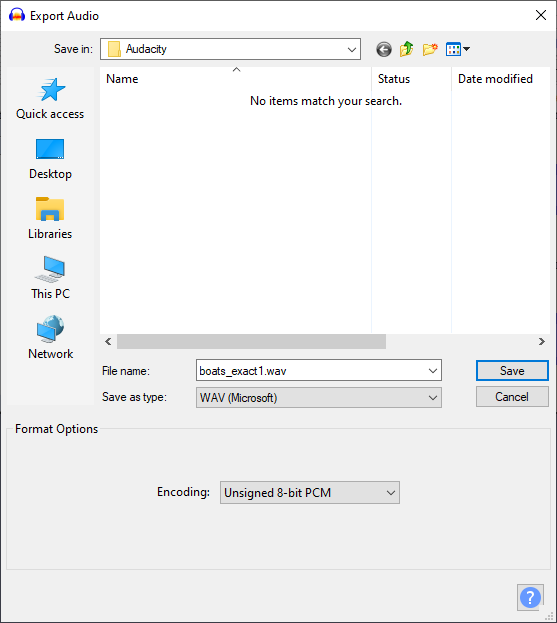
To save the file in a format supported by the original Caesar 3 (which can also be opened in Julius), set the Project Rate (Hz) (In portuguese: Taxa do Projeto (Hz)) at the lower left corner to 22050 and export the file by going to File -> Export -> Export Audio... and set the file type to Other files without compression (Outros ficheiros sem compressão), Header (Cabeçalho) to WAV (Microsoft) and Endoding (Codificação) to Unsigned 8-bit PCM, then save the file.
You'll lose some (read: a lot of) audio quality, but the audio can then directly be used by the original Caesar 3 executable.
crudelios
on 20 Jan 2021
I do think the faster 5% version is more in line with the rest of the dialogue.
Great!
When you add it to your pack, can we also add it to our C3 Portuguese patch (giving both you and the voice actor proper credit, of course).
Of course. I didn't put a license in my project yet, but it would definitely be the looser as possible. However, which C3 Portuguese patch are you talking about? The 1.1 available in the wiki?
Also, the current wav format is not compatible with the original Caesar 3 executable (it produces only static). That's because C3 expects 8-bit, 22050hz audio.
To save the file in a format supported by the original Caesar 3 (which can also be opened in Julius), set the
Project Rate (Hz)(In portuguese:Taxa do Projeto (Hz)) at the lower left corner to22050and export the file by going toFile -> Export -> Export Audio...and set the file type toOther files without compression(Outros ficheiros sem compressão),Header(Cabeçalho) toWAV (Microsoft)andEndoding(Codificação) toUnsigned 8-bit PCM, then save the file.You'll lose some (read: a lot of) audio quality, but the audio can then directly be used by the original Caesar 3 executable.
Sure. Thanks for letting me know.
felipecrs
on 20 Jan 2021
However, which C3 Portuguese patch are you talking about? The 1.1 available in the wiki?
Yes.
crudelios
on 20 Jan 2021
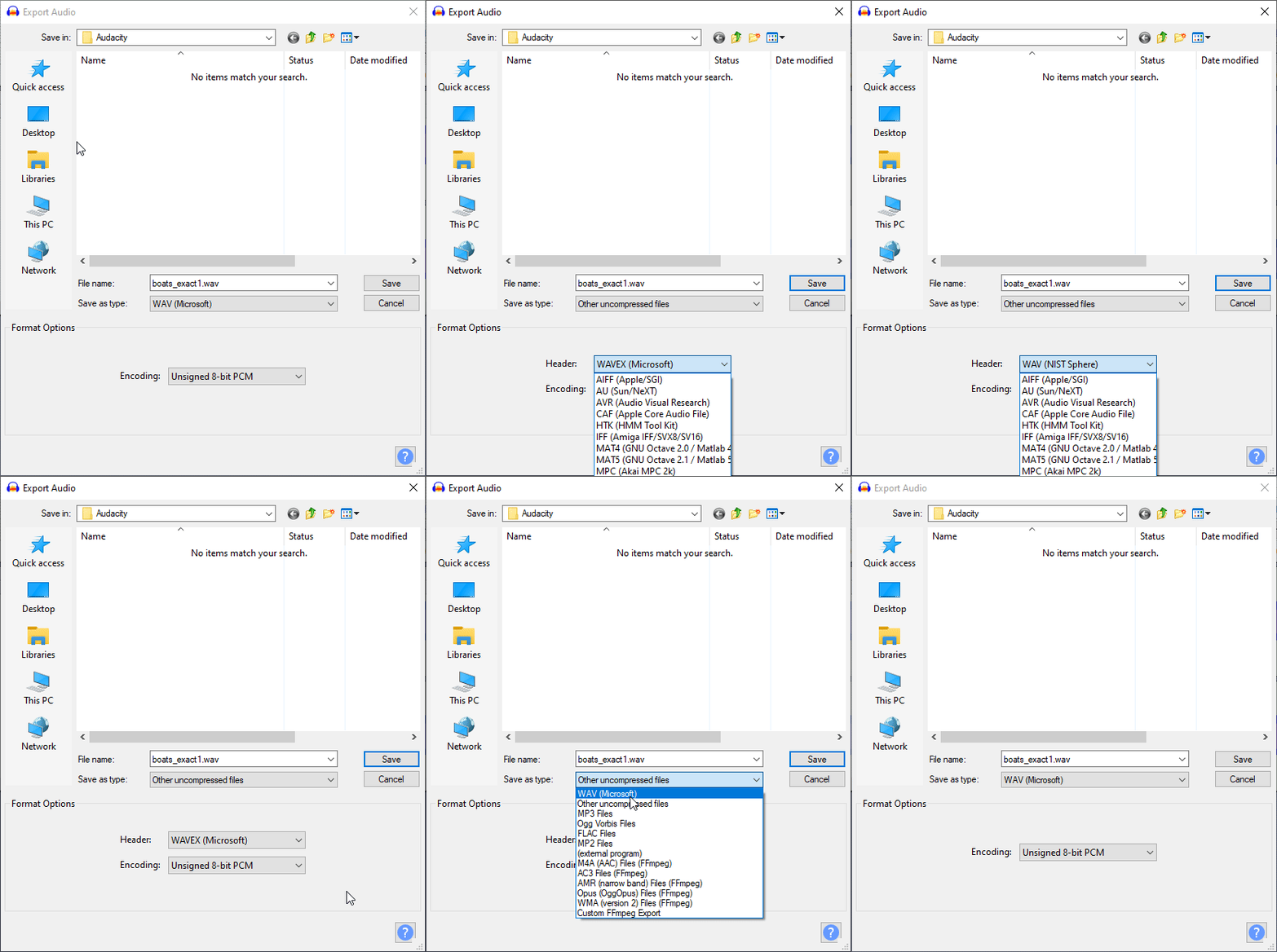
I could not find the WAV (Microsoft) in the Uncompressed audio format types. Should it be WAVEX instead?
Also, if I choose WAV (Microsoft) as the file type (not "other uncompressed audio", there is an option for encoding it as unsigned 8-bit PCM. Should I do this way?
felipecrs
on 20 Jan 2021
The second image should work, I think!
crudelios
on 20 Jan 2021
The work continues on MR !1. Thanks so much for your input, @crudelios!
felipecrs
on 23 Jan 2021
The MR was merged, and it's now part of the v3 of the patch (project homepage here).
@crudelios feel free to use and distribute these files. Just don't forget to give the voice credits to Horieber Oliveira.
felipecrs
on 24 Jan 2021
Thank you! This is a nice addition 🙂
crudelios
on 24 Jan 2021
- Renamed the wavs\vigils_exact0.wav file to wavs\vigils_exact10.wav (it was probably an error when the PT-BR version of the game was created, as no speech file starts with 0 and there is a vigils_exact10.wav present in the English version)
From: https://gitlab.com/felipecrs/caesar3-ptbr-steam-patch/-/blob/main/README.en.md#language-pack
@bvschaik when you have a chance, could you please advise if my assumption is right?
felipecrs
on 27 Jan 2021
@bvschaik when you have a chance, could you please advise if my assumption is right?
Yes, you are correct. The exact10 file is one of the 4 "prefect fighting enemy" phrases which you don't hear very often, so it doesn't surprise me that this slipped through.
bvschaik
on 27 Jan 2021
Great. Thank you!
felipecrs
on 27 Jan 2021
Related issues
 devnoname120
·
5Comments
devnoname120
·
5Comments
 jdmillard
·
3Comments
jdmillard
·
3Comments
 jfkonecn
·
6Comments
jfkonecn
·
5Comments
jfkonecn
·
6Comments
jfkonecn
·
5Comments
 Uberwire
·
5Comments
Uberwire
·
5Comments