Julius: Add scaling options to the config window
Is there a way to change to another full screen resolution?
I appreciate that julius supports 1920x1080 resolution, but I think either a zoom feature or a possibility to select another full-screen solution like 1280x720 or 1366x768 would be very good for our eyes :)
 onurarpapay
All 17 comments
There is a way to define different resolutions, which is to use the --display-scaling command line argument.
If you use the line --display-scaling 1.5 at 1920x1080 you'll get 1280x720!
 crudelios
on 20 Oct 2020
crudelios
on 20 Oct 2020
Wow thanks, I guessed that there might be a command line option for that. I will try today evening and report the result.
Can you please add this information to Wiki? If there are any other helpful command line options, we'd be thankful if you'd add them to wiki as well. Thanks!
Edit: I have tried and it worked perfectly! For me, 1.4 as the scaling factor was the best.
onurarpapay
on 21 Oct 2020
For now the information is in the Running.md file. I plan to move it to the wiki soon.
Also, we're going to add both display and cursor scale to the configuration options (main menu -> options) in the near future.
 bvschaik
on 21 Oct 2020
bvschaik
on 21 Oct 2020
For now the information is in the Running.md file. I plan to move it to the wiki soon.
Also, we're going to add both display and cursor scale to the configuration options (main menu -> options) in the near future.
You're right, I missed that. Thanks. And yes, moving the option to in-game menu is the most convenient solution to this issue!
onurarpapay
on 21 Oct 2020
Glad it's sorted. I'm going to change the description of the issue to "nag" us until we implement the config option.
crudelios
on 21 Oct 2020
Is there documentation anywhere detailing how the current display scalling system works? I just stumbled upon this repo and wanted to see if I can play with integer scaling over some of the original resolutions (like 640x480 scaled to 1280x960).
EDIT: Yeah.... I played around with the scaling setting a little bit and it results in massive amounts of blur. I'll look into the codebase a bit more in the coming days to see what could be done.
 julealgon
on 28 Oct 2020
julealgon
on 28 Oct 2020
If you scale by an integer value (2, 3, etc), there won't be blur but it may be too big a scale.
This is not easy for us to fix because it's a problem with SDL.
crudelios
on 28 Oct 2020
Integer scaling shouldn't result in blur, but the other ones will result in some amount of blur, yes.
Julius uses SDL texture scaling, with the RENDER_SCALE_QUALITY hint set to "nearest" for integer scaling, and "linear" for the others. Not sure what can be improved there, if anything.
NB: I'm working on adding these options to the config in this branch. Basic functionality should work, but it's not monkey-proof yet since you're able to set scale to 500% without option to turn it back because the buttons are then out of view (unless you have a huge monitor, of course).
bvschaik
on 28 Oct 2020
@bvschaik / @crudelios any reason you are not using SDL's native integer scaling option?
This is how I added support for integer scaling in DevilutionX:
Then, once custom resolutions were introduced to the game, it was very easy to support 960x540 integer scaled by a factor of 2 to get 1920x1080, which is probably the settings I'd play with in Caesar 3 as well. This however doesn't seem possible right now in Julius?
julealgon
on 2 Nov 2020
We're not using that for two reasons:
- We didn't know that function existed
- Caesar 3 doesn't have a fixed resolution like Diablo: the interface can support any resolution, so this is of less use.
From what we know (which is not much, to be honest), most people seem to use the scaling option to either fix the game not running well on HD displays, so they use a display scale of 2, which automatically does integer scaling due to the render quality hint we set. Or, they find it's too small on their monitor and they use 1.25 or 1.5, for which integer scaling does not work at all.
Note that there was a bug in the scale quality hint which was fixed last week, where the hint was applied after the texture was created, thus only applying after the window was resized.
For your example, this is easily achieved by using a display scale of 2 on the command line, or 200% on the config screen in my feature branch.
bvschaik
on 2 Nov 2020
@julealgon
any reason you are not using SDL's native integer scaling option?
From my own testing, using SDL_RenderSetIntegerScale seems to simply letterbox the game.
The SDL manual page states precisely that:
This function restricts the logical viewport to integer values - that is, when a resolution is between two multiples of a logical size, the viewport size is rounded down to the lower multiple.
That is not what we want. We want the game to take the whole window. The only way to do that (that I know of), without having inconsistent pixel sizes, is to use filtering.
crudelios
on 2 Nov 2020
@bvschaik
We didn't know that function existed
Fair enough.
Caesar 3 doesn't have a fixed resolution like Diablo: the interface can support any resolution, so this is of less use.
I'm aware that Caesar has in-game resolution settings. However, I disagree with your claim that this in turn has "less use". Increasing the resolution to 1080p creates the "playing with ants" problem, as all assets are reduced in size dramatically along with the UI since they are not DPI-aware. With integer scaling, people are allowed to play with graphics that are a little closer to the original (in size) while having good scaling to go with it.
As I mentioned, I think 960x540 might be a good compromise on a 1080p monitor, and it integer scales x2 to 1080p perfectly.
From what we know (which is not much, to be honest), most people seem to use the scaling option to either fix the game not running well on HD displays
Oh that's absolutely the case. Most people don't really care about 1 to 1 pixel scaling or are not even aware of the problems uneven pixels create (shimmering, etc). This is for sure an "advanced" use case scenario.
...so they use a display scale of 2, which automatically does integer scaling due to the render quality hint we set.
I'm a bit lost here. I guess I'm not used to having this "display scaling" setting in any games, so it seems weird to me. What does "scale of 2" even mean if you can't set the actual resolution the game is rendering at? What exactly is it scaling "by 2"? Apologies here if I'm missing something obvious.
Or, they find it's too small on their monitor and they use 1.25 or 1.5, for which integer scaling does not work at all.
Again, I don't quite grasp what "1.25" or "1.5" scale means here. What are we multiplying by these fractions? When I ran Julius, it seemed to be displaying at 1080p.
Note that there was a bug in the scale quality hint which was fixed last week, where the hint was applied after the texture was created, thus only applying after the window was resized.
Interesting. Will give it a shot (even though I didn't manage to actually run the game from my own compilation for some reason... keeps saying SDL.dll was not found).
For your example, this is easily achieved by using a display scale of 2 on the command line, or 200% on the config screen in my feature branch.
So you are saying that display scale of 2, equals 960x540 integer scaled to 1080p? If that's the case, I'll give it a try for sure. Are you using nearest neighbor interpolation? If bilinear is used, it creates blur even with integer scaling.
@crudelios
From my own testing, using SDL_RenderSetIntegerScale seems to simply letterbox the game.
If you don't "expand" the game view to widescreen before applying it, then sure, because all default resolutions in the original Caesar were 4:3. To make it fill the screen, you have to set it to a 16:9 resolution before scaling (like 960x540).
That is not what we want. We want the game to take the whole window. The only way to do that (that I know of), without having inconsistent pixel sizes, is to use filtering.
I believe you are missing something here. If you look at how DevilutionX works, you'll see it has widescreen support _and_ integer scaling support: they are independent of one another. The way it works, as I said, is that you first change the internal rendering resolution to a widescreen resolution, and apply integer scaling into that. This is how folks did it on DevilutionX: while the original game is 640x480, the play area can be expanded to 960x540 and then integer scaled into 1080p. Obviously, if you have a monitor with a higher resolution, you have a lot more freedom here. For instance, a 1440p monitor can take a 3x integer scaled 480p expanded into widescreen, or a 2x scaled 600p image with black borders, or a full screen 720p image. On 4k, the options are drastically increased as well.
julealgon
on 2 Nov 2020
Ah, so we are talking more or less about the same.
When we mention a scale value of 2, it means the internal resolution is expanded 2x. When using integer scaling (2x, 3x, 4x or the maximum of 5x) there already are no artifacts and Julius behaves as you described for DevilutionX.
However, we also allow granular scaling (for example 1.5x). When using such scaling, to avoid artifacts, the filter is applied.
In the end it's up to the user to decide if they want to use integer scaling with no filter and no artifacting, or a more granular value.
crudelios
on 2 Nov 2020
Seems like the latest release does indeed work perfectly when --display-scale 2 is set! Thanks for clarifying @crudelios and @bvschaik
julealgon
on 2 Nov 2020
Just an update. We've been working on adding display scale and cursor scale options to the new "Options" window on the main menu:
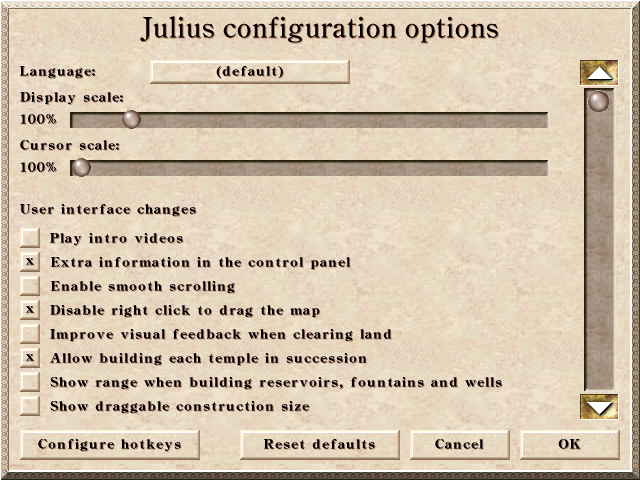
The implementation is almost ready and will make it very easy to customize the scale of your game.
crudelios
on 11 Nov 2020
That's very good to hear, kudos to you guys!
José Cadete notifications@github.com, 11 Kas 2020 Çar, 16:29 tarihinde
şunu yazdı:
Just an update. We've been working on adding display scale and cursor
scale options to the new "Options" window on the main menu:[image: Display scale and cursor scale options]
https://user-images.githubusercontent.com/6518876/98830686-9b747f00-2432-11eb-97ba-9b192edfe4bf.pngThe implementation is almost ready and will make it very easy to customize
the scale of your game.—
You are receiving this because you authored the thread.
Reply to this email directly, view it on GitHub
https://github.com/bvschaik/julius/issues/520#issuecomment-725488183,
or unsubscribe
https://github.com/notifications/unsubscribe-auth/AAHOE2I2H2XWSJGIBGVPKPDSPKUWDANCNFSM4SY3DOLA
.
onurarpapay
on 11 Nov 2020
Scaling options are now available in the Options menu 😃
bvschaik
on 13 Nov 2020
Related issues
crudelios
·
6Comments
 garganshul108
·
6Comments
garganshul108
·
6Comments
 mirh
·
9Comments
mirh
·
9Comments
 jfkonecn
·
5Comments
jfkonecn
·
5Comments
 jdmillard
·
7Comments
jdmillard
·
7Comments
Most helpful comment
Scaling options are now available in the Options menu 😃