
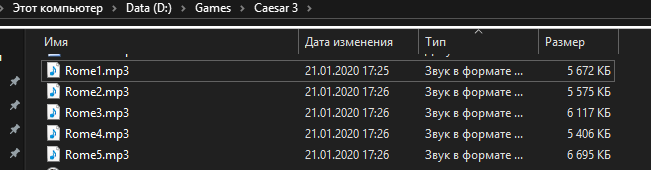
I've done all steps to instructions. I removed original rome1.wav rome2.wav etc... from wavs dir, and run julius (music is ON via game settings) - nothing is playing back.
Things i tried:
Put .mp3 files to wavs directory - no result
Make dir named "mp3" and put .mp3 files there - no result.
Julius ver 1.2.0.34
 ArtySh0ck
All 10 comments
I'll take care of this bug. Right now I don't know whyit doesn't work, but expect an update to this issue. I may ask you to test custom builds, if you don't mind.
The mp3 should go to a folder called mp3, so leave them there for testing.
 crudelios
on 22 Jan 2020
crudelios
on 22 Jan 2020
For now these .mp3s are in 3 places: mp3 dir, main dir, wavs dir. So i wont delete them, ok.
ArtySh0ck
on 22 Jan 2020
@ArtySh0ck As long as you keep them in the mp3 folder, there's no problem.
Here's a build with better logging of mp3 errors: https://ci.appveyor.com/api/buildjobs/8jf15rsyuq3tnt12/artifacts/build%2Fjulius.exe
Can you run this build and then copy julius-log.txt please?
crudelios
on 23 Jan 2020
INFO: Error opening music file 'mp3/ROME1.mp3'. Reason: Failed loading libmpg123-0.dll: б—°Вѕ
INFO: Error opening music file '(null)'. Reason: Couldn't open '(null)'
INFO: Error opening music file 'mp3/ROME1.mp3'. Reason: Failed loading libmpg123-0.dll: б—°Вѕ
INFO: Error opening music file '(null)'. Reason: Couldn't open '(null)'
Windows 10 LTSC x64
ArtySh0ck
on 23 Jan 2020
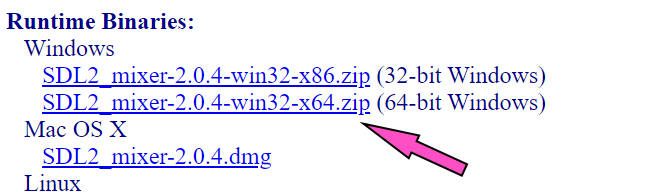
If you downloaded the 64-bit version of libmpg, try downloading the 32-bit or vice-versa
crudelios
on 23 Jan 2020
ArtySh0ck
on 23 Jan 2020
OMG with 32bit version of libmpg123-0.dll - WORKS! I can hear the music within game.
ArtySh0ck
on 23 Jan 2020
Nice! Please close this issue now 😉
crudelios
on 23 Jan 2020
But it isnt nice. I have a 64 bit system, HOW can i guess i need x86 32bit DLL???
Or please edit instructions to do that on main page.
ArtySh0ck
on 23 Jan 2020
This specific issue is fixed. The outdated instructions are being talked about on issue #270, and the eventual inclusion of the dll with the build is also being discussed on issue #271. So to avoid clutter, it's best to close this one.
crudelios
on 23 Jan 2020
Related issues
ArtySh0ck
·
3Comments
 Uberwire
·
5Comments
Uberwire
·
5Comments
 devnoname120
·
5Comments
devnoname120
·
5Comments
 mirh
·
9Comments
mirh
·
9Comments
 garganshul108
·
6Comments
garganshul108
·
6Comments