Jtapplecalendar: 8.0 layout issues. I saw this issue somewhere else, but can't for the life of me find it again.
8.0.3
Since migration to 8.0 my calendar is not displaying properly. No code of mine has changed.
All days load, but they no longer respect the constraints. This is worse on iPhone but its easier to see what's wrong on iPad, pictured below.
This is how the view loads
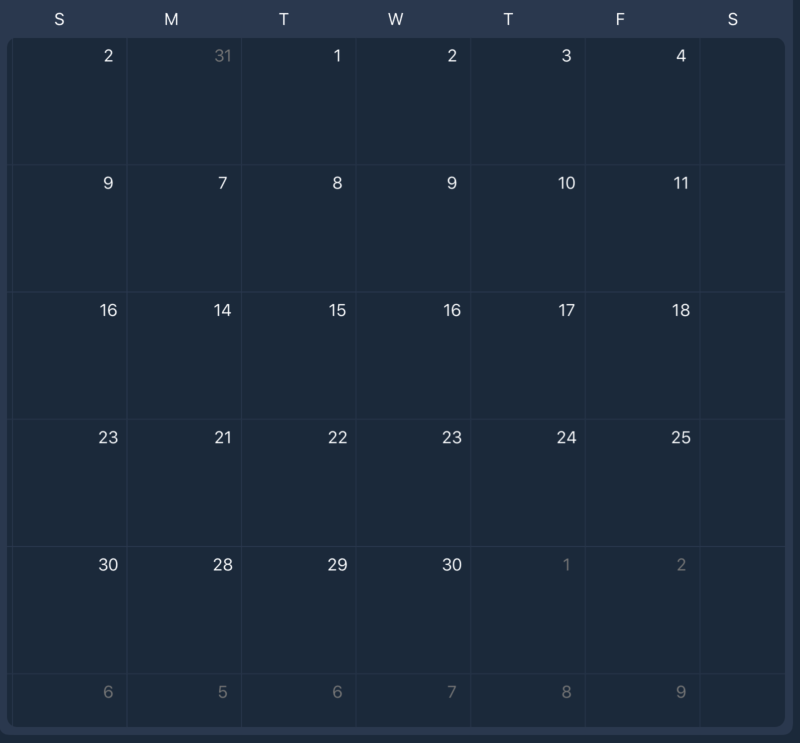
As you can see the grid is not displaying correctly. This exact code was working perfectly before 8.0 so I don't know what I'm missing.
The screenshot is of June, so the 1st should be a Monday, which is what is set in my configuration parameters
 squiDcookiE
All 15 comments
As you can see the grid is not displaying correctly.
Do you have a sample app which replicates this issue?
 patchthecode
on 7 Jun 2020
patchthecode
on 7 Jun 2020
I apologize, I'm new at this. How would I go about doing that?
squiDcookiE
on 9 Jun 2020
create a sample project that has this error.
zip the file.
Then drag the zip file into the chat box.
patchthecode
on 9 Jun 2020
Im working on making one. Sorry for delay
squiDcookiE
on 11 Jun 2020
take your time. Haha. I am also tied up with other work.
patchthecode
on 11 Jun 2020
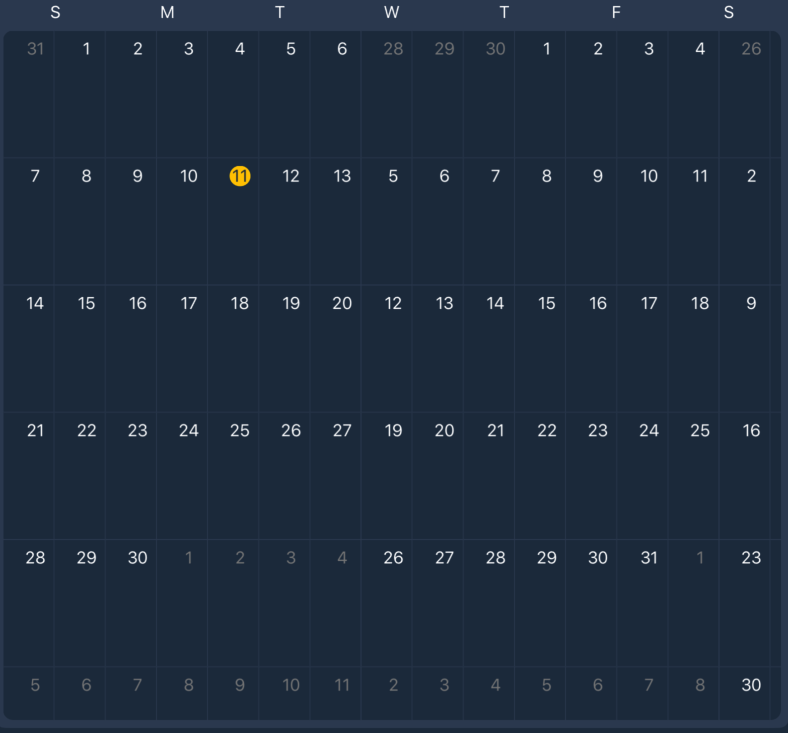
In the meantime just as another clue hopefully, adding "calendarView.cellSize = calendarView.bounds.width / 7" fixes the width (but not height obviously) on iPhone, but the same code when run on iPad makes this happen.
squiDcookiE
on 11 Jun 2020
I have created a sample app that is basically that view copied over with the irrelevant code removed (segue's, core data, etc) and its working perfectly so I think I'm just going to have to find what I removed that's breaking things
squiDcookiE
on 11 Jun 2020
Ok I've figured out that it has to do with how the tab bar is resizing the view. The sample app breaks as soon as I embedded the view in a tab bar. If I can't figure it out by the end of the day I'll throw it up on here.
squiDcookiE
on 16 Jun 2020
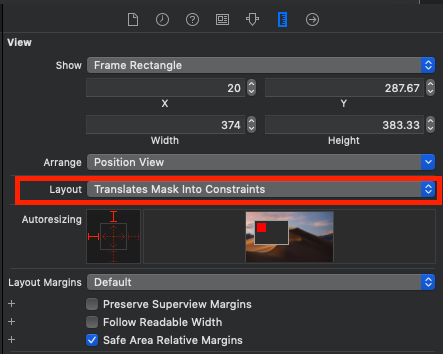
Fixed it. I needed to change the Layout option on my calendar view in the storyboard from "Automatic" to "Translate Mask Into Constraints". A couple small tweaks to other constraints and it's all back to the way it was.
squiDcookiE
on 16 Jun 2020
Awesome. Glad it was resolved.
patchthecode
on 17 Jun 2020
Translate Mask Into Constraints
Can you put a screenshot here of where that option is located?
patchthecode
on 17 Jun 2020
squiDcookiE
on 18 Jun 2020
oh. wow.
haha, now it all makes sense.
Your project should be using constraints.
This is how this library works.
Usually i do not see that screen shot because I use storyboard. I should have known.
Thanks for the information.
patchthecode
on 18 Jun 2020
Yeah it was a real facepalm moment for me haha. Thanks for your work on the project in general, it's been awesome for me
squiDcookiE
on 18 Jun 2020
awesome and thanks.
patchthecode
on 18 Jun 2020
Related issues
 VladFrolov
·
4Comments
VladFrolov
·
4Comments
 programus
·
3Comments
programus
·
3Comments
 Kevinw14
·
3Comments
Kevinw14
·
3Comments
 arn00s
·
3Comments
arn00s
·
3Comments
 zhanswift
·
5Comments
zhanswift
·
5Comments