Jtapplecalendar: Incorrect cell position handling on month boundaries
(Required) Version Number:
8.0.1 57e874ad2c54b3b405f994ca560d9b658088eeed
Description
CellState instances are associated with a closure called selectedPosition which calculates the cell's relationship to selected ranges.
When:
- the cell represents the last day of a month
- that cell is the last column for the row (There no intermediary cells such that
dateBelongsTo != .thisMonth) - The first day of next month is selected
Then the calculated selectedPosition is incorrect. (and can never be .middle)
Steps To Reproduce
- Produce a calendar with the described cell boundary configuration. Aug-Sept of 2019 suffices.
- Observe the state of
selectedPositionwhen the selection range crosses a month boundary.
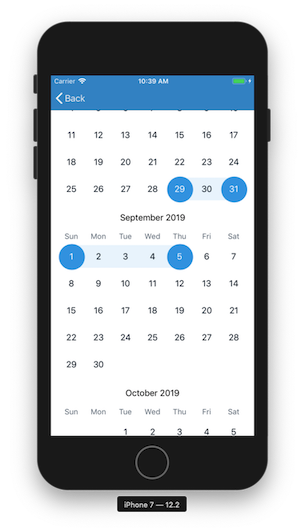
Expected Behavior
- SelectedPosition can be
.middle
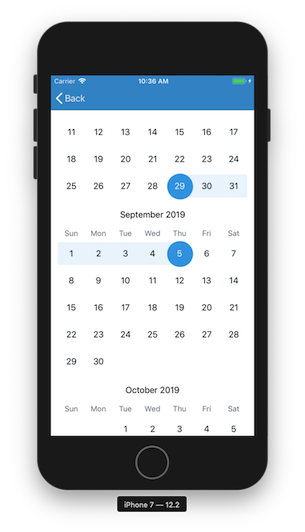
Possible fix
The call to validForwardAndBackwordSelectedIndexes requires restrictToSection: false, at least for cells at the boundary of a month && row.
 allynbauer
All 10 comments
haha.
seems i cant please every developer.
I had it that way orignally, but then coded it to the way you currently see it because many developers wanted it that way.
I think this means that i'll need to have two modes to resolve this.
- ContinuousRange
- SegmentedRange
Continuous will behave like you proposed.
Segmented will behave like you currently see it.
The developers that requested I code it this way predominantly used horizontal calendars where Segmented makes more sense. But on vertical calendars like yours, it looks llike Continuous makes more sense.
Marking this as an upgrade.
In the mean time, it looks like you have to have a customCondition to determine .left and .right.
Maybe you can do a check to see if the (selectedDate - 1) is selected, then it can be marked as .middle
 patchthecode
on 18 Jul 2019
patchthecode
on 18 Jul 2019
seems i cant please every developer.
Perhaps not, but thanks for trying!
I wondered if there was some other feature that instigated the change causing this behavior. I'm not sure I fully understand the 'segmented range' case, though. Does that mean that some people are wanting ranges to stop at month boundaries?
If that's the plot, how are you thinking of adding the new case? Something like selectedPosition(for type: RangeType) or a different approach?
Maybe you can do a check to see if the (selectedDate - 1) is selected, then it can be marked as .middle
Thanks for that suggestion, I hadn't considered it. Depending on the timeline of the enhancement, it may well come to that. If you're planning this improvement anyway, I'll probably just leave the restrictToSection: false change in our commit history until we can integrate the updates.
allynbauer
on 18 Jul 2019
With segmentedRange, if a user selects range from the 29th to the 5th, it will look like this
with continuousRange, it will look like this
The new case will be added something like this.
calendarView.rangeSelectionMode = .selectedRange
calendarView.rangeSelectionMode = .continuousRange
Every thing else stays the same.
Just select the range like you normally do now, and the behavior will be the mode you have selected.
segmentedRange will be default.
patchthecode
on 18 Jul 2019
I've just pushed a possible resolution to this issue, please let me know if that works for you. I had to create my own separate sample app to reproduce the issue.
Xcode workspace didn't work for me for some reason.
 nadyapost
on 3 Aug 2019
nadyapost
on 3 Aug 2019
@nadyapost btw, i must say im impressed (looked at your profile). Ive never seen a switch from 2 separate fields like that before. Thanks.
patchthecode
on 4 Sep 2019
Thank you so much @patchthecode ! I actually got my first iOS developer internship thanks to this PR and my blog post about it ( https://medium.com/@nadyapost/my-first-pull-request-or-how-to-edit-a-cocoa-pod-3f4e3a12e4b2 ). 🤗🤩🤓
nadyapost
on 5 Sep 2019
@patchthecode Hey do you need to update the library to a new version? I just ran pod update, it's not updating to the new code. Also it doesn't upgrade to 8.0.1 somehow.
 rameswarprasad
on 5 Sep 2019
rameswarprasad
on 5 Sep 2019
@nadyapost great post. And congratz on your internship. I hope it goes well for you. Judging by the fix you made and how you investigated, Im sure you'll go far 🍻.
patchthecode
on 5 Sep 2019
@rameswar54 ok before I answer my disappointing response, can you let me know if you are using the new Xcode 11Beta? or are you still on Xcode 10.
patchthecode
on 5 Sep 2019
@patchthecode I'm on Xcode 10.3 and Swift 5.0. Will be upgrading to Xcode 11 possibly next weekend. :)
rameswarprasad
on 5 Sep 2019
Related issues
 gotamafandy
·
3Comments
gotamafandy
·
3Comments
 oddpandadesign
·
5Comments
oddpandadesign
·
5Comments
 programus
·
3Comments
programus
·
3Comments
 zhanswift
·
5Comments
zhanswift
·
5Comments
 blinkmeoff
·
3Comments
blinkmeoff
·
3Comments
Most helpful comment
Thank you so much @patchthecode ! I actually got my first iOS developer internship thanks to this PR and my blog post about it ( https://medium.com/@nadyapost/my-first-pull-request-or-how-to-edit-a-cocoa-pod-3f4e3a12e4b2 ). 🤗🤩🤓