Jtapplecalendar: Showing only selected month without scrolling
IMPORTANT - BEFORE CREATING YOUR ISSUE PLEASE READ THE FOLLOWING:
- PLEASE STATE THE VERSION NUMBER you are using.
- Are you using the latest version of JTAppleCalendar? Latest version is currently 7.1.6
- PROVIDE ENOUGH INFORMATION SO I CAN RECREATE THE PROBLEM.
You can now clear this text and ask your question.
I am using the latest version of this fantastic library. I am able to display the calendar fine, but what I am trying to do is have a single button for each month and set the start and end date for the calendar to only the selected month.
Basic idea is user clicks January and the calendar is set to show only January, same for any other month chosen. However, it is only showing January no matter which other start end date is chosen.
Is there any way to make this happen? I don't want to let the user scroll like the normal configuration allows, they should be locked to the month chosen by the button click (January, February, March, ect.)
 jforward5
All 16 comments
The start and end is chosen in the configureCalendar function. I guess you are correctly changing the date in there and reloading the calendar?
If yes, then you need to give me a sample app (with no other bulk code in it) which recreates the problem. Make a sample app in 2 mins (a really simple app recreating the problem).
 patchthecode
on 16 Apr 2019
patchthecode
on 16 Apr 2019
How do I reload the calendar? I think that might be the problem.
jforward5
on 16 Apr 2019
I think I found the answer, I would use JTAppleCalendar.reloadDates() function before calling the configure function? Or would I do it after it fires?
jforward5
on 16 Apr 2019
Maybe these screenshots can help show what is happening in my app.
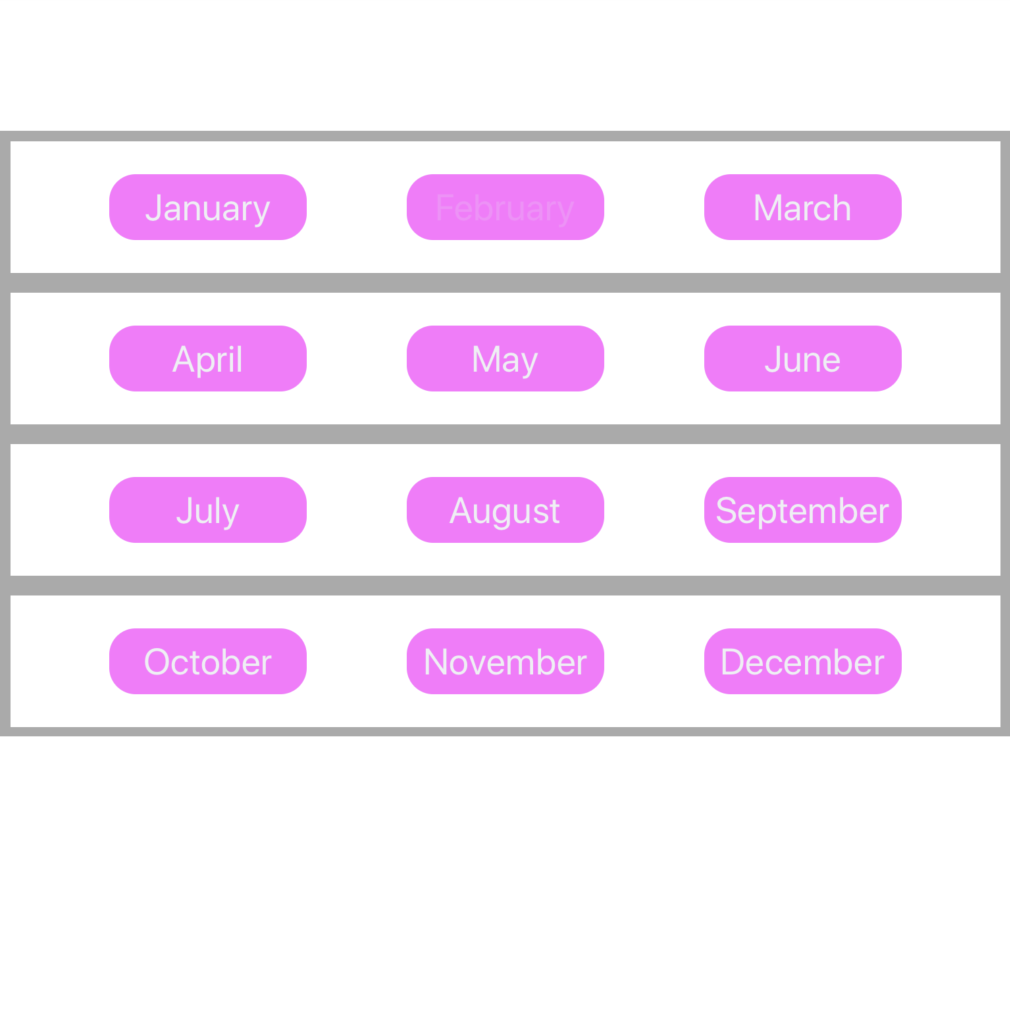
I ran the debugger. Here is the basic idea, I have a page with 12 buttons, 1 for each month of the year:
When the user selects one of those buttons it should load the calendar like so:
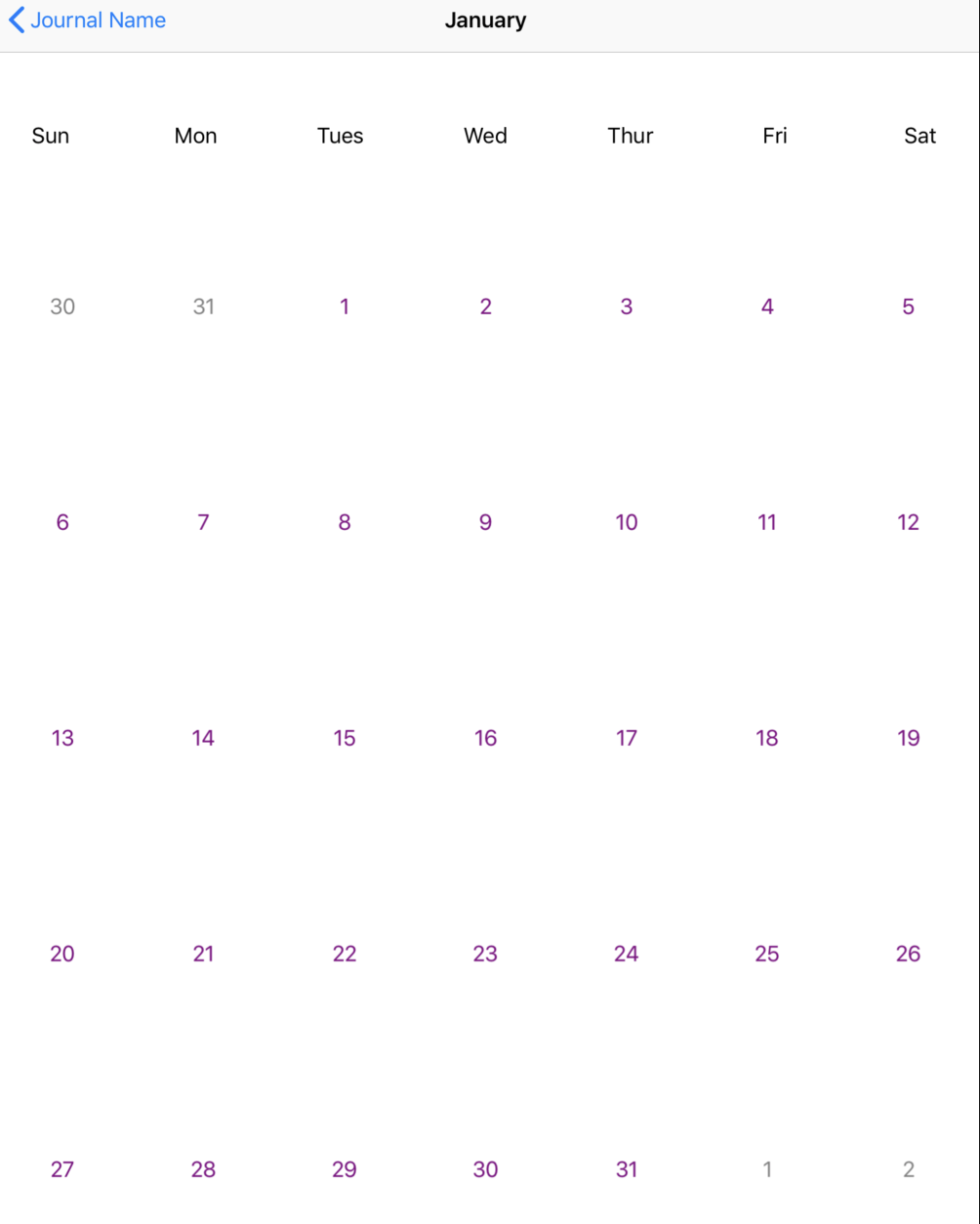
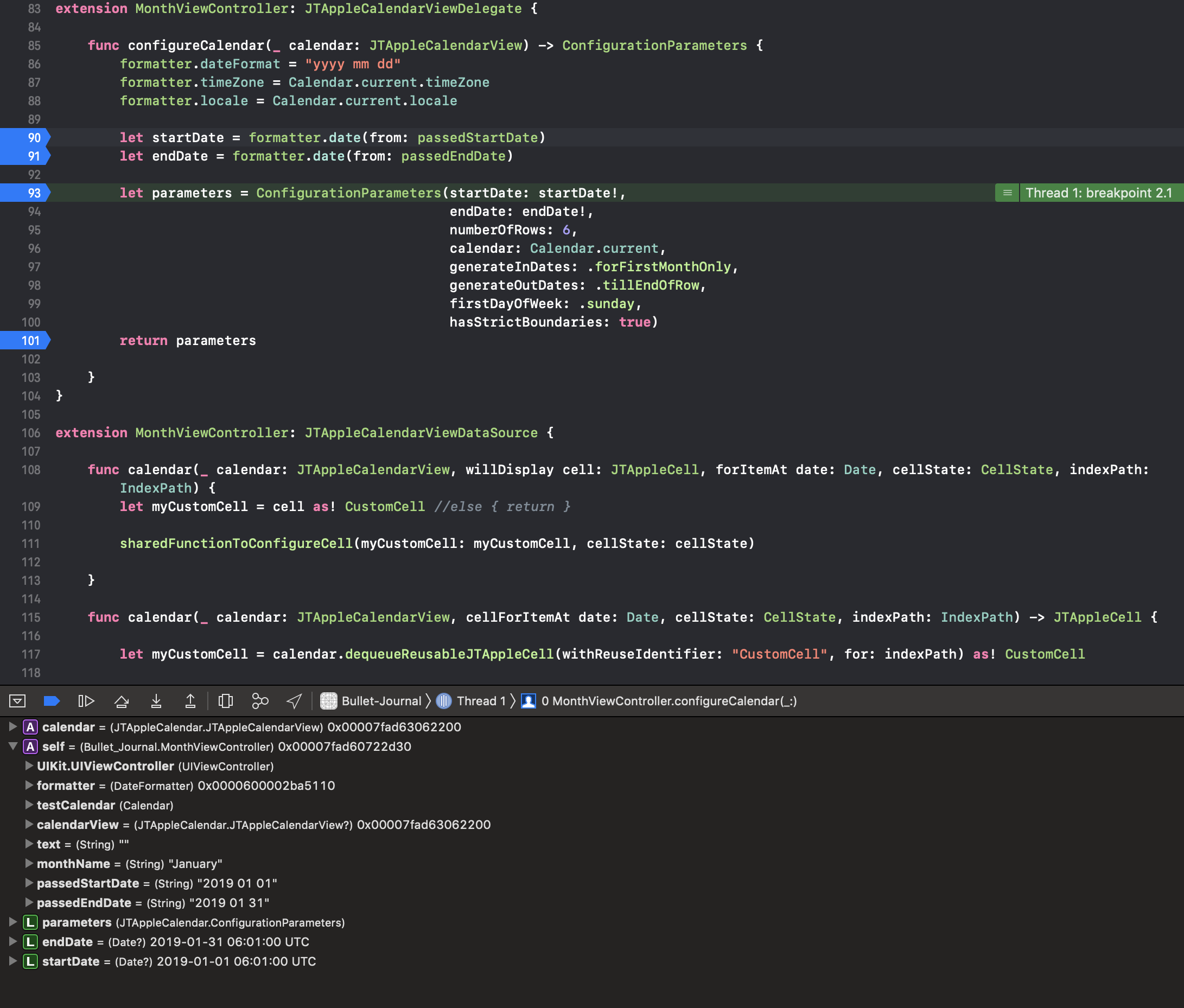
In the example above I chose January, and here is what the debugger shows for that selection:
This works great for January, as you can see from the flow above. But so far this is what happens when I choose February, even if January was never selected:
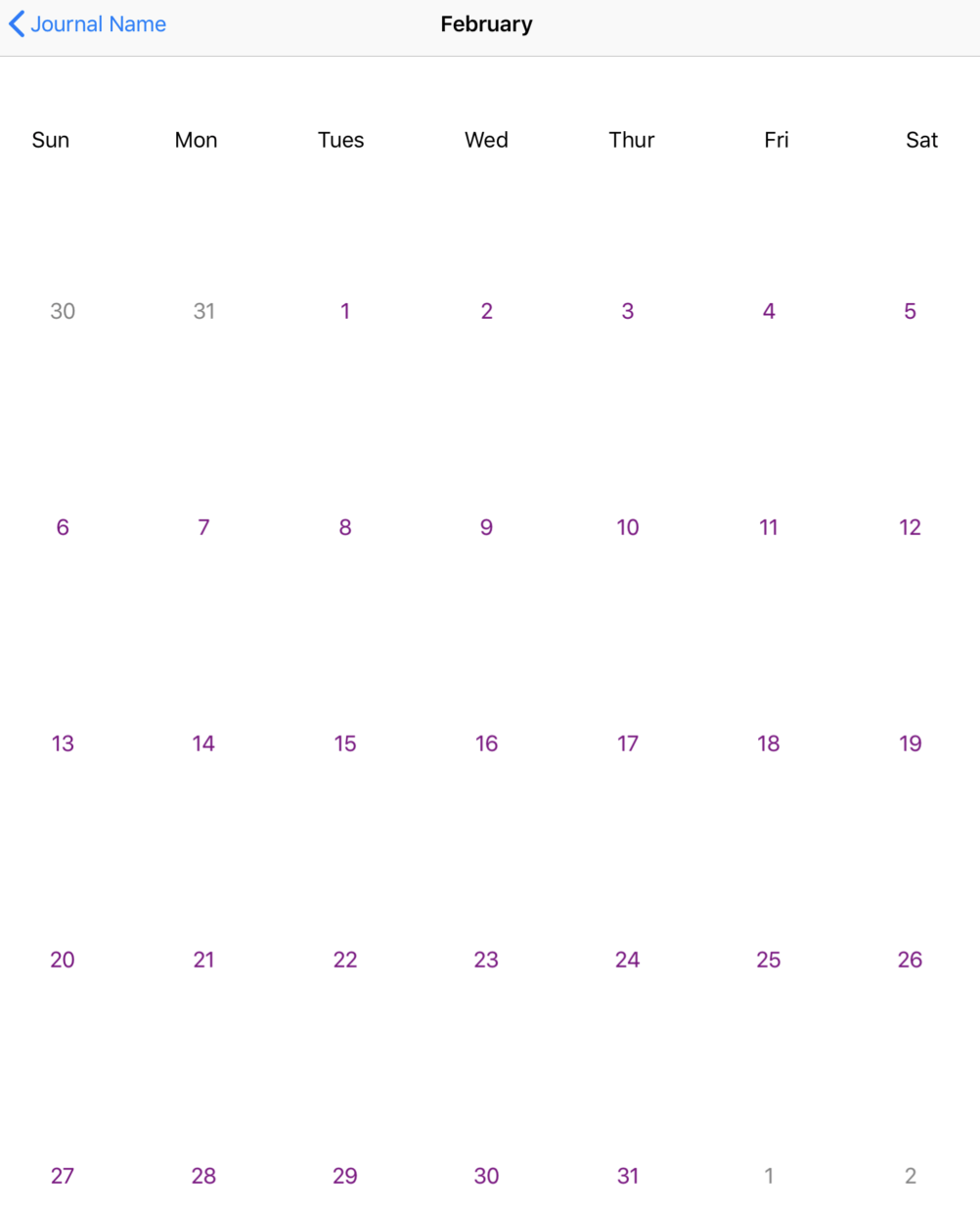
And here is the debugger:
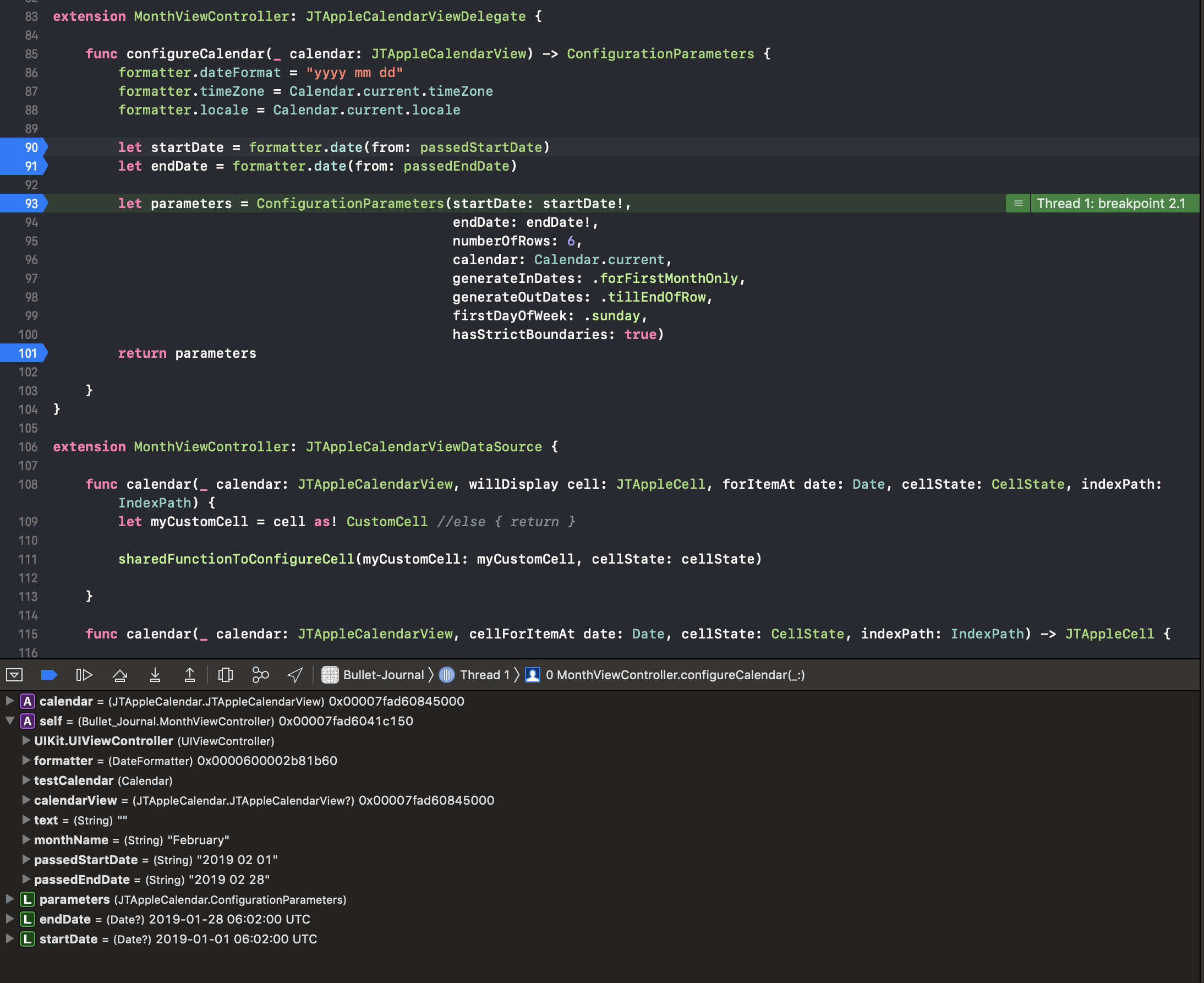
The strangest part to me, is that the configure calendar sees the day I passed, but not the month. If it would recognize that I have passed 2019 02 01 to 2019 02 28 then all would be well. but instead it is seeing 2019 01 01 to 2019 01 28....
Here is the code that passes the value to the calendar view (calendar isn't called yet):
`import Foundation
import UIKit
class MonthSelection: UIViewController {
@IBOutlet weak var januaryButton: UIButton?
@IBOutlet weak var februaryButton: UIButton?
@IBOutlet weak var marchButton: UIButton?
let formatter = DateFormatter()
var month:String = ""
var startDate:String = ""
var endDate:String = ""
@IBAction func januaryButtonTouch(_ sender: UIButton) {
    month = "January"

    startDate = "2019 01 01"
    endDate = "2019 01 31"
}

@IBAction func februaryButtonTouch(_ sender: UIButton) {
    month = "February"

    startDate = "2019 02 01"
    endDate = "2019 02 28"

}


override func viewDidLoad() {
    super.viewDidLoad()

}

override func prepare(for segue: UIStoryboardSegue, sender: Any?){

    if segue.destination is MonthViewController{
            let vc = segue.destination as? MonthViewController
            vc?.monthName = month
            vc?.passedStartDate = startDate
            vc?.passedEndDate = endDate
        }
    }
}`
And here is the code that displays the calendar using the selection that the user makes (separate view that calls the calendar):
`import UIKit
import JTAppleCalendar
class MonthViewController: UIViewController {
let formatter = DateFormatter()
let testCalendar = Calendar.current
@IBOutlet weak var calendarView: JTAppleCalendarView!
var text:String = ""
var monthName:String = ""
var passedStartDate:String = ""
var passedEndDate:String = ""
override func viewDidLoad() {
    super.viewDidLoad()
    calendarView.calendarDelegate = self
    calendarView.calendarDataSource = self

    self.navigationItem.title = monthName
    calendarView.reloadData()
}

func handleCellSelected(view: JTAppleCell?, cell: CellState){
    guard let validCell = view as? CustomCell else { return }

    if cell.dateBelongsTo == .thisMonth {
        if cell.isSelected{
            validCell.backgroundColor = UIColor.purple
        } else {
            validCell.backgroundColor = UIColor.white
        }
    }
}

func handleCelltextColor(view: JTAppleCell?, cell: CellState){
    guard let validCell = view as? CustomCell else { return }

    if cell.dateBelongsTo == .thisMonth {
        if cell.isSelected{
            validCell.dateLabel.textColor = UIColor.white
        } else {
            validCell.dateLabel.textColor = UIColor.purple
        }
    }
}

func sharedFunctionToConfigureCell(myCustomCell: JTAppleCell, cellState: CellState) {
    guard let myCustomCell = myCustomCell as? CustomCell else { return }

    //let touch = UITouch!.self

    myCustomCell.dateLabel.text = cellState.text
    myCustomCell.backgroundColor = UIColor.white
    myCustomCell.dateLabel.textColor = UIColor.purple

    myCustomCell.layer.cornerRadius = 50
    myCustomCell.layer.masksToBounds = true

    if ((cellState.dateBelongsTo == .previousMonthOutsideBoundary) || (cellState.dateBelongsTo == .followingMonthOutsideBoundary)){
        myCustomCell.dateLabel.textColor = UIColor.gray
    }

    //if testCalendar. {
    //myCustomCell.backgroundColor = UIColor.red
    //} else {
    //myCustomCell.backgroundColor = UIColor.white
    //}
    // more code configurations
    // ...
    // ...
    // ...
}
}
extension MonthViewController: JTAppleCalendarViewDelegate {
func configureCalendar(_ calendar: JTAppleCalendarView) -> ConfigurationParameters {
    formatter.dateFormat = "yyyy mm dd"
    formatter.timeZone = Calendar.current.timeZone
    formatter.locale = Calendar.current.locale

    let startDate = formatter.date(from: passedStartDate)
    let endDate = formatter.date(from: passedEndDate)

    let parameters = ConfigurationParameters(startDate: startDate!,
                                             endDate: endDate!,
                                             numberOfRows: 6,
                                             calendar: Calendar.current,
                                             generateInDates: .forFirstMonthOnly,
                                             generateOutDates: .tillEndOfRow,
                                             firstDayOfWeek: .sunday,
                                             hasStrictBoundaries: true)
    return parameters

}
}
extension MonthViewController: JTAppleCalendarViewDataSource {
func calendar(_ calendar: JTAppleCalendarView, willDisplay cell: JTAppleCell, forItemAt date: Date, cellState: CellState, indexPath: IndexPath) {
    let myCustomCell = cell as! CustomCell //else { return }

    sharedFunctionToConfigureCell(myCustomCell: myCustomCell, cellState: cellState)

}

func calendar(_ calendar: JTAppleCalendarView, cellForItemAt date: Date, cellState: CellState, indexPath: IndexPath) -> JTAppleCell {

    let myCustomCell = calendar.dequeueReusableJTAppleCell(withReuseIdentifier: "CustomCell", for: indexPath) as! CustomCell

    self.calendar(calendar, willDisplay: myCustomCell, forItemAt: date, cellState: cellState, indexPath: indexPath)
    //sharedFunctionToConfigureCell(myCustomCell: myCustomCell, cellState: cellState)
    return myCustomCell
}

func calendar(_ calendar: JTAppleCalendarView, didSelectDate date: Date, cell: JTAppleCell?, cellState: CellState) {
    handleCellSelected(view: cell, cell: cellState)
    handleCelltextColor(view: cell, cell: cellState)
}

func calendar(_ calendar: JTAppleCalendarView, didDeselectDate date: Date, cell: JTAppleCell?, cellState: CellState) {
    handleCellSelected(view: cell, cell: cellState)
    handleCelltextColor(view: cell, cell: cellState)
}
}`
jforward5
on 16 Apr 2019
Update...I just tried statically assigning the calendar start date 2019 02 01 and end date 2019 02 28 and it still only would recognize start date 2019 01 01 and end date 2019 01 28 instead...
Seems like a bug to me...I could be wrong
jforward5
on 16 Apr 2019
man... thats a long post.
just awoke checking it out
patchthecode
on 16 Apr 2019
Ok, thanks.
On Tue, Apr 16, 2019 at 8:46 AM JTAppleCalendar notifications@github.com
wrote:
man... thats a long post.
just awoke checking it out—
You are receiving this because you authored the thread.
Reply to this email directly, view it on GitHub
https://github.com/patchthecode/JTAppleCalendar/issues/1038#issuecomment-483665936,
or mute the thread
https://github.com/notifications/unsubscribe-auth/AvXM9XB0hKQ2c3awLNibN1PT8S57SZ95ks5vhdQ7gaJpZM4cxIbp
.
jforward5
on 16 Apr 2019
do you have this sample app?
I do not think you are properly setting the startDate/endDate when the new ViewController loads.
The reason why i say this is because, if January start was the only date that works, i would be having a whole lot of issues opened by angry developers 😅
patchthecode
on 16 Apr 2019
If you have a sample app which reproduces this then just drop the zip file in this chat box.
Reading so much code on here is harder to do.
patchthecode
on 16 Apr 2019
hmm. its crashing after i click on the month.
It looks like passedStartDate = ""
It is an empty string. Is this the part your were stuck at? It looks like something else.
patchthecode
on 17 Apr 2019
Not sure how. It works for me when I click a month. The button passes the
start and end date. The empty string is just the initializer for the
variable to hold the dates.
On Tue, Apr 16, 2019 at 11:03 PM JTAppleCalendar notifications@github.com
wrote:
hmm. its crashing after i click on the month.
It looks like passedStartDate = ""
It is an empty string. Is this the part your were stuck at? It looks like
something else.—
You are receiving this because you authored the thread.
Reply to this email directly, view it on GitHub
https://github.com/patchthecode/JTAppleCalendar/issues/1038#issuecomment-483928722,
or mute the thread
https://github.com/notifications/unsubscribe-auth/AvXM9ajfUjaTgcf_pu6O5CxHF-V4CPATks5vhp0PgaJpZM4cxIbp
.
jforward5
on 17 Apr 2019
Ok so I have found more information that leads me to believe this is a bug. If I hardcode the startDate to 2019 01 01 and the end date to 2019 12 31 the parameters always see startDate 2019 01 01 and EndDate of 2019 01 31. But if I hard code the startDate to 2017 01 01 and endDate to 2030 12 31, it works as a scrolling calendar.
I am going to attempt turning off the month view scrolling and setting a wide range for the dates and see if I can achieve the functionality I am looking for.
But it does seem like a bug that passing in a range of 2019 02 01 to 2019 02 28 is recognized as 2019 01 01 to 2019 01 28.
jforward5
on 17 Apr 2019
Ok, so from the testing I have done, it seems that this calendar will only allow you to configure calendars that span multiple years. I need to be able to define smaller gaps, such as each month individually.
When I set the configure it to a wide gap like 2017 01 01 and endDate to 2030 12 31 it will scroll through the months and dates and does set both start and end date. But If I try to configure a small span per month, it will only recognize January.
Is this by design? I don't need full years all at once, I only want to define individual months past and present for the current year.
jforward5
on 17 Apr 2019
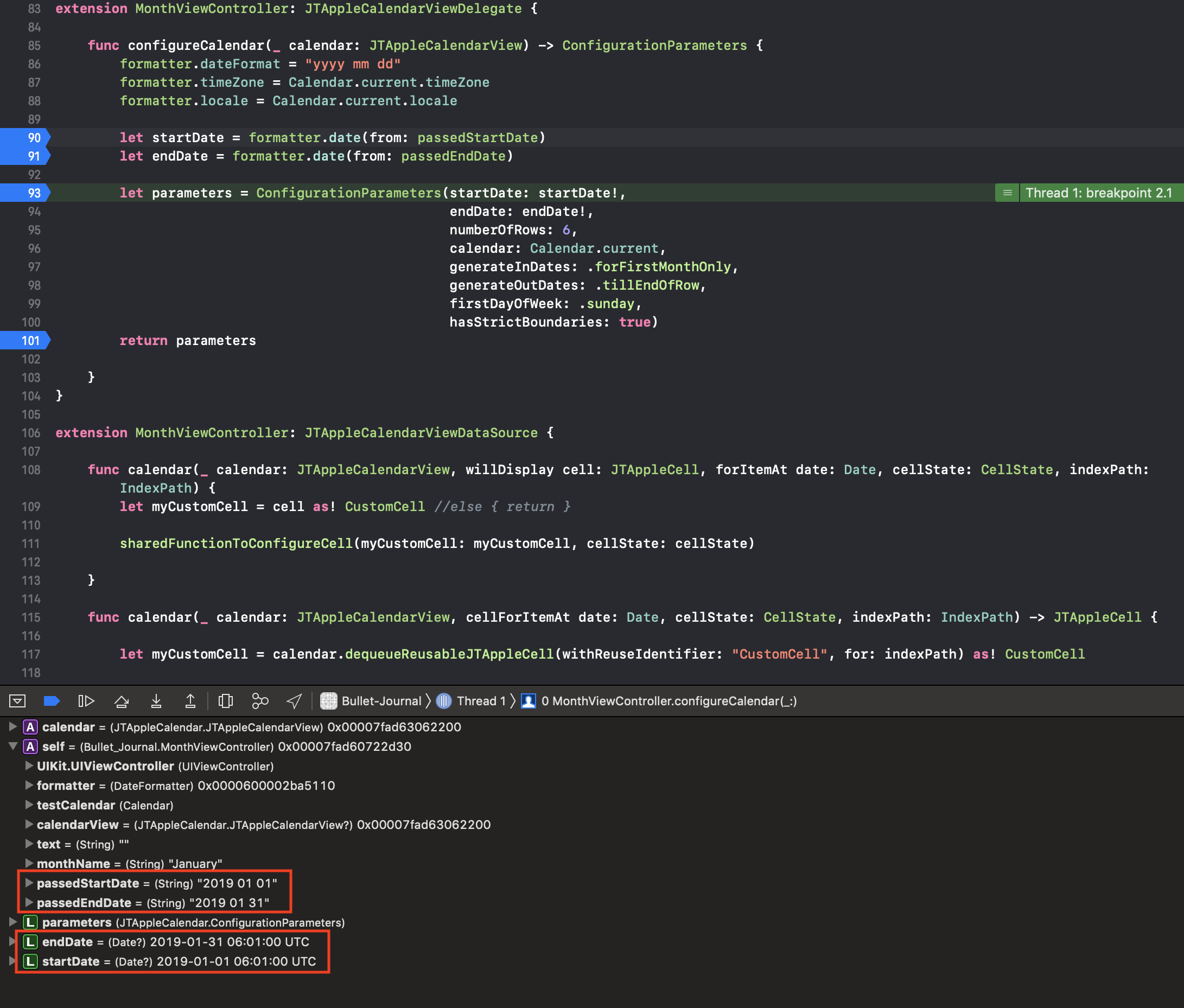
Maybe these more specific screenshots of the debugger will help show what is happening.
When clicking the January button it passes the passedStartDate, and passedEndDate. They are properly set in the parameters:
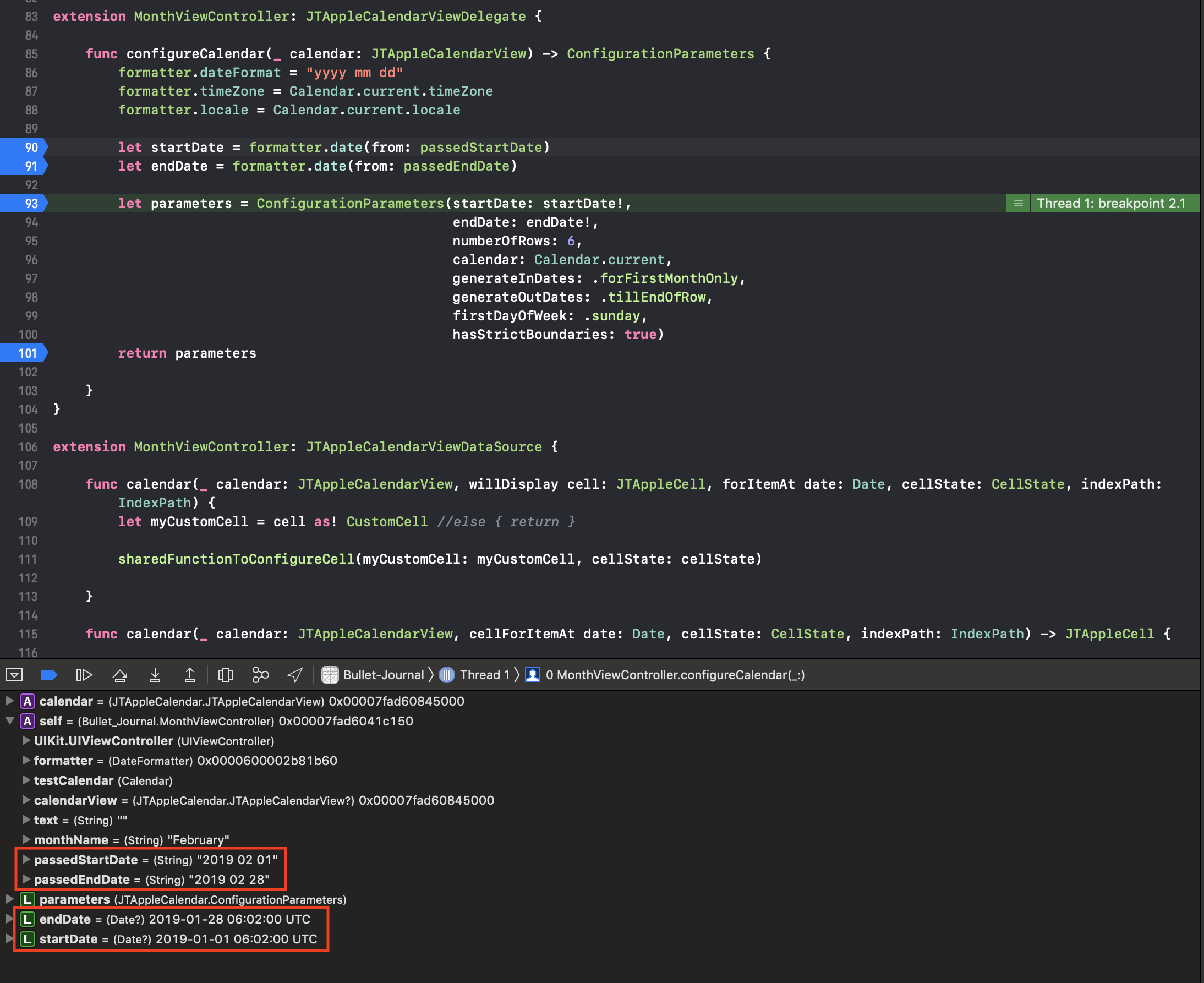
Same thing, but for February. As you can see the parameters for start and end date are not being set to what I am requesting:
jforward5
on 17 Apr 2019
@jforward5 are you available to talk?
message here -> https://gitter.im/patchthecode/JTAppleCalendar
Messaging here is too slow. If youre not availablle then give me a time.
patchthecode
on 17 Apr 2019
Thank you so much for your help! As you helped me to see, it was as simple as my own typo!
I had misconfigured my formatter to "yyyy mm dd" and should have been "yyyy MM dd".
jforward5
on 17 Apr 2019
Related issues
 arn00s
·
3Comments
arn00s
·
3Comments
 zhanswift
·
5Comments
zhanswift
·
5Comments
 blinkmeoff
·
3Comments
blinkmeoff
·
3Comments
 dimitris-c
·
5Comments
dimitris-c
·
5Comments
 leo150
·
3Comments
leo150
·
3Comments