Jtapplecalendar: Range selection question
I am using 7.1.5
I have set up as shown below. I have given different colors ( and uiview shapes) for the cell based on the selectionRangePosition. In my app logic, when the user selects 27 ( the first date) , then selects a second date ( April 1 in this case) , then all the dates in between will be selected.
In the image below , I expect the selected date of March 31 to be a cell of type .middle. I am not sure why it shows both the .left and .right views , could you please let me know.

 ThasneemH
All 31 comments
do you have a zip file with this?
can you drag and drop the file into this chat box?
I can try it out
 patchthecode
on 14 Mar 2019
patchthecode
on 14 Mar 2019
I am creating a small project with just the functionality and will upload it today.
ThasneemH
on 15 Mar 2019
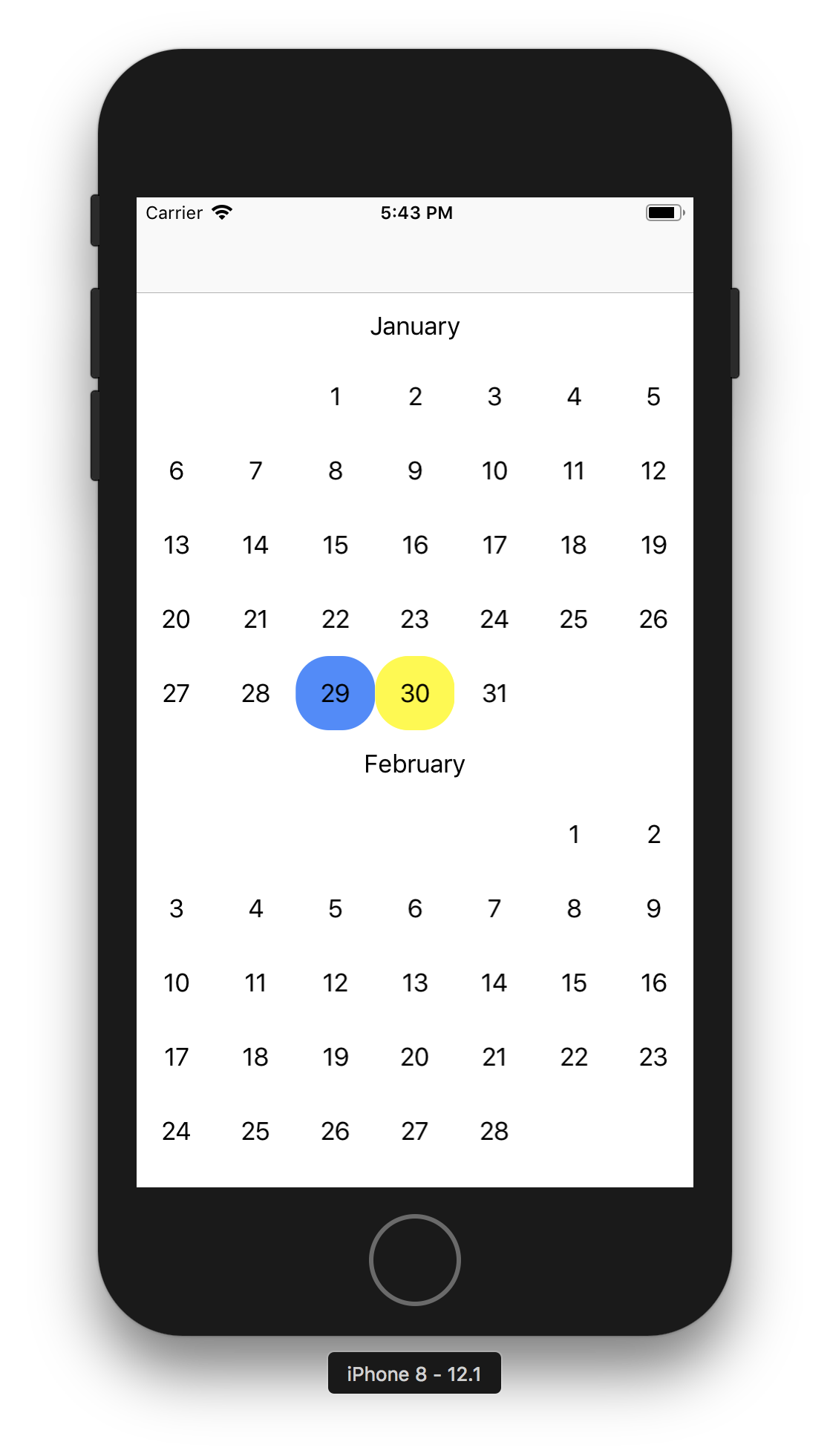
I have created a small simple project. Also added a new screen shot based on the testproject attached. (Its not the exact issue as the older screenshot I attached earlier, but still related to rangeSelection) Based on the new screen shot 1) First Jan 28 is selected and it shows the correct full selectedview 2) Now 29 is selected as the rangeEndDate. After this selection and (subsequent execution batchReloadIndexPaths being called in the code) , I expect 28 to be red since it is the left view and 29 to be yellow since it is the right view. However, 28 still stays as the old color ( as for a fullview) . Could you kindly take a look and let me know what could be the reason. Thanks!
ThasneemH
on 18 Mar 2019
you have errors in logic in these line of code
switch (rangeStartDate,rangeEndDate) {
        case (nil,nil):
            // Set the start date and no need to return true since the selectDates call will
            // trigger the didSelect delegate and display.
            self.rangeStartDate = date
            self.selectionInProgress = true
            calendar.selectDates([date], triggerSelectionDelegate: true, keepSelectionIfMultiSelectionAllowed: true)
            self.selectionInProgress = false
        case (.some,nil):
            // Set the end date and no need to return true since the selectDates call will
            // trigger the didSelect delegate and display.
            self.rangeEndDate = date
            self.selectionInProgress = true
            calendar.selectDates(from: self.rangeStartDate!, to: self.rangeEndDate!,  triggerSelectionDelegate: true, keepSelectionIfMultiSelectionAllowed: true)
            self.selectionInProgress = false
        case (.some,.some):
            self.rangeStartDate = nil
            self.rangeEndDate = nil
            calendar.deselectAllDates()
        default: break
        }
Hope this helps.
BTW, I would not put this inside the should select function. I'd put in the didSelect function.
also, your will display cell should be this as stated in the bold text on the main page.
    func calendar(_ calendar: JTAppleCalendarView, willDisplay cell: JTAppleCell, forItemAt date: Date, cellState: CellState, indexPath: IndexPath) {
        let cell = cell as! CustomCell
        self.configureCell(cell, date: date, cellState: cellState)
    }
I saw that you were again dequeing in that funciton which will give you headscratching visual errors.
patchthecode
on 18 Mar 2019
great, thanks ,I will try this out and get back if any issues.
ThasneemH
on 18 Mar 2019
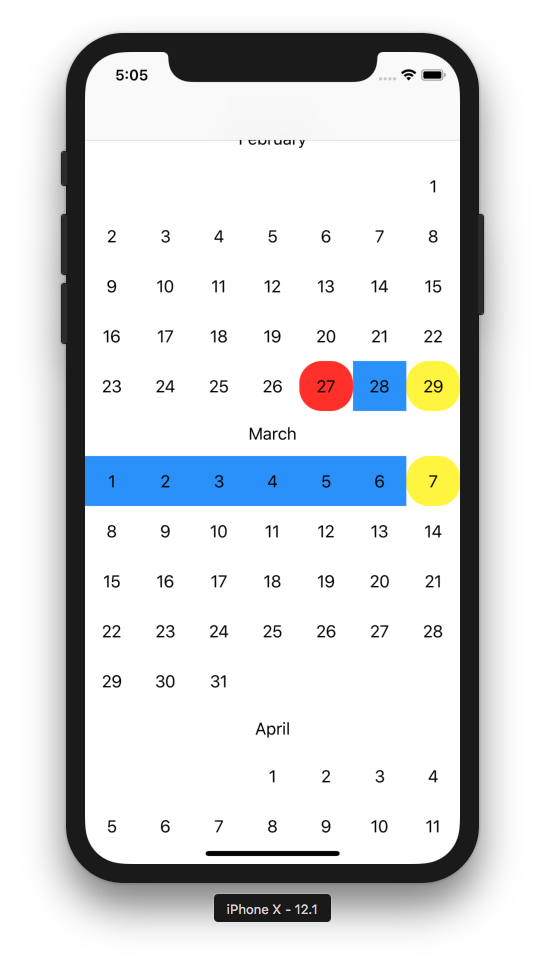
I have got it to work, have attached the updated project. The first date selected is the startdate of the range, the second selection is the end date ( and it cannot be earlier than the start date) . The third click deselects everything ( if clicking on the already selected range - delsects the dates after it) My testing works fine for all cases ,except the case when feb 29 is selected in a leap year. Have attached the screen shot here as well. Could it be that may be some internal changes are required for leap year handling. Thanks for your time.
TestCalendar.zip
ThasneemH
on 20 Mar 2019
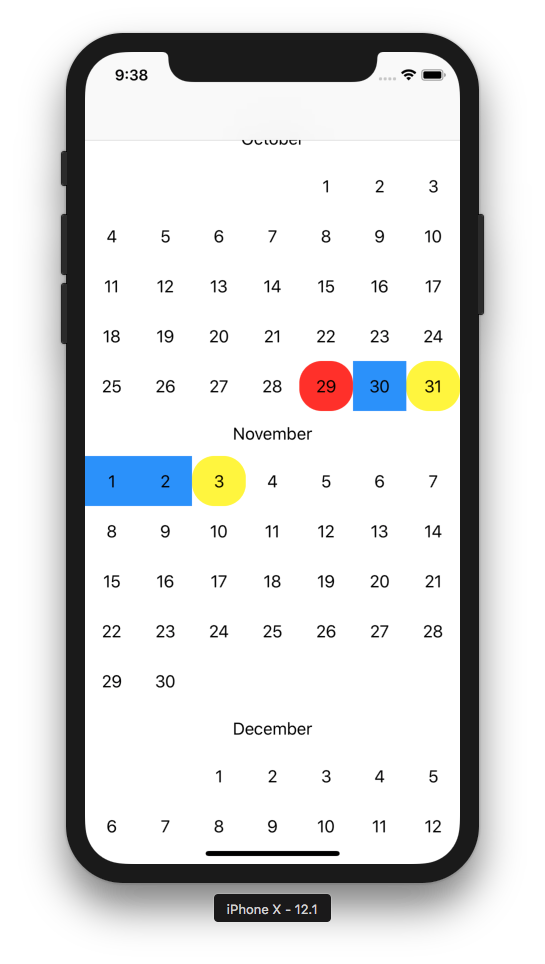
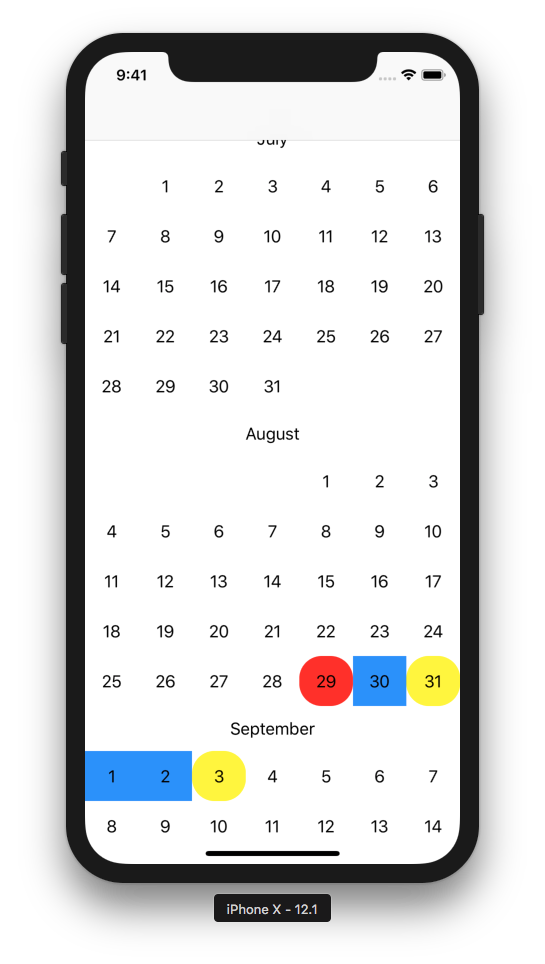
On further testing, it appears to not be a leap year issue. If the last day of the month falls in the last cell, then we can see this issue. Have attached the screenshots for Oct 31, 2020 and Aug 31, 2019 .Thanks
ThasneemH
on 20 Mar 2019
congratz. 🎉
you found an issue.
I wonder why no one has found it before.
patchthecode
on 21 Mar 2019
Looking into it.
patchthecode
on 21 Mar 2019
great ! thanks. will wait for your fix.
ThasneemH
on 21 Mar 2019
I just made a push to master branch.
Follow the instructions here to test if the bug is fixed on master branch.
patchthecode
on 5 Apr 2019
I just tested this ,but do see the issue still. ( tried with Aug 19) . Here is my project after the update
TestCalendar 2.zip
Thanks for your time.
ThasneemH
on 11 Apr 2019
ok checking it out now.
patchthecode
on 11 Apr 2019
you tapped aug 19 for the first date. What did you tap for the 2nd date?
(asking because i am not seeing the issue again)
patchthecode
on 12 Apr 2019
I wish you let me know of a time you'd be online so we can type chat here -> https://gitter.im/patchthecode/JTAppleCalendar
talking here is like an annoying slow motion xD
patchthecode
on 12 Apr 2019
I select any date in mid august as the start date and end date is any date in september, so that Aug 31, 2019 is a middle date and should be colored blue. But it will show up as yellow ( right) . I can be available to chat more on this if needed around 4:30 pm today. Thanks for looking into this.
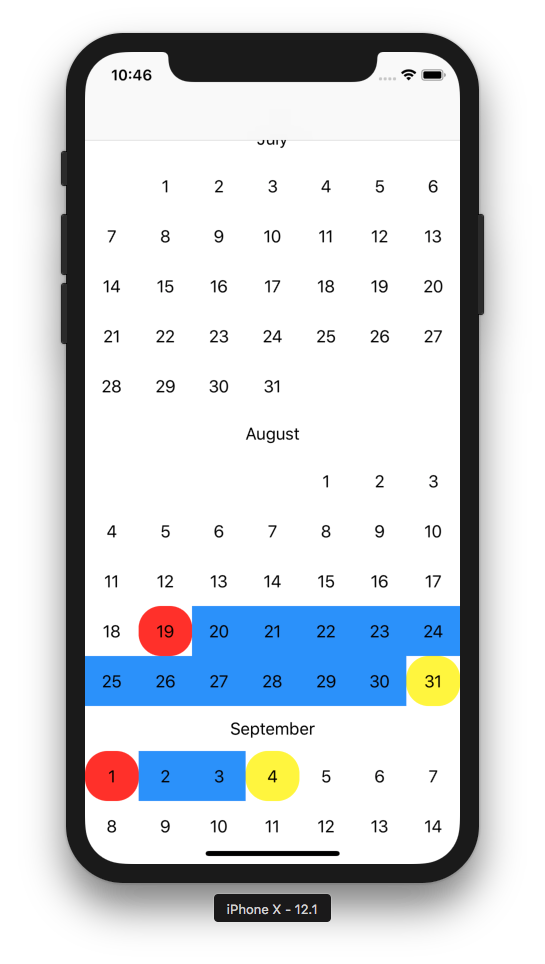
Thanks.
ThasneemH
on 12 Apr 2019
Yes, this is the way i coded it to be.
because this is the way it behaved for all the other cases -> All month sections are separate, and therefore starts a new range.
I think i get what the problem is now.
The way I coded it, many developers like it that way, but i looks like other developers also like it your way.
Therefore there is ambiguity.
The way to solve this problem, it looks like i would have to introduce a new state -> sectional
So it will be this:
- full
- mid
- left | sectional
- right | sectional
Therefore users can still check for left or right. but can also check to see if it is sectional as well as left
or if it issectionalas well asright`.
User who want them separated can then have them as separated ranges, and users who wants them joined can have them as joined ranges.
patchthecode
on 13 Apr 2019
closing this issue
and created this new one for the enhancement -> https://github.com/patchthecode/JTAppleCalendar/issues/1034
patchthecode
on 13 Apr 2019
ok i cancelled that upgrade. It was a bad idea.
The reality is that the sections now work as expected.
The problem is that some developers will want it your way, while others may want it the way I have coded it.
You can since all you want is continuous range selection, you can do the code your self.
Please put this as your handleCellSelectedView function, and you should get the behavior you expect
    func  handleCellSelectedView(cell: CustomCell, cellState: CellState) {
        cell.midView.isHidden = true
        cell.leftView.isHidden = true
        cell.rightView.isHidden = true
        cell.selectedView.isHidden = true

        if cellState.isSelected, calendarView.isRangeSelectionUsed {
            if rangeEndDate == nil {
              cell.selectedView.isHidden = false
            } else if rangeStartDate == cellState.date {
                cell.leftView.isHidden = false
            } else if rangeEndDate == cellState.date {
                cell.rightView.isHidden = false
            } else {
                cell.midView.isHidden = false
            }
        }
    }
issue closed. let me know if this works for you.
patchthecode
on 13 Apr 2019
Thank you for your replies on this. I tried the suggested method and have a few questions:
1) Before the fix , I believe it was this commit (https://github.com/patchthecode/JTAppleCalendar/commit/a28f3b273d8f4d043d8ae1227e351723ed6ea7c7
) , the selection looked like pic1 , which seems right based on each month being a new range. But now it looks like pic 2. (The handleCellSelectedView has the original code and not the suggestion above )
Pic 1:
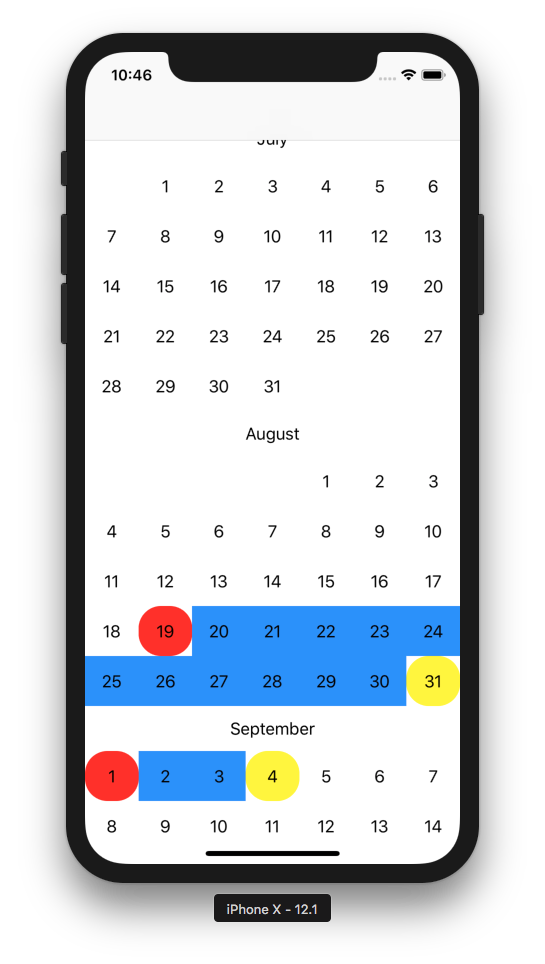
Pic 2:
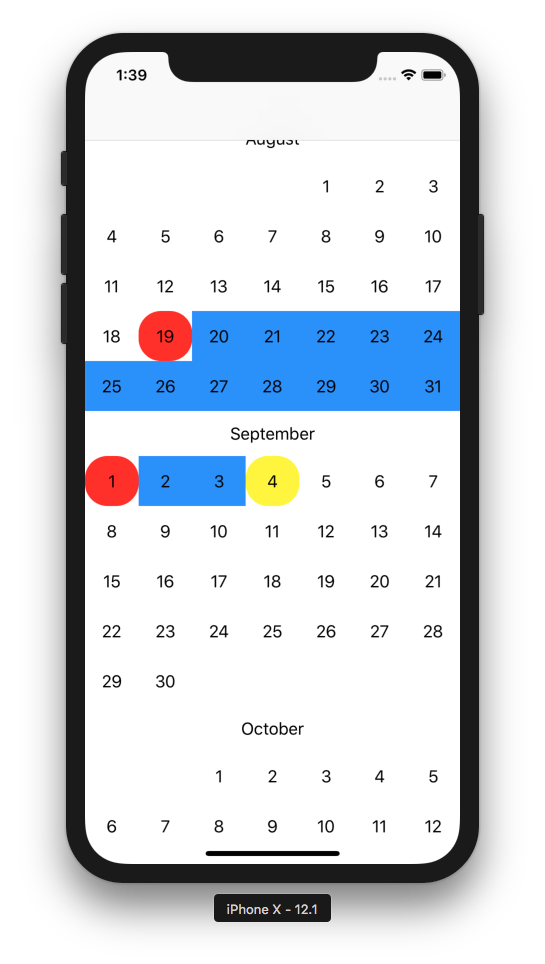
2) After applying the changes suggested to handleCellSelectedView, I dont see the original issue anymore, but the view does not change when I modify the range. Have attached a small video of the issue. In the video, if you notice, clicking on Sept 1 should desselect it, but also make Aug 31 show the right view instead of the midVide since it is the last date now in the selected range of dates.
TestClip.zip
Thanks much.
ThasneemH
on 15 Apr 2019
Hey just to confirm
you are saying that with the library update (and your old code before i changed your code) you are seeing pic 2 instead of pic 1?
Because this is not what i am seeing with the code you gave me. The old code, with the updated library. --> TestCalendar 2.zip
patchthecode
on 15 Apr 2019
As for your point (2), let me look into that.
patchthecode
on 16 Apr 2019
For your point (2) i just made an update to master branch.
Do a clean and then pull the new master branch pod as before.
The code change i made for you in your project should now work.
If you find any more edge cases, then let me know. I am still looking
patchthecode
on 16 Apr 2019
1) Yes, you are correct about point 1. Let me retry that and send u the project if needed.
2) Regarding 2) , will try that out now.
thanks
ThasneemH
on 16 Apr 2019
Yes, you are correct about point 1. Let me retry that and send u the project if needed.
Its not needed. I just wanted to know if there was another bug. Since there is none, then its ok.
patchthecode
on 16 Apr 2019
one thing though, I do not know your code fully so i suggested the code fix on top.
I did see one issue with the code though:
change yours to this:
    func  handleCellSelectedView(cell: CustomCell, cellState: CellState) {
        cell.midView.isHidden = true
        cell.leftView.isHidden = true
        cell.rightView.isHidden = true
        cell.selectedView.isHidden = true

        if cellState.isSelected, calendarView.isRangeSelectionUsed {
            if calendarView.selectedDates.count == 1 {
                cell.selectedView.isHidden = false
            } else if rangeStartDate == cellState.date {
                cell.leftView.isHidden = false
            } else if rangeEndDate == cellState.date {
                cell.rightView.isHidden = false
            } else {
                cell.midView.isHidden = false
            }
        }
    }
i changed the first if condition.
calendarView.selectedDates.count == 1
I do not know if this will work for all your cases, but i think you are on a good path to solving the rest of issues since you know your code better than i do. You should have enough info to work with your specific code.
patchthecode
on 16 Apr 2019
Thanks for the above tip and the quick turnaround time. Really appreciate it. I tried with the latest update.
1) Issue 1 is resolved - I don't see it anymore.
2) Issue 2 still exists. I have attached the latest project just in case.
ThasneemH
on 16 Apr 2019
Nah # 2 is fixed.
You still had the old pod cached.
Clear cache. delete the Pod folder. delete the pod.lock file.
then do a pod update.
It works.
You might get a build error telling you
'semanticContentAttribute' is only available on iOS 9.0 or newer
If you seed that, then go to the pod target, and in all the targets you see there, make their iOS version to be at least iOS 9.
here is your app with latest pod
t3.zip
patchthecode
on 16 Apr 2019
works great ! thanks. Closing this issue.
ThasneemH
on 16 Apr 2019
awesome.
patchthecode
on 16 Apr 2019
Related issues
 gotamafandy
·
3Comments
gotamafandy
·
3Comments
 VladFrolov
·
4Comments
VladFrolov
·
4Comments
 programus
·
3Comments
programus
·
3Comments
 blinkmeoff
·
3Comments
blinkmeoff
·
3Comments
 oddpandadesign
·
5Comments
oddpandadesign
·
5Comments