Jtapplecalendar: Prevent displaying empty row when cells ares divided by months
Great work, guys! Its really powerful and easy to use.
I'm using the latest version (7.1.5).
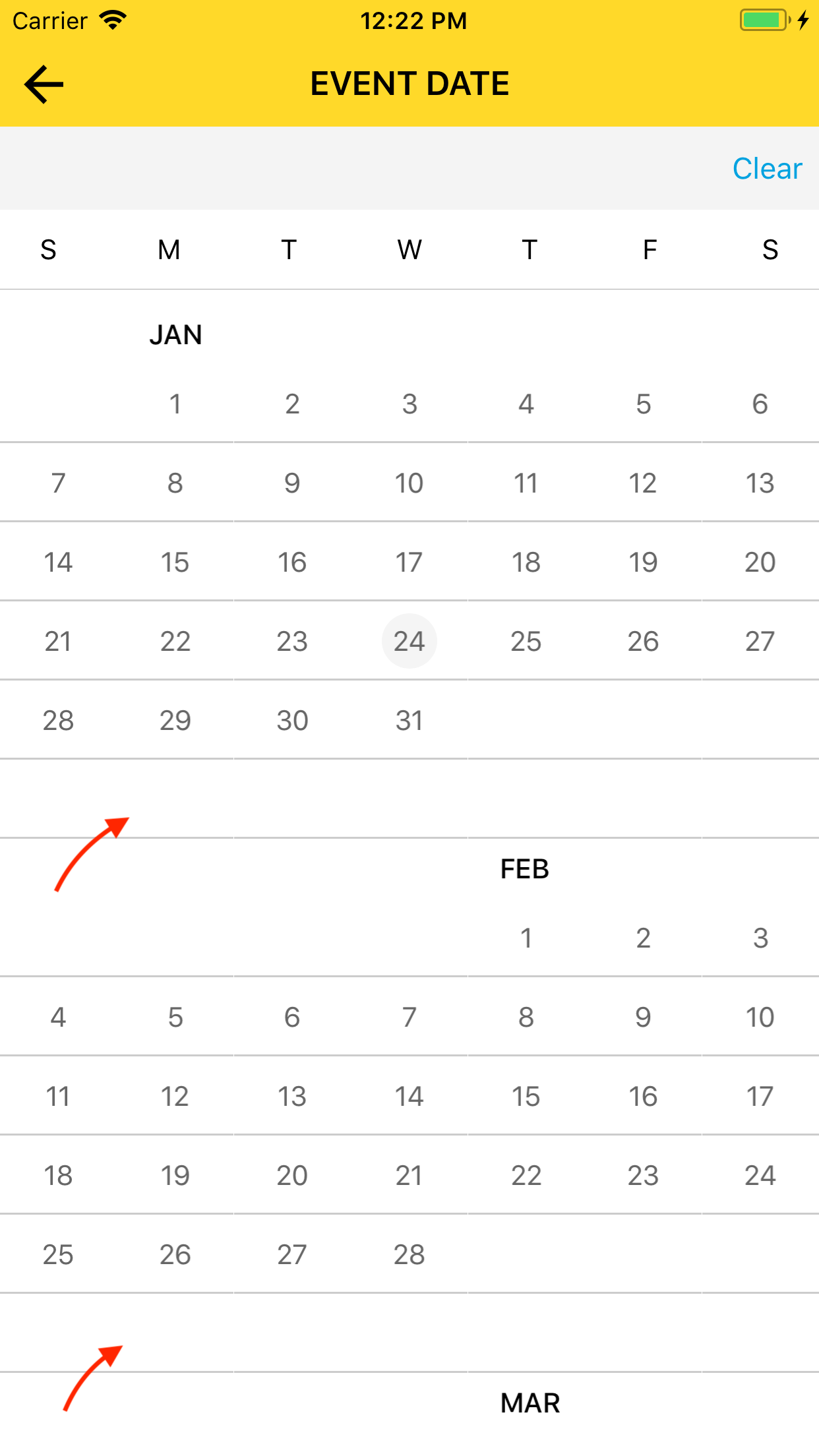
I have been using cellState.dateBelongsTo == .thisMonth to determine whether a cell should be display so that the cells and divided by months. The problem is there is always a empty row between two months which I want to get rid of. I have checked the source code but didn't find any hints.
I wonder if there is any way to implement that?
 kukushi
All 5 comments
@kukushi explain empty row?
screenshot might help here thanks.
 patchthecode
on 23 Jan 2018
patchthecode
on 23 Jan 2018
@patchthecode Thanks for the quick reply.
Here is the screenshot. The areas arrow point to are the empty rows.
kukushi
on 24 Jan 2018
Oh. thats easy.
in your configureCalendarFuntion, just set the generateOutDates to = .endOfRow
If youre still unsure of what to do, just print me your configure calendar function code (in text, no pictures)
patchthecode
on 24 Jan 2018
It works! Thanks a lot!
kukushi
on 24 Jan 2018
cool.
patchthecode
on 24 Jan 2018
Related issues
 leo150
·
3Comments
leo150
·
3Comments
 gotamafandy
·
3Comments
gotamafandy
·
3Comments
 sahirmemon
·
4Comments
sahirmemon
·
4Comments
 Fatalution
·
3Comments
Fatalution
·
3Comments
 oddpandadesign
·
5Comments
oddpandadesign
·
5Comments
Most helpful comment
Oh. thats easy.
in your
configureCalendarFuntion, just set thegenerateOutDatesto = .endOfRowIf youre still unsure of what to do, just print me your configure calendar function code (in text, no pictures)