Jtapplecalendar: Scrolling Calendar to latest date will show wrong dates
try this
I made a programmatically calendar using the JTAppleCalendarView
use this as the configuration:
let startdate = formatter.date(from: "2017 02 01")!
let endDate = formatter.date(from: "2018 02 28")!
the in viewDidload, try to reload the calendar and it will show wrong dates in every cell
 siapno01
All 11 comments
Im using 7.1.5 version of JTAppleCalendar
siapno01
on 5 Jan 2018
@siapno01 what do you mean wrong dates in every cell?
A screen shot can help.
Are the dates wrong by one date less?
 patchthecode
on 5 Jan 2018
patchthecode
on 5 Jan 2018
the dates are wrong once you scrollToDate for 1 time only in view did
load..maybe later ai can give the screen shot
On Jan 5, 2018 5:04 PM, "JTAppleCalendar" notifications@github.com wrote:
@siapno01 https://github.com/siapno01 what do you mean wrong dates in
every cell?A screen shot can help.
Are the dates wrong by one date less?—
You are receiving this because you were mentioned.
Reply to this email directly, view it on GitHub
https://github.com/patchthecode/JTAppleCalendar/issues/673#issuecomment-355505383,
or mute the thread
https://github.com/notifications/unsubscribe-auth/AScWPvlVpsX57UMykvIzSdYv8AkEj7tWks5tHeWsgaJpZM4RUJwi
.
siapno01
on 5 Jan 2018
this what will show..
On Jan 5, 2018 6:00 PM, "Michael Siapno" siapno01@gmail.com wrote:
the dates are wrong once you scrollToDate for 1 time only in view did
load..maybe later ai can give the screen shotOn Jan 5, 2018 5:04 PM, "JTAppleCalendar" notifications@github.com
wrote:@siapno01 https://github.com/siapno01 what do you mean wrong dates in
every cell?A screen shot can help.
Are the dates wrong by one date less?—
You are receiving this because you were mentioned.
Reply to this email directly, view it on GitHub
https://github.com/patchthecode/JTAppleCalendar/issues/673#issuecomment-355505383,
or mute the thread
https://github.com/notifications/unsubscribe-auth/AScWPvlVpsX57UMykvIzSdYv8AkEj7tWks5tHeWsgaJpZM4RUJwi
.
siapno01
on 5 Jan 2018
when I try to use the startdate and endDate value in tutorial it works
great but when I change the value as I comment above it is not working
On Jan 5, 2018 6:04 PM, "Michael Siapno" siapno01@gmail.com wrote:
this what will show..
On Jan 5, 2018 6:00 PM, "Michael Siapno" siapno01@gmail.com wrote:
the dates are wrong once you scrollToDate for 1 time only in view did
load..maybe later ai can give the screen shotOn Jan 5, 2018 5:04 PM, "JTAppleCalendar" notifications@github.com
wrote:@siapno01 https://github.com/siapno01 what do you mean wrong dates in
every cell?A screen shot can help.
Are the dates wrong by one date less?—
You are receiving this because you were mentioned.
Reply to this email directly, view it on GitHub
https://github.com/patchthecode/JTAppleCalendar/issues/673#issuecomment-355505383,
or mute the thread
https://github.com/notifications/unsubscribe-auth/AScWPvlVpsX57UMykvIzSdYv8AkEj7tWks5tHeWsgaJpZM4RUJwi
.
siapno01
on 5 Jan 2018
I still do not understand.
You'll have to explain what you mean by it is wrong.
Please explain this to me in "programmer language".
Saying that something is wrong is not versy descriptive.
You'll have to tell me:
- what is expected
- what you did
- how your results differed from what you expected
only then i can know what "wrong" is.
patchthecode
on 5 Jan 2018
Firs set the configure of calendar like this
func configureCalendar(_ calendar: JTAppleCalendarView) -> ConfigurationParameters {

        let startdate = formatter.date(from: "2017 02 01")
        let endDate = formatter.date(from: "2020 02 28")

        let parameters = ConfigurationParameters(startDate: startdate, endDate: endDate)
        return parameters
    }
then try to scroll to current date in viewDidLoad
override func viewDidLoad() {
        super.viewDidLoad()

        calendar.register(CalendarDayViewCell.self, forCellWithReuseIdentifier: CalendarDayViewCell.reuseIdentifier)

        calendar.calendarDelegate = self
        calendar.calendarDataSource = self
        calendar.scrollToDate(Date())
    }
This what will show and see the dates in every cell.
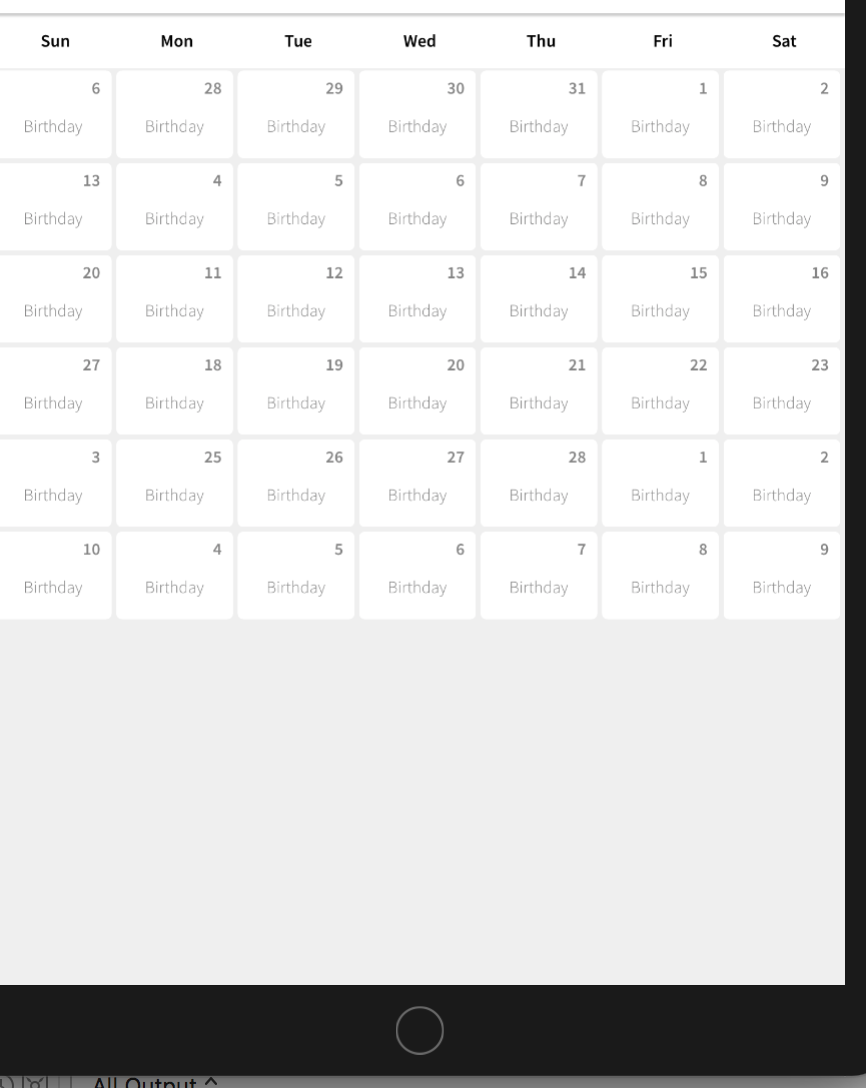
When you scroll it .. It will be nice .. is that a bug or what ? I try to put calendar.reload() below the calendar.scrollToDate(Date()) but nothing happen.
*What I expect is to show the current date .
siapno01
on 6 Jan 2018
If you created your calendar manually, did you remember to put this in your code?
calendarView.scrollingMode = .stopAtEachCalendarFrame
If you created your calendar manually, you must put this in your code.
If you created your calendar using interface builder, then this should be done automatically for you.
let me know.
patchthecode
on 6 Jan 2018
Im sorry i did not put that one.
On Jan 6, 2018 2:47 PM, "JTAppleCalendar" notifications@github.com wrote:
If you created your calendar manually, did you remember to put this in
your code?calendarView.scrollingMode = .stopAtEachCalendarFrame
—
You are receiving this because you were mentioned.
Reply to this email directly, view it on GitHub
https://github.com/patchthecode/JTAppleCalendar/issues/673#issuecomment-355727944,
or mute the thread
https://github.com/notifications/unsubscribe-auth/AScWPsHYtOFozbvVcvoM5aIX_LE0qpEhks5tHxcVgaJpZM4RUJwi
.
siapno01
on 6 Jan 2018
Does it work now?
if it works then i can close this issue
patchthecode
on 6 Jan 2018
Yes it works good now . thanks a lot . I didnt notice that you need to declare that when you are creating calendar manually . This is noted . 👍
siapno01
on 7 Jan 2018
Related issues
 sahirmemon
·
4Comments
sahirmemon
·
4Comments
 VladFrolov
·
4Comments
VladFrolov
·
4Comments
 programus
·
3Comments
programus
·
3Comments
 Kevinw14
·
3Comments
Kevinw14
·
3Comments
 Geekbell
·
4Comments
Geekbell
·
4Comments
Most helpful comment
Does it work now?
if it works then i can close this issue