Jtapplecalendar: Programmatically selecting date and scrolling to date simultaneously
Heres a gif with the issue:
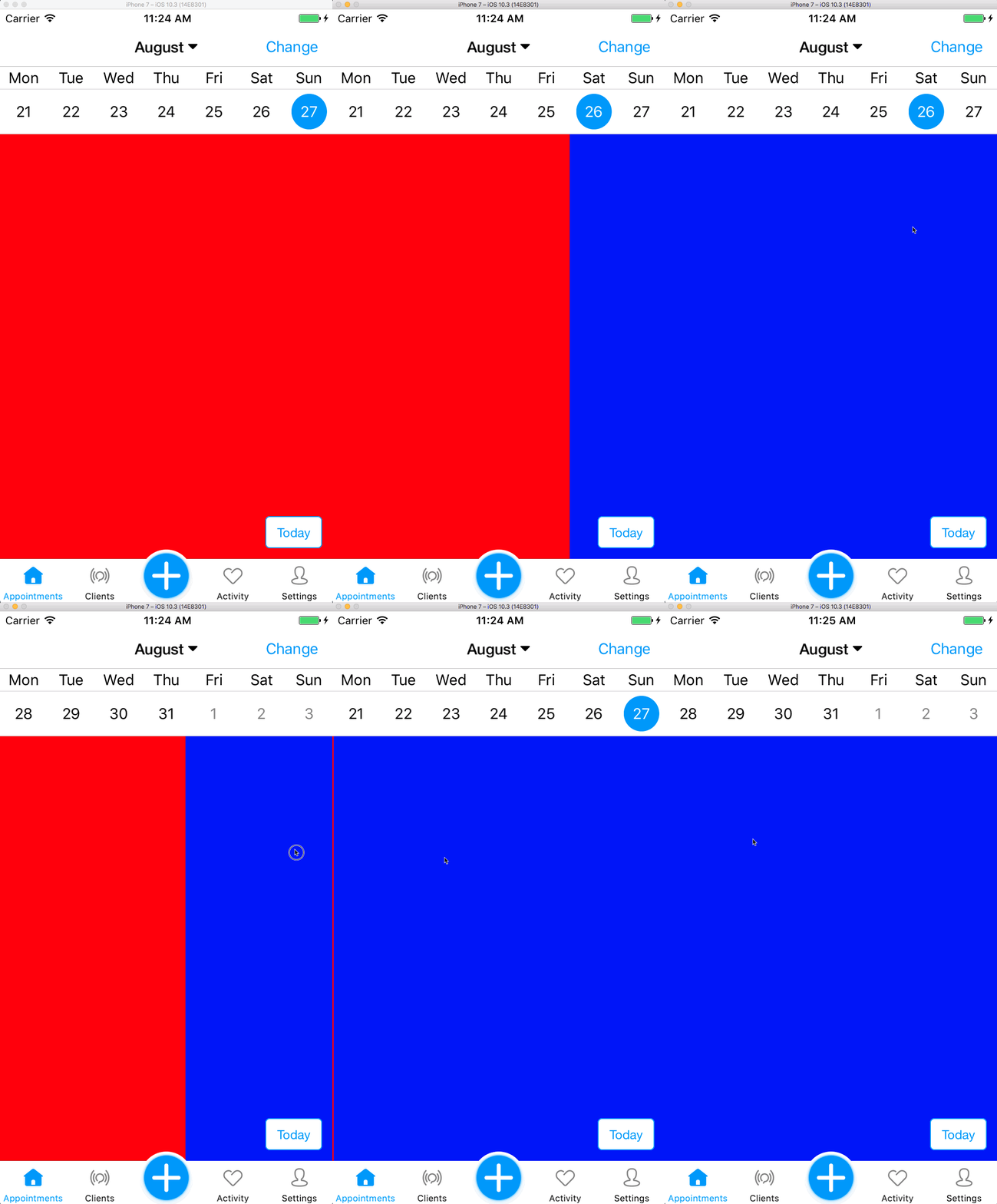
As you can see, when I scroll from the 27th August to the 28th August, the date does not become selected.
Heres the code for what happens when I scroll to collection view (each cell fills the collection view with a color of red or blue just to show whats happening)
func scrollViewDidEndDecelerating(_ scrollView: UIScrollView) {
    let x = collectionView.contentOffset.x
    let w = collectionView.bounds.size.width
    let currentPage = Int(ceil(x/w))
    let newDate = Calendar.current.date(byAdding: .day, value: currentPage - previousPage, to: date)
    previousPage = currentPage
    calendar.scrollToDate(date)
    calendar.selectDates([date])
}
I noticed that when calling the didSelectDate function, the cell is set to nil.
func calendar(_ calendar: JTAppleCalendarView, didSelectDate date: Date, cell: JTAppleCell?, cellState: CellState) {

    guard let cell = cell as? CalendarCell else {
        return <-- hits this line when scrolling from sun to monday
    }
 lukejones1
All 8 comments
This looks like 2 errors.
- the first is your error -
calendar.scrollToDate(date)
calendar.selectDates([date])
When you run scrollToDate, the scrolling might still be in process. The cell that you wish to scroll to may not yet be on the screen. In order to ensure that the selection occurs when the date is already on the screen, you can use the completion handler. This will ensure the cell is on the screen when selected, and therefore will not be nil.
calendar.scrollToDate(date) {
   self.calendar.selectDates([date])
}
- The second one is my error. - There's a minor bug which i just fixed. If you do solution 1 above, it will not work. Therefore put this in your Podfile and do a
pod installto get the fix.
pod 'JTAppleCalendar', :git => 'https://github.com/patchthecode/JTAppleCalendar.git', :branch => 'master'
Let me know if this worked.
 patchthecode
on 23 Aug 2017
patchthecode
on 23 Aug 2017
Ahh of course, forgot about the closure for scrollToDate.
I'm not 100% sure if this is a new issue or not that I've just picked up, but every time I select a date where the following/previous month exists in the same row, I can not set the state to isSelected e.g. I select 30th August which has 3 days in September in the same row. 30th August isSelected always seems to return true.
lukejones1
on 23 Aug 2017
@lukejones1 Its probably an issue i put in, since im still working on master branch.
However, can you let me know in detail what this new error is?
Maybe if you have a sample app you can point me to, this will help a lot. I am not understanding the new issue you are experiencing.
patchthecode
on 23 Aug 2017
Not sure if this is related to this issue, but I have something like this:
self.calendarView.scrollToDate(startWeekDate) {
      self.calendarView.selectDates([self.currentStartDay])
}
which works, but when I set animateScroll to false, it stops working (the cell is set to nil inside the didSelectDate function)
 annakopp
on 24 Aug 2017
annakopp
on 24 Aug 2017
@annakopp you'll need to tell me the version youre are using.
Without the exact version number, I do not know where to look. 7.0.6?
patchthecode
on 24 Aug 2017
@patchthecode I'm using the newest stuff on master
annakopp
on 24 Aug 2017
@annakopp
Do you have this code in your viewDidLoad function?
self.calendarView.scrollToDate(startWeekDate) {
      self.calendarView.selectDates([self.currentStartDay])
}
I put it in my viewDidLoad and it worked perfectly. If possible can you provide a sample app with the problem? You can drag the zip file in your chat box.
patchthecode
on 24 Aug 2017
closing issue.
Assuming issue has been resolved with latest master branch fix.
If bu still exists, i will re-open this issue.
Awaiting user input.
patchthecode
on 3 Sep 2017
Related issues
 oddpandadesign
·
5Comments
oddpandadesign
·
5Comments
 PedroAnibarro1
·
5Comments
PedroAnibarro1
·
5Comments
 carlosper88
·
4Comments
carlosper88
·
4Comments
 Geekbell
·
4Comments
Geekbell
·
4Comments
 blinkmeoff
·
3Comments
blinkmeoff
·
3Comments
Most helpful comment
This looks like 2 errors.
When you run scrollToDate, the scrolling might still be in process. The cell that you wish to scroll to may not yet be on the screen. In order to ensure that the selection occurs when the date is already on the screen, you can use the completion handler. This will ensure the cell is on the screen when selected, and therefore will not be nil.
pod installto get the fix.Let me know if this worked.