Jtapplecalendar: Problem with Persian Calendar
Hi,
As you've suggested in your valuable tutorials, I have used my own calendar with code: let persianCalendar = Calendar(identifier: .persian)
to initialize the ConfigurationParameters

However, the calendar seems to represent dates incorrectly. (see the image above). Please note the startDate and endDate are in Gregorian format (I'm not sure this has caused the issue or not!) What is my fault?
Thanks for your great work!
 amiinous
All 10 comments
OK. i will check this out in another 11 hours
 patchthecode
on 30 Jul 2017
patchthecode
on 30 Jul 2017
Hey i just had a chance to look at this.
Mine is displaying correctly.
So can you answer some questions to help me easier find the solution to the problem?
- Is you calendar vertical or horizontal?
- What month are you looking at in the picture above that has this error?
- can you show me you
configureCalendarfunction code? I need to see what calendar you are providing to the library. - Can you show me the code that colors the inDates/Outdates? Because that seems to be where the problem is
Thanks.
patchthecode
on 1 Aug 2017
Hi thanks for your effort!
- Horizontal
- 9th month of Persian Calendar
3.
let startDate = persianDateFormatter.date(from: "1396/05/01")!
let endDate = persianDateFormatter.date(from: "1420/01/01")!


let persianCalendar = Calendar(identifier: .persian)
let parameters = ConfigurationParameters(startDate: startDate, endDate: endDate, numberOfRows: nil, calendar: persianCalendar, generateInDates: nil, generateOutDates: nil, firstDayOfWeek: .saturday, hasStrictBoundaries: nil)
        return parameters
-
4.
func calendar(_ calendar: JTAppleCalendarView, didSelectDate date: Date, cell: JTAppleCell?, cellState: CellState) {
        handleCellSelected(cell: cell, cellState: cellState)
        handleCellTextColor(cell: cell, cellState: cellState)
    }

func handleCellTextColor(cell: JTAppleCell?, cellState: CellState){
        guard let validCell = cell as? CalendarCell else { return }
        if validCell.isSelected {
            validCell.dateLabel.textColor = UIColor.white
        } else {
            let today = Date()
            persianDateFormatter.dateFormat = "yyyy MM dd"
            let todayDateStr = persianDateFormatter.string(from: today)
            dateFormatter.dateFormat = "yyyy MM dd"
            let cellDateStr = dateFormatter.string(from: cellState.date)

            if todayDateStr == cellDateStr {
                validCell.dateLabel.textColor = UIColor.yellow
            } else {
                if cellState.dateBelongsTo == .thisMonth {
                    validCell.dateLabel.textColor = UIColor.white
                } else { //i.e. case it belongs to inDate or outDate
                    validCell.dateLabel.textColor = UIColor.gray
                }
            }
        }
    }
I dont think the issue is from this section, cause I wrote it according to your tutorial.
Please check the images below:
This image shows that the "Day" text shows an incorrect day according to the date field of cellState.
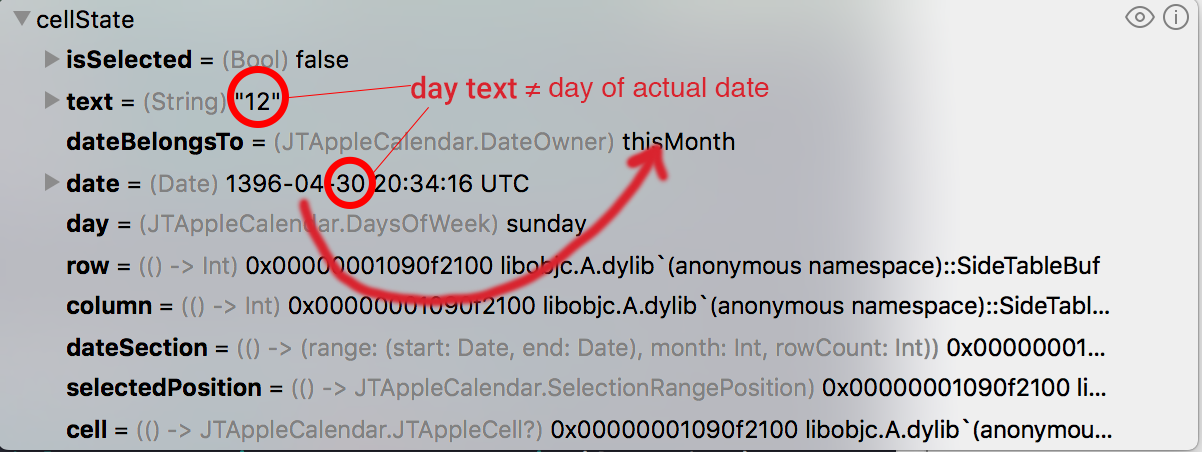
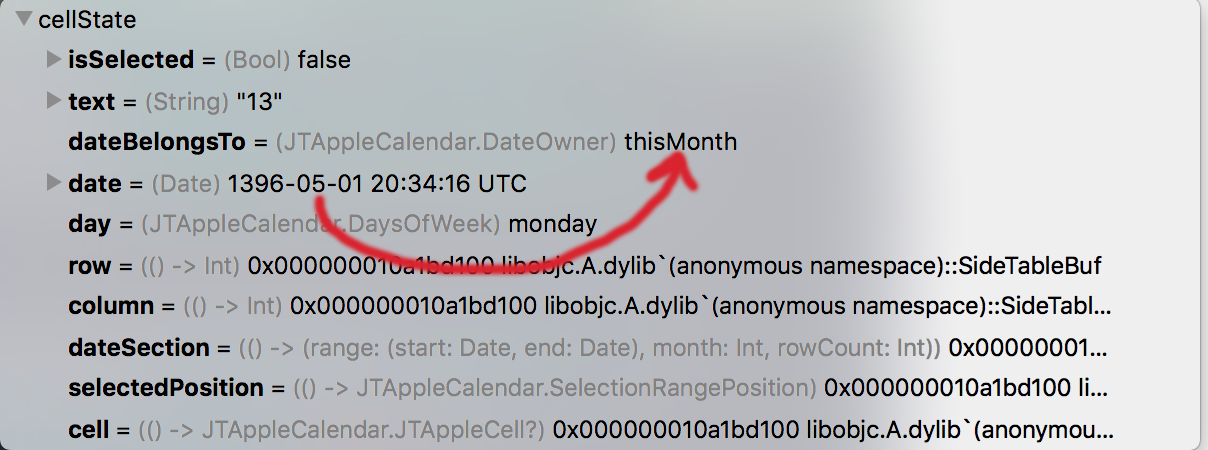
Comparing the two above images (which both cells are whithin a month), we find out that the two dates, one belongs to the 4th month of Persian Calendar (PC) and one belongs to the 5th month of PC, are considered as "thisMonth" which they're not.
amiinous
on 2 Aug 2017
I give up on this.
I have tried every way to re-create the error you have presented. I cannot reproduce it.
// my calendar is defined like this:
let testCalendar = Calendar(identifier: .persian)

// my dateformatter is defined like this
let persianDateFormatter = DateFormatter()
persianDateFormatter.dateFormat = "yyyy/MM/dd"
persianDateFormatter.timeZone = testCalendar.timezone
persianDateFormatter.locale = testCalendar.locale
My dates are still printed correctly.
This is the last resort. Is it possible you can provide a zipped copy of an empty sample project which has this bug?
This bug is difficult to reproduce because not many developers approach me with a Persian calendar.
patchthecode
on 13 Aug 2017
SampleCalendar.zip
Hi
Really grateful for your dedication!
I just tried your initialization code and still no success...
I also get the "out of range error in indexPathOfdateCellCounterPath() upper. This should not happen. Contact developer on github" error while selecting a cell.
As you asked, I attached a sample project which generates the bug.
Thank you again...
amiinous
on 14 Aug 2017
ok. investigating some more.
patchthecode
on 14 Aug 2017
Hey, a fix was made on master branch last week which affects those type of calendars.
Can you put this in your pod file?
pod 'JTAppleCalendar', :git => 'https://github.com/patchthecode/JTAppleCalendar.git', :branch => 'master'
Then do a pod install
Let me know if this resolved your issue?
patchthecode
on 14 Aug 2017
Great JOB!
Thank you...
By the way, the date property which is behind each cell shows the date in 20:30:00 UTC. Is it possible to change its timezone? cause it has 1 day offset from my local time zone.(But it is not so important I currently convert that date to my preferred format)
amiinous
on 15 Aug 2017
in the configureCalendar() function you gave JTAppleCalendar library a Persian Calendar() instance. Then you also created a formatterInstance with the same timeZone and locale to create the startDate and EndDate
let persianCalendar = Calendar(identifier: .persian)

let testFotmatter = DateFormatter()
testFotmatter.dateFormat = "yyyy/MM/dd"
testFotmatter.timeZone = persianCalendar.timeZone
testFotmatter.locale = persianCalendar.locale

let parameters = ConfigurationParameters(startDate: startDate, endDate: endDate, calendar: persianCalendar)
Anytime you need to print dates on the console, what you need is a formatter just like the one you created in the ConfigureCalendar() function.
But instead what you have done was created a formatter that was of a different format ->
lazy var dateFormatter: DateFormatter = {
        let dateFormatter = DateFormatter()
        dateFormatter.timeZone = TimeZone(abbreviation: "UTC")
        dateFormatter.dateFormat = "hh:mm"
        return dateFormatter
    }()
You formatter's timeZone and locale should be consistent/same as the ones you use to generate the calendar.
Let me know if this helps.
patchthecode
on 15 Aug 2017
It worked!
You're totally right...
Thank you for your support:heart:
amiinous
on 16 Aug 2017
Related issues
 nikolalukovic
·
4Comments
nikolalukovic
·
4Comments
 prahaladm
·
3Comments
prahaladm
·
3Comments
 Kevinw14
·
3Comments
Kevinw14
·
3Comments
 carlosper88
·
4Comments
carlosper88
·
4Comments
 MoridinBG
·
5Comments
MoridinBG
·
5Comments