Js-buy-sdk: Uncaught (in promise) when calling client.product.fetchAll()
Describe the bug
I cannot fetchAll products from a simple buildClient, the exact same code as showned in the getting started demos.

To Reproduce
const client = Client.buildClient({
  domain: 'subdomain.myshopify.com',
  storefrontAccessToken: 'access-token'
});

client.product.fetchAll().then((products) => {
  // Do something with the products
  console.log(products);
});
Expected behavior
Should get a JS object list of all the products listed on the Shopify store.
Environment (please complete the following information):
- All
- Tested on Chrome
- SDK Version 1.10.0
Additional context
Weird thing is, if I try to access the .json file using https://user:[email protected]/admin/products.json from the StoreFront API, I do get a list of products. Seems like the issue I'm having is only with the Shopify Buy SDK.
Is there something I'm missing here? Thanks a lot for the help.
Bug Report Checklist
- [x] I have read and agree to the CODE_OF_CONDUCT.md
- [x] I have read the CONTRIBUTING.md guidelines.
- [x] I have provided a detailed description of the bug, including code samples, and/or network data.
- [x] I have provided information about my development environment, including SDK version.
 baptistebriel
All 14 comments
@rebeccajfriedman I looked into this issue. I'm able to reproduce this on my test shop if I disable the Read Product Tags permission.
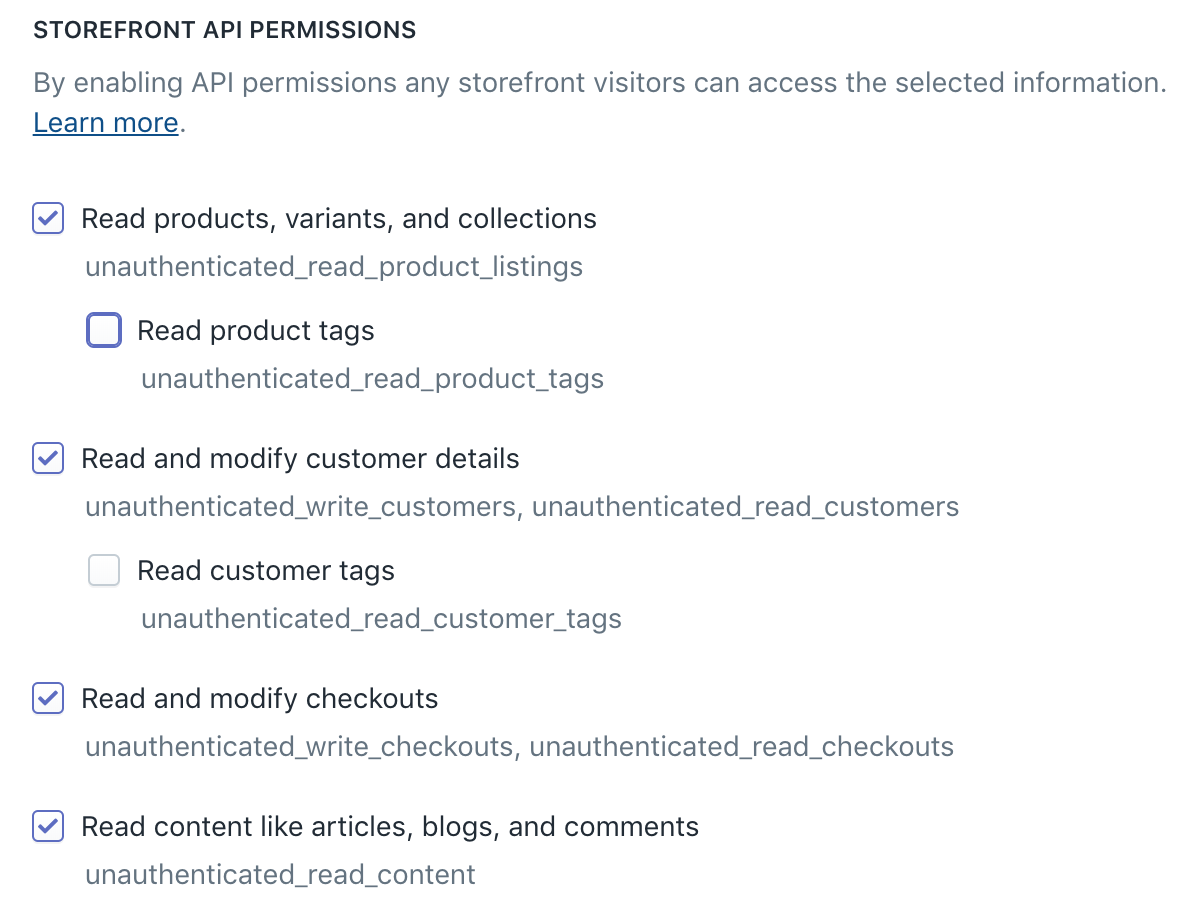
@baptistebriel try it out. See if checking/allowing this permission helps. You can temporarily enable it. If there's a reason why you don't want this permission enabled your best option might be to wait for a fix.
 mikkoh
on 15 Nov 2018
mikkoh
on 15 Nov 2018
That fixed the access denied issue! Thanks a lot!
baptistebriel
on 16 Nov 2018
Hi @mikkoh, do you think removing tags from the Product fragment makes sense?
That's how I solved the problem before seeing your reply on this issue. And if the permissions to read tags are disabled by default in the Storefront API, every developer that tries out this SDK will step into this issue, right?
Happy to contribute and do it myself, but only if that's a reasonable solution to this issue.
 igghera
on 16 Nov 2018
igghera
on 16 Nov 2018
@igghera feel free to make a PR to remove tags from the fragment. You are correct that since the permission is intentionally not checked by default, we should not include the field in the default fragment.
We are planning to release a major version of JS Buy SDK to remove deprecated fields, and we would love to include this.
 rebeccajfriedman
on 16 Nov 2018
rebeccajfriedman
on 16 Nov 2018
This would be a fantastic fix. Most of my users are currently running into this issue :)
 arobbins
on 16 Nov 2018
arobbins
on 16 Nov 2018
@rebeccajfriedman @arobbins done
igghera
on 17 Nov 2018
Feel free to close this issue whenever the PR gets merged. Thanks, everyone!
baptistebriel
on 19 Nov 2018
Yay! Nice to see this move forward! 🎉
mikkoh
on 20 Nov 2018
FYI that we are planning to release this as part of a new version on November 27. Thanks everyone!
rebeccajfriedman
on 20 Nov 2018
Because of this merge after removing tags, our site stopped working. Can you pls tell us the way to fix it?
 priyankafet
on 28 Nov 2018
priyankafet
on 28 Nov 2018
@priyankafet This change was released in version 1.11.0. In the immediate term, you can just lock to version 1.10.0 and you will have tags back. We are working on a way to allow more flexibility with the queries, but you can also patch the SDK by writing your own product fragment and passing it through your own method.
rebeccajfriedman
on 28 Nov 2018
We are using the older version but still not getting tags in return.
priyankafet
on 29 Nov 2018
Can you pls send us CDN URL to access the 1.10.0? We were using below URL earlier:
https://sdks.shopifycdn.com/js-buy-sdk/v1/latest/index.umd.min.js
priyankafet
on 29 Nov 2018
Hi @priyankafet sorry for the hassle. Here's a link to 1.10.0
https://sdks.shopifycdn.com/js-buy-sdk/1.10.0/index.umd.min.js
 StefanSlehta
on 29 Nov 2018
StefanSlehta
on 29 Nov 2018
Related issues
 v1nk0
·
3Comments
v1nk0
·
3Comments
 rkoberg
·
4Comments
rkoberg
·
4Comments
 rizedr
·
6Comments
rizedr
·
6Comments
 youanden
·
7Comments
youanden
·
7Comments
 Codesesh
·
7Comments
Codesesh
·
7Comments