Js-buy-sdk: JS-Buy-SDK product ID's are different from rest API product ID's?
When using the js-buy-sdk the product ID's are different e.g
js-buy-sdk product ID = Z2lkOi8vc2hvcGlmeS9Qcm9kdWN0LzU5Mzk2NTE1NDMzOQ
Shopify rest API product ID = 593965154339
Both are ID's for the same product.
I was wanting to use the REST API in conjunction with the js-buy-sdk. E.g grab product ID from rest API (which will be stored in a database) then pass through that product ID to the js-buy-sdk to add to cart/create cart etc. Since the ID's are different this isn't possible?
 Codesesh
All 7 comments
Running atob("Z2lkOi8vc2hvcGlmeS9Qcm9kdWN0LzU5Mzk2NTE1NDMzOQ") will give you "gid://shopify/Product/593965154339". You can see how buy-button-js does it here
 StefanSlehta
on 27 Apr 2018
StefanSlehta
on 27 Apr 2018
Hi, I'm in the opposite situation, where I have: 593965154339 but I need: Z2lkOi8vc2hvcGlmeS9Qcm9kdWN0LzU5Mzk2NTE1NDMzOQ.
How would I do this?
 OctaneInteractive
on 3 Jul 2018
OctaneInteractive
on 3 Jul 2018
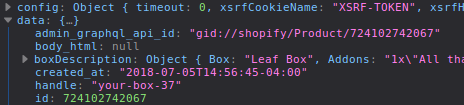
@OctaneInteractive, based off of @StefanSlehta's comment I think you can just do the following:
btoa(data.admin_graphql_api_id)
 jibinycricket
on 5 Jul 2018
jibinycricket
on 5 Jul 2018
Hi @j-mutter, I figured it out myself yesterday afternoon:
Buffer.from('gid://shopify/Product/593965154339').toString('base64');
I found this through trial and error, fuelled by pure guesswork — the Shopify documentation is by far the worst I've ever experienced.
OctaneInteractive
on 6 Jul 2018
@OctaneInteractive - thank you so much for you answer, that's really helped me.
 harnasz
on 16 Oct 2018
harnasz
on 16 Oct 2018
This worked for me:
btoa('gid://shopify/ProductVariant/593965154339')
 peteshilling
on 1 Mar 2019
peteshilling
on 1 Mar 2019
Hey peeps, this worked for me:
const uglyId = Z2lkOi8vc2hvcGlmeS9Qcm9kdWN0LzU5Mzk2NTE1NDMzOQ;
const badId = atob(uglyId); // gid://shopify/Product/593965154339
const goodId = badId.split('/');
console.log(goodId[4]); // 593965154339
 lennymendez
on 17 Sep 2019
lennymendez
on 17 Sep 2019
Related issues
 chrisallick
·
7Comments
chrisallick
·
7Comments
 rkoberg
·
4Comments
rkoberg
·
4Comments
 daveadotdev
·
6Comments
daveadotdev
·
6Comments
 darkylmnx
·
7Comments
darkylmnx
·
7Comments
 richgcook
·
3Comments
richgcook
·
3Comments
Most helpful comment
Hi @j-mutter, I figured it out myself yesterday afternoon:
Buffer.from('gid://shopify/Product/593965154339').toString('base64');I found this through trial and error, fuelled by pure guesswork — the Shopify documentation is by far the worst I've ever experienced.