Jormungandr: Stuck at listening and accepting gRPC connections
I tried running 0.8.7 today after a sucessful 0.8.6 but latest version seem to be problematic for me. I see that not everyone has the same issue i am getting.
it stuck here for a long time. Never receive any block.
Jan 24 06:36:44.889 INFO update current branch tip, peer_addr: 13.56.0.226:3000, task: bootstrap
Jan 24 06:36:44.906 INFO initial bootstrap completed, peer_addr: 13.56.0.226:3000, task: bootstrap
Jan 24 06:36:44.915 INFO listening and accepting gRPC connections, local_addr: 0.0.0.0:3000, task: network
This shows only uptime 81 , but i have run it for much longer without luck.
blockRecvCnt: 0
lastBlockContentSize: 0
lastBlockDate: "41.16510"
lastBlockFees: 0
lastBlockHash: e12773816bb432ad1415ceeb00690e61d09d910ea9ac95acaaa75c7e729c6d31
lastBlockHeight: "126157"
lastBlockSum: 0
lastBlockTime: "2020-01-24T04:23:57+00:00"
lastBlockTx: 0
lastReceivedBlockTime: ~
peerAvailableCnt: "0"
peerQuarantinedCnt: "0"
peerUnreachableCnt: "0"
state: Running
txRecvCnt: 0
uptime: 81
version: jormungandr 0.8.7-364cd84e+
I notice the the Recv-Q is being filled to 1025 and then it stops.
State     Recv-Q     Send-Q          Local Address:Port           Peer Address:Port
LISTEN    0          128             127.0.0.53%lo:domain              0.0.0.0:*
LISTEN    0          128                   0.0.0.0:ssh                 0.0.0.0:*
LISTEN    647        1024                  0.0.0.0:3000                0.0.0.0:*
LISTEN    0          1024                127.0.0.1:3100                0.0.0.0:*
LISTEN    0          2048                127.0.0.1:3101                0.0.0.0:*
LISTEN    0          1024                  0.0.0.0:3200                0.0.0.0:*
TCPdump:
lots of retransmittion
tcpdump.zip
kernel version:
5.0.0-1028-azure
 skokasik
All 36 comments
Same issue on 4.15.0-1057-aws #59-Ubuntu t2.medium EC2.
 fish2plain
on 24 Jan 2020
fish2plain
on 24 Jan 2020
I'm having the same issue on 0.8.7 #1635
 A-Caccese
on 24 Jan 2020
A-Caccese
on 24 Jan 2020
@skokasik @fish2plain @A-Caccese do you have any log attempting connections smth like:
Jan 24 13:04:15.230 INFO listening and accepting gRPC connections, local_addr: 127.0.0.1:9001, task: network
Jan 24 13:04:15.232 INFO connecting to peer, node_id: 52762c49a84699d43c96fdfe6de18079fb2512077d6aa5bc, peer_addr: 13.112.181.42:3000, task: network
Jan 24 13:04:15.232 INFO connecting to peer, node_id: 671a9e7a5c739532668511bea823f0f5c5557c99b813456c, peer_addr: 52.9.132.248:3000, task: network
Jan 24 13:04:15.233 INFO connecting to peer, node_id: 18bf81a75e5b15a49b843a66f61602e14d4261fb5595b5f5, peer_addr: 52.8.15.52:3000, task: network
Jan 24 13:04:15.233 INFO connecting to peer, node_id: 7ddf203c86a012e8863ef19d96aabba23d2445c492d86267, peer_addr: 13.56.0.226:3000, task: network
Jan 24 13:04:15.234 INFO connecting to peer, node_id: 8529e334a39a5b6033b698be2040b1089d8f67e0102e2575, peer_addr: 18.182.115.51:3000, task: network
Jan 24 13:04:15.234 INFO connecting to peer, node_id: 8f9ff09765684199b351d520defac463b1282a63d3cc99ca, peer_addr: 3.125.31.84:3000, task: network
Jan 24 13:04:15.235 INFO connecting to peer, node_id: 7e1020c2e2107a849a8353876d047085f475c9bc646e42e9, peer_addr: 13.114.196.228:3000, task: network
Jan 24 13:04:15.235 INFO connecting to peer, node_id: 9d15a9e2f1336c7acda8ced34e929f697dc24ea0910c3e67, peer_addr: 3.125.183.71:3000, task: network
Jan 24 13:04:15.235 INFO connecting to peer, node_id: df02383863ae5e14fea5d51a092585da34e689a73f704613, peer_addr: 54.183.149.167:3000, task: network
Jan 24 13:04:15.236 INFO connecting to peer, node_id: fc89bff08ec4e054b4f03106f5312834abdf2fcb444610e9, peer_addr: 18.177.78.96:3000, task: network
Jan 24 13:04:15.236 INFO connecting to peer, node_id: fcdf302895236d012635052725a0cdfc2e8ee394a1935b63, peer_addr: 52.9.77.197:3000, task: network
Jan 24 13:04:15.236 INFO connecting to peer, node_id: 35bead7d45b3b8bda5e74aa12126d871069e7617b7f4fe62, peer_addr: 3.115.154.161:3000, task: network
Jan 24 13:04:15.237 INFO connecting to peer, node_id: 06aa98b0ab6589f464d08911717115ef354161f0dc727858, peer_addr: 18.184.35.137:3000, task: network
@skokasik your nodes having
peerAvailableCnt: "0"
peerQuarantinedCnt: "0"
peerUnreachableCnt: "0"
shows that no gossiping data was exchanged with the bootstrapping peer, so if the node has no way to get further info. Thank you all for the reports. Invetigating the reasons for this case.
 rinor
on 24 Jan 2020
rinor
on 24 Jan 2020
I have the same issue. The node will bootstrap but then it will not gossip with any peers. Verified the port is open to the outside (my other node can connect to it but no exchange of data occurs). Eventually, the node times out or something and the external port is no longer reachable. Using netstat shows only one connection to the bootstrap node--no new connections are made. After bootstrap the CPU utilization is almost nothing.
Running 0.8.7 (release) on AWS (tried multiple different AWS instances). Version 0.8.6 runs fine on the same AWS instance with the same config.
 nalyd88
on 24 Jan 2020
nalyd88
on 24 Jan 2020
Same on CentOS 7, 2 dedicated CPU
 cardanoinvest
on 24 Jan 2020
cardanoinvest
on 24 Jan 2020
@rinor
there were no attempting connections showing in the log at all after bootstrapped from the trusted peer:
Jan 24 22:26:15.990 INFO update current branch tip, peer_addr: 3.125.31.84:3000, task: bootstrap
Jan 24 22:26:15.992 INFO update current branch tip, peer_addr: 3.125.31.84:3000, task: bootstrap
Jan 24 22:26:15.995 INFO update current branch tip, peer_addr: 3.125.31.84:3000, task: bootstrap
Jan 24 22:26:15.998 INFO update current branch tip, peer_addr: 3.125.31.84:3000, task: bootstrap
Jan 24 22:26:16.146 INFO update current branch tip, peer_addr: 3.125.31.84:3000, task: bootstrap
Jan 24 22:26:16.148 INFO update current branch tip, peer_addr: 3.125.31.84:3000, task: bootstrap
Jan 24 22:26:16.150 INFO initial bootstrap completed, peer_addr: 3.125.31.84:3000, task: bootstrap
Jan 24 22:26:16.161 INFO listening and accepting gRPC connections, local_addr: 172.31.22.156:3000, task: netwo
but netstat -tn are showing connected incoming peers connected to jormungandr on port 3000, but just not getting any blocks and no activity in the log:
~/logs  : netstat -tn
**Active Internet connections (w/o servers)**
Proto Recv-Q Send-Q Local Address           Foreign Address         State
tcp      142      0 172.31.22.156:3000      76.89.138.183:54558     ESTABLISHED
tcp      142      0 172.31.22.156:3000      88.99.85.85:38814       ESTABLISHED
tcp      142      0 172.31.22.156:3000      52.165.36.132:3968      ESTABLISHED
tcp      142      0 172.31.22.156:3000      108.5.247.143:55357     ESTABLISHED
tcp      142      0 172.31.22.156:3000      178.62.206.129:41224    ESTABLISHED
tcp      142      0 172.31.22.156:3000      52.50.149.29:35438      ESTABLISHED
tcp      142      0 172.31.22.156:3000      76.113.13.58:54636      ESTABLISHED
tcp      142      0 172.31.22.156:3000      174.77.167.52:61381     ESTABLISHED
tcp      160      0 172.31.22.156:3000      34.90.225.253:42254     CLOSE_WAIT
tcp      142      0 172.31.22.156:3000      178.39.214.45:57050     ESTABLISHED
tcp      142      0 172.31.22.156:3000      51.140.191.235:24740    ESTABLISHED
tcp      142      0 172.31.22.156:3000      222.236.255.231:51891   ESTABLISHED
tcp      142      0 172.31.22.156:3000      14.9.90.128:63591       ESTABLISHED
tcp      142      0 172.31.22.156:3000      66.68.12.139:52010      ESTABLISHED
tcp      142      0 172.31.22.156:3000      121.80.213.84:63791     ESTABLISHED
tcp      143      0 172.31.22.156:3000      172.105.71.59:36880     CLOSE_WAIT
tcp      142      0 172.31.22.156:3000      68.39.247.221:51460     ESTABLISHED
tcp      142      0 172.31.22.156:3000      125.30.106.235:34761    ESTABLISHED
tcp      160      0 172.31.22.156:3000      95.217.43.44:48582      CLOSE_WAIT
tcp      142      0 172.31.22.156:3000      95.216.17.109:44420     ESTABLISHED
tcp        0      0 172.31.22.156:22        71.202.114.178:60518    ESTABLISHED
tcp      173      0 172.31.22.156:3000      98.151.82.186:32594     CLOSE_WAIT
tcp      142      0 172.31.22.156:3000      5.9.240.249:47245       ESTABLISHED
tcp      142      0 172.31.22.156:3000      79.172.210.209:28390    ESTABLISHED
tcp      142      0 172.31.22.156:3000      73.169.77.96:59910      ESTABLISHED
tcp      142      0 172.31.22.156:3000      171.100.233.79:53924    ESTABLISHED
tcp      173      0 172.31.22.156:3000      75.63.29.87:58258       CLOSE_WAIT
tcp      142      0 172.31.22.156:3000      84.209.25.111:63134     ESTABLISHED
tcp      142      0 172.31.22.156:3000      99.228.195.126:26690    ESTABLISHED
tcp      142      0 172.31.22.156:3000      46.4.69.177:45858       ESTABLISHED
tcp      142      0 172.31.22.156:3000      63.229.204.74:59642     ESTABLISHED
tcp      173      0 172.31.22.156:3000      45.77.152.19:5044       CLOSE_WAIT
tcp      173      0 172.31.22.156:3000      85.93.89.21:7684        CLOSE_WAIT
tcp      142      0 172.31.22.156:3000      212.225.140.86:62416    ESTABLISHED
tcp        0      0 127.0.0.1:33276         127.0.0.1:9090          ESTABLISHED
tcp      160      0 172.31.22.156:3000      34.90.81.140:54000      CLOSE_WAIT
tcp      142      0 172.31.22.156:3000      184.153.91.13:61836     ESTABLISHED
tcp      142      0 172.31.22.156:3000      104.49.120.211:55498    ESTABLISHED
tcp      142      0 172.31.22.156:3000      64.225.77.161:9074      ESTABLISHED
tcp      173      0 172.31.22.156:3000      91.121.85.221:63466     CLOSE_WAIT
tcp      160      0 172.31.22.156:3000      24.9.65.174:39002       CLOSE_WAIT
tcp      142      0 172.31.22.156:3000      162.253.9.26:42402      ESTABLISHED
tcp      142      0 172.31.22.156:3000      195.201.57.98:48474     ESTABLISHED
tcp      142      0 172.31.22.156:3000      106.156.194.114:51604   ESTABLISHED
tcp      142      0 172.31.22.156:3000      45.77.250.34:55158      ESTABLISHED
tcp      142      0 172.31.22.156:3000      116.86.192.88:49681     ESTABLISHED
tcp      142      0 172.31.22.156:3000      167.179.65.18:56318     ESTABLISHED
tcp      142      0 172.31.22.156:3000      34.223.43.234:37736     ESTABLISHED
tcp      142      0 172.31.22.156:3000      24.130.62.138:28550     ESTABLISHED
tcp      142      0 172.31.22.156:3000      50.24.130.48:56854      ESTABLISHED
tcp      142      0 172.31.22.156:3000      85.59.213.78:50248      ESTABLISHED
tcp      160      0 172.31.22.156:3000      170.72.32.62:33614      CLOSE_WAIT
tcp      142      0 172.31.22.156:3000      84.203.125.11:54277     ESTABLISHED
tcp      142      0 172.31.22.156:3000      45.77.57.228:21126      ESTABLISHED
tcp      142      0 172.31.22.156:3000      217.45.24.101:52077     ESTABLISHED
tcp      142      0 172.31.22.156:3000      188.166.23.170:36016    ESTABLISHED
tcp      142      0 172.31.22.156:3000      35.213.163.243:27446    ESTABLISHED
tcp      142      0 172.31.22.156:3000      46.250.220.218:62480    ESTABLISHED
tcp      142      0 172.31.22.156:3000      108.200.166.109:45664   ESTABLISHED
tcp      142      0 172.31.22.156:3000      3.220.106.188:50312     ESTABLISHED
tcp      142      0 172.31.22.156:3000      80.56.212.191:60732     ESTABLISHED
tcp      142      0 172.31.22.156:3000      27.127.184.86:14081     ESTABLISHED
tcp      142      0 172.31.22.156:3000      144.2.89.90:5762        ESTABLISHED
tcp      142      0 172.31.22.156:3000      175.34.184.229:63164    ESTABLISHED
tcp      142      0 172.31.22.156:3000      66.219.236.231:35308    ESTABLISHED
tcp      142      0 172.31.22.156:3000      37.228.229.180:14767    ESTABLISHED
tcp      142      0 172.31.22.156:3000      81.229.232.77:35552     ESTABLISHED
tcp      143      0 172.31.22.156:3000      45.33.70.112:51548      CLOSE_WAIT
tcp      142      0 172.31.22.156:3000      86.172.162.196:58631    ESTABLISHED
tcp      142      0 172.31.22.156:3000      121.105.72.247:51470    ESTABLISHED
tcp      142      0 172.31.22.156:3000      98.115.155.213:15260    ESTABLISHED
tcp      142      0 172.31.22.156:3000      195.201.62.120:55792    ESTABLISHED
tcp      142      0 172.31.22.156:3000      3.125.183.71:53862      ESTABLISHED
tcp        0      0 172.31.22.156:32872     3.125.31.84:3000        ESTABLISHED
tcp      142      0 172.31.22.156:3000      213.127.107.63:6597     ESTABLISHED
tcp      160      0 172.31.22.156:3000      199.229.249.188:54186   CLOSE_WAIT
tcp      142      0 172.31.22.156:3000      144.202.70.17:33308     ESTABLISHED
tcp      142      0 172.31.22.156:3000      86.49.56.202:1344       ESTABLISHED
tcp      142      0 172.31.22.156:3000      162.83.127.77:64763     ESTABLISHED
tcp      142      0 172.31.22.156:3000      91.121.30.37:49962      ESTABLISHED
tcp      160      0 172.31.22.156:3000      78.47.153.134:42644     CLOSE_WAIT
tcp      142      0 172.31.22.156:3000      87.123.192.82:8040      ESTABLISHED
tcp      142      0 172.31.22.156:3000      217.123.235.204:53196   ESTABLISHED
tcp      142      0 172.31.22.156:3000      5.9.240.254:17819       ESTABLISHED
tcp      160      0 172.31.22.156:3000      3.215.52.18:47090       CLOSE_WAIT
tcp        0      0 127.0.0.1:56348         127.0.0.1:9100          ESTABLISHED
tcp      142      0 172.31.22.156:3000      213.195.96.133:57504    ESTABLISHED
tcp      142      0 172.31.22.156:3000      82.217.191.196:55922    ESTABLISHED
tcp      142      0 172.31.22.156:3000      118.8.147.113:59237     ESTABLISHED
tcp      142      0 172.31.22.156:3000      213.167.224.64:53070    ESTABLISHED
tcp      142      0 172.31.22.156:3000      3.125.186.180:49330     ESTABLISHED
tcp      142      0 172.31.22.156:3000      119.254.81.66:43980     ESTABLISHED
tcp      142      0 172.31.22.156:3000      3.93.37.234:16104       ESTABLISHED
tcp      142      0 172.31.22.156:3000      172.74.3.129:62694      ESTABLISHED
tcp      142      0 172.31.22.156:3000      174.195.143.35:8399     ESTABLISHED
tcp      142      0 172.31.22.156:3000      86.120.39.148:41101     ESTABLISHED
tcp      160      0 172.31.22.156:3000      209.250.239.195:14346   CLOSE_WAIT
tcp      142      0 172.31.22.156:3000      216.71.197.237:60880    ESTABLISHED
tcp      142      0 172.31.22.156:3000      45.153.184.41:37148     ESTABLISHED
tcp      142      0 172.31.22.156:3000      23.115.80.11:62941      ESTABLISHED
tcp      142      0 172.31.22.156:3000      178.254.35.159:63563    ESTABLISHED
tcp      142      0 172.31.22.156:3000      3.230.168.24:57854      ESTABLISHED
tcp      142      0 172.31.22.156:3000      176.251.47.87:53765     ESTABLISHED
tcp      142      0 172.31.22.156:3000      86.184.43.234:58485     ESTABLISHED
tcp      142      0 172.31.22.156:3000      68.196.42.53:58660      ESTABLISHED
tcp      142      0 172.31.22.156:3000      102.130.116.45:48742    ESTABLISHED
tcp      142      0 172.31.22.156:3000      73.52.25.31:54002       ESTABLISHED
tcp      142      0 172.31.22.156:3000      121.6.122.230:3153      ESTABLISHED
tcp      142      0 172.31.22.156:3000      190.85.74.138:55830     ESTABLISHED
tcp      173      0 172.31.22.156:3000      82.217.191.196:56030    CLOSE_WAIT
tcp      142      0 172.31.22.156:3000      185.183.157.213:2380    ESTABLISHED
tcp      142      0 172.31.22.156:3000      50.39.165.123:65052     ESTABLISHED
tcp      142      0 172.31.22.156:3000      167.71.7.106:24740      ESTABLISHED
tcp      142      0 172.31.22.156:3000      134.56.196.118:58229    ESTABLISHED
tcp      142      0 172.31.22.156:3000      35.193.129.221:7490     ESTABLISHED
tcp      160      0 172.31.22.156:3000      172.105.76.218:42936    CLOSE_WAIT
tcp      142      0 172.31.22.156:3000      35.204.176.13:57554     ESTABLISHED
tcp      142      0 172.31.22.156:3000      18.196.82.38:17076      ESTABLISHED
tcp      173      0 172.31.22.156:3000      95.217.43.44:51132      CLOSE_WAIT
tcp      142      0 172.31.22.156:3000      13.68.183.58:49860      ESTABLISHED
tcp      142      0 172.31.22.156:3000      91.113.9.66:65020       ESTABLISHED
tcp      142      0 172.31.22.156:3000      5.181.234.94:62188      ESTABLISHED
tcp      142      0 172.31.22.156:3000      94.230.152.8:43042      ESTABLISHED
tcp      142      0 172.31.22.156:3000      24.122.134.130:59247    ESTABLISHED
tcp      142      0 172.31.22.156:3000      151.56.62.102:60826     ESTABLISHED
tcp        0      0 127.0.0.1:43418         127.0.0.1:3100          TIME_WAIT
tcp      142      0 172.31.22.156:3000      24.19.142.228:65355     ESTABLISHED
tcp      160      0 172.31.22.156:3000      149.28.210.92:18436     CLOSE_WAIT
tcp      142      0 172.31.22.156:3000      99.93.54.240:63115      ESTABLISHED
tcp      142      0 172.31.22.156:3000      81.161.155.210:28111    ESTABLISHED
tcp        0  13884 172.31.22.156:22        71.202.114.178:60469    ESTABLISHED
tcp      142      0 172.31.22.156:3000      97.97.83.29:13400       ESTABLISHED
tcp      142      0 172.31.22.156:3000      188.155.221.153:52859   ESTABLISHED
tcp        0      0 172.31.22.156:22        71.202.114.178:55588    ESTABLISHED
tcp      142      0 172.31.22.156:3000      126.241.95.168:65310    ESTABLISHED
tcp      173      0 172.31.22.156:3000      185.86.106.217:48222    CLOSE_WAIT
tcp6       0      0 127.0.0.1:9090          127.0.0.1:33276         ESTABLISHED
tcp6       0      0 127.0.0.1:9100          127.0.0.1:56348         ESTABLISHED
and the following command would have shown connections to all the trusted peers and connected nodes like the net stat output above, but in 8.7 it only shows the peer that did the bootstrapping.
so looks like jormungandr running without servers?
~/logs  : netstat -tnlp
(Not all processes could be identified, non-owned process info
 will not be shown, you would have to be root to see it all.)
**Active Internet connections (only servers)**
Proto Recv-Q Send-Q Local Address           Foreign Address         State       PID/Program name
tcp        0      0 127.0.0.53:53           0.0.0.0:*               LISTEN      -
tcp        0      0 0.0.0.0:22              0.0.0.0:*               LISTEN      -
tcp      129      0 172.31.22.156:3000      0.0.0.0:*               LISTEN      11514/jormungandr
tcp        0      0 127.0.0.1:3100          0.0.0.0:*               LISTEN      11514/jormungandr
@fish2plain thank you for the info. If feasible can you please check if any cpu core/thread is locked at 100% usage. Thanks
rinor
on 25 Jan 2020
@skokasik @fish2plain @A-Caccese do you have any log attempting connections smth like:
Jan 24 13:04:15.230 INFO listening and accepting gRPC connections, local_addr: 127.0.0.1:9001, task: network
Jan 24 13:04:15.232 INFO connecting to peer, node_id: 52762c49a84699d43c96fdfe6de18079fb2512077d6aa5bc, peer_addr: 13.112.181.42:3000, task: network
Jan 24 13:04:15.232 INFO connecting to peer, node_id: 671a9e7a5c739532668511bea823f0f5c5557c99b813456c, peer_addr: 52.9.132.248:3000, task: network
Jan 24 13:04:15.233 INFO connecting to peer, node_id: 18bf81a75e5b15a49b843a66f61602e14d4261fb5595b5f5, peer_addr: 52.8.15.52:3000, task: network
Jan 24 13:04:15.233 INFO connecting to peer, node_id: 7ddf203c86a012e8863ef19d96aabba23d2445c492d86267, peer_addr: 13.56.0.226:3000, task: network
Jan 24 13:04:15.234 INFO connecting to peer, node_id: 8529e334a39a5b6033b698be2040b1089d8f67e0102e2575, peer_addr: 18.182.115.51:3000, task: network
Jan 24 13:04:15.234 INFO connecting to peer, node_id: 8f9ff09765684199b351d520defac463b1282a63d3cc99ca, peer_addr: 3.125.31.84:3000, task: network
Jan 24 13:04:15.235 INFO connecting to peer, node_id: 7e1020c2e2107a849a8353876d047085f475c9bc646e42e9, peer_addr: 13.114.196.228:3000, task: network
Jan 24 13:04:15.235 INFO connecting to peer, node_id: 9d15a9e2f1336c7acda8ced34e929f697dc24ea0910c3e67, peer_addr: 3.125.183.71:3000, task: network
Jan 24 13:04:15.235 INFO connecting to peer, node_id: df02383863ae5e14fea5d51a092585da34e689a73f704613, peer_addr: 54.183.149.167:3000, task: network
Jan 24 13:04:15.236 INFO connecting to peer, node_id: fc89bff08ec4e054b4f03106f5312834abdf2fcb444610e9, peer_addr: 18.177.78.96:3000, task: network
Jan 24 13:04:15.236 INFO connecting to peer, node_id: fcdf302895236d012635052725a0cdfc2e8ee394a1935b63, peer_addr: 52.9.77.197:3000, task: network
Jan 24 13:04:15.236 INFO connecting to peer, node_id: 35bead7d45b3b8bda5e74aa12126d871069e7617b7f4fe62, peer_addr: 3.115.154.161:3000, task: network
Jan 24 13:04:15.237 INFO connecting to peer, node_id: 06aa98b0ab6589f464d08911717115ef354161f0dc727858, peer_addr: 18.184.35.137:3000, task: network
@skokasik your nodes having
peerAvailableCnt: "0"
peerQuarantinedCnt: "0"
peerUnreachableCnt: "0"
shows that no gossiping data was exchanged with the bootstrapping peer, so if the node has no way to get further info. Thank you all for the reports. Invetigating the reasons for this case.
Thanks @rinor for looking at this problem.
I don't see much data after grpc server listening at specific port. having said that the port is open and accepting packet.
Jan 24 22:52:27.796 DEBG validated block, block_date: 42.6446, hash: 10ed58931c52ef1690005e8a1cf3699af9544782bfaf1d79a213f300159aab61, peer_addr: 3.115.154.161:3000, task: bootstrap
Jan 24 22:52:27.811 INFO update current branch tip, peer_addr: 3.115.154.161:3000, task: bootstrap
Jan 24 22:52:27.821 DEBG validated block, block_date: 42.6479, hash: 1c498eea58b81e8f85e41e096fd039a212702f8d0dce447250e017291560ca35, peer_addr: 3.115.154.161:3000, task: bootstrap
Jan 24 22:52:27.831 INFO update current branch tip, peer_addr: 3.115.154.161:3000, task: bootstrap
Jan 24 22:52:27.847 DEBG validated block, block_date: 42.6486, hash: 596d42b68578ccc3d826e0556fe105bb8e850aa0ae7fc19c8cb07af34fc7d30c, peer_addr: 3.115.154.161:3000, task: bootstrap
Jan 24 22:52:27.857 INFO update current branch tip, peer_addr: 3.115.154.161:3000, task: bootstrap
Jan 24 22:52:27.874 DEBG validated block, block_date: 42.6508, hash: f2ce8c8528680260ead2cccff9376ef0af2cfe1606852d58366359bcf5a755f3, peer_addr: 3.115.154.161:3000, task: bootstrap
Jan 24 22:52:27.883 INFO update current branch tip, peer_addr: 3.115.154.161:3000, task: bootstrap
Jan 24 22:52:27.894 INFO initial bootstrap completed, peer_addr: 3.115.154.161:3000, task: bootstrap
Jan 24 22:52:27.906 INFO listening and accepting gRPC connections, local_addr: 0.0.0.0:3000, task: network
State       Recv-Q       Send-Q              Local Address:Port               Peer Address:Port
LISTEN      0            128                 127.0.0.53%lo:domain                  0.0.0.0:*
LISTEN      0            128                       0.0.0.0:ssh                     0.0.0.0:*
LISTEN      1025         1024                      0.0.0.0:3000                    0.0.0.0:*
LISTEN      0            1024                    127.0.0.1:3100                    0.0.0.0:*
LISTEN      0            2048                    127.0.0.1:3101                    0.0.0.0:*
LISTEN      0            1024                      0.0.0.0:3200                    0.0.0.0:*
LISTEN      0            128                          [::]:ssh                        [::]:*
LISTEN      0            65535                           *:4000                          *:*
LISTEN      0            65535                           *:9090                          *:*
LISTEN      0            65535                           *:9100                          *:*


md5-c237b00239ebd7a39391b6d2bd57fc94


netcat: connect to 0.0.0.0 port 3000 (tcp) failed: Connection timed out
Connection to 0.0.0.0 3100 port [tcp/*] succeeded!
Connection to 0.0.0.0 3101 port [tcp/*] succeeded!
netcat: connect to 0.0.0.0 port 3192 (tcp) failed: Connection refused
netcat: connect to 0.0.0.0 port 3193 (tcp) failed: Connection refused
netcat: connect to 0.0.0.0 port 3194 (tcp) failed: Connection refused
netcat: connect to 0.0.0.0 port 3195 (tcp) failed: Connection refused
netcat: connect to 0.0.0.0 port 3196 (tcp) failed: Connection refused
netcat: connect to 0.0.0.0 port 3197 (tcp) failed: Connection refused
netcat: connect to 0.0.0.0 port 3198 (tcp) failed: Connection refused
netcat: connect to 0.0.0.0 port 3199 (tcp) failed: Connection refused
Connection to 0.0.0.0 3200 port [tcp/*] succeeded!


md5-bd9d9cca560e6dc7ac933fb33c3db1a0


blockRecvCnt: 0
lastBlockContentSize: 0
lastBlockDate: "42.8998"
lastBlockFees: 0
lastBlockHash: 13754fde498672464cb30474b3fc5a8e20d0ab98f06e75a07d66a0d3ca4fc2b6
lastBlockHeight: "128730"
lastBlockSum: 0
lastBlockTime: "2020-01-25T00:13:33+00:00"
lastBlockTx: 0
lastReceivedBlockTime: ~
peerAvailableCnt: "0"
peerQuarantinedCnt: "0"
peerUnreachableCnt: "0"
state: Running
txRecvCnt: 0
uptime: 420
version: jormungandr 0.8.7-364cd84


md5-2e84c8cf9654241745c9acac3aee5c60


blockRecvCnt: 1
lastBlockContentSize: 0
lastBlockDate: "42.9117"
lastBlockFees: 0
lastBlockHash: aefb1985d78680444e0ef8502c24ad1caadc8c801d1866dcaf3c2923dfbef17e
lastBlockHeight: "128742"
lastBlockSum: 0
lastBlockTime: "2020-01-25T00:17:31+00:00"
lastBlockTx: 0
lastReceivedBlockTime: "2020-01-25T00:26:28+00:00"
peerAvailableCnt: "50"
peerQuarantinedCnt: "107"
peerUnreachableCnt: "1"
state: Running
txRecvCnt: 6
uptime: 445
version: jormungandr 0.8.7-364cd84e
Azure vm:
Distributor ID: Ubuntu
Description: Ubuntu 18.04.3 LTS
Release: 18.04
Codename: bionic
One thing I can see is difference in libc library, local uses 2.29, azure vm 2.27. But that might not be the problem since i put the binary from release and it still run without error on dependency.
skokasik
on 25 Jan 2020
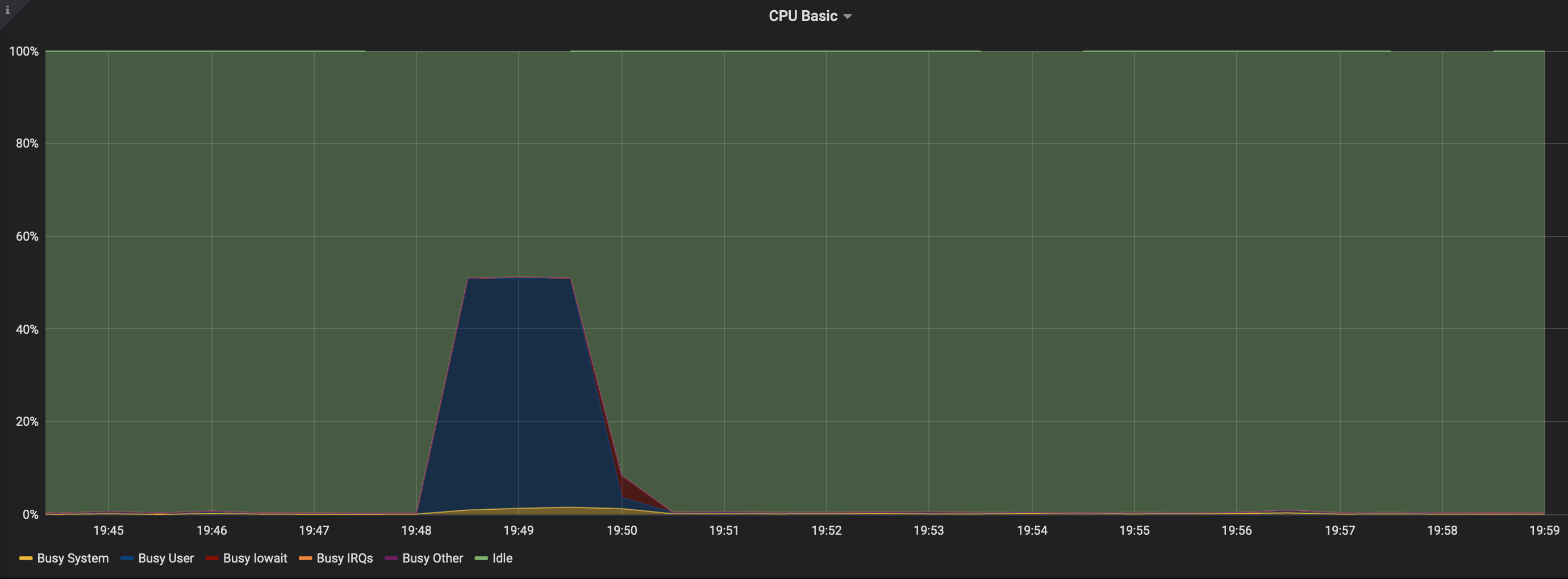
@fish2plain thank you for the info. If feasible can you please check if any cpu core/thread is locked at 100% usage. Thanks
cpu is not toping at 100%. it seems to be hovering around 10% - 100%
skokasik
on 25 Jan 2020
@fish2plain thank you for the info. If feasible can you please check if any cpu core/thread is locked at 100% usage. Thanks
nope.. almost no cpu activities after bootstrapped
fish2plain
on 25 Jan 2020
I have two nodes, but only one experiences this issue, the other works.
The biggest difference between the two is that the working one uses jormungandr-v0.8.7-aarch64-unknown-linux-gnu.tar.gz and the broke one uses jormungandr-v0.8.7-x86_64-unknown-linux-gnu.tar.gz
 reliablestaking
on 25 Jan 2020
reliablestaking
on 25 Jan 2020
If it is helpful, I am having the same problem on 2 v0.8.7 nodes.
Here's my relevant info.
blockRecvCnt: 0
lastBlockContentSize: 0
lastBlockDate: "43.7651"
lastBlockFees: 0
lastBlockHash: 82f5adc0a57166e84e7352a17c8c989bbf7e823e0ed5877cee2872047f5f040b
lastBlockHeight: "131772"
lastBlockSum: 0
lastBlockTime: "2020-01-25T23:28:39+00:00"
lastBlockTx: 0
lastReceivedBlockTime: ~
peerAvailableCnt: "0"
peerQuarantinedCnt: "0"
peerUnreachableCnt: "0"
state: Running
txRecvCnt: 0
uptime: 467
version: jormungandr 0.8.7-364cd84e
date: Sat Jan 25 23:36:39 UTC 2020
Log head
Jan 25 23:27:30.057 INFO Starting jormungandr 0.8.7 (HEAD-364cd84e, release, linux [x86_64]) - [rustc 1.40.0 (73528e339 2019-12-16)], task: init
Jan 25 23:27:30.057 WARN Node started without path to the stored secret keys (not a stake pool or a BFT leader), task: init
Jan 25 23:27:30.058 INFO storing blockchain in '"/home/ubuntu/chains/jormungandr-itn_rewards_v1/blocks.sqlite"', task: init
Jan 25 23:28:43.796 INFO connecting to bootstrap peer 52.9.77.197:3000, peer_addr: 52.9.77.197:3000, task: bootstrap
Jan 25 23:28:43.924 INFO update current branch tip, peer_addr: 52.9.77.197:3000, task: bootstrap
Jan 25 23:28:43.927 INFO update current branch tip, peer_addr: 52.9.77.197:3000, task: bootstrap
Log tail
Jan 25 23:28:51.362 INFO update current branch tip, peer_addr: 52.9.77.197:3000, task: bootstrap
Jan 25 23:28:51.363 INFO update current branch tip, peer_addr: 52.9.77.197:3000, task: bootstrap
Jan 25 23:28:51.366 INFO update current branch tip, peer_addr: 52.9.77.197:3000, task: bootstrap
Jan 25 23:28:51.367 INFO initial bootstrap completed, peer_addr: 52.9.77.197:3000, task: bootstrap
Jan 25 23:28:51.378 INFO listening and accepting gRPC connections, local_addr: 0.0.0.0:20002, task: network
Connections
netstat -tupan |grep EST |grep 2000 |wc -l
246
Config
log:
- output: stderr
format: plain
level: info
p2p:
topics_of_interest:
blocks: normal
messages: low
listen_address: "/ip4/0.0.0.0/tcp/20002"
public_address: "/ip4/52.70.79.184/tcp/20002"
public_id: 189c346de1704ee6cf54e7fd4de9420638acb82372a76728
max_connections: 512
max_unreachable_nodes_to_connect_per_event: 16
gossip_interval: 2s
trusted_peers:
[...]
rest:
listen: "127.0.0.1:20001"
storage: /home/ubuntu/chains/jormungandr-itn_rewards_v1
mempool:
pool_max_entries: 30000
fragment_ttl: 30m
log_max_entries: 300000
log_ttl: 1h
garbage_collection_interval: 5m
leadership:
log_ttl: 24h
garbage_collection_interval: 30m
 shawnim
on 26 Jan 2020
shawnim
on 26 Jan 2020
@rinor
Hi Rinor, I did few more investigation by running it on container in my local machine running the ubuntu bionic and cosmic. Both seem to work
blockRecvCnt: 263
lastBlockContentSize: 0
lastBlockDate: "43.8608"
lastBlockFees: 0
lastBlockHash: 3e96175e4f2798501c68a714354c8c4814e4b64345c9df02171d0a031d3ff719
lastBlockHeight: "131844"
lastBlockSum: 0
lastBlockTime: "2020-01-26T00:00:33+00:00"
lastBlockTx: 0
lastReceivedBlockTime: "2020-01-26T00:00:34+00:00"
peerAvailableCnt: "12702"
peerQuarantinedCnt: "9590"
peerUnreachableCnt: "267"
state: Running
txRecvCnt: 54
uptime: 4783
version: jormungandr 0.8.7-364cd84
I ran the container on my server
27abe24f69e3dad3013f674b08f30b, peer_addr: 13.56.0.226:3000, task: bootstrap
Jan 26 00:56:22.711 INFO update current branch tip, peer_addr: 13.56.0.226:3000, task: bootstrap
Jan 26 00:56:22.720 DEBG validated block, block_date: 43.9878, hash: 04d81f44afa6bd6f7e6746f6960b422d74a3c932169ddd39bcb7aa801f1f0ae2, peer_addr: 13.56.0.226:3000, task: bootstrap
Jan 26 00:56:22.729 INFO update current branch tip, peer_addr: 13.56.0.226:3000, task: bootstrap
Jan 26 00:56:22.738 DEBG validated block, block_date: 43.9885, hash: 30b09bd9a8be7aba7ea02812cd042c134c3b6b61da8899e57fea708abf3fe991, peer_addr: 13.56.0.226:3000, task: bootstrap
Jan 26 00:56:22.748 INFO update current branch tip, peer_addr: 13.56.0.226:3000, task: bootstrap
Jan 26 00:56:22.756 INFO initial bootstrap completed, peer_addr: 13.56.0.226:3000, task: bootstrap
Jan 26 00:56:22.769 INFO listening and accepting gRPC connections, local_addr: 0.0.0.0:3000, task: network
blockRecvCnt: 0
lastBlockContentSize: 0
lastBlockDate: "43.9885"
lastBlockFees: 0
lastBlockHash: 30b09bd9a8be7aba7ea02812cd042c134c3b6b61da8899e57fea708abf3fe991
lastBlockHeight: "131950"
lastBlockSum: 0
lastBlockTime: "2020-01-26T00:43:07+00:00"
lastBlockTx: 0
lastReceivedBlockTime: ~
peerAvailableCnt: "0"
peerQuarantinedCnt: "0"
peerUnreachableCnt: "0"
state: Running
txRecvCnt: 0
uptime: 61
version: jormungandr 0.8.7-364cd84
I am leaning toward new dependency was introduced which not working well with kernel version I have. WIll keep this thread more info as i check more.
skokasik
on 26 Jan 2020
Thank you all for the valuable information. Will update once fixed or if further information required.
rinor
on 26 Jan 2020
@skokasik @fish2plain @A-Caccese do you have any log attempting connections smth like:
Jan 24 13:04:15.230 INFO listening and accepting gRPC connections, local_addr: 127.0.0.1:9001, task: network
Jan 24 13:04:15.232 INFO connecting to peer, node_id: 52762c49a84699d43c96fdfe6de18079fb2512077d6aa5bc, peer_addr: 13.112.181.42:3000, task: network
Jan 24 13:04:15.232 INFO connecting to peer, node_id: 671a9e7a5c739532668511bea823f0f5c5557c99b813456c, peer_addr: 52.9.132.248:3000, task: network
Jan 24 13:04:15.233 INFO connecting to peer, node_id: 18bf81a75e5b15a49b843a66f61602e14d4261fb5595b5f5, peer_addr: 52.8.15.52:3000, task: network
Jan 24 13:04:15.233 INFO connecting to peer, node_id: 7ddf203c86a012e8863ef19d96aabba23d2445c492d86267, peer_addr: 13.56.0.226:3000, task: network
Jan 24 13:04:15.234 INFO connecting to peer, node_id: 8529e334a39a5b6033b698be2040b1089d8f67e0102e2575, peer_addr: 18.182.115.51:3000, task: network
Jan 24 13:04:15.234 INFO connecting to peer, node_id: 8f9ff09765684199b351d520defac463b1282a63d3cc99ca, peer_addr: 3.125.31.84:3000, task: network
Jan 24 13:04:15.235 INFO connecting to peer, node_id: 7e1020c2e2107a849a8353876d047085f475c9bc646e42e9, peer_addr: 13.114.196.228:3000, task: network
Jan 24 13:04:15.235 INFO connecting to peer, node_id: 9d15a9e2f1336c7acda8ced34e929f697dc24ea0910c3e67, peer_addr: 3.125.183.71:3000, task: network
Jan 24 13:04:15.235 INFO connecting to peer, node_id: df02383863ae5e14fea5d51a092585da34e689a73f704613, peer_addr: 54.183.149.167:3000, task: network
Jan 24 13:04:15.236 INFO connecting to peer, node_id: fc89bff08ec4e054b4f03106f5312834abdf2fcb444610e9, peer_addr: 18.177.78.96:3000, task: network
Jan 24 13:04:15.236 INFO connecting to peer, node_id: fcdf302895236d012635052725a0cdfc2e8ee394a1935b63, peer_addr: 52.9.77.197:3000, task: network
Jan 24 13:04:15.236 INFO connecting to peer, node_id: 35bead7d45b3b8bda5e74aa12126d871069e7617b7f4fe62, peer_addr: 3.115.154.161:3000, task: network
Jan 24 13:04:15.237 INFO connecting to peer, node_id: 06aa98b0ab6589f464d08911717115ef354161f0dc727858, peer_addr: 18.184.35.137:3000, task: network
@skokasik your nodes having
peerAvailableCnt: "0"
peerQuarantinedCnt: "0"
peerUnreachableCnt: "0"
shows that no gossiping data was exchanged with the bootstrapping peer, so if the node has no way to get further info. Thank you all for the reports. Invetigating the reasons for this case.
Thanks @rinor for looking at this problem.
I don't see much data after grpc server listening at specific port. having said that the port is open and accepting packet.Jan 24 22:52:27.796 DEBG validated block, block_date: 42.6446, hash: 10ed58931c52ef1690005e8a1cf3699af9544782bfaf1d79a213f300159aab61, peer_addr: 3.115.154.161:3000, task: bootstrap Jan 24 22:52:27.811 INFO update current branch tip, peer_addr: 3.115.154.161:3000, task: bootstrap Jan 24 22:52:27.821 DEBG validated block, block_date: 42.6479, hash: 1c498eea58b81e8f85e41e096fd039a212702f8d0dce447250e017291560ca35, peer_addr: 3.115.154.161:3000, task: bootstrap Jan 24 22:52:27.831 INFO update current branch tip, peer_addr: 3.115.154.161:3000, task: bootstrap Jan 24 22:52:27.847 DEBG validated block, block_date: 42.6486, hash: 596d42b68578ccc3d826e0556fe105bb8e850aa0ae7fc19c8cb07af34fc7d30c, peer_addr: 3.115.154.161:3000, task: bootstrap Jan 24 22:52:27.857 INFO update current branch tip, peer_addr: 3.115.154.161:3000, task: bootstrap Jan 24 22:52:27.874 DEBG validated block, block_date: 42.6508, hash: f2ce8c8528680260ead2cccff9376ef0af2cfe1606852d58366359bcf5a755f3, peer_addr: 3.115.154.161:3000, task: bootstrap Jan 24 22:52:27.883 INFO update current branch tip, peer_addr: 3.115.154.161:3000, task: bootstrap Jan 24 22:52:27.894 INFO initial bootstrap completed, peer_addr: 3.115.154.161:3000, task: bootstrap Jan 24 22:52:27.906 INFO listening and accepting gRPC connections, local_addr: 0.0.0.0:3000, task: networkState Recv-Q Send-Q Local Address:Port Peer Address:Port LISTEN 0 128 127.0.0.53%lo:domain 0.0.0.0:* LISTEN 0 128 0.0.0.0:ssh 0.0.0.0:* LISTEN 1025 1024 0.0.0.0:3000 0.0.0.0:* LISTEN 0 1024 127.0.0.1:3100 0.0.0.0:* LISTEN 0 2048 127.0.0.1:3101 0.0.0.0:* LISTEN 0 1024 0.0.0.0:3200 0.0.0.0:* LISTEN 0 128 [::]:ssh [::]:* LISTEN 0 65535 *:4000 *:* LISTEN 0 65535 *:9090 *:* LISTEN 0 65535 *:9100 *:*Result of port scanning for 3000 range, i ommited the rest of Ports with Connection refused.
netcat: connect to 0.0.0.0 port 3000 (tcp) failed: Connection timed out Connection to 0.0.0.0 3100 port [tcp/*] succeeded! Connection to 0.0.0.0 3101 port [tcp/*] succeeded! netcat: connect to 0.0.0.0 port 3192 (tcp) failed: Connection refused netcat: connect to 0.0.0.0 port 3193 (tcp) failed: Connection refused netcat: connect to 0.0.0.0 port 3194 (tcp) failed: Connection refused netcat: connect to 0.0.0.0 port 3195 (tcp) failed: Connection refused netcat: connect to 0.0.0.0 port 3196 (tcp) failed: Connection refused netcat: connect to 0.0.0.0 port 3197 (tcp) failed: Connection refused netcat: connect to 0.0.0.0 port 3198 (tcp) failed: Connection refused netcat: connect to 0.0.0.0 port 3199 (tcp) failed: Connection refused Connection to 0.0.0.0 3200 port [tcp/*] succeeded!local machine: jormungandr 0.8.7-364cd84e
Azure VM: jormungandr 0.8.7-364cd84e+
compiled version in relese: jormungandr 0.8.7-364cd84eI am wondering what is '+' character at the end on my version ?
I have tried to replace the binary in my azure vm with the binary in release, also show similar problem:
blockRecvCnt: 0 lastBlockContentSize: 0 lastBlockDate: "42.8998" lastBlockFees: 0 lastBlockHash: 13754fde498672464cb30474b3fc5a8e20d0ab98f06e75a07d66a0d3ca4fc2b6 lastBlockHeight: "128730" lastBlockSum: 0 lastBlockTime: "2020-01-25T00:13:33+00:00" lastBlockTx: 0 lastReceivedBlockTime: ~ peerAvailableCnt: "0" peerQuarantinedCnt: "0" peerUnreachableCnt: "0" state: Running txRecvCnt: 0 uptime: 420 version: jormungandr 0.8.7-364cd84Local machine: -
Distributor ID: Ubuntu
Description: Ubuntu 19.04
Release: 19.04
Codename: discokernel version:
5.0.0-38-genericLocal machine seems to exhbit diffeent behavior, it seems to work on my local machine.
blockRecvCnt: 1 lastBlockContentSize: 0 lastBlockDate: "42.9117" lastBlockFees: 0 lastBlockHash: aefb1985d78680444e0ef8502c24ad1caadc8c801d1866dcaf3c2923dfbef17e lastBlockHeight: "128742" lastBlockSum: 0 lastBlockTime: "2020-01-25T00:17:31+00:00" lastBlockTx: 0 lastReceivedBlockTime: "2020-01-25T00:26:28+00:00" peerAvailableCnt: "50" peerQuarantinedCnt: "107" peerUnreachableCnt: "1" state: Running txRecvCnt: 6 uptime: 445 version: jormungandr 0.8.7-364cd84eAzure vm:
Distributor ID: Ubuntu
Description: Ubuntu 18.04.3 LTS
Release: 18.04
Codename: bionicOne thing I can see is difference in libc library, local uses 2.29, azure vm 2.27. But that might not be the problem since i put the binary from release and it still run without error on dependency.
jormungandr-v0.8.7-x86_64-unknown-linux-gnu.tar.gz
Im also having the same issue after deploying jormungandr-v0.8.7-x86_64-unknown-linux-gnu.tar.gz:
lsb_release -a
No LSB modules are available.
Distributor ID: Ubuntu
Description: Ubuntu 16.04 LTS
Release: 16.04
Codename: xenial
I'm forced to run Jormungandr 0.8.6 for now.
 gatisdruva
on 27 Jan 2020
gatisdruva
on 27 Jan 2020
BTW, I noticed that it makes no difference whether you bootstrap from a saved database or remove the db and fetch block 0 from the trusted peer.
On Monday, January 27, 2020, 7:39:19 AM PST, Gatis <[email protected]> wrote:
@skokasik @fish2plain @A-Caccese do you have any log attempting connections smth like:
Jan 24 13:04:15.230 INFO listening and accepting gRPC connections, local_addr: 127.0.0.1:9001, task: network
Jan 24 13:04:15.232 INFO connecting to peer, node_id: 52762c49a84699d43c96fdfe6de18079fb2512077d6aa5bc, peer_addr: 13.112.181.42:3000, task: network
Jan 24 13:04:15.232 INFO connecting to peer, node_id: 671a9e7a5c739532668511bea823f0f5c5557c99b813456c, peer_addr: 52.9.132.248:3000, task: network
Jan 24 13:04:15.233 INFO connecting to peer, node_id: 18bf81a75e5b15a49b843a66f61602e14d4261fb5595b5f5, peer_addr: 52.8.15.52:3000, task: network
Jan 24 13:04:15.233 INFO connecting to peer, node_id: 7ddf203c86a012e8863ef19d96aabba23d2445c492d86267, peer_addr: 13.56.0.226:3000, task: network
Jan 24 13:04:15.234 INFO connecting to peer, node_id: 8529e334a39a5b6033b698be2040b1089d8f67e0102e2575, peer_addr: 18.182.115.51:3000, task: network
Jan 24 13:04:15.234 INFO connecting to peer, node_id: 8f9ff09765684199b351d520defac463b1282a63d3cc99ca, peer_addr: 3.125.31.84:3000, task: network
Jan 24 13:04:15.235 INFO connecting to peer, node_id: 7e1020c2e2107a849a8353876d047085f475c9bc646e42e9, peer_addr: 13.114.196.228:3000, task: network
Jan 24 13:04:15.235 INFO connecting to peer, node_id: 9d15a9e2f1336c7acda8ced34e929f697dc24ea0910c3e67, peer_addr: 3.125.183.71:3000, task: network
Jan 24 13:04:15.235 INFO connecting to peer, node_id: df02383863ae5e14fea5d51a092585da34e689a73f704613, peer_addr: 54.183.149.167:3000, task: network
Jan 24 13:04:15.236 INFO connecting to peer, node_id: fc89bff08ec4e054b4f03106f5312834abdf2fcb444610e9, peer_addr: 18.177.78.96:3000, task: network
Jan 24 13:04:15.236 INFO connecting to peer, node_id: fcdf302895236d012635052725a0cdfc2e8ee394a1935b63, peer_addr: 52.9.77.197:3000, task: network
Jan 24 13:04:15.236 INFO connecting to peer, node_id: 35bead7d45b3b8bda5e74aa12126d871069e7617b7f4fe62, peer_addr: 3.115.154.161:3000, task: network
Jan 24 13:04:15.237 INFO connecting to peer, node_id: 06aa98b0ab6589f464d08911717115ef354161f0dc727858, peer_addr: 18.184.35.137:3000, task: network
@skokasik your nodes having
peerAvailableCnt: "0"
peerQuarantinedCnt: "0"
peerUnreachableCnt: "0"
shows that no gossiping data was exchanged with the bootstrapping peer, so if the node has no way to get further info. Thank you all for the reports. Invetigating the reasons for this case.
Thanks @rinor for looking at this problem.
I don't see much data after grpc server listening at specific port. having said that the port is open and accepting packet.
Jan 24 22:52:27.796 DEBG validated block, block_date: 42.6446, hash: 10ed58931c52ef1690005e8a1cf3699af9544782bfaf1d79a213f300159aab61, peer_addr: 3.115.154.161:3000, task: bootstrap
Jan 24 22:52:27.811 INFO update current branch tip, peer_addr: 3.115.154.161:3000, task: bootstrap
Jan 24 22:52:27.821 DEBG validated block, block_date: 42.6479, hash: 1c498eea58b81e8f85e41e096fd039a212702f8d0dce447250e017291560ca35, peer_addr: 3.115.154.161:3000, task: bootstrap
Jan 24 22:52:27.831 INFO update current branch tip, peer_addr: 3.115.154.161:3000, task: bootstrap
Jan 24 22:52:27.847 DEBG validated block, block_date: 42.6486, hash: 596d42b68578ccc3d826e0556fe105bb8e850aa0ae7fc19c8cb07af34fc7d30c, peer_addr: 3.115.154.161:3000, task: bootstrap
Jan 24 22:52:27.857 INFO update current branch tip, peer_addr: 3.115.154.161:3000, task: bootstrap
Jan 24 22:52:27.874 DEBG validated block, block_date: 42.6508, hash: f2ce8c8528680260ead2cccff9376ef0af2cfe1606852d58366359bcf5a755f3, peer_addr: 3.115.154.161:3000, task: bootstrap
Jan 24 22:52:27.883 INFO update current branch tip, peer_addr: 3.115.154.161:3000, task: bootstrap
Jan 24 22:52:27.894 INFO initial bootstrap completed, peer_addr: 3.115.154.161:3000, task: bootstrap
Jan 24 22:52:27.906 INFO listening and accepting gRPC connections, local_addr: 0.0.0.0:3000, task: network
State Recv-Q Send-Q Local Address:Port Peer Address:Port
LISTEN 0 128 127.0.0.53%lo:domain 0.0.0.0:*
LISTEN 0 128 0.0.0.0:ssh 0.0.0.0:*
LISTEN 1025 1024 0.0.0.0:3000 0.0.0.0:*
LISTEN 0 1024 127.0.0.1:3100 0.0.0.0:*
LISTEN 0 2048 127.0.0.1:3101 0.0.0.0:*
LISTEN 0 1024 0.0.0.0:3200 0.0.0.0:*
LISTEN 0 128 [::]:ssh [::]:*
LISTEN 0 65535 :4000 *:
LISTEN 0 65535 :9090 *:
LISTEN 0 65535 :9100 *:
Result of port scanning for 3000 range, i ommited the rest of Ports with Connection refused.
netcat: connect to 0.0.0.0 port 3000 (tcp) failed: Connection timed out
Connection to 0.0.0.0 3100 port [tcp/] succeeded!
Connection to 0.0.0.0 3101 port [tcp/] succeeded!
netcat: connect to 0.0.0.0 port 3192 (tcp) failed: Connection refused
netcat: connect to 0.0.0.0 port 3193 (tcp) failed: Connection refused
netcat: connect to 0.0.0.0 port 3194 (tcp) failed: Connection refused
netcat: connect to 0.0.0.0 port 3195 (tcp) failed: Connection refused
netcat: connect to 0.0.0.0 port 3196 (tcp) failed: Connection refused
netcat: connect to 0.0.0.0 port 3197 (tcp) failed: Connection refused
netcat: connect to 0.0.0.0 port 3198 (tcp) failed: Connection refused
netcat: connect to 0.0.0.0 port 3199 (tcp) failed: Connection refused
Connection to 0.0.0.0 3200 port [tcp/*] succeeded!
local machine: jormungandr 0.8.7-364cd84e
Azure VM: jormungandr 0.8.7-364cd84e+
compiled version in relese: jormungandr 0.8.7-364cd84e
I am wondering what is '+' character at the end on my version ?
I have tried to replace the binary in my azure vm with the binary in release, also show similar problem:
blockRecvCnt: 0
lastBlockContentSize: 0
lastBlockDate: "42.8998"
lastBlockFees: 0
lastBlockHash: 13754fde498672464cb30474b3fc5a8e20d0ab98f06e75a07d66a0d3ca4fc2b6
lastBlockHeight: "128730"
lastBlockSum: 0
lastBlockTime: "2020-01-25T00:13:33+00:00"
lastBlockTx: 0
lastReceivedBlockTime: ~
peerAvailableCnt: "0"
peerQuarantinedCnt: "0"
peerUnreachableCnt: "0"
state: Running
txRecvCnt: 0
uptime: 420
version: jormungandr 0.8.7-364cd84
Local machine: -
Distributor ID: Ubuntu
Description: Ubuntu 19.04
Release: 19.04
Codename: disco
kernel version:
5.0.0-38-generic
Local machine seems to exhbit diffeent behavior, it seems to work on my local machine.
blockRecvCnt: 1
lastBlockContentSize: 0
lastBlockDate: "42.9117"
lastBlockFees: 0
lastBlockHash: aefb1985d78680444e0ef8502c24ad1caadc8c801d1866dcaf3c2923dfbef17e
lastBlockHeight: "128742"
lastBlockSum: 0
lastBlockTime: "2020-01-25T00:17:31+00:00"
lastBlockTx: 0
lastReceivedBlockTime: "2020-01-25T00:26:28+00:00"
peerAvailableCnt: "50"
peerQuarantinedCnt: "107"
peerUnreachableCnt: "1"
state: Running
txRecvCnt: 6
uptime: 445
version: jormungandr 0.8.7-364cd84e
Azure vm:
Distributor ID: Ubuntu
Description: Ubuntu 18.04.3 LTS
Release: 18.04
Codename: bionic
One thing I can see is difference in libc library, local uses 2.29, azure vm 2.27. But that might not be the problem since i put the binary from release and it still run without error on dependency.
jormungandr-v0.8.7-x86_64-unknown-linux-gnu.tar.gz
Im also having the same issue after deploying jormungandr-v0.8.7-x86_64-unknown-linux-gnu.tar.gz:
lsb_release -a
No LSB modules are available.
Distributor ID: Ubuntu
Description:    Ubuntu 16.04 LTS
Release:        16.04
Codename:       xenial
I'm forced to run Jormungandr 0.8.6 for now.
—
You are receiving this because you commented.
Reply to this email directly, view it on GitHub, or unsubscribe.
shawnim
on 27 Jan 2020
Could the problem be the network configuration that cloud computing providers like AWS use.
Every EC2 server has a private IP that is different from the public IP that is reachable form the outside world. Previously, with v0.8.6 the listen_address was set to the private IP and the public_address was set to the public IP.
On AWS neither x86 nor ARM servers work with v0.8.7 while on my Mac with a DSL connection everything works fine.
 onyxstakepool
on 27 Jan 2020
onyxstakepool
on 27 Jan 2020
@onyxstakepool can you try (if not already) in the failing environements the following cases:
listen_address: /ip4/PRIVATEIP/tcp/PORTset only, nopublic_address:
if that works try alsolisten_address: /ip4/PRIVATEIP/tcp/PORTandpublic_address: /ip4/PUBLICIP/tcp/PORTboth set
and report back the findings if possible.
Thank you.
rinor
on 28 Jan 2020
@rinor No difference for me with or without public_address on VPS. Or only with listen_address.
cardanoinvest
on 28 Jan 2020
@cardanoinvest thank you.
rinor
on 28 Jan 2020
@rinor I just installed master build on the node that had problems, and it works now! I tried it with public and listen address. But strange thing is after bootstraping I am on that block (lastBlockTime: "2019-12-31T07:21:13+00:00") and it downloads new blocks slower than 0.8.6 -
blockRecvCnt: 1472
lastBlockContentSize: 0
lastBlockDate: "17.21828"
lastBlockFees: 0
lastBlockHash: bf1329a1d6745995bf11253a5834f814712b8b04ea00cf183c68c3dba4e39375
lastBlockHeight: "57592"
lastBlockSum: 0
lastBlockTime: "2019-12-31T07:21:13+00:00"
lastBlockTx: 0
lastReceivedBlockTime: "2020-01-28T14:38:22+00:00"
peerAvailableCnt: 1644
peerQuarantinedCnt: 1080
peerUnreachableCnt: 45
state: Running
txRecvCnt: 115
uptime: 582
version: jormungandr 0.8.7-b57e77a
cardanoinvest
on 28 Jan 2020
@cardanoinvest thanks for the report.
Regarding lastBlockTime: "2019-12-31T07:21:13+00:00", probably the node started bootstrapping from genesis again and failed pulling all the blocks so it is stuck to that one, and may not recover since is too far behind. There is a fix for this that will be included shortly https://github.com/input-output-hk/jormungandr/pull/1646 that should keep the node trying until it fetches all the blocks from the bootstrapping node. (not all exactly, but till the tip of the remote node we are bootstrapping from...)
rinor
on 28 Jan 2020
Can anyone else, if feasible, try and confirm that mater brach works in the prevously failing environements! Thank you
rinor
on 28 Jan 2020
master branch seems to work for me. keen to see what actually fix it. @rinor thanks.
blockRecvCnt: 10
lastBlockContentSize: 0
lastBlockDate: "45.38112"
lastBlockFees: 0
lastBlockHash: 00c28db99231c406136a1506eceae90beb7fc10f635c07bb5ce77f529a2cf7dc
lastBlockHeight: "140319"
lastBlockSum: 0
lastBlockTime: "2020-01-28T16:24:01+00:00"
lastBlockTx: 0
lastReceivedBlockTime: "2020-01-28T16:29:23+00:00"
peerAvailableCnt: 1157
peerQuarantinedCnt: 175
peerUnreachableCnt: 49
state: Running
txRecvCnt: 8
uptime: 45
version: jormungandr 0.8.7-b57e77a4
skokasik
on 28 Jan 2020
master branch seems to work for me. keen to see what actually fix it. @rinor thanks.
blockRecvCnt: 10
lastBlockContentSize: 0
lastBlockDate: "45.38112"
lastBlockFees: 0
lastBlockHash: 00c28db99231c406136a1506eceae90beb7fc10f635c07bb5ce77f529a2cf7dc
lastBlockHeight: "140319"
lastBlockSum: 0
lastBlockTime: "2020-01-28T16:24:01+00:00"
lastBlockTx: 0
lastReceivedBlockTime: "2020-01-28T16:29:23+00:00"
peerAvailableCnt: 1157
peerQuarantinedCnt: 175
peerUnreachableCnt: 49
state: Running
txRecvCnt: 8
uptime: 45
version: jormungandr 0.8.7-b57e77a4
Hi skokasic, in which environment have you tried new master branch?
A-Caccese
on 28 Jan 2020
@skokasik thank you for the feedback.
keen to see what actually fix it.
Some code that was added for v0.8.7 was reverted until better investigated.
rinor
on 28 Jan 2020
@skokasik thank you for the feedback.
keen to see what actually fix it.
Some code that was added for v0.8.7 was reverted until better investigated.
thanks @rinor. super appricate the quick fix. I will try to diff the branch. I just finished setting up my machine for remote debugging. if only no work during the day :) . anyway, thanks again @rinor
skokasik
on 28 Jan 2020
master branch seems to work for me. keen to see what actually fix it. @rinor thanks.
blockRecvCnt: 10
lastBlockContentSize: 0
lastBlockDate: "45.38112"
lastBlockFees: 0
lastBlockHash: 00c28db99231c406136a1506eceae90beb7fc10f635c07bb5ce77f529a2cf7dc
lastBlockHeight: "140319"
lastBlockSum: 0
lastBlockTime: "2020-01-28T16:24:01+00:00"
lastBlockTx: 0
lastReceivedBlockTime: "2020-01-28T16:29:23+00:00"
peerAvailableCnt: 1157
peerQuarantinedCnt: 175
peerUnreachableCnt: 49
state: Running
txRecvCnt: 8
uptime: 45
version: jormungandr 0.8.7-b57e77a4Hi skokasic, in which environment have you tried new master branch?
Hello i was testing it on azure environment which was having problem before.
Azure vm:
Distributor ID: Ubuntu
Description: Ubuntu 18.04.3 LTS
Release: 18.04
Codename: bionic
kernel version:
5.0.0-1028-azure
skokasik
on 28 Jan 2020
Hi, master branch works fine for me as well.
AWS EC2 VM:
Distributor ID: Ubuntu
Description: Ubuntu 18.04.3 LTS
Release: 18.04
Codename: bionic
Public and listening IPs remained same like with 0.8.6
blockRecvCnt: 12
lastBlockContentSize: 0
lastBlockDate: "46.147"
lastBlockFees: 0
lastBlockHash: c99cdf163bc86f37a281d14d073384aef232a07de2b1d8114652916795a9d943
lastBlockHeight: "140705"
lastBlockSum: 0
lastBlockTime: "2020-01-28T19:18:31+00:00"
lastBlockTx: 0
lastReceivedBlockTime: "2020-01-28T19:18:33+00:00"
peerAvailableCnt: 106
peerQuarantinedCnt: 160
peerUnreachableCnt: 3
state: Running
txRecvCnt: 5
uptime: 405
version: jormungandr 0.8.7-e33758bf
 lunarpool
on 28 Jan 2020
lunarpool
on 28 Jan 2020
@lunarpool thank you for the feedback.
rinor
on 28 Jan 2020
@rinor yeah, I tried on my other node, different server, different OS. And master works also.
cardanoinvest
on 28 Jan 2020
@rinor I have compiled the master (e33758bfbc75c2577dd4b4e29b3a751ff2651413) and the jormungandr v0.8.7 works on my cloud setup now!
Great work!
onyxstakepool
on 28 Jan 2020
@onyxstakepool thank you for checking.
rinor
on 28 Jan 2020
I'm running jormungandr 0.8.7-e33758bf on Ubuntu 18.04.3 (bionic), kernel 4.15.0-74-generic, and it's working fine.
blockRecvCnt: 337
lastBlockContentSize: 0
lastBlockDate: "47.6594"
lastBlockFees: 0
lastBlockHash: c14ee40c722ac34a47b88f686e5bb4a52644f63d1ae716c6bc2c55c949d1a358
lastBlockHeight: "144250"
lastBlockSum: 0
lastBlockTime: "2020-01-29T22:53:25+00:00"
lastBlockTx: 0
lastReceivedBlockTime: "2020-01-29T22:53:25+00:00"
peerAvailableCnt: 3579
peerQuarantinedCnt: 34261
peerUnreachableCnt: 761
state: Running
txRecvCnt: 213
uptime: 6971
version: jormungandr 0.8.7-e33758bf
@A-Caccese thank you for the feedback.
rinor
on 30 Jan 2020
Thank you all for the feedback. Will close this one, but please keep an eye on it and feel free to reopen/comment if it happens again on recent releases, even if only once. Thank you.
rinor
on 30 Jan 2020
Related issues
 dorin100
·
28Comments
dorin100
·
28Comments
 rickymac68
·
18Comments
rickymac68
·
18Comments
 tstdin
·
28Comments
tstdin
·
28Comments
 NicolasDP
·
19Comments
NicolasDP
·
19Comments
 lewnelson
·
18Comments
lewnelson
·
18Comments
Most helpful comment
Same issue on
4.15.0-1057-aws #59-Ubuntut2.medium EC2.