Joplin: Synchronisation crash with Evernote imported notes
Environment
Joplin version:
Joplin for Desktop
Copyright © 2016-2020 Laurent Cozic
Joplin 1.2.6 (prod, win32)Client ID: 3ea7e21a2a304b4dbb4c1704fcf59d6e
Sync Version: 2
Profile Version: 34
Keychain Supported: YesRevision: f5f117cb (master)
Platform:
Windows 10
OS specifics:
| Major | Minor | Build | Revision |
| ----- | ----- | ----- | -------- |
| 10 | 0 | 19041 | 0 |
Steps to reproduce
- Export notebook from Evernote in _enex_ format
- Import the file into Joplin ( as _HTML_ or as _Markdown_ )
- Configure synchronisation (Dropbox or OneDrive)
- Synchronise for the first time
- Synchronise with another device (Windows or Android)
Remarks
- No matter if I use Dropbox or OneDrive.
- Import _enex_ as _HTML_ or _Markdown_ does not matter
- Error occurs in Android and Windows
- Deleting through the UI the faulting file doesn fix the issue
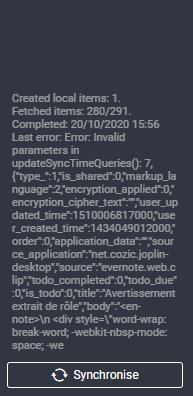
Error
_enex_ file
Here's the file that causes the issue
Logfile
2020-10-20 15:50:20: "Operations completed: "
2020-10-20 15:50:20: "createRemote: 9"
2020-10-20 15:50:20: "fetchingTotal: 291"
2020-10-20 15:50:20: "fetchingProcessed: 280"
2020-10-20 15:50:20: "createLocal: 242"
2020-10-20 15:50:20: "Total folders: 23"
2020-10-20 15:50:20: "Total notes: 72"
2020-10-20 15:50:20: "Total resources: 122"
2020-10-20 15:50:20: "There was some errors:"
2020-10-20 15:50:20: "Error: Invalid parameters in updateSyncTimeQueries(): 7, {"type_":1,"is_shared":0,"markup_language":2,"encryption_applied":0,"encryption_cipher_text":"","user_updated_time":1510006817000,"user_created_time":1434049012000,"order":0,"application_data":"","source_application":"net.cozic.joplin-desktop","source":"evernote.web.clip","todo_completed":0,"todo_due":0,"is_todo":0,"title":"Avertissement extrait de rôle","body":"..."}, 1603201818218
Error: Invalid parameters in updateSyncTimeQueries(): 7, {"type_":1,"is_shared":0,"markup_language":2,"encryption_applied":0,"encryption_cipher_text":"","user_updated_time":1510006817000,"user_created_time":1434049012000,"order":0,"application_data":"","source_application":"net.cozic.joplin-desktop","source":"evernote.web.clip","todo_completed":0,"todo_due":0,"is_todo":0,"title":"Avertissement extrait de rôle","body":"..."}, 1603201818218
    at Function.updateSyncTimeQueries (C:\Program Files\Joplin\resources\app.asar\lib\models\BaseItem.js:672:61)
    at Synchronizer.start (C:\Program Files\Joplin\resources\app.asar\lib\synchronizer.js:739:31)
    at async timeoutCallback (C:\Program Files\Joplin\resources\app.asar\lib\registry.js:130:26)"
2020-10-20 15:50:21: "DecryptionWorker: cannot start because no master key is currently loaded."
2020-10-20 15:51:15: "ResourceFetcher: Auto-add resources: Mode: always"
2020-10-20 15:51:15: "ResourceFetcher: Auto-added resources: 10"
2020-10-20 15:51:18: "ResourceFetcher: Auto-add resources: Mode: always"
2020-10-20 15:51:18: "ResourceFetcher: Auto-added resources: 9"
2020-10-20 15:51:21: "ResourceFetcher: Auto-add resources: Mode: always"
2020-10-20 15:51:22: "ResourceFetcher: Auto-added resources: 8"
2020-10-20 15:51:24: "ResourceFetcher: Auto-add resources: Mode: always"
2020-10-20 15:51:24: "ResourceFetcher: Auto-added resources: 9"
2020-10-20 15:51:28: "ResourceFetcher: Auto-add resources: Mode: always"
2020-10-20 15:51:28: "ResourceFetcher: Auto-added resources: 9"
2020-10-20 15:51:32: "ResourceFetcher: Auto-add resources: Mode: always"
2020-10-20 15:51:32: "ResourceFetcher: Auto-added resources: 9"
2020-10-20 15:51:35: "ResourceFetcher: Auto-add resources: Mode: always"
2020-10-20 15:51:35: "ResourceFetcher: Auto-added resources: 9"
2020-10-20 15:51:39: "ResourceFetcher: Auto-add resources: Mode: always"
2020-10-20 15:51:39: "ResourceFetcher: Auto-added resources: 9"
2020-10-20 15:51:42: "ResourceFetcher: Auto-add resources: Mode: always"
2020-10-20 15:51:42: "ResourceFetcher: Auto-added resources: 9"
2020-10-20 15:51:45: "ResourceFetcher: Auto-add resources: Mode: always"
2020-10-20 15:51:45: "ResourceFetcher: Auto-added resources: 0"
2020-10-20 15:51:45: "ResourceFetcher: Auto-add resources: Mode: always"
2020-10-20 15:51:45: "ResourceFetcher: Auto-added resources: 0"
2020-10-20 15:51:46: "ResourceFetcher: Auto-add resources: Mode: always"
2020-10-20 15:51:46: "ResourceFetcher: Auto-added resources: 0"
 jibedoubleve
All 10 comments
For some reason, id is missing from the json. When I read the stacktrace, updateSyncTimeQueries() checks if the note has an id and a type_. type_ exists but not id.
{
    "type_": 1,
    "is_shared": 0,
    "markup_language": 2,
    "encryption_applied": 0,
    "encryption_cipher_text": "",
    "user_updated_time": 1510006817000,
    "user_created_time": 1434049012000,
    "order": 0,
    "application_data": "",
    "source_application": "net.cozic.joplin-desktop",
    "source": "evernote.web.clip",
    "todo_completed": 0,
    "todo_due": 0,
    "is_todo": 0,
    "title": "...",
    "body": "..."
}
Would you mind sharing the Evernote note that's causing problem as an ENEX file? It should be the note titled "Avertissement extrait de rôle"
 laurent22
on 20 Oct 2020
laurent22
on 20 Oct 2020
Here's the content of the _enex_ file. I've anonymised sensitive data.
<?xml version="1.0" encoding="UTF-8"?>
<!DOCTYPE en-export SYSTEM "http://xml.evernote.com/pub/evernote-export3.dtd">
<en-export export-date="20201121T080106Z" application="Evernote" version="10.1.7">
  <note>
    <title>Avertissement extrait de rôle</title>
    <created>20150611T185652Z</created>
    <updated>20171106T222017Z</updated>
    <note-attributes>
      <source>web.clip</source>
      <source-url>
        https://<!-- VERY LONG URL (431 chars)-->
      </source-url>
    </note-attributes>
    <content>
      <![CDATA[<?xml version="1.0" encoding="UTF-8" standalone="no"?>
<!DOCTYPE en-note SYSTEM "http://xml.evernote.com/pub/enml2.dtd">

<en-note><div style="word-wrap: break-word; -webkit-nbsp-mode: space; -webkit-line-break: after-white-space;"><div><div><br/></div><table style="border-collapse: collapse; min-width: 100%;"><colgroup><col style="width: 1017px;"/></colgroup><tbody><tr><td style="background-color: rgb(87, 183, 121); border: 1px solid rgb(70, 146, 97); width: 1017px; padding: 8px;"><div><span style="background-color: rgb(87, 183, 121); color: rgb(255, 255, 255);">2012</span></div></td></tr><tr><td style="border: 1px solid rgb(204, 204, 204); width: 1017px; padding: 8px;"><div><en-media hash="177af617ff86d31713b0f977e811aa26" type="application/pdf"/></div></td></tr><tr><td style="background-color: rgb(87, 183, 121); border: 1px solid rgb(70, 146, 97); width: 1017px; padding: 8px;"><div><span style="background-color: rgb(87, 183, 121); color: rgb(255, 255, 255);">2013</span></div></td></tr><tr><td style="border: 1px solid rgb(204, 204, 204); width: 1017px; padding: 8px;"><div><en-media hash="f19072762382fcaadadd6eb0943965b9" type="application/pdf"/></div></td></tr><tr><td style="background-color: rgb(87, 183, 121); border: 1px solid rgb(70, 146, 97); width: 1017px; padding: 8px;"><div><span style="background-color: rgb(87, 183, 121); color: rgb(255, 255, 255);">2014</span></div></td></tr><tr><td style="border: 1px solid rgb(204, 204, 204); width: 1017px; padding: 8px;"><div><en-media hash="fd70ed057b5c50f4ce0a1dee48be9b6c" type="application/pdf"/></div></td></tr><tr><td style="background-color: rgb(87, 183, 121); border: 1px solid rgb(70, 146, 97); width: 1017px; padding: 8px;"><div><span style="background-color: rgb(87, 183, 121); color: rgb(255, 255, 255);">2015</span></div></td></tr><tr><td style="border: 1px solid rgb(204, 204, 204); width: 1017px; padding: 8px;"><div><br/></div></td></tr><tr><td style="background-color: rgb(87, 183, 121); border: 1px solid rgb(70, 146, 97); width: 1017px; padding: 8px;"><div><span style="background-color: rgb(87, 183, 121); color: rgb(255, 255, 255);">2016</span></div></td></tr><tr><td style="border: 1px solid rgb(204, 204, 204); width: 1017px; padding: 8px;"><div><br/></div></td></tr></tbody></table><div><br/></div></div></div><div><br/></div></en-note>      ]]>
    </content>
    <resource>
      <data encoding="base64">
        <!--REMOVED-->
      </data>
      <mime>application/pdf</mime>
      <resource-attributes>
        <file-name>documents.pdf</file-name>
        <source-url>
          en-cache://tokenKey%3D%22AuthToken%3AUser%<!--REMOVED-->+https://www.evernote.com/shard/<!--REMOVED-->/res/<!--REMOVED-->
        </source-url>
      </resource-attributes>
    </resource>
    <resource>
      <data encoding="base64">
        <!--REMOVED-->
      </data>
      <mime>application/pdf</mime>
      <resource-attributes>
        <file-name>P9000009094IN_662570283_78060201157 [18298].pdf</file-name>
        <source-url>
          en-cache://tokenKey%3D%22AuthToken%3AUser%<!--REMOVED-->+https://www.evernote.com/shard/<!--REMOVED-->/res/<!--REMOVED-->
        </source-url>
      </resource-attributes>
    </resource>
    <resource>
      <data encoding="base64">
        <!--REMOVED-->
      </data>
      <mime>application/pdf</mime>
      <resource-attributes>
        <file-name>documents.pdf</file-name>
        <source-url>
          en-cache://tokenKey%3D%22AuthToken%3AUser%<!--REMOVED-->+https://www.evernote.com/shard/<!--REMOVED-->/res/<!--REMOVED-->
        </source-url>
      </resource-attributes>
    </resource>
  </note>
</en-export>
I understand it makes sense to anonymize the note but without any data in there it's not possible to replicate the bug. Do you know of any way to recreate this kind of note myself? For example, attaching of PDF of size x, or clipping a page from some website, etc.
laurent22
on 21 Oct 2020
Here, you can find a _enex_ file without sensitive data. Just to be clear, I can reproduce the bug with this file
jibedoubleve
on 21 Oct 2020
Thanks, it was due to faulty import of certain resources and has been fixed recently, so it will be part of the next pre-release.
laurent22
on 22 Oct 2020
Just FYI, I've tested with pre-release version 1.3.9. And the problem is still there.
- I've uninstall previous version,
- deleted dir
%userprofile%\.config\joplin-desktop\ - and dir
%appdata%\Joplin\.
jibedoubleve
on 24 Oct 2020
Does it crash if you import the file in failing.zip above? As for me it wasn't doing it.
laurent22
on 24 Oct 2020
The failing file is the _enex_ inside the zip (GitHub enforce me to upload this file as a ZIP)
To reproduce the issue, here's what I do
- I delete dir
%userprofile%\.config\joplin-desktop\and%userprofile%\.config\joplin-desktop\ - I import the _enex_ file as html into Joplin
- I setup DropBox and execute a first synchronisation
- To simulate a synchronisation with another device, I delete dir
%userprofile%\.config\joplin-desktop\and%userprofile%\.config\joplin-desktop\ - I setup DropBox and execute a first synchronisation
- The synchronisation fails
Note: _This time I did'nt chech with Android device but I checked with Android device at the time I filed this issue._
jibedoubleve
on 25 Oct 2020
Thanks I was able to replicate and fix the issue this time, so it should work from the next pre-release.
laurent22
on 28 Oct 2020
Related issues
 GingerPapa
·
3Comments
GingerPapa
·
3Comments
 kopfuss
·
3Comments
kopfuss
·
3Comments
 Cybernemo
·
3Comments
Cybernemo
·
3Comments
 v-marinkov
·
3Comments
laurent22
·
3Comments
v-marinkov
·
3Comments
laurent22
·
3Comments
Most helpful comment
Thanks, it was due to faulty import of certain resources and has been fixed recently, so it will be part of the next pre-release.