Since some time I have sync issues both with the MacOS app and the iOS apps. I use nextcloud 19 as a backend.
On the MacOS app I suddenly got sync errors like
Abgeschlossen: 05/06/2020 11:23
Letzte Fehlermeldung: Error: Invalid property format: so: <<--text from note-->> - id: 55...4e parent_id: 55...38
Other, similar errors, complain about Invalid property format: "is_shared".
Somebody on reddit suggested to me to remove the conflicting notes and see what happens. After removing the conflicting notes, the MacOS app was able to sync changes from/to the server. So I thought everything is fine.
But, I also tried to update my iOS apps' notes and here I found the sync process to be stuck.
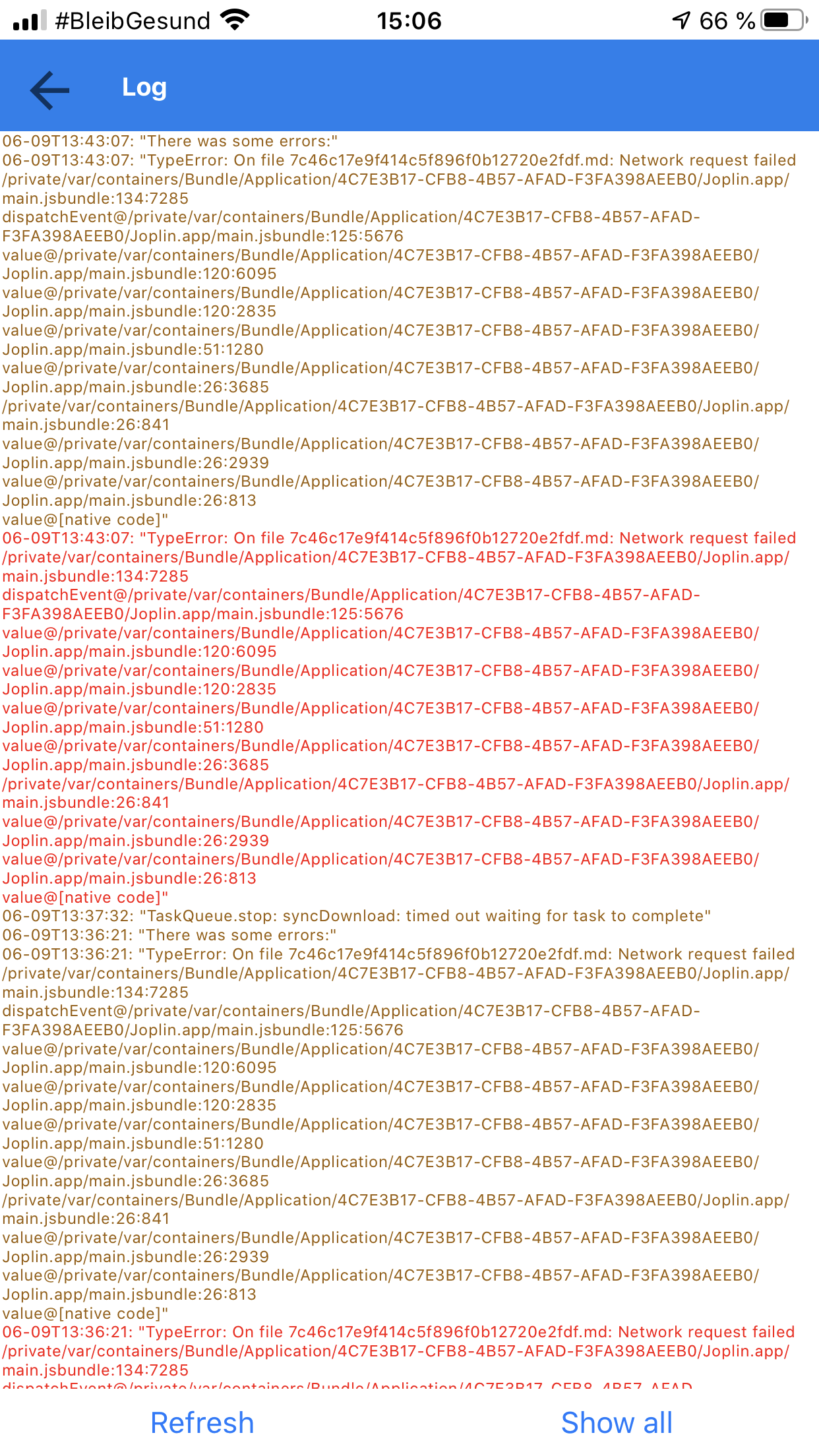
I do not know if bot issues are related or something totally different. If I can provide more detail, please tell me what to provide.
 ho1ger
All 18 comments
I have the same problem - Joplin on Android and Joplin on Windows 10. Both version can't sync with Nextcloud 19. Some notes are incompletle - Ivalid property format. There missing ends of notes.
But on the server is Notes complete.
Can you help me?
 stepanpos
on 10 Jun 2020
stepanpos
on 10 Jun 2020
Same problem here.
- Nextcloud Version 19
- Nextcloud Sync Client 2.6.4git (In Joplin i use "File System" as sync target and let Nextcloud Sync Client do the Sync. Don't know if this is relevant for the Issue)
- Joplin Desktop Version 1.0.201 (running on Linux Mint 19.3)
- Android Version 1.0.331
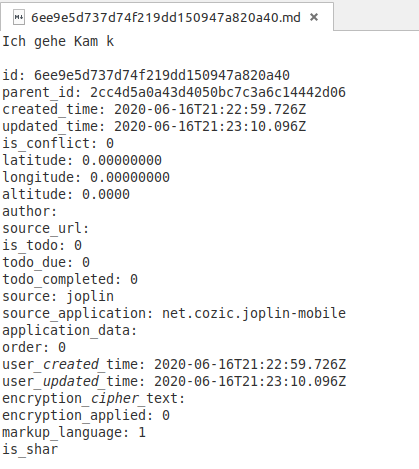
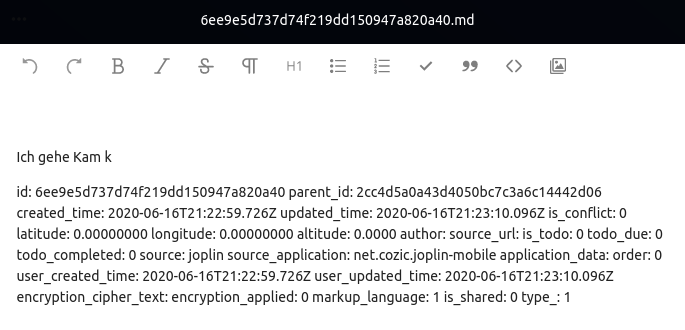
But the Note seems incomplete on the Server, too. Somehow the metainfos seem to be more complete on the server..
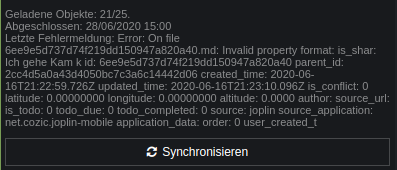
The Note opened in Texteditor in Linux:
The same note opened in Nextcloud:
 mahibi
on 28 Jun 2020
mahibi
on 28 Jun 2020
Same issue for me with NC v19. I move my notes in a NC v18 instance and no issue anymore.
 mrtpcet
on 3 Jul 2020
mrtpcet
on 3 Jul 2020
Pretty much every note I create now breaks in some way and I need to fix sync errors constantly by deleting/editing files and re-creating notes. Unfortunately this has made using Joplin very difficult.
Last error: Error: On file 672566b9cdd04a72b500f4293c222138.md: Missing required property: type_:
File on the server:
id: 672566b9cdd04a72b500f4293c222138
parent_id: 5c8ab1500c2b44f7b29e712dcf64de05
created_time: 2020-07-13T23:34:21.917Z
updated_time: 2020-07-13T23:34:31.783Z
is_conflict: 0
latitude: [removed]
longitude: [removed]
altitude: 49.5367
author:
source_url:
is_todo: 1
todo_due: 0
todo_completed: 0
source: joplin
source_application: net.cozic.joplin-mobile
application_data:
order: 1594683261913
user_created_time: 2020-07-13T23:34:21.917Z
user_updated_time: 2020-07-13T23:34:31.783Z
encryption_cipher_text:
encryption_applied: 0
markup_language: 1
is_shared: 0
type_: 1#
The # at the end is added by zsh, indicating that there is no newline character on the last line.
 Derkades
on 14 Jul 2020
Derkades
on 14 Jul 2020
For me Joplin is nearly not usable since this bug appears. The Android app shows the error log (below the sync button) which is quite large depending on the failing note, so that often the overview of the notes is not visible.
Can't grade down to nextcloud 18 because i use a managed NC hosting.
Please let me know if any more information from the logs is necessary to reproduce this issue..
mahibi
on 14 Jul 2020
Hi,
just to mention I have reproducible issue with nextcloud 19 corrupting files due to wrong size reporting, which leads to potential file truncate. See https://github.com/nextcloud/server/issues/21315#issuecomment-659423374 for tests reports.
 julieni
on 16 Jul 2020
julieni
on 16 Jul 2020
@julieni so at https://github.com/nextcloud/server/issues/21315 the comments look like it is fixed with NC 19.0.1
my hosting provider updated to 19.0.1 but the android joplin APP keeps complaining (can't test the dektop APP at the moment). Can the corrupted files be fixed somehow with NC 19.0.1 or do i have to use backups of these files to replace the corrupted ones?
mahibi
on 23 Jul 2020
Hi, upgrading will not recover your files I think. I mean, if file is corrupted on the nextcloud server's storage, it still will be after upgrading. But after upgrade, you should not see any new corrupted file.
julieni
on 23 Jul 2020
It is possible to restore corrupted files. If it's a local note that won't upload, the easiest way is to create a new note and copy note contents over. In some cases you have to modify the files on the remote. Edit the file on the remote and remove the line with is_shared:. Make sure there is no trailing newline or joplin will give new errors. Many text editors, for example nano, automatically add a newline at the end of the file. Remove it using truncate -s -1 <file> after editing. For other errors (not is_shared) modify the files at your own risk. Backups!
Derkades
on 23 Jul 2020
I had this same issue after upgrading to Nextcloud 19, and may have accidentally discovered a fix for it. Unfortunately, I cannot re-test to confirm.
I began removing the is_shared: line from some of the offending files, but then decided against proceeding further in case it caused some unintended future issues. After restoring from backup the files that I had edited the properties on, some of them were not showing up in the Nextcloud UI or syncing to devices. I recalled from previous Nextcloud issues the command to rescan for orphaned files in users' Nextcloud directories, and proceeded to do so on the directory containing the Joplin markdown files.
Once the scan completed, the restored files showed up in the Nextcloud UI and synced to other devices. I then opened Joplin, and the sync completed with no errors.
A possible theory is the metadata on some of the Nextcloud files gets corrupted after the upgrade and rescanning the directory writes the correct values.
Nextcloud file scan on single user's Joplin directory:
sudo -u abc php /config/www/nextcloud/occ files:scan --path="/<nextcloud_user_id>/files/<path_to_Joplin_md_files>"
To scan all users and directories (this can take a few hours, depending on the number of files users have):
sudo -u abc php /config/www/nextcloud/occ files:scan --all
I run Nextcloud as a docker, so the username is abc. I believe the username for non-container instances is www-data. One of the two should work.
Again, I can't confirm this will work for everyone, but hoping it does.
EDIT:
Corrected path for file scan
 prayingmantis287
on 15 Aug 2020
prayingmantis287
on 15 Aug 2020
Unfortunately this 'fix' was transient, as the same sync error just reoccurred in Joplin. The error persist even after rescanning for orphaned files in NC19.
prayingmantis287
on 21 Aug 2020
You have to upgrade to 19.0.1 which fixes the issue (webdav reporting wrong filesize, causing partial content download)
BTW: it's not a Joplin issue, all webdav file transfers in nextcloud 19.0.0 were affected
julieni
on 21 Aug 2020
This issue can be closed, since updating to Nextcloud 19.0.1 and fixing some corrupted note files everything is working fine.
Derkades
on 21 Aug 2020
I should have clarified better with presenting it as a Nextcloud issue as opposed to a Joplin issue. I am currently running NC 19.0.1. Usually I wait for the first major update before upgrading from the previous major version in hopes of avoiding sizable issues. Suppose that logic didn't work this time around.
I will try re-establishing the webdav connection on that device later today and report back the result.
prayingmantis287
on 21 Aug 2020
Just re-read the thread and put 2+2 together about fixing the broken files _after_ upgrading to 19.0.1. My apologies, it's been that kind of week.
prayingmantis287
on 21 Aug 2020
This Issue appeared again. Might have been caused by the upgrade to Nextcloud 19.0.2.
See https://github.com/nextcloud/server/issues/21315#issuecomment-686980682
Server:
Nextcloud 19.0.2
Desktop:
Nextcloud Desktop Client 2.6.5 (KDE)
Joplin 1.0.201 (prod, linux)
Android:
Joplin 1.0.336
PS:
After i decided to delete the corrupt files, the Issue https://github.com/nextcloud/server/issues/21170 appeared. Don't know if this could be related to the bug dicussed here..
mahibi
on 12 Sep 2020
Hey there, it looks like there has been no activity on this issue recently. Has the issue been fixed, or does it still require the community's attention? This issue may be closed if no further activity occurs. You may comment on the issue and I will leave it open. Thank you for your contributions.
![stale[bot] picture](https://avatars3.githubusercontent.com/in/1724?v=4&s=40) stale[bot]
on 12 Oct 2020
stale[bot]
on 12 Oct 2020
Closing this issue after a prolonged period of inactivity. If this issue is still present in the latest release, please feel free to create a new issue with up-to-date information.
stale[bot]
on 20 Oct 2020
Related issues
 hakim89
·
3Comments
hakim89
·
3Comments
 deftdawg
·
3Comments
deftdawg
·
3Comments
 xfrose
·
3Comments
xfrose
·
3Comments
 laurent22
·
3Comments
laurent22
·
3Comments
 okoetter
·
3Comments
okoetter
·
3Comments
Most helpful comment
Hi,
just to mention I have reproducible issue with nextcloud 19 corrupting files due to wrong size reporting, which leads to potential file truncate. See https://github.com/nextcloud/server/issues/21315#issuecomment-659423374 for tests reports.