Joplin: Full Text Search and <base> Tag Break Katex Rendering In In-App Preview
Issue: Katex code: $\rightarrow$ renders as: \rightarrow ➡
....and so on...
(Meaning, the render in the in-app preview also shows raw code along with rendered Katex)
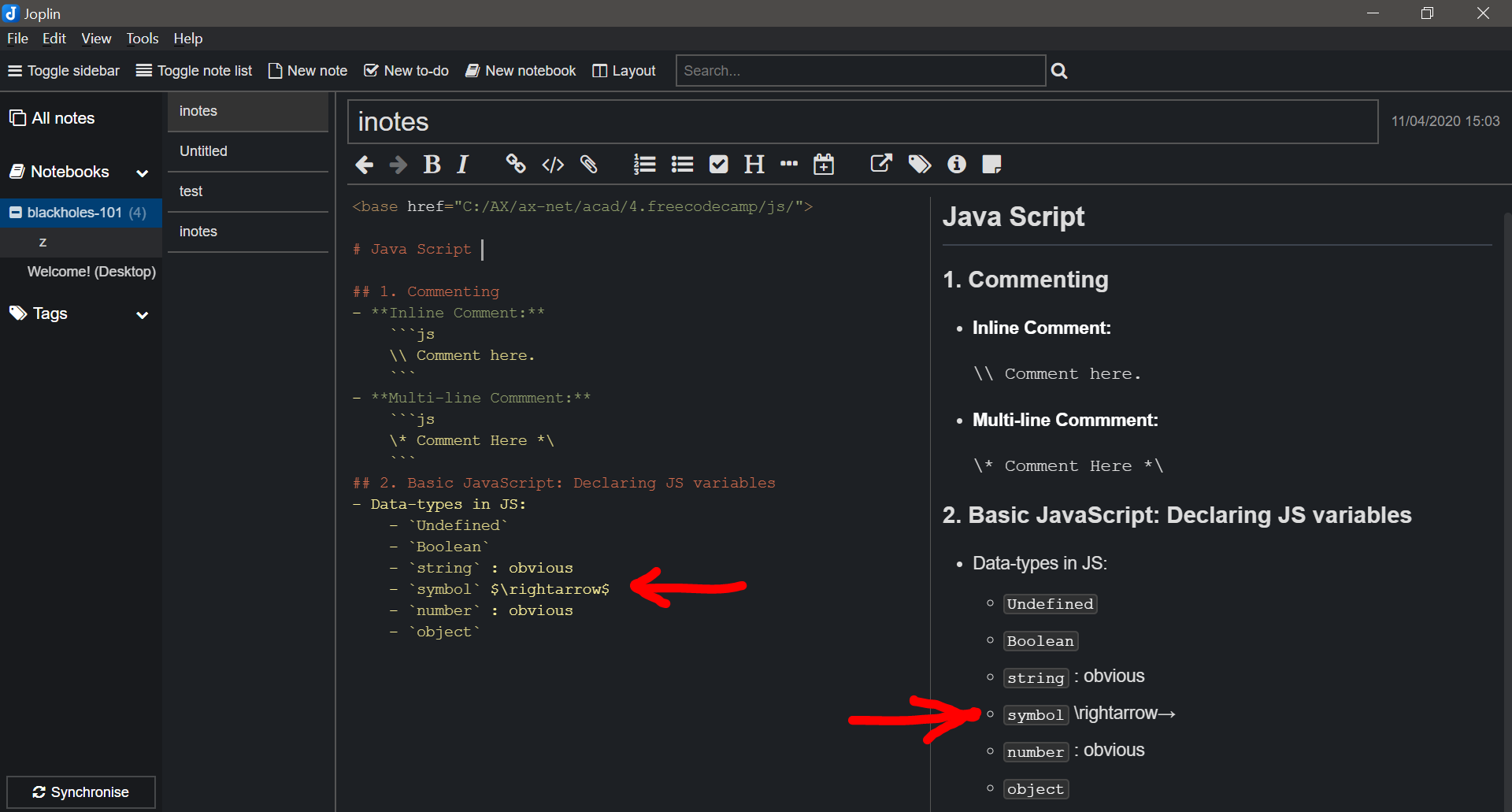
I just downloaded Joplin (Joplin-Setup-1.0.197.exe) 2 days ago, it worked perfectly when suddenly after 2 days of flawless performance, the app (version 1.0.197) started facing above-mentioned issues with Katex rendering.
I re-installed the same version, and opened a new note, the issue seemed to have gone, but re-appeared in a few minutes.
The issue persists in the newly released version-1.0.199
NOTE: The app seems to exporting documents in pdf and html format properly, the problem only seems to exist in the in-app preview.
Environment
Joplin version: 1.0.197 and 1.0.199 (prod, win32)
Platform: Windows
OS specifics: Windows 10, version 1909
Steps to reproduce
- Download the Windows installer from: https://github.com/laurent22/joplin/releases/download/v1.0.199/Joplin-Setup-1.0.199.exe
- Install it.
- Change theme to Dark (I am currently not sure if theme is involved, most probably it isn't).
- Create a new note containing Katex ...
- Specify the base address for files using
<base>tag at the top of the note. (For example<base href="C:/">,hrefattribute should not be empty, and should point to a directory at least) - Add an image from your local storage. (For example:
<img src="test-image.jpg">, use relative path, the rest will be taken care of by the<base>tag) - The
<img>using<base>works which is great! - At this point there is a 70% chance that Katex render in in-app preview will start malfunctioning..., if it doesn't, do a full text search by typing a string (that you have used in your note) in the search bar at the top, and press enter (Make sure that Joplin doesn't show the message "No notes in here. Create one by clicking on "New note").
- At this point the Katex render should definitely malfunction.
- If the malfunction happened at the point of using the
<base href="directory_base">tag, then remove the<base>tag and the Katex should start working again. But, if the malfunction happened at the point of doing a Full Text Search, then simply pressCtrl+Fand the issue should resolve (if it doesn't, remove the base tag as well, and then pressCtrl+F) - If the malfunction happens at the point of Full Text Search, it will persist and will be seen on all other notes as well. Restarting or re-installing the software will also NOT resolve it. On the other hand, if it happens at the point of using the
<base>tag, it only shows up in the specific document with the tag.
Describe what you expected to happen
Katex should NOT show raw Katex code along with the render. (Support for <base> tag is useful, it should not be deprecated! 😂)
Logfile
Reproducing the same, created no new visible Errors or Warnings in the Console Tab of Debug mode. (I'll recheck and modify the issue if I find any)
 aakashsinghbais
All 20 comments
Would you mind posting your code as text and not as a screenshot so that I can test?
 laurent22
on 11 Apr 2020
laurent22
on 11 Apr 2020
Would you mind posting your code as text and not as a screenshot so that I can test?
Yep, here it is:
--------(.md code)--------
# Java Script

## 1. Commenting
- **Inline Comment:**
    ```js
    \\ Comment here.
    ```
- **Multi-line Commment:**
    ```js
    \* Comment Here *\
    ```
## 2. Basic JavaScript: Declaring JS variables
- Data-types in JS:
    - `Undefined`
    - `Boolean`
    - `string` : obvious
    - `symbol` $\rightarrow$
    - `number` : obvious
    - `object`
-----------(end of .md code)------------
aakashsinghbais
on 11 Apr 2020
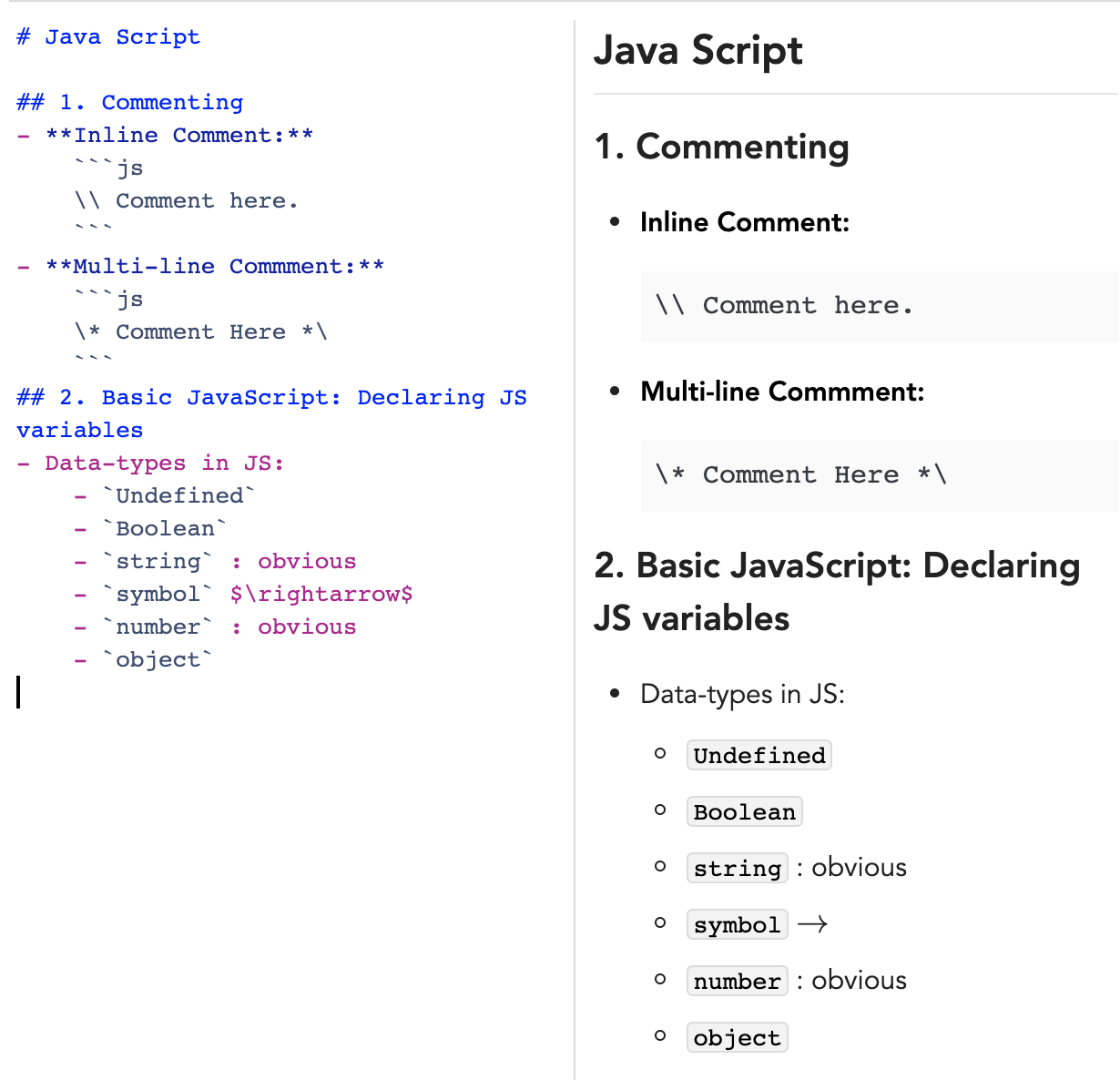
Works for me:
laurent22
on 11 Apr 2020
It worked for me too in the beginning for about 2 days, but now it doesn't.
aakashsinghbais
on 11 Apr 2020
If you paste your code above in a new note, does it not work?
laurent22
on 11 Apr 2020
Nope, the renderer is moody!
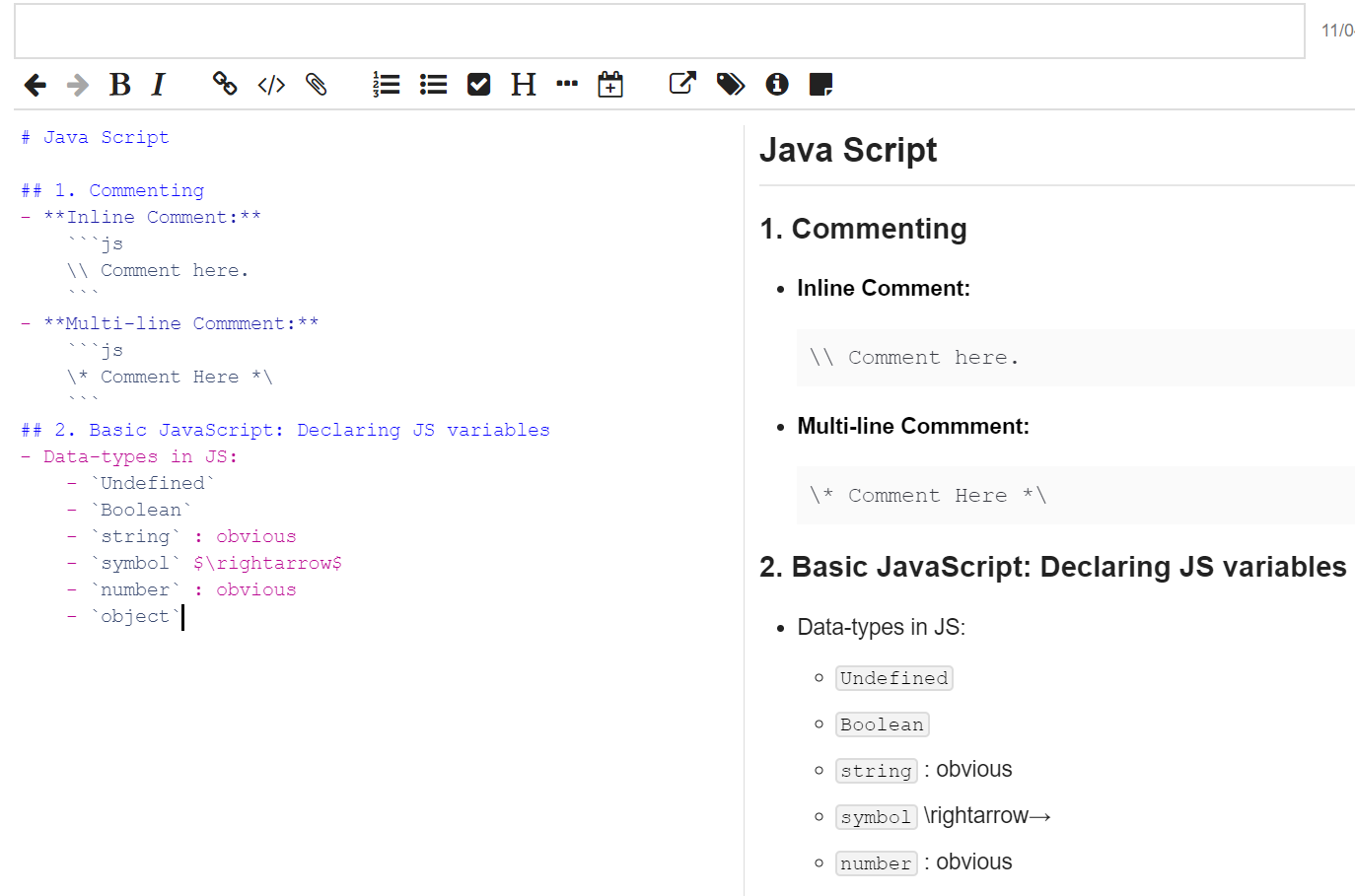
I think it has got something to do with the Dark theme as well...
So, when I pasted it in the light theme, on a new note, it seemed to work initially, but the moment I switched to DARK THEME to check whether things are rendering fine there as well, it again started malfunctioning on all notes including the new one I created for you (where it was functioning well initially).
aakashsinghbais
on 11 Apr 2020
...and after that it malfunctions even in the light theme
aakashsinghbais
on 11 Apr 2020
Alright.
I think I have figured it out.
Last night I was fiddling with Ctrl + F search functionality, and the search failed...and as a side-effect I guess, the Katex started malfunctioning.
I punched Ctrl + F again, and things have now started working again....Katex is back running fine...
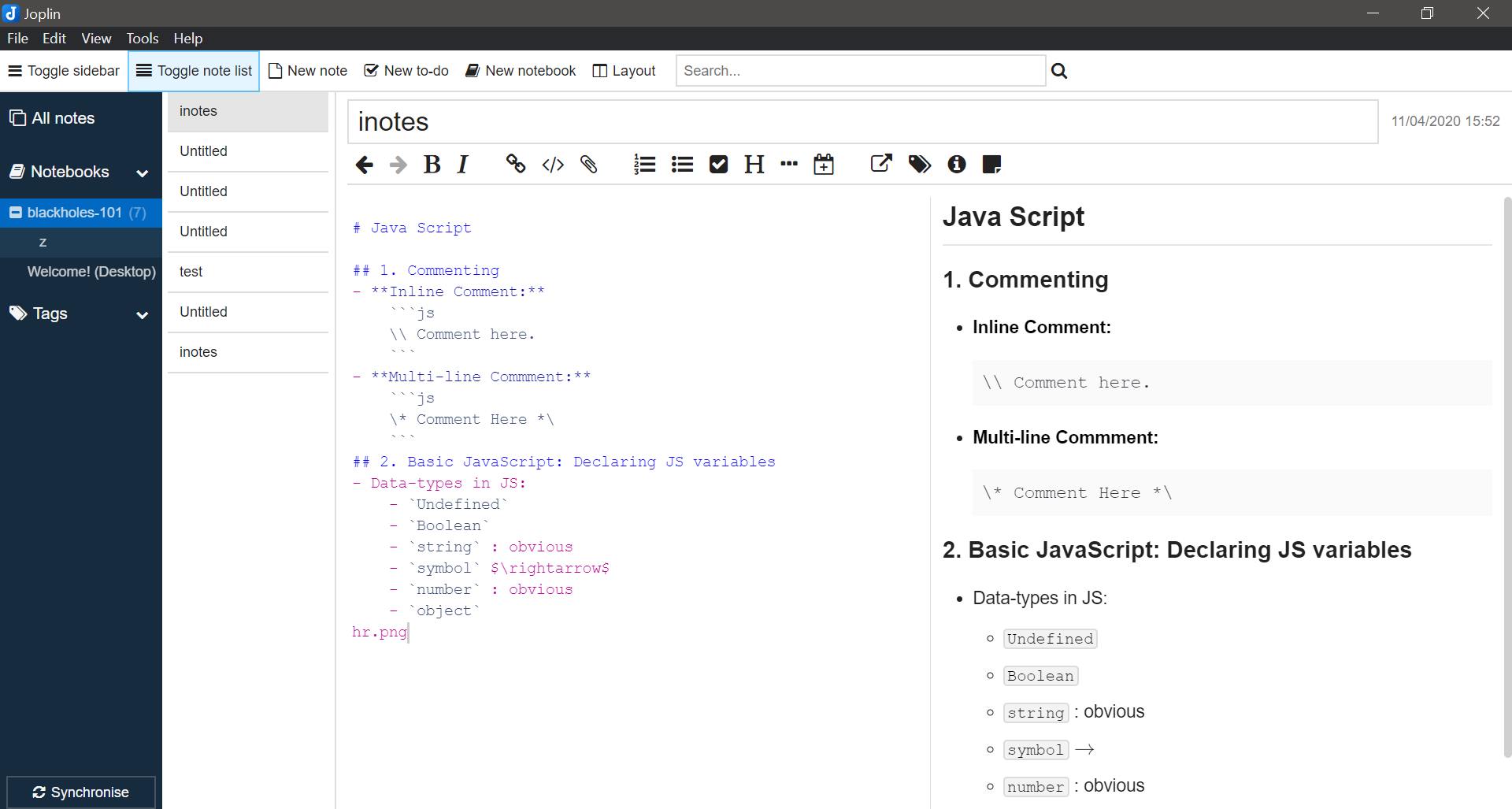
Should I modify the issue?, and add the details?
aakashsinghbais
on 11 Apr 2020
Yes if you managed to replicate it, it would be good if you could list the exact steps that make it happen. And maybe also the notes you switch to in case it's relevant.
laurent22
on 11 Apr 2020
Alright, I dunno if I'll be able to get it to malfunction again...I'll try...
aakashsinghbais
on 11 Apr 2020
Yes, it broke again on full text search in dark theme on a large document.
I'll modify the issue.
aakashsinghbais
on 11 Apr 2020
So you search for a string that appears in this large note, you open it, and then it's broken?
Does it work if you open the note when the app starts?
Is it really only with dark theme, or can it happen with light theme?
Just trying to gather as much as info as possible for the next time I'll look at this, as I couldn't replicate.
laurent22
on 11 Apr 2020
I have around 7 notes open in the sidebar.
One of them is bulky, it is long and contains a lot of latex code along with other stuff.
Last night I was trying to modify the HTML attributes of an tag for an img that I had used repeatedly, so I did
Ctrl + F and then punched hr.png in the bar, it somehow didn't work (or was taking more time than I expected it to). Then I tried a full-text search using the bar at the top (though I didn't know abt its function earlier), and punched the same hr.png in it and pressed Enter. That's what broke the Katex (and still continues to).
Quick Remedy: Press Ctrl+F after everything is broken, and Katex starts working (most of the time, at least for me).
Alright, this time when I broke it, Ctrl+F brought Katex on smaller notes back, but the heavier one stays the same....
....gathering more info....
aakashsinghbais
on 11 Apr 2020
I accidentally deleted my bulky study notes in the process (which I hadn't fully exported)!! 😭...now I'll have to write them again...and then test...it doesn't break on lighter documents....I'll be back soon.
aakashsinghbais
on 11 Apr 2020
I accidentally deleted my bulky study notes in the process (which I hadn't fully exported)!! 😭...now I'll have to write them again...and then test...it doesn't break on lighter documents....I'll be back soon.
I feel you man 😥
 Rishabh-malhotraa
on 11 Apr 2020
Rishabh-malhotraa
on 11 Apr 2020
Ok, I have modified the issue @laurent22 , and have tried to describe it as best as I could understand it, with all info that I found...I'll keep you informed.
aakashsinghbais
on 11 Apr 2020
@aakashsinghbais, when the bug happens again, could you try to open the developer tools and see what the issue is?
- You can open the developer tools from the Help menu.
- Then click on the selection arrow

- And select the buggy Katex rendering.
You should see something like below:
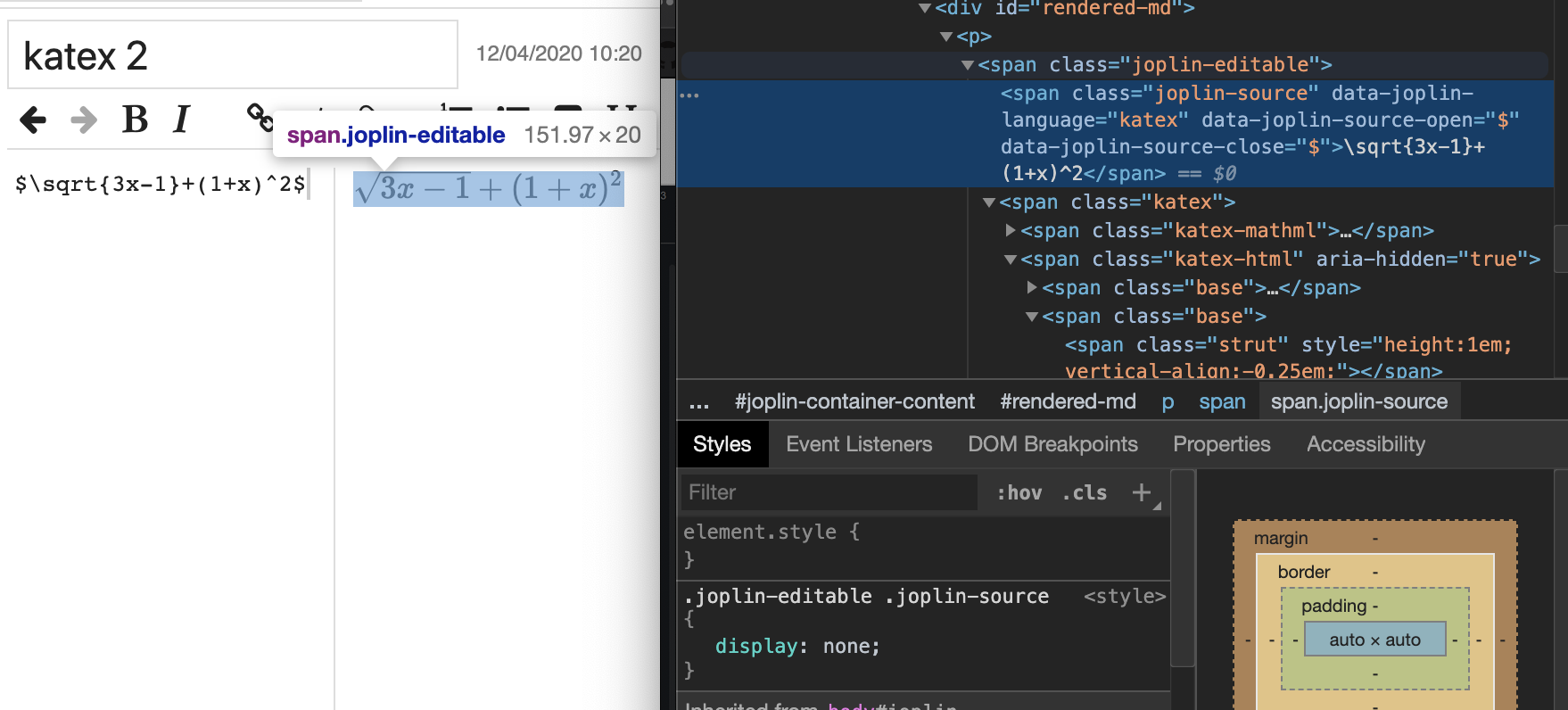
Normally, when it works, there should be a <span class="joplin-editable"> with a <span class="joplin-source"> element inside. That "joplin-source" normally is hidden, as can be seen with the "display: none" in the style below. What's happening in your case is that this element for some reason is visible.
So could you check this element in particular, and see what CSS is applied to it? If you could send a screenshot with that element selected it might help too.
laurent22
on 12 Apr 2020
Ok I managed to replicate it. This is due to the use the <base> tag as it makes Katex load the CSS from the wrong directory. In general, components in the application expects a stable current directory and changing it with <base> is likely to break various things.
In fact, I wonder if it could also be a security issue, so as a result I will disable it from the next version. In general, Joplin is a Markdown-based application and HTML should only be used for formatting, maybe layout, but not for advanced features like changing the base URL.
laurent22
on 12 Apr 2020
Hmm....but I wonder if there is a way to relatively link images because Joplin appears to try to create a copy of the image and retain it...then, while exporting, those images appear in the _resources folder which ultimately ends up creating multiple copies of one image which was already stored in my local storage.
aakashsinghbais
on 12 Apr 2020
Links to local files work in Joplin but is not officially supported. In general, you should import images as attachments as this is what we support and it should work as expected everywhere.
laurent22
on 12 Apr 2020
Related issues
 smhearty
·
3Comments
laurent22
·
3Comments
smhearty
·
3Comments
laurent22
·
3Comments
 v-marinkov
·
3Comments
v-marinkov
·
3Comments
 jmcastagnetto
·
3Comments
jmcastagnetto
·
3Comments
 Dharmesh-Poddar
·
3Comments
Dharmesh-Poddar
·
3Comments