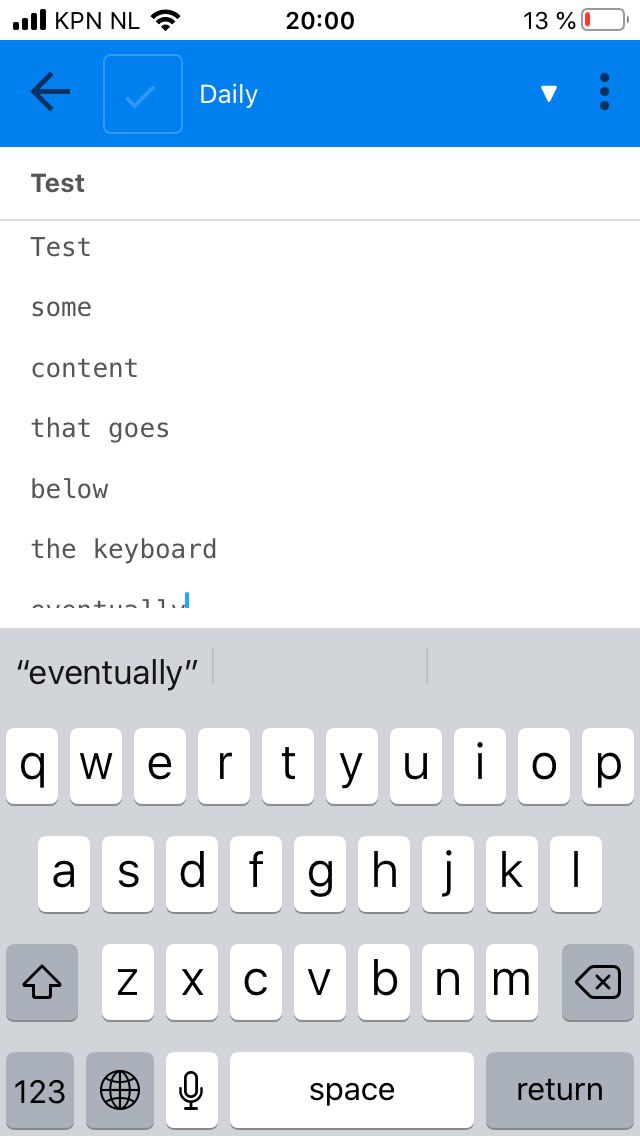
While typing a note on mobile, the page does not scroll as you type, hence very soon your new text goes below the keyboard. This can be be very annoying for typing, as similar to a typewriter, you'd have to scroll down at the end of each line to see what you will type next.
Environment
Joplin version: 10.0.46
Platform: IOS
OS specifics: IOS 13.3.1 (IPhone SE)
Steps to reproduce
Just strat typing.
Describe what you expected to happen
As you type, the page should automatically scroll to the bottom.
Logfile
 kianenigma
All 9 comments
@kianenigma working perfectly on android
 Rahulm2310
on 10 Apr 2020
Rahulm2310
on 10 Apr 2020
Could be, my device is IOS as mentioned. You can see the bug even in the screenshot, how the word 'eventually' is almost no longer visible. I started typing that as I would naturally.
kianenigma
on 10 Apr 2020
I have the same issue with the exact same environment. On top of that there are some scrolling issues sometimes where I can't really scroll and it sort of bounces back to its previous position.
Not sure when exactly it appeared but it must've been a recent update. Before it was working just fine.
 jonastheis
on 10 Apr 2020
jonastheis
on 10 Apr 2020
We have some increasing platform dependent issues @tessus . It'd be great if we could discuss this overall issue on Discourse, isn't it?
 coderrsid
on 11 Apr 2020
coderrsid
on 11 Apr 2020
I have the same issue with the exact same environment. On top of that there are some scrolling issues sometimes where I can't really scroll and it sort of bounces back to its previous position.
I am experiencing the same problem with version 10.0.47 on iPhone XS iOS 13.4. Sometimes after scrolling ends after bouncing back (waiting a sec) it lets me scroll the page to the end or to the part where I want to edit, but mostly it bounces back to the top of the note, making it impossible to add or edit on the go.
And also having the issue with the overlapping keyboard.
Maybe a dev can lay it side by side with Apple Notes app to compare UX?
Do these comments ask for a new support ticket(s)?
 Ymetro
on 21 Apr 2020
Ymetro
on 21 Apr 2020
Hey there, it looks like there has been no activity on this issue recently. Has the issue been fixed, or does it still require the community's attention? This issue may be closed if no further activity occurs. You may comment on the issue and I will leave it open. Thank you for your contributions.
![stale[bot] picture](https://avatars3.githubusercontent.com/in/1724?v=4&s=40) stale[bot]
on 5 Jun 2020
stale[bot]
on 5 Jun 2020
the issue is not yet resolved.
kianenigma
on 5 Jun 2020
Hey there, it looks like there has been no activity on this issue recently. Has the issue been fixed, or does it still require the community's attention? This issue may be closed if no further activity occurs. You may comment on the issue and I will leave it open. Thank you for your contributions.
stale[bot]
on 10 Jul 2020
Closing this issue after a prolonged period of inactivity. If this issue is still present in the latest release, please feel free to create a new issue with up-to-date information.
stale[bot]
on 17 Jul 2020
Related issues
 christianlupus
·
3Comments
christianlupus
·
3Comments
 Cybernemo
·
3Comments
Cybernemo
·
3Comments
 LifeIsAParadox
·
3Comments
LifeIsAParadox
·
3Comments
 deftdawg
·
3Comments
deftdawg
·
3Comments
 kopfuss
·
3Comments
kopfuss
·
3Comments
Most helpful comment
the issue is not yet resolved.