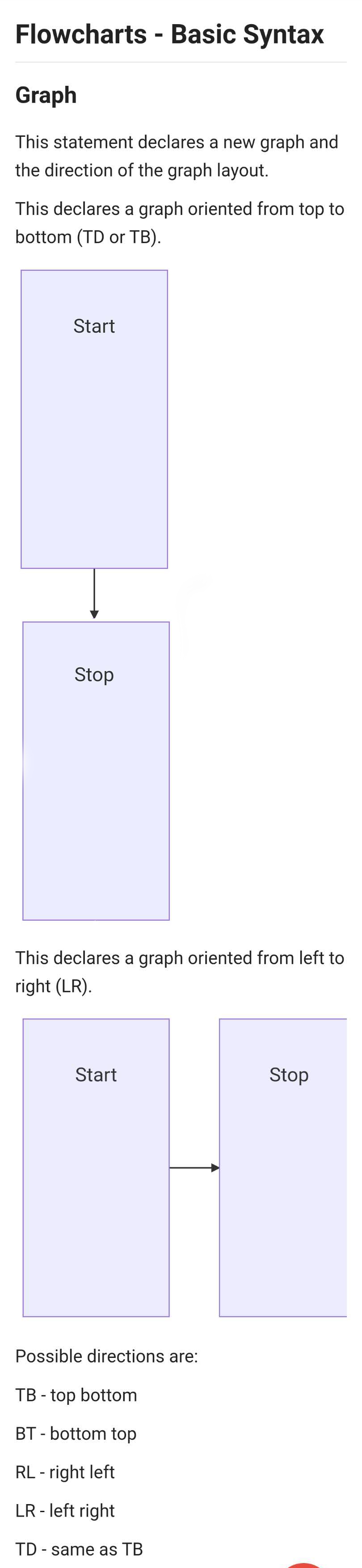
Joplin: Mobile:When I use mermaid on android,Nodes & shapes was so big
Environment
Joplin version: From 1.0.321 To 1.0.324
Platform: Samsung Note8
OS specifics: Android 9.0
The code is here:
graph TD
    Start --> Stop
graph LR
    Start --> Stop
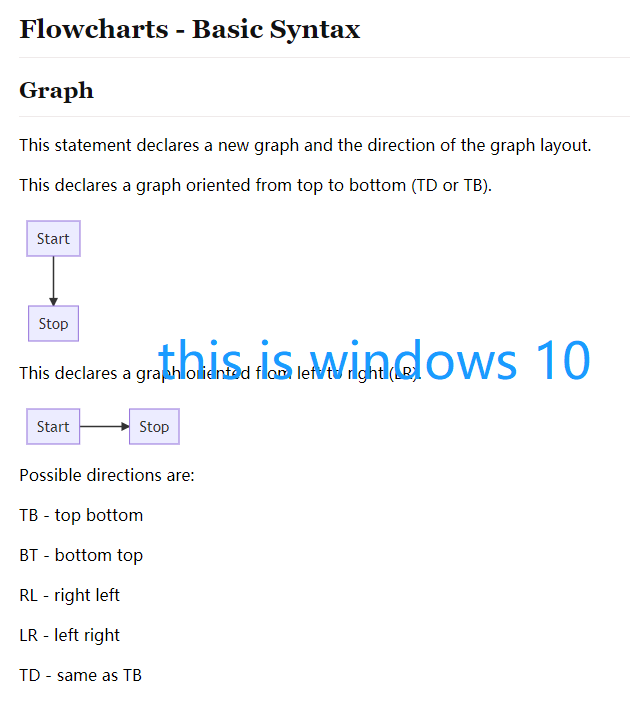
# On the windows 10 it's normal
 letian304
All 9 comments
Could you post the complete code of your note please? In case it affects how it's rendered.
 laurent22
on 25 Mar 2020
laurent22
on 25 Mar 2020
Code is here:
# Flowcharts - Basic Syntax
## Graph
This statement declares a new graph and the direction of the graph layout.

This declares a graph oriented from top to bottom (TD or TB).

```mermaid
graph TD
    Start --> Stop

 ```

This declares a graph oriented from left to right (LR).

```mermaid
graph LR
    Start --> Stop
```


Possible directions are:

TB - top bottom

BT - bottom top

RL - right left

LR - left right

TD - same as TB
Could you post the complete code of your note please? In case it affects how it's rendered.
Sir, can I look into this?
 ishantgupta777
on 25 Mar 2020
ishantgupta777
on 25 Mar 2020
@ishantgupta777 Are you working on this? We have more users reporting this issue https://discourse.joplinapp.org/t/mermaid-graph-size/7571
 coderrsid
on 1 Apr 2020
coderrsid
on 1 Apr 2020
@ishantgupta777 Are you working on this? We have more users reporting this issue https://discourse.joplinapp.org/t/mermaid-graph-size/7571
I tried and looked at the code and I think this is not the problem with the Joplin but with the mermaid library itself. There was not any specific reason for it be to this big in Joplin. There are many issues also with the same type on mermaid repo. I also tried to write some overriding some CSS styles to fix this issue. But that also didn't work. So if you want to try this issue, you can go ahead.
ishantgupta777
on 1 Apr 2020
Just wanted to know that what's the current state of the issue.
coderrsid
on 1 Apr 2020
Cannot replicate on iOS so I guess it's an Android issue.
laurent22
on 8 Apr 2020
I can replicate on emulator but can't make sense of it as it's not possible to inspect the generated HTML. Sounds like a bug in Mermaid anyway so could be fixed in a future upgrade.
laurent22
on 19 Apr 2020
I encountered a similar issue using AppImage on Manjaro Linux,
but it only appears on the preview window, all text within the Node is in the upper half rather than the middle, like the following:
but when it is exported, it is normal.
 jimewu
on 17 Nov 2020
jimewu
on 17 Nov 2020
Related issues
 deftdawg
·
3Comments
deftdawg
·
3Comments
 hakim89
·
3Comments
hakim89
·
3Comments
 kopfuss
·
3Comments
kopfuss
·
3Comments
 alexanderadam
·
3Comments
alexanderadam
·
3Comments
 Dharmesh-Poddar
·
3Comments
Dharmesh-Poddar
·
3Comments