Joplin: New note/to-do disappear gradually
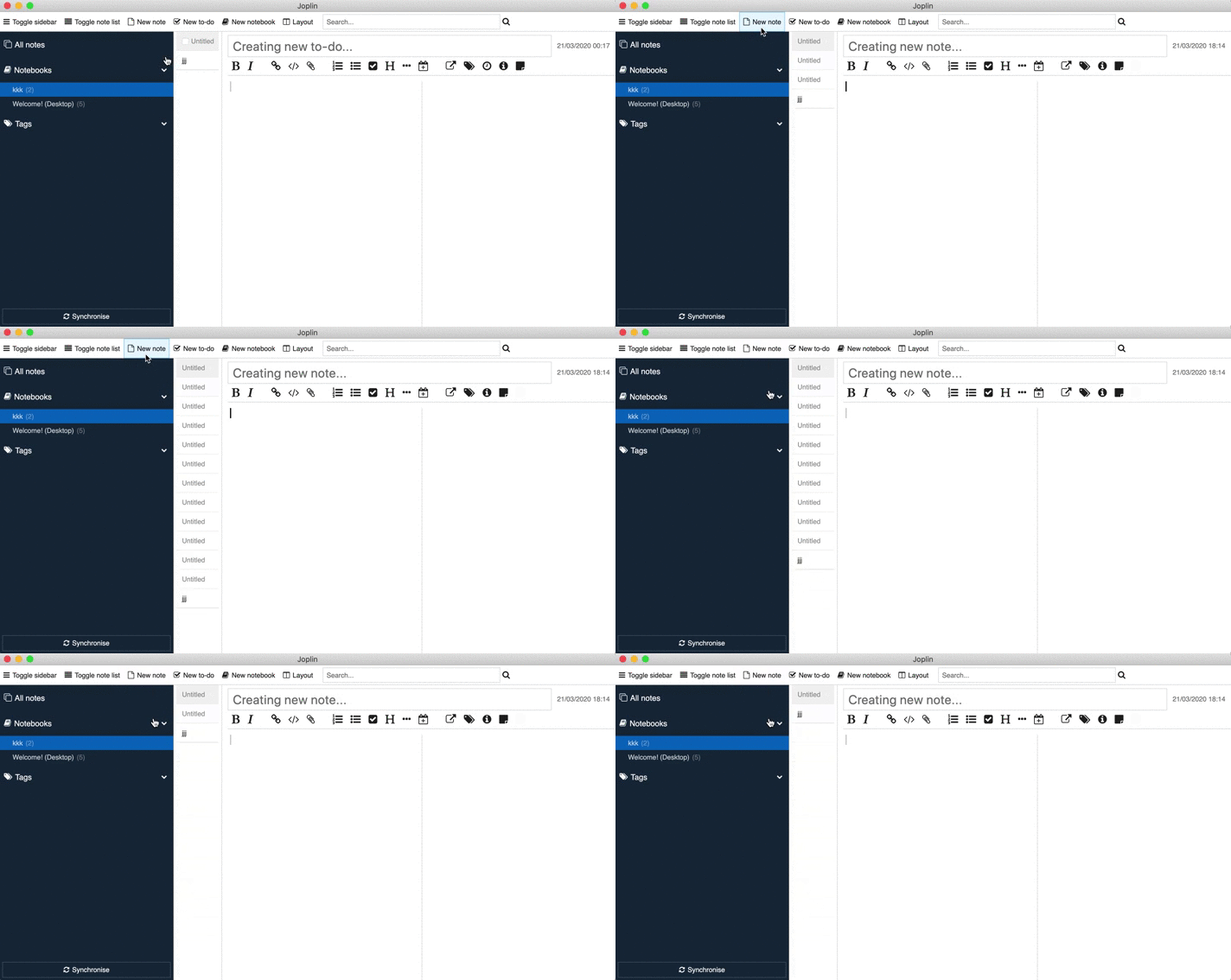
When clicking fast on New note/New to-do button new items are adding to the list and then disappearing gradually
Environment
Joplin version: v1.0.194
Platform: macOS
OS specifics: 10.15
Steps to reproduce
- Open Joplin app
- Start clicking fast on New note/New to-do button
- New notes/to-do's are created and then disappear
Describe what you expected to happen
I expected to create multiple empty notes/to-do's or warning that says that I can't create empty note/to-do if I already have one
Logfile
```
2020-03-21 18:29:18: "Provisional was not modified - deleting it"
2020-03-21 18:29:18: "Scheduling sync operation..."
2020-03-21 18:29:18: "Scheduling sync operation..."
2020-03-21 18:29:18: "Provisional was not modified - deleting it"
2020-03-21 18:29:18: "Scheduling sync operation..."
2020-03-21 18:29:18: "Provisional was not modified - deleting it"
2020-03-21 18:29:18: "Scheduling sync operation..."
2020-03-21 18:29:18: "Provisional was not modified - deleting it"
2020-03-21 18:29:18: "Scheduling sync operation..."
2020-03-21 18:29:18: "Provisional was not modified - deleting it"
2020-03-21 18:29:18: "Scheduling sync operation..."
2020-03-21 18:29:18: "Scheduling sync operation..."
2020-03-21 18:29:18: "Provisional was not modified - deleting it"
2020-03-21 18:29:18: "Scheduling sync operation..."
2020-03-21 18:29:18: "Provisional was not modified - deleting it"
2020-03-21 18:29:18: "Scheduling sync operation..."
2020-03-21 18:29:18: "Provisional was not modified - deleting it"
2020-03-21 18:29:18: "Scheduling sync operation..."
2020-03-21 18:29:18: "Scheduling sync operation..."
2020-03-21 18:29:18: "Provisional was not modified - deleting it"
2020-03-21 18:29:19: "Scheduling sync operation..."
2020-03-21 18:29:19: "Provisional was not modified - deleting it"
2020-03-21 18:29:19: "Scheduling sync operation..."
2020-03-21 18:29:19: "Scheduling sync operation..."
2020-03-21 18:29:19: "Provisional was not modified - deleting it"
2020-03-21 18:29:19: "Scheduling sync operation..."
2020-03-21 18:29:19: "Scheduling sync operation..."
 sealch
All 7 comments
I will fix this
 amitsin6h
on 21 Mar 2020
amitsin6h
on 21 Mar 2020
So according to me, there is 2 way to fix this issue:
- First, count empty note inside the notebook and if empty not is present then do not allow the user to create another empty note
- Second, avoid rapid clicking on New note button so that no empty new note will be created
@tessus your thoughts on this?
amitsin6h
on 21 Mar 2020
This should have been fixed by 4920f648164140f22aab82009c7edbf52093197e
I can only reproduce this, if I jack-hammer my mouse button, so I'm not sure how often such a problem ever occurs. IMO, not a very good use of our time.
 tessus
on 21 Mar 2020
tessus
on 21 Mar 2020
I think then this issue should be closed
amitsin6h
on 21 Mar 2020
I leave this for Laurent to decide.
tessus
on 21 Mar 2020
This should have been fixed by 4920f64
I can only reproduce this, if I jack-hammer my mouse button, so I'm not sure how often such a problem ever occurs. IMO, not a very good use of our time.
I think the main problem is that note/to-do creates and then disappears without any warning or message. So as amitsin6h said, there should be warning or new note/to-do should be creating. And you don't have to spam really fast to accomplish this behavior.
sealch
on 21 Mar 2020
No need to be fixed indeed. New notes disappear if they aren't modified.
 laurent22
on 21 Mar 2020
laurent22
on 21 Mar 2020
Related issues
laurent22
·
3Comments
 Cybernemo
·
3Comments
Cybernemo
·
3Comments
 smhearty
·
3Comments
smhearty
·
3Comments
 v-marinkov
·
3Comments
v-marinkov
·
3Comments
 jurgenhaas
·
3Comments
jurgenhaas
·
3Comments
Most helpful comment
This should have been fixed by 4920f648164140f22aab82009c7edbf52093197e
I can only reproduce this, if I jack-hammer my mouse button, so I'm not sure how often such a problem ever occurs. IMO, not a very good use of our time.