Joplin: note added from mobile shows up as encrypted in linux desktop
I have version 1.0.320 on my mobile (android) and added a note. Just updated linux desktop to 1.0.193 and after opening and sync the new note from mobile shows up as encrypted on the linux desktop. Never happened before on previous releases. I then created a note from linux and it synced to mobile. created a mobile note again and synced to linux.
I then deleted the test notes I created and synced on linux then mobile and the notes were still there on mobile. Deleted on the mobile and synced and gone from both.
Something strange on sync. Using OneDrive as cloud storage sync.
 pcause
All 19 comments
I have the same issue on desktop Win and iOS app.
When I create note on desktop and sync Joplin, the app appears in iOS app as encrypted. I already have +100 notes on mobile that are encrypted.
Now, every time I open Joplin on mobile, the app says its decrypting those encrypted. When the decrypting process is finished notes are still encrypted. When I open the app again, this cycle repeats.
Joplin desktop: 1.0.193 (Win)
Joplin iOS: 10.0.45
 alexdevero
on 9 Mar 2020
alexdevero
on 9 Mar 2020
I had a similar issue after updating on Android to 1.0.320. Created a new note, that wouldn't decrypt on Windows desktop, until I updated to 1.0.193 for Windows. My guess is that it's due to the introduction of CCM encryption in the latest releases.
Are you on the latest releases for each platform? Has CCM been added to iOS yet?
 axq
on 9 Mar 2020
axq
on 9 Mar 2020
@axq I don't think so. I've been encountering issues with encryption for the last 5-6 days. Since I always download the latest version right when it is released, the bug could to be introduced in one of the last ~3 version.
To answer your question, yes I am using latest Joplin for both, Win 10 desktop and iOS.
alexdevero
on 9 Mar 2020
If you have the latest version of mobile and desktop, you can go in the Synchronsiation Status screen, and click "Retry" for each item that could not be decrypted.
 laurent22
on 9 Mar 2020
laurent22
on 9 Mar 2020
Hope this will be helpful, screen from iOS app:
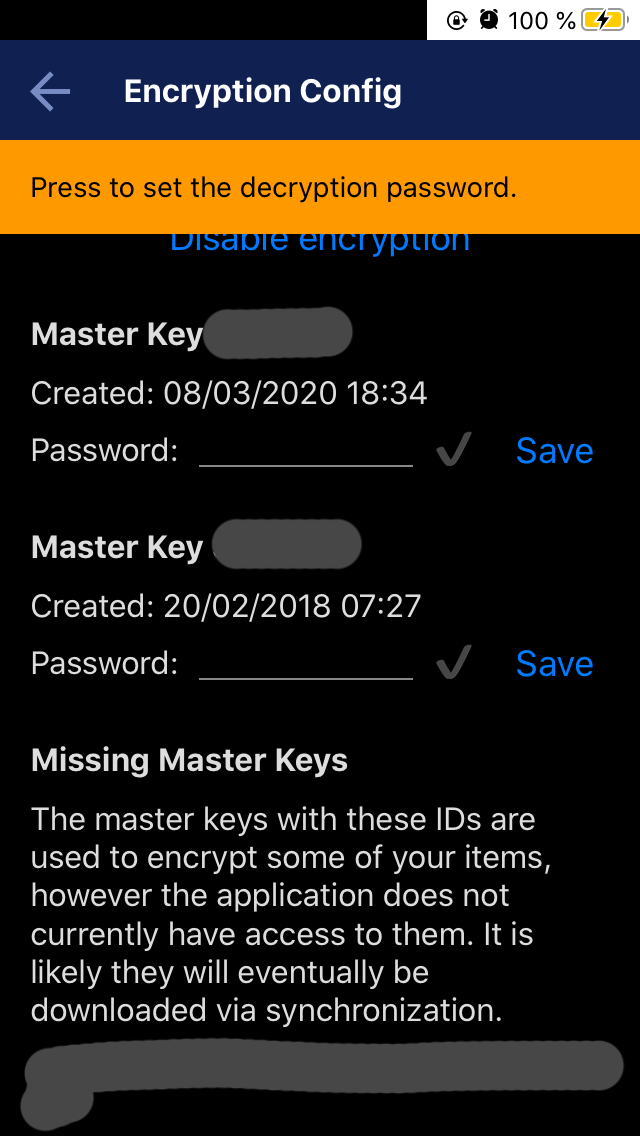
Note: I didn't change my master encryption key for the last year. For some reason, the app started showing this message few days ago.
alexdevero
on 9 Mar 2020
A few things:
- The latest iOS version with CCM mode support has not been released yet (waiting for Apple)
- If you're still having issues decrypting items, please check the sync status screen to see if you can retry decryption
- Post your log if it still doesn't work
laurent22
on 9 Mar 2020
My bad, the iOS is actually released now. So if it doesn't please post your log.
laurent22
on 9 Mar 2020
I tried to export debug log, but it does nothing - button is grayed out but nothing happens. How long does it take to export the log?
alexdevero
on 9 Mar 2020
This button doesn't work in iOS (and should be removed). If you could take a screenshot of the relevant lines (errors related to encryption) in the log that could help.
laurent22
on 9 Mar 2020
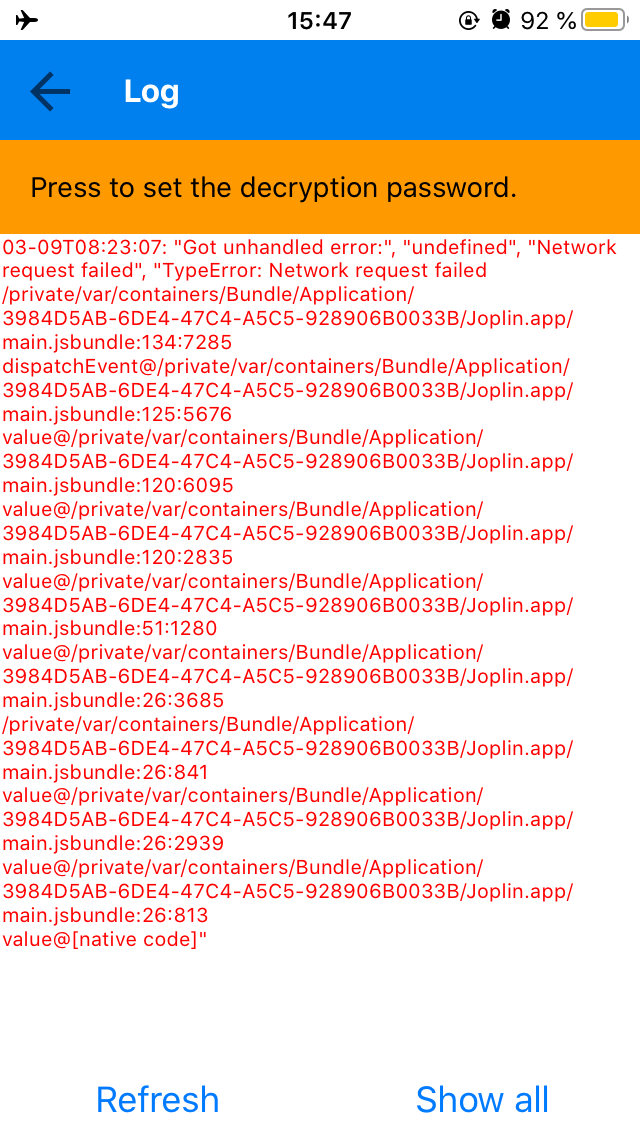
Here is the screenshot:
alexdevero
on 9 Mar 2020
Those are network errors, not encryption errors. Did you try actually setting the master key password?
laurent22
on 9 Mar 2020
Yes, twice. I set the password in 2018 and didn't change it since then. I've been using the same pass for almost two years and it worked, until few days ago. I also didn't reinstall the app, desktop or mobile.
alexdevero
on 9 Mar 2020
If it says it's decrypting on startup, but it's not actually doing anything, there should be some info in the log, not necessarily an error. Could you look through it and see if there's anything about encryption?
laurent22
on 9 Mar 2020
There is only message about DecriptionWorker being started and then completing decryption.
alexdevero
on 10 Mar 2020
I think the problem may not be specifically in the encryption/decryption process, or missing master keys. I noticed that even though there were +100 encrypted notes in the mobile app (iOS), there were also decrypted notes that matched the [also decrypted] notes in desktop app (Windows). It looks like those encrypted notes were duplicates of the notes that were encrypted.
Or, another option, there was one encrypted note duplicated many times. I created only few notes in the past days. Yet, there were more than 100 encrypted notes. That doesn't make sense. It would make sense if the app created duplicates during sync. This could lead to +100 encrypted notes even though only few new real notes were added.
Based on this, I think there is some issue in the sync process.
Were there any changes in the sync process the last ~4 versions. I know there were some bugs and regressions with the last 1 or 2 versions. Could there be some bug related to sync as well?
alexdevero
on 10 Mar 2020
Had the same problem from MacOsX to Linux client, so it's not a mobile problem. Just wrote 3 notes on 1.0.193 on MacOsX and read it on older version on Manjaro, still at 1.0.173.
Than i've upgraded the linux version to 1.0.193 but nothing, still encrypted. In my case i've just resolved deleting that 3 notes and wroting it again from MacOsX and all went to normal, but of course that's something wrong there
 leorac
on 11 Mar 2020
leorac
on 11 Mar 2020
I had the same issue: Mobile (Android) at 1.0.320 and Linux desktop at 1.0.179. New and edited notes from the mobile device were shown as "encrypted" on desktop. After updating the desktop to 1.0.193, they were still shown as "encrypted".
My solution: After upgrading the desktop client to the most recent version, I made duplicates of the affected notes on the mobile device. After syncing, the duplicates work fine on the desktop client. Originals then can be removed.
 Flnch
on 11 Mar 2020
Flnch
on 11 Mar 2020
I had the same issue on Linux desktop 1.0.179 and Android 1.0.322. Syncing over Nextcloud. All notes created on mobile appears "encrypted" and is unreadable on desktop (the only right-click option is delete). Notes created on desktop shows as expected on mobile.
- Sync status -> retry: results in failed items just re-appearing in list (1.0.179)
- Upgraded to 1.0.193 and @Flnch:s solution works fine for syncing notes that were previously only appearing "encrypted" on desktop.
 johodh
on 14 Mar 2020
johodh
on 14 Mar 2020
I cannot replicate this and I suspect it was due to the encryption upgrade which normally should be fixed now.
laurent22
on 8 Apr 2020
Related issues
 alexanderadam
·
3Comments
alexanderadam
·
3Comments
 Dharmesh-Poddar
·
3Comments
Dharmesh-Poddar
·
3Comments
 GingerPapa
·
3Comments
GingerPapa
·
3Comments
 seagoj
·
3Comments
seagoj
·
3Comments
 LifeIsAParadox
·
3Comments
LifeIsAParadox
·
3Comments
Most helpful comment
I had the same issue: Mobile (Android) at 1.0.320 and Linux desktop at 1.0.179. New and edited notes from the mobile device were shown as "encrypted" on desktop. After updating the desktop to 1.0.193, they were still shown as "encrypted".
My solution: After upgrading the desktop client to the most recent version, I made duplicates of the affected notes on the mobile device. After syncing, the duplicates work fine on the desktop client. Originals then can be removed.