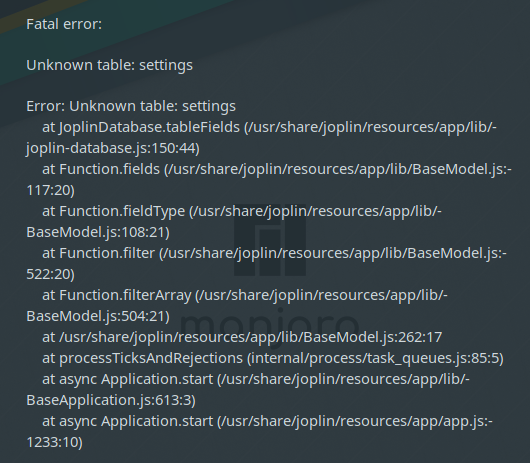
Joplin: Fatal error: unknown table: settings
Issue
I installed the application for the first time. I tried both, the AUR version as well as the AppImage. I am able to start the terminal version, but the GUI version does not start.
Environment
Joplin version: 1.0.179-1
Platform: GNU/Linux Manjaro
OS specifics: uname -r gives the following output
Linux dave-desktop 5.5.7-1-MANJARO #1 SMP PREEMPT Fri Feb 28 22:01:16 UTC 2020 x86_64 GNU/Linux
Steps to reproduce
- Open the application menu and click on the Joplin icon or type "joplin-desktop" in terminal
- Error message occurs
Describe what you expected to happen
I expect that the GUI application would open just fine.
Logfile
Terminal output when starting "joplin-desktop":
[17226:0305/215550.202190:ERROR:buffer_manager.cc(488)] [.DisplayCompositor]GL ERROR :GL_INVALID_OPERATION : glBufferData: <- error from previous GL command
(node:17230) Electron: Loading non context-aware native modules in the renderer process is deprecated and will stop working at some point in the future, please see https://github.com/electron/electron/issues/18397 for more information
(node:17230) Electron: Loading non context-aware native modules in the renderer process is deprecated and will stop working at some point in the future, please see https://github.com/electron/electron/issues/18397 for more information
 Dave-van-der-Meer
All 18 comments
For starters, do you need the 5.5 kernel for hardware reasons or can you get away with using the 5.4 lts kernel? Check out #2518 for more info.
Have you deleted your $HOME/.config/joplin-desktop directory to reset your settings?
The error you're getting seems to be saying that your database wasn't formed correctly when you first started.
I'd also highly recommend against using any AURs for this particular project since they're not officially supported and seem to be often pretty broken (with the number of bug reports coming in involving them). You can either use the official Joplin_update_and_install.sh script found in the main repo here or click the Releases tab up top and download the latest AppImage and run that.
 bedwardly-down
on 5 Mar 2020
bedwardly-down
on 5 Mar 2020
I had some severe issues with the 5.4 kernel which caused me to move to the new kernel.
I did not delete the said directory.
I tried the AUR version as the AppImage also had this problem.
Would you recommend to uninstall the AUR version, delete the directory and try with the distro independent installer instead?
Dave-van-der-Meer
on 5 Mar 2020
If it's not too late, please save your database file
~/.config/joplin-desktop/database.sqlite
Also the log files in the same directory.
This problem has not been reproducible, so capturing this would help investigation.
BTW can you reproduce the problem at will?
 mic704b
on 5 Mar 2020
mic704b
on 5 Mar 2020
Fair point. You might be stuck with 5.5 then and have to wait until a recent fix for the issue gets merged into the main branch which means it may still be a bit.
@mic704b sorry about that. I'll let you have this one.
@Dave-van-der-Meer, he's one of the main devs here
bedwardly-down
on 5 Mar 2020
@bedwardly-down Your instructions are good for trying to get the installation up and running.
For this problem though, it would be great if we could capture the clues too, because this is a rare one.
mic704b
on 5 Mar 2020
@bedwardly-down Your instructions are good for trying to get the installation up and running.
For this problem though, it would be great if we could capture the clues too, because this is a rare one.
Gotya. @Dave-van-der-Meer , could you share the AUR name you used with me? I can look to see if it's got issues because this could just be an issue with it.
Got lucky here. Looks like the one listed in the unofficial repos part of Joplin's documentation is the only one available. I don't need to look further. There's quite a few different variations of many packages in AUR.
bedwardly-down
on 5 Mar 2020
If it's not too late, please save your database file
Thanks for the hint
BTW can you reproduce the problem at will?
It occurs every time I start the application. Even after a reboot.
could you share the AUR name you used with me?
I don't know what you mean...
I installed the following:
aur/joplin 1.0.179-1 [installed] [87+] [13.41%] [28 Jan 2020]
    A note taking and to-do application with synchronization capabilities
I used trizen as AUR helper.
Then there is another package:
aur/joplin-appimg 1.0.179-0 [2+] [1.45%] [17 Feb 2020]
    A note taking and to-do application with synchronization capabilities
I am not sure if I can help with this information. Let me know what else I can do to help.
Dave-van-der-Meer
on 6 Mar 2020
@Dave-van-der-Meer
Thanks for the hint
Sorry, I wasn't clear. Your installation has a corrupt profile for some reason. After installing, you should have a completely initialised database ready to go, but yours is corrupted. What I wanted you to do was save your database and log files so we could have a close look for clues what happened.
So before doing anything, please zip up that directory ~/.config/joplin-desktop and put it aside.
Then to try again, please remove or rename the directory, and run the AppImage again. This shoud create a new database. Please try that and see if the same problem happens again, or if it succeeds this time.
BTW the very first time you installed, was it AUR or AppImage?
mic704b
on 6 Mar 2020
Fatal error: unknown table: settings
Several users have reported this issue, and it's not clear why it's happening. It seems several of them (maybe all of them?) were using the AUR package so maybe that package is doing something wrong.
Perhaps if someone having this issue could send us their database, it might help making sense of it.
 laurent22
on 6 Mar 2020
laurent22
on 6 Mar 2020
I don't know what you mean...
I installed the following:aur/joplin 1.0.179-1 [installed] [87+] [13.41%] [28 Jan 2020] A note taking and to-do application with synchronization capabilitiesI used trizen as AUR helper.
Then there is another package:aur/joplin-appimg 1.0.179-0 [2+] [1.45%] [17 Feb 2020] A note taking and to-do application with synchronization capabilities
AUR builds often have multiple varients released due to it being pretty much a place where once you're allowed the ability to upload packages (which is pretty hard), there's really no maintenance required for packages to stay there, so, often, you get broken or unstable packages. I was asking if you had installed any that had Joplin in the name but were not the one maintained by the original uploader. I did a quick search and there's only one available in AUR, so if there's something wrong with it, there's only one maintainer to contact about it.
bedwardly-down
on 6 Mar 2020
We should create a list of maintainers for the different packages. If people don't use npm for cli, the AppImage on Linux and the officials builds for macOS and Windows, we'll send a canned reply with the list...
As unfortunate as it is, we can't support a myriad of packages. Some maintainers even bundle cli and desktop app into one package.
 tessus
on 6 Mar 2020
tessus
on 6 Mar 2020
BTW the very first time you installed, was it AUR or AppImage?
I first installed the AUR package.
Perhaps if someone having this issue could send us their database, it might help making sense of it.
I copied all the config files and added them to this post.
Then to try again, please remove or rename the directory, and run the AppImage again.
I uninstalled the AUR version, I deleted the config files and I installed the AppImage and the GUI version works now. However, the CLI version can't be found as it seems. Also, the GUI version can't be opened through the terminal.
(base) [dave@dave-desktop ~]$ joplin

bash: joplin: command not found

(base) [dave@dave-desktop ~]$ joplin-desktop

bash: joplin-desktop: command not found
As the GUI tool works, thanks a lot.
Maybe it would be smart to change the installation instructions on the official website so that people know that the AUR version is not recommended when the AppImage version can be installed instead.
Also, while I wanted to run the installer in the terminal, I got the following error:
(base) [dave@dave-desktop ~]$   wget -O - https://raw.githubusercontent.com/laurent22/joplin/master/Joplin_install_and_update.sh | bash

--2020-03-06 15:37:01--  https://raw.githubusercontent.com/laurent22/joplin/master/Joplin_install_and_update.sh
Loaded CA certificate '/etc/ssl/certs/ca-certificates.crt'
Resolving raw.githubusercontent.com (raw.githubusercontent.com)... 151.101.12.133
Connecting to raw.githubusercontent.com (raw.githubusercontent.com)|151.101.12.133|:443... connected.
HTTP request sent, awaiting response... 200 OK
Length: 4808 (4,7K) [text/plain]
Saving to: ‘STDOUT’

-                     100%[=========================>]   4,70K  --.-KB/s    in 0,001s

2020-03-06 15:37:01 (8,63 MB/s) - written to stdout [4808/4808]

tput: unknown terminal "alacritty"
I realize that this is specific for this terminal emulator, but I wanted you to be aware of this. It worked just fine in the Terminology terminal emulator.
Dave-van-der-Meer
on 6 Mar 2020
I copied all the config files and added them to this post.
Are you able to replicate the error you had above with these databases? Because they are valid ones so they wouldn't show that "unknown table" error.
laurent22
on 6 Mar 2020
Are you able to replicate the error you had above with these databases? Because they are valid ones so they wouldn't show that "unknown table" error.
Yes, I can replicate the issue. The problem lies within the ~/.config/joplin-desktop directory.
What I did war replacing the entire directory with the old one from the AUR installation and the same issue shows up. When I replace the ~/.config/Joplin folder only, it still works.
I also see that the working directory does not contain a file called "database.sqlite-journal". I don't know if this is relevant.
I just tested what happens when I only swap the "database.sqlite" file and it seems like this causes the problem. The good file is 516,1 kB in size while the AUR version is only 331,8 kB in size. Is this simply because I added files to my notebooks or is it connected in a different way?
I attach the files so you can have a look.
Dave-van-der-Meer
on 6 Mar 2020
However, the CLI version can't be found as it seems.
This is due to Joplin's AppImage not containing the CLI. To install it, run this in your terminal and you should be good to go:
NPM_CONFIG_PREFIX=~/.joplin-bin npm install -g joplin
sudo ln -sv ~/.joplin-bin/bin/joplin /usr/bin/joplin
@Dave-van-der-Meer please be aware that database files contain configuration and data including notes, So unless this is a clean new install, then your notes might be in the sql file.
If this is a concern, then delete the files from your post, and we can help you check the contents yourself before reposting.
mic704b
on 6 Mar 2020
please be aware that database files contain configuration and data including notes
I am aware of this but my notes do not require privacy as they do not contain any personal information. These were some lecture notes of minor importance.
This is due to Joplin's AppImage not containing the CLI. To install it, run this in your terminal and you should be good to go:
Thanks, I managed to install the CLI version with this.
Is there anything else I could to help you? Otherwise I would recommend to close this issue.
Thanks a lot for your kind support. I wish you good luck with your projects.
Dave-van-der-Meer
on 6 Mar 2020
So just to recap the staps to make it work when installing the AUR package:
Delete the configuration files (maybe make a backup first):
rm -r ~/.config/joplin-desktop
rm -r ~/.config/Joplin
Remove the AUR application (assuming using yay package manager):
yay -R joplin
Install the AppImage:
wget -O - https://raw.githubusercontent.com/laurent22/joplin/master/Joplin_install_and_update.sh | bash
Install the CLI version of Joplin:
NPM_CONFIG_PREFIX=~/.joplin-bin npm install -g joplin
sudo ln -sv ~/.joplin-bin/bin/joplin /usr/bin/joplin
If someone has still issues, I recommend asking the friendly team for help.
Dave-van-der-Meer
on 9 Mar 2020
Related issues
 jurgenhaas
·
3Comments
jurgenhaas
·
3Comments
 hakim89
·
3Comments
hakim89
·
3Comments
 smhearty
·
3Comments
smhearty
·
3Comments
 yschutz
·
3Comments
yschutz
·
3Comments
 Dharmesh-Poddar
·
3Comments
Dharmesh-Poddar
·
3Comments