Joplin: No undo/redo functionality on Android
OS: Android
App: Mobile
As mentioned in the title there is no option to undo/redo in Android while editing a file (AFAIK). This along with aggressive auto-save make a annoying combo in case of accidentally deleting something in a note, especially big texts.
 XTerminatorGR
All 17 comments
I am working on this
 amitsin6h
on 27 Feb 2020
amitsin6h
on 27 Feb 2020
Ok! Thx for the response!
XTerminatorGR
on 27 Feb 2020
(AFAIK)
What do you mean by this?
 coderrsid
on 28 Feb 2020
coderrsid
on 28 Feb 2020
(AFAIK)
What do you mean by this?
It means As Far As I Know (AFAIK)
Its an abbreviation :sweat_smile:
amitsin6h
on 28 Feb 2020
Thanks @amitsin6h 👍
coderrsid
on 28 Feb 2020
Hey there, it looks like there has been no activity on this issue recently. Has the issue been fixed, or does it still require the community's attention? This issue may be closed if no further activity occurs. You may comment on the issue and I will leave it open. Thank you for your contributions.
![stale[bot] picture](https://avatars3.githubusercontent.com/in/1724?v=4&s=40) stale[bot]
on 15 Apr 2020
stale[bot]
on 15 Apr 2020
@laurent22 is this still an issue?
coderrsid
on 15 Apr 2020
@coderrsid Unfortunately yes....
XTerminatorGR
on 15 Apr 2020
Ohh.. i'll look what i can do.
coderrsid
on 15 Apr 2020
@coderrsid I am already working on it, so could you please look on some other issue
 Rahulm2310
on 16 Apr 2020
Rahulm2310
on 16 Apr 2020
Although @Rahulm2310 i'll suggest you to discuss the feature on the Discourse forum as it will increase the understanding of the feature for you and the community better.
coderrsid
on 16 Apr 2020
the scope of this issue is not only Android, but also desktop (win/Linux).
tested version: 1.0.201
 teddyzhai
on 22 Apr 2020
teddyzhai
on 22 Apr 2020
@teddyzhai I think we have undo/redo functionality on the desktop app.
Rahulm2310
on 26 Apr 2020
@Rahulm2310 , I am on version 1.0.201 for Linux.
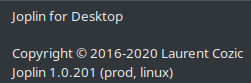
Under Edit tab, there is no undo or redo. Can you please point me to the right place? thanks.
teddyzhai
on 27 Apr 2020
Under Edit tab, there is no
undoorredo. Can you please point me to the right place? thanks.
Yeah we know that. But if the focus of cursor is in editor. Press Ctrl+Z for undo & Ctrl+Shift+Z for redo, it will work till the last note sync.
Although i have created an issue for listing in Edit Menu. I'll put a PR soon.
coderrsid
on 27 Apr 2020
Hey there, it looks like there has been no activity on this issue recently. Has the issue been fixed, or does it still require the community's attention? This issue may be closed if no further activity occurs. You may comment on the issue and I will leave it open. Thank you for your contributions.
stale[bot]
on 11 Jun 2020
@stale[bot] yes the issue is still at large
XTerminatorGR
on 12 Jun 2020
Related issues
 Cybernemo
·
3Comments
Rahulm2310
·
3Comments
Cybernemo
·
3Comments
Rahulm2310
·
3Comments
 alexanderadam
·
3Comments
alexanderadam
·
3Comments
 LifeIsAParadox
·
3Comments
LifeIsAParadox
·
3Comments
 xfrose
·
3Comments
xfrose
·
3Comments