Joplin: Add support for notebook icons
Application
- Desktop
- Mobile
Description
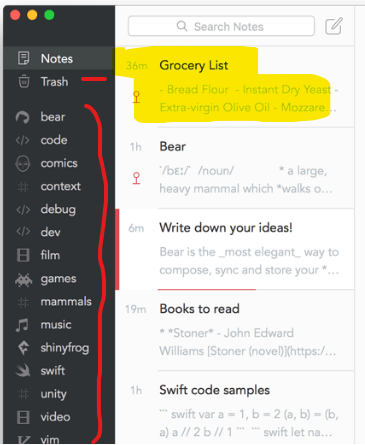
We would like to support notebook icons in the sidebar, as is done for example in Bear. See screenshot below:
Specification
- Add a new
iconproperty to theFolderobject - it will be a string that will take any of the Fork Awesome icon names. - Make sure Fork Awesome is loaded in the app (it should already be) so that its icons can be displayed
- When right-clicking a notebook, change "Rename" to "Properties"
- Change the Rename dialog to a more generic Notebook Properties dialog
- Add the option to set the icon there. Initially it can be a simple text input where the user inputs the name of the icon directly. We can link to the Fork Awesome page to give the list of possible icons.
- When the user click Save, save the icon to the database
- In the sidebar, display the icon next to the notebook name.
Ideally both desktop and mobile should be supported, but it's ok to only support one of them at first.
 laurent22
All 17 comments
This doesn't do anything fancy or really useful yet, but I've got a start so far on this.


 bedwardly-down
on 25 Jan 2020
bedwardly-down
on 25 Jan 2020
Hey @laurent22 and @bedwardly-down, I'd like to help out on this issue. Is there a discussion thread regarding this on Discourse?
 plibither8
on 25 Jan 2020
plibither8
on 25 Jan 2020
@plibither8, no, only the spec above but if you need more info feel free to ask here.
@bedwardly-down, thanks but please check the spec carefully - I do not want to clutter context menus with items like "Set icon", that's why I've put it under "Properties".
laurent22
on 25 Jan 2020
@plibither8 it doesn't look like it, but if you want to assist with what I've done so far, I'd gladly take it as long as you know how to use git and are willing to stay pretty consistent with how the devs have already written the code.
These steps apply to anyone regardless of proficiency that want to help out so that everything stays consistent:
- Fork my joplin fork
git clone <insert the full line that begins with git@ on your repo>
in a terminal or Git for Bash/Powershell if you're on Windows

cd joplinnpm installgit remote add upstream https://github.com/bedwardly-down/joplin.git
this way you have access to my changes and can pull updates on the flygit fetch upstream
to pull my branches to your repo (might not be necessary)git checkout upstream/Notebook-Icons
the branch I'm working on for this task- Optional: I'd highly recommend creating your own branch (like Notebook-Icons-local) so you can test out things without messing up what I or anyone else has done. When you feel confident, send a pull request and I'll check it out.
I want to keep this completely separate from the main joplin repo until everything gets ironed out and is working. Thanks. :D
bedwardly-down
on 25 Jan 2020
Thanks @bedwardly-down. I've got sufficient experience with Git so I'm pretty sure I'll be able to handle that aspect of the issue - thanks for the instructions! :)
I'll hopefully start work on this tomorrow.
plibither8
on 25 Jan 2020
@plibither8 you're quite welcome. My instructions definitely weren't for anyone in particular, just me laying out how I want people to go about helping me. :D
bedwardly-down
on 25 Jan 2020
@plibither8 I have a NotebookPropertiesDialog class started in ElectronClient/app/gui. I'm not 100% sure how to implement everything yet but am going to mainly doing everything there with some code added where needed to get the app to register the new additions. MainScreen looks like the main area for just that.
bedwardly-down
on 25 Jan 2020
@laurent22 i would love to be assigned this issue. I don't have a massive amount of experience with nodejs or reactjs but I'm great at learning on the fly and have quite a bit of experience with Java and a small handful of other languages.
bedwardly-down
on 26 Jan 2020
That's done @bedwardly-down 👍
laurent22
on 26 Jan 2020
@laurent22 what's your policy on progress updates for assignments? I didn't see anything about that in the Contributing Code section of the docs.
bedwardly-down
on 27 Jan 2020
No policy as of yet
laurent22
on 27 Jan 2020
Thanks for getting back to me. I can't sleep, so I'm working on the task as we speak.
bedwardly-down
on 27 Jan 2020
bedwardly-down
on 4 Feb 2020
Hi @laurent22 , i'd like to work on this issue for the React Native Mobile app. Should i create a draft PR and reference it in this issue thread before starting work on it or once i've completed it?
 idl99
on 23 Feb 2020
idl99
on 23 Feb 2020
Working on this.
 rabeehrz
on 27 Feb 2020
rabeehrz
on 27 Feb 2020
Hey there, it looks like there has been no activity on this issue recently. Has the issue been fixed, or does it still require the community's attention? This issue may be closed if no further activity occurs. You may comment on the issue and I will leave it open. Thank you for your contributions.
![stale[bot] picture](https://avatars3.githubusercontent.com/in/1724?v=4&s=40) stale[bot]
on 15 Apr 2020
stale[bot]
on 15 Apr 2020
Closing this issue after a prolonged period of inactivity. If this issue is still present in the latest release, please feel free to create a new issue with up-to-date information.
stale[bot]
on 22 Apr 2020
Related issues
 GingerPapa
·
3Comments
GingerPapa
·
3Comments
 jmcastagnetto
·
3Comments
jmcastagnetto
·
3Comments
 Rahulm2310
·
3Comments
Rahulm2310
·
3Comments
 seagoj
·
3Comments
seagoj
·
3Comments
 alexanderadam
·
3Comments
alexanderadam
·
3Comments