Joplin: Warning when opening Joplin 1.0.170 on macOS Catalina
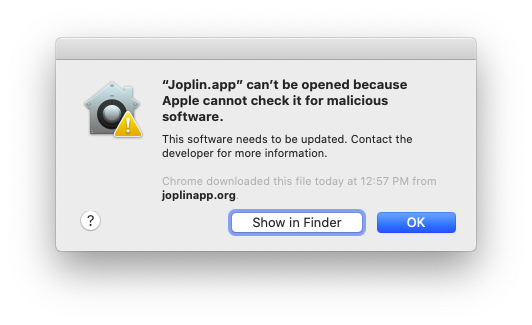
On macOS 10.15 (Catalina), upon launching, a warning displays which says:
==============================================================
“Joplin.app” can’t be opened because Apple cannot check it for malicious software.
This software needs to be updated. Contact the developer for more information.
Firefox downloaded this file today at xx:xx xx from github.com.
===============================================================
Upon clicking OK, the dialog disappears and the program does not launch.
Environment
Joplin version: 1.0.170
Platform: macOS
OS specifcs: 10.15
Steps To Reproduce
Download the latest release of Javalin for Mac from Github (https://github.com/laurent22/joplin/releases/download/v1.0.170/Joplin-1.0.170.dmg)
Mount the .dmg and drag the Javalin .app to the Application folder.
Open the Applications folder and double-click on Joplin.app
A warning dialog appears as detailed above and the program does not launch.
Describe what you expected to happen:
I expected the application to launch and run.
Logfile
The path "~/.config/joplin-desktop" does not exist on my machine, therefore I was unable to insert a flags.txt file to open development tools.
I opened the macOS Console.app and attached the relevant data which occured during the attempted Joplin launch.
 gituser94x54102
All 38 comments
Pretty sure this has to do with Apple's notarization scam.
@laurent22 I suggest that you no longer sign the app at all.
 tessus
on 14 Oct 2019
tessus
on 14 Oct 2019
I think there might be a way to get this notarization stuff working with electron-builder. I expect Catalina is full of bugs though since it was just released, so I don't know if it will be possible to make it work right now.
 laurent22
on 14 Oct 2019
laurent22
on 14 Oct 2019
The problem is that if you sign the app it has to be notarized, otherwise the app won't run. If the app is not signed, you can still run the app.
So in macOS Catalina there are only 2 options:
- sign AND notarize
- don't sign
tessus
on 14 Oct 2019
so same, but option-click is bypassed. it's same of 10.14. but more message scam damm. and check the T2 option in system preferences, maybe T2 is blocked this. sign is more security, but need apple's codesign cert.
 readingsnail
on 15 Oct 2019
readingsnail
on 15 Oct 2019
As a side note, it is still possible to run the application by going into the system preferences security panel and clicking the 'open anyway' button under the 'general' tab.
Once you do that, it runs without any problems for subsequent launches.
 ege-erdogan
on 15 Oct 2019
ege-erdogan
on 15 Oct 2019
@ege-erdogan is that for signed and not notarized programs as well? are you sure you haven't turned off SIP. Apple clearly stated that signed programs won't run when they are not notarized. For unsigned programs, however, one can use the above "open anyway" workaround.
tessus
on 15 Oct 2019
@tessus I just did the "open anyway" workaround. I still have SIP enabled per csrutil status which returns System Integrity Protection status: enabled.
 itzsaga
on 21 Oct 2019
itzsaga
on 21 Oct 2019
@itzsaga thx for the info. I'm still not on Catalina, but I always have SIP disabled and I've also started to use sudo spctl --master-disable.
Edit: Apple stated that even the workaround won't work. It's either not signed and not notarized (which makes the workaround possible) or it has to be signed AND notarized. Well, I guess they lied again. What's new.
[Rant coming on]
I'm getting sick and tired of Apple's idiotic system, which btw can still be hacked with side channel attacks. As long as the CPUs are not fixed, the SW workarounds are a very poor attempt to make one's system secure. They try to make you think that your system is secuee, but it isn't.
How about not downloading and installing SW off weird and disreputable sites? The SW I have installed is mostly open source and the SW that isn't is from companies I trust - and that's not because they have their SW signed with an Apple developer id. e.g. I would never trust any SW that comes from an Internet provider. I have never had a virus scanner installed. Guess what? I never had a virus...in over 30 years. Anyway, sorry for the rant.
tessus
on 21 Oct 2019
FWIW I just stumbled here after updating Joplin (I'm not using my mac as much as I did in the past) and using the workaround explained in https://github.com/laurent22/joplin/issues/1983#issuecomment-542170276 I was able to successfully open Joplin 1.0.179 on macOS 10.15.2
When opening Preferences -> Security & Privacy -> General, in the lower half of the screen I had the message (translating to English by memory, so it won't be the exact message) "Joplin could not be launched [Open anyway]".
This prompted a dialog similar to the first one but with a new "open" button.
Subsequent launches started without warnings or dialogs.
 hrk
on 25 Jan 2020
hrk
on 25 Jan 2020
Another workaround is to right-click Joplin and select "Open". This gives you a dialog that lets you open the app anyway. Quick & easy... if you know it.
(to anyone says this is a weird UI to get around a questionable feature... agreed!)
 bronson
on 4 Feb 2020
bronson
on 4 Feb 2020
This is a major blocker for many users since they will download, see they can't open, and delete.
This app is awesome! Is it only for developers and superusers?
 IanEdington
on 6 Mar 2020
IanEdington
on 6 Mar 2020
I would gladly accept a pull request for Catalina support. I can't do it myself as I don't plan to ever switch to Catalina since it means I'll lose Photoshop CS6.
laurent22
on 6 Mar 2020
I would gladly accept a pull request for Catalina support. I can't do it myself as I don't plan to ever switch to Catalina since it means I'll lose Photoshop CS6.
I'm running Catalina, but I doubt I have the knowledge of what to do.
hrk
on 6 Mar 2020
IMO, this is a critical feature for Mac OS users.
I'm a developer and I just knew I'd have to go and do this myself in the 'Security & Privacy' panel in System Preferences program, so I'm not the average user for this program certainly. The average user isn't going to have any idea of what to do at first and it'll be hard for them to just 'know' to google the problem and then read through github issues like these.
Better to fix the app's releases, definitely. I'm also tired of having to go to that menu every time a new version of Joplin is released (kudos to the core devs for this amazing piece of software and the frequency of releases and fixes is amazing, of course!).
I have Catalina, what can I do here? Is there a way to set this up without myself being personally involved in every release? What's the process right now for each release?
 Nitrodist
on 16 Mar 2020
Nitrodist
on 16 Mar 2020
Confirmed, Right Click -> Open works, from that point forward opening from dock seems to work fine.
 EricB10
on 27 Mar 2020
EricB10
on 27 Mar 2020
@EricB10 yes, Right-Click-->Open works but we must also say that this is from
Finder-->Applications-->Joplin (some users don't have the Applications options in Finder)
So
the above means that if you just use
Launchpad, the Right-Click workaround does not work.
It also means that if you do not have Applications in your Finder then go to your
Finder Preferences, select the Sidebar tab and
click/select the Applications checkbox -
This will enable the Applications folder to be shown in your Finder and from there you can Right-Click as suggested.
HTH those less techy.
 zrml
on 1 Apr 2020
zrml
on 1 Apr 2020
Hey there, it looks like there has been no activity on this issue recently. Has the issue been fixed, or does it still require the community's attention? This issue may be closed if no further activity occurs. You may comment on the issue and I will leave it open. Thank you for your contributions.
![stale[bot] picture](https://avatars3.githubusercontent.com/in/1724?v=4&s=40) stale[bot]
on 16 May 2020
stale[bot]
on 16 May 2020
This is still an issue
IanEdington
on 19 May 2020
I am still getting this today with 1.0.216 on OS X 10.15.4
 fukawi2
on 26 May 2020
fukawi2
on 26 May 2020
@laurent22 sorry for the delay in my reply.
I've done some research and the warning is due to missing notarization for Joplin.
I have found this blog post with an explanation on how to automate the process (otherwise a manual task), but I'd need to hear more from you regarding your workflow. If all you need is a Catalina+ computer w/ Xcode to run the notarization process, I'll gladly offer mine, but I haven't dug enough to know if I'd require some private data or if I can just compile from git + upload and have your app signed in your place.
hrk
on 26 May 2020
Travis has Mac machines. I've never done it but you might be able to Notarizing it there:
IanEdington
on 31 May 2020
Hey there, it looks like there has been no activity on this issue recently. Has the issue been fixed, or does it still require the community's attention? This issue may be closed if no further activity occurs. You may comment on the issue and I will leave it open. Thank you for your contributions.
stale[bot]
on 10 Jul 2020
Yes, please. Issue is still relevant.
hrk
on 10 Jul 2020
Here's another helpful blog post with details about automating this step.
 case
on 2 Aug 2020
case
on 2 Aug 2020
Just experienced this on the latest release: Joplin 1.0.233 (prod, darwin)
 reybango
on 11 Aug 2020
reybango
on 11 Aug 2020
I found a workaround!
- Download and install Joplin
- Find Joplin in Finder -> Applications
- Hold down "Command" and _right-click_ on Joplin
- Click "Open" in the context menu.
- You will get the warning about it not being signed, but now you also have an "Open" button that lets you bypass "gatekeeper".
This exception appears to remain in place until you install a new version (ie, upgrade).
fukawi2
on 20 Aug 2020
I am on catalina 10.15.6 and right click on the open does not solve this problem.
 sagnik
on 26 Aug 2020
sagnik
on 26 Aug 2020
You have to hold down ⌘ Command while right-clicking.
fukawi2
on 27 Aug 2020
Still a problem in 1.0.233
 linesarefuzzy
on 2 Sep 2020
linesarefuzzy
on 2 Sep 2020
command click doesn't work, but you can rightclick (two finger or whatever) and press command before you click on 'open'
 RMHogervorst
on 17 Sep 2020
RMHogervorst
on 17 Sep 2020
If nothing works for you, you can change this property globally using sudo spctl --master-disable
sagnik
on 21 Sep 2020
Nothing works for me, I have no sudo on machine ... but, I build from sources, now I can use Joplin. :)
 davizucon
on 28 Sep 2020
davizucon
on 28 Sep 2020
The macOS security warning is a common problem with open-source software. It is also apparently quite easy to fix if you pay $99/year for an Apple Developer Program subscription, which @laurent22 already does, considering Joplin is available in the iOS App Store.
Here's an idea: why not offer a signed and notarized version of Joplin in the Mac App Store (with a "tip jar" in-app purchase, or perhaps a paid subscription for sync hosting), while also continuing to offer unsigned and/or non-notarized builds of Joplin alongside the libre code for, you know, the tinkerers? The Mac App Store also has the advantage of automatic background updates, which are just super nice, along with a higher degree of discoverability for new users.
Another suggestion I have for the non-notarized builds is that if they are distributed in a DMG image, the custom background for the DMG could have instructions to right-click to open for the first time along with the usual alias to the Applications folder. I have attached a mockup of this, if someone wants to figure out actually adding it to the official download. (Note: the text is SF UI Display, in my case in 13pt, with 1.25x line spacing.)

 elsiehupp
on 10 Oct 2020
elsiehupp
on 10 Oct 2020
I wanted to let everyone know this is still an issue.
- “Joplin” can’t be opened because Apple cannot check it for malicious software.
- os : 10.15.7
installed with homebrew
How secure is following comment 1983 instruction's? I'm relatively new to technology.
 TexAg12
on 22 Oct 2020
TexAg12
on 22 Oct 2020
Your link to comment 1983 appears to be broken.
elsiehupp
on 22 Oct 2020
@laurent22 see this tweet from Jeff Geerling:
Just want to give a ❤️ to @macstadium — they have offered mac hosting for me to be able to build my open source Mac-related projects, which is extremely handy as I can't get them to build without running out of build hours on
@travisci anymore!
You / we might be able to get in touch with someone there re: helping out with Joplin-for-Mac?
case
on 5 Nov 2020
Still a problem with Big Sur 11.0.1.
Right click, press 'command', click 'open' and 'open' again still works though.
 dmnkhrn
on 18 Nov 2020
dmnkhrn
on 18 Nov 2020
Download dmg image from release page, copy to Applications folder.
1st run I got: "is damaged and can’t be opened. You should move it to the Trash"
then:
xattr -d -r com.apple.quarantine /Applications/Joplin.app
Now I open fine.
davizucon
on 25 Nov 2020
Related issues
 xfrose
·
3Comments
xfrose
·
3Comments
 jurgenhaas
·
3Comments
laurent22
·
3Comments
jurgenhaas
·
3Comments
laurent22
·
3Comments
 christianlupus
·
3Comments
christianlupus
·
3Comments
 kopfuss
·
3Comments
kopfuss
·
3Comments
Most helpful comment
As a side note, it is still possible to run the application by going into the system preferences security panel and clicking the 'open anyway' button under the 'general' tab.
Once you do that, it runs without any problems for subsequent launches.