Joplin: [feature request] add trash folder
Operating system
- Windows
- macOS
- Linux
- Android
- iOS
Application
- Desktop
- Mobile
- Terminal
Last time I got a conflict error when I sync one of my PC to the cloud, I tried to empty everything to re-sync, but all the deleting operations were synced, so everything was erased from the server.
My understanding is that every joplin instance can create and modify notes on the cloud, but can not delete, at least not automatically(manual deletion from the cloud is much more reasonable ).
My point is that data on the server should be managed very carefully(deletion should be always cautious), even though we can always use backups.
 haitaogithub
All 46 comments
Delete operations need to be synced too as it would be too much work to manually delete files from the server. Otherwise this issue has been discussed a bit on the forum - https://discourse.joplin.cozic.net/t/troubleshooting-joplins-synchronization-on-ubuntu/22
In general the likely solution is, when many notes are going to be deleted or changed during sync, to have a dialog like "Sync is going to delete 3545 notes - do you wish to continue?" so that user can cancel and investigate the issue.
 laurent22
on 2 May 2018
laurent22
on 2 May 2018
Thanks for your quick response, you have made your point. Manually delete every file on the server is painful.
- I looked into the discussion on the forum. I strongly favorite the idea of trash folder, we can undo the deletion for certain time(maybe in the configuration), as accidentally deletion is very common, what do you think?
- But this case may happen when user create some notes with the same name.
I believe data on the server shouldn't be real deleted just with one click, this operation need the ability to rollback.
haitaogithub
on 2 May 2018
a trash folder could be helpful. Even once the items are sync, we could rollback the note from the trash to the original notebook
 foxmask
on 3 May 2018
foxmask
on 3 May 2018
Right now as a workaround I just created a Trash notebook and drag unneeded notes there. Pretty simple - I don't know how this would fare as an 'official' feature.
 gombosg
on 27 Nov 2018
gombosg
on 27 Nov 2018
Please consider adding this feature, I got a problem today because the note got deleted.
Step to reproduce:
- Create a note on mobile, synced to the server
- Delete note on the mobile, close app, so the action delete is not synced to the server
- Open Joplin on my computer, edit note (which one I deleted on mobile, _my mistake here is forgetting that the note I have deleted somewhere_)
- Open Joplin mobile, sync, did not see the note I have work on, so I'm thinking sync problem (because I forgot that the note is deleted on the mobile), open Joplin on my computer, press sync again, my working note is gone forever :(
Yes, this is a user mistake, but with trash bin feature, we can recover data.
 NothingCtrl
on 21 Mar 2019
NothingCtrl
on 21 Mar 2019
@NothingCtrl that sounds like a bug in the synchronization resolution: any updates of a note should supersede the deletion. i.e., the note should no longer be deleted and should be restored onto the mobile device.
 huyz
on 21 Mar 2019
huyz
on 21 Mar 2019
Right now as a workaround I just created a Trash notebook and drag unneeded notes there. Pretty simple - I don't know how this would fare as an 'official' feature.
I think we definitely need this as an official feature because:
- Safety. Delete (context menu option a well as keyboard key) will be what most users will be using. Especially novice users who will be most vulnerable to and most likely to make data management mistakes. This basic safety shouldn't be only for power users.
- Convenience. I want to press the Delete key followed by the Enter key and have safety for all of those people who need it. Dragging and dropping instead to a specific notebook is a much bigger hassle.
A counterargument to trash folder would be that some people want to completely erase notes conveniently. I would say that such needs are outweighed by the need for safe delete. Alternatively we could just implement a Shift+Delete for those people so everyone is happy. And for safety with that we either don't mention the shift-delete feature in note context menus (can't accidentally click it if it isn't on the menu) or give it a scary label like "Permanent delete" in bright red.
 i-need-to-tell-you-something
on 23 May 2019
i-need-to-tell-you-something
on 23 May 2019
Is this issue still viable for comments?
Over the last couple days I recommended this piece of software to some people, and all of them at one time complained that deleted files are not trashbined. Some of them stopped using the app due to the ease of losing valuable/ critical notes with simple button press.
A trashbin would be further secure important notes, even powerusers would benefit, noone is perfect but losing notes due to the absence would be a bummer.
 mightyBroccoli
on 3 Aug 2019
mightyBroccoli
on 3 Aug 2019
I'm going to put in my vote for this as well. @gombosg solution seems like a no-brainer. If there was a Trash notebook by default that notes were sent to, possibly as an option. Otherwise if there were a way to do this ourselves. I use Joplin daily and this just seems like a gaping hole in an otherwise complete feature set.
 esa1975
on 20 Sep 2019
esa1975
on 20 Sep 2019
I'd favour a bit more complex solution, where the location the note is deleted from remains in tact: add a flair or equivelant to the note, what makes it only display in the trash folder / trashed view (similar to linux show hidden files). Optionally (I prefer to never empty my trash) it could be cleared after n days, that would make a need to have information about deletion date as well.
 jtagcat
on 5 Dec 2019
jtagcat
on 5 Dec 2019
GSoC 2020 candidate?
 Perkolator
on 17 Dec 2019
Perkolator
on 17 Dec 2019
@Perkolator, I think that would work. If you could add a description to ideas.md I can merge.
laurent22
on 17 Dec 2019
If this isn't already reserved, could you assigned this issue to me?
 mic704b
on 12 Feb 2020
mic704b
on 12 Feb 2020
Sure, that's done. Before writing the code please could you describe roughly what approach you're going to follow? I found that any approach I try there are a lot of unexpected pitfalls and potential long term issues in terms of maintenance.
laurent22
on 12 Feb 2020
The approach I was intending would first be implemented on Desktop and is based on a tag and smart filter. It would be something like this:
All existing Delete note commands are changed to Move to trash.
Notes are sent to the trash by applying a "trash" tag eg _deleted_. This tag is a special system tag in that it is hidden from the user (ie it doesn't show up in tag lists or the sidebar). So when the user selects Move to trash, behind the scenes, we just add the trash tag to the note.
The Trash item in the sidebar is a smart filter that, when selected, simply shows all notes with the trash tag. The context menu when in the trash only includes Restore and Delete operations. Restore removes the item from trash and returns the note to its original folder (behind the scenes we just remove the tag), and Delete is final permanent delete (as we have now).
Normal folders etc are modified to hide their notes that have the trash tag. But in all other aspects behind the scenes, they actually still contain the "trashed" notes, and work like normal.
The beauty of this is that it is built with existing functionality and is fully backwards compatible. If you view the database in a "pre-trash" client, you would see the trash tag, and it would just look like some notes are tagged as _deleted_, and they would still exist in their original folders. All the core functionality is compatible and unchanged.
mic704b
on 12 Feb 2020
I can't think of anything right now, but sounds like this 'smart tag' behavior could be reused in the future. Try to make it modular ;)
Thanks for the effort!
jtagcat
on 13 Feb 2020
Normal folders etc are modified to hide their notes that have the trash tag. But in all other aspects behind the scenes, they actually still contain the "trashed" notes, and work like normal.
What happens if a user deletes that folder?
Restoreremoves the item from trash and returns the note to its original folder (behind the scenes we just remove the tag)
What happens: A) if the folder isn't there anymore? B) There's a new note in that folder with the same note name?
The context menu when in the trash only includes
RestoreandDeleteoperations.
The "restore to original folder" should clearly indicate to which folder the note is restored. Also I think that "restore to a new folder" and "restore to other folder" options should be offered to the user.
I think this feature should be thought and planned over carefully.
Perkolator
on 13 Feb 2020
Should folders also be "trashed" and restorable?
Perkolator
on 13 Feb 2020
Thanks for clarifying @mic704b. Like Perkolator, I think we need to address what happens if the tag gets deleted (and no matter how hidden it will get deleted by someone at some point).
Also other questions:
What happens if I setup Joplin on mobile, delete a note, then setup it up on desktop, delete a note again, and then sync both clients. There will be two instances of the _delete_ tag.
Even if we don't implement it now we need to think about auto-erasing some items after a set time. How would that be handled in this case?
What is the impact in terms of performance and additional complexity to handle the join between the notes and note_tags tables? This will be needed to find what notes are currently deleted and exclude them from various parts of the UI. Note lists, search maybe, API results and probably other places.
I had a similar idea but using a hidden folder instead of hidden tag. The advantage of your solution is that timestamps aren't changed (since the note properties aren't changed) when a note is moved to the trash, which is a good thing.
Lately the solution that looked ok to me was to add a "deleted_time" property to the note table. If set, it means the note is deleted, and appears in a virtual Trash folder, but not in note list, search etc. And it means we also have the deletion time, so we can auto-remove items after a while. I couldn't think of any big issue with this, other than the need to add a new property, but it's possible I missed something.
laurent22
on 13 Feb 2020
Would the virtual Trash folder show folders of the deleted notes?
Would this "virtual Trash folder" plan affect versions?
And it means we also have the deletion time, so we can auto-remove items after a while.
I hope this is planned as optional.
Perkolator
on 13 Feb 2020
Thanks for your comments @Perkolator
What happens if a user deletes that folder?
i) Initially I was planning to implement the most simplest behaviour: eg warn the user that notes previously deleted from the folder, exist in the trash, and that proceeding to delete the folder will result in them being permanently deleted too.
ii) Another option is to move all notes contained in the folder to the trash, but reassign them to the default folder so they are not orphans. Joplin has a concept of a default folder, and in the future it is expected to be user configurable. Of course deleting the default folder must be disallowed.
iii) Yet another option is to reassign the ophan notes to a hidden system folder. When restoring such a note, the user would be prompted to select an alternative "real" folder to restore into.
iv) A final option is as (iii), but to recreate its parent folder (in name only) when the orphan is restored. However I think this is too complex to consider for now.
These options described are increasing in complexity implementation-wise. If we implement the simplest option now, I don't see it impeding a move to the other options later, there are no additional complications or special migrations need.
What happens: A) if the folder isn't there anymore?
See above. In summary, we wouldn't allow this to happen by design.
B) There's a new note in that folder with the same note name?
Note names are not important for this. Already in Joplin, each note is identified by a unique id, and this is would not be affected by this trash implementation. All notes could have the same name, and it would still work fine.
The "restore to original folder" should clearly indicate to which folder the note is restored.
When you view the note in the trash, it will clearly display the folder name in its toolbar. So the user will see exactly where it is to be restored to.
Also I think that "restore to a new folder" and "restore to other folder" options should be offered to the user.
These functions are also possible and can be considered, however I don't think they should be prioritiised for the first iteration of this feature. The change set is going to be relatively large for this PR, so to keep it manageable I think we should leave it for later iterations after the fundamentals are in place and working.
I think this feature should be thought and planned over carefully.
Yes, this is important. Thank you for your thought and comments on the proposed strategies.
mic704b
on 13 Feb 2020
I'm sorry to say this but the "tag solution" seems too complex and prone to errors, personally I would pursue the "add a 'deleted_time' property to the note table" idea for now. If that doesn't work, the tag solution could be then re-evaluated.
I guess an "actual" Trash folder (= moving notes to a Trash folder) is out of the question? Because it would bring problems with timestamps?
Perkolator
on 13 Feb 2020
I guess an "actual" Trash folder (= moving notes to a Trash folder) is out of the question? Because it would bring problems with timestamps?
It has very similar issues with the tag solution. Also an actual Trash folder would be called "Trash" in English, but differently in other languages, and if a user switches the language midway, the app will start deleting to a differently named folder. And indeed also problem with timestamps, and with duplicate Trash folders when multiple of them are created on multiple devices.
laurent22
on 13 Feb 2020
@laurent22 thanks for your reply
what happens if the tag gets deleted
If the tag gets deleted, the notes are restored from the trash. This is acceptable, because information is not lost, and it is an extreme and unexpected scenario.
Wrt the trash tag itself, good question. Joplin would check the trash tag exists on startup. If it doesn't exist, it would create it (with a predefined id). So it is meant to self correct.
However I need to look at this in more detail, to see if there would be any remnants from its earlier existence that would block its reincarnation.
Just to be clear, this is an unexpected situation, because the user will not have access to this tag in any way. However completely I agree, we need to handle and recover from it anyway.
What happens if I setup Joplin on mobile, delete a note, then setup it up on desktop, delete a note again, and then sync both clients. There will be two instances of the _delete_ tag.
I need to look closely at this, to ensure I understand the sync behaviour. The design intent was that this scenario is already handled by sync.
The trash functionality would use the id of the trash tag to access it, not its name, so it would not be confused by an imposter. However I need to check how sync would handle the system tag, to ensure it doesn't create a duplicate in the tags table. Even if it does though, I think it can be handled.
Even if we don't implement it now we need to think about auto-erasing some items after a set time. How would that be handled in this case?
If tagging a note doesn't result in its modified time being updated, then I think your solution (deleted time property) sounds like the natural solution. I was trying to avoid modifying the tables, but it might be necessary for that functionality.
What is the impact in terms of performance and additional complexity to handle the join between the notes and note_tags tables?
To be quantified. The additional SQL is not complex, but it is definitely another SELECT and condition, so the performance needs to be assessed.
Let me do some homework and get back to you on these. Please feel free to throw any more scenarios at me too, if they come to mind.
mic704b
on 13 Feb 2020
Same-Named notes could be merged: if you make a new note, restore the old from trash (and 'move' the trashed version to previous revisions)
jtagcat
on 14 Feb 2020
Updated/clarified response:
What happens if a user deletes that folder?
When the user deletes a folder that has child notes in trash, a dialog box appears advising them those notes will also be deleted, and asking if they wish to continue.
What happens: A) if the folder isn't there anymore?
This can never happen
B) There's a new note in that folder with the same note name?
The note is restored and both notes will exist in the folder. This is the same as if you create two notes with the same name yourself.
The "restore to original folder" should clearly indicate to which folder the note is restored.
Each note in trash shows from which folder it was deleted, so it is already clear where they will be restored to.
Indicating the restore destination on the restore menu option is possible but becomes tricky if multiple notes are restored simultaneously.
Also I think that "restore to a new folder" and "restore to other folder" options should be offered to the user.
Potentially these can be added but I don't think they are required in the first iteration of the feature.
mic704b
on 8 Mar 2020
Should folders also be "trashed" and restorable?
This would be a good feature though I propose a first iteration that only supports notes is still a useful feature. Support for folders in trash would be a enhancement in a future iteration.
mic704b
on 8 Mar 2020
What happens if a user deletes that folder?
When the user deletes a folder that has child notes in trash, a dialog box appears advising them those notes will also be deleted, and asking if they wish to continue.
Am I understanding this right, an example scenario:
1) User deletes a note from "A" folder.
-> Note goes to/is seen in trash folder.
2) User deletes the "A" folder.
-> A dialog is presented to the user. If the user clicks "ok/continue", then folder "A" is deleted completely, can't be seen in trash folder? Also the note that was earlier deleted to the trash folder is deleted completely, even from trash folder?
If this is correct, I don't like this implementation at all. Notes & folders in the trash should only be completely deleted if a user deletes them from the trash folder.
Perkolator
on 8 Mar 2020
I think we need to address what happens if the tag gets deleted (and no matter how hidden it _will_ get deleted by someone at some point).
Through design, the trash tag is not presented to the user when editing tags. Further, the tag delete method does not allow deleting the trash tag.
However it could still happen through a bug, and if it happened the design is still robust. The app will alert the user to restart if the tag is missing and it will automatically recreate the tag on next start up. The user cannot create an alternative trash tag, any attempt will be rejected.
There are test cases for these scenarios.
* What happens if I setup Joplin on mobile, delete a note, then setup it up on desktop, delete a note again, and then sync both clients. There will be two instances of the _delete_ tag.
Yes, this is correct, and is the same behaviour as for any tag today. Trash is designed to work in these circumstances. Test cases are added for this scenario.
* Even if we don't implement it now we need to think about auto-erasing some items after a set time.
A side-effect of the design is that the time of note deletion is the time when the trash tag is applied to the note, so this is the updated_time of the relevant row in note_tag table. We get this for free. An automatic trash clearing service could use this timestamp to determine which notes to discard.
* This will be needed to find what notes are currently deleted and exclude them from various parts of the UI. Note lists, search maybe, API results and probably
Generally all app functionality should not include trash notes. So by updating the methods on the models to exclude trash notes, this is what is achieved. Further, the app functionality is reviewed to identify any necessary exceptions, and also all app features affected are covered by test cases.
mic704b
on 8 Mar 2020
2\. then folder "A" is deleted completely, can't be seen in trash folder
Support for folders in trash would be a good feature though I propose a first iteration that only supports notes is still a useful feature. Support for folders in trash would be a enhancement in a future iteration.
Until then, when the user initiates deletion of a folder, they will be informed that this means permanent deletion and so will not be surprised the notes do not appear in trash.
2\. Also the note that was earlier deleted to the trash folder is deleted completely, even from trash folder
The user is clearly informed and has the choice to proceed with their deletion or cancel the operation.
Notes & folders in the trash should only be completely deleted if a user deletes them from the trash folder.
The user is required to authorise their deletion, or cancel the operation. Nothing happens without the user confirmation.
This would only the use case until trash support for folders is added.
Is it your opinion that a trash that works with notes is not useful until it supports deletion of folders as well?
mic704b
on 8 Mar 2020
I have never seen such implementation of a trash folder in any software. Things put in trash folder should be ONLY deleted when a user deletes them FROM the trash folder (or optionally, if user has selected some automatic trash emptying schedule). That's the whole point of the trash folder!
Also you put too much faith in end users to understand what they are actually doing (user confirmation dialog).. especially since this proposed implementation is very unorthodox.
And yes, I personally would like to see the trash folder to be implemented properly from the start, with folder support too.
In my vision the trash folder view would show the same folder view like the normal view of folders, not just a list of notes. Like this:
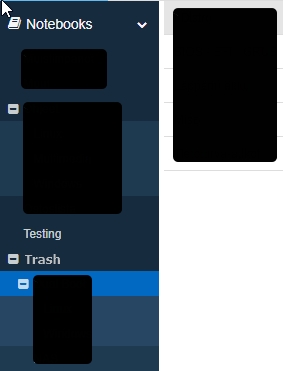
Just like a "normal" trash folder does, it retains the folder structure and notes in original folders.
Perkolator
on 8 Mar 2020
Until then, when the user initiates deletion of a folder, they will be informed that this means permanent deletion and so will not be surprised the notes do not appear in trash.
Any reason why it needs to be that way? If the note is already in the trash, couldn't you leave it there (not need to permanently delete it), and just add the remaining notes (which weren't already in the trash) to the trash?
laurent22
on 8 Mar 2020
Also you put too much faith in end users to understand what they are actually doing (user confirmation dialog).. especially since this proposed implementation is very unorthodox.
I accept your point. I agree we should avoid an unorthodox solution that is not completely intuitive.
mic704b
on 8 Mar 2020
Any reason why it needs to be that way?
The note retains the parent_id of its folder so we know where to return it. If the folder is removed then the note is an orphan.
If the note is already in the trash, couldn't you leave it there (not need to permanently delete it), and just add the remaining notes (which weren't already in the trash) to the trash?
Storage of the complete folder structure is a challenge at this point.
Would an acceptable alternative in this case be to move the notes to trash (as orphans) and then restore them to an alternative folder if/when they are restored?
It is not ideal, but perhaps it is an acceptable solution until full folder support can be implemented?
mic704b
on 8 Mar 2020
It is not ideal, but perhaps it is an acceptable solution until full folder support can be implemented?
Are there big hurdles to overcome this? Would the same hurdles exist later when improving the trash feature to include folder support? If the answer to the latter is yes, wouldn't it make more sense to implement the whole feature now? Especially IF the the first implementation which doesn't include folders needs to be changed later on when folder support is implemented.
Just my 2c's. Sometimes it makes sense to split work, but sometimes not, if that would mean that the previous work needs to be heavily re-designed/worked later.
Perkolator
on 8 Mar 2020
Storage of the complete folder structure is a challenge at this point.
Would an acceptable alternative in this case be to move the notes to trash (as orphans) and then restore them to an alternative folder if/when they are restored?
Under your current approach, that would work I think. We only need to care about the parent_id when restoring the note. If the notebook no longer exists, we can restore to an automatically created folder, a bit like it's done when restoring revisions.
While your approach works well overall, it might indeed be tricky to support deleting notebooks later on. In particular, notebooks can't have tags so there would have to be a completely separate solution to support this. Do you have any solution in mind for this?
In my view, we can either allow notebooks to be tagged (which means creating a new "folder_tags" table, which would have to be synced), or add a new "deleted" property to the folders table. But if we add new properties or create new tables and sync items, I think it would be best to have a complete plan now, even if you don't implement all of it now (which indeed is not necessary).
laurent22
on 8 Mar 2020
we can allow notebooks to be tagged
That sounds brilliant. It would work the same as for notes. We may not even need a separate tags table, perhaps they share a single 'note_tags' table (or rather 'item_tags'). I'll investigate the trade offs.
mic704b
on 9 Mar 2020
Updated proposal: implement the trash feature in two iterations, with full folder support in the second.
Iteration 1: (Folders are not visible in trash)
- delete note/s:
- note/s are moved to trash and appear there
- delete a folder
- all child notes are moved to trash (including from sub-folders)
- the folder and sub-folders are removed from SideBar view
- the folder itself does not appear in trash
- restore note/s from trash
- note is replaced in the folder from which it was deleted
- if the folder been deleted in the interim, the folder is reinstated (and its parents)
- if through some unforeseen circumstance the parent folder cannot be reinstated, the note is restored to an
Orphansfolder which behaves similar to theConflictsfolder
- there are standard permanent delete shortcuts eg
Shift-Deleteon Windows
- require user confirmation before the request is actioned
- permanently deleting note/s
- completely deletes the notes, bypassing the trash - permanently deleting a folder
- all its notes and sub-folder notes are permanently deleted
- if it has child notes previously placed in trash, then those notes remain in trash unaffected
Iteration 2: (Folders are visible in trash)
There are a few ways this could be work. My preferred option at this stage is:
- Clicking on trash opens a "trash" window from which items can be restored or permanently deleted
- The trash window shows all deleted notes and folders
- The trash window has columns for
- name
- type of object (perhaps an icon)
- date deleted,
- original location, (ie restore location)
- number of items (for folders)
- the items in the trash window can be sorted by any column
Technical
- All the information for iteration 2 is already stored and available in iteration 1
- Folder tagging is implemented so we can apply the trash tag to deleted folders
- Folder tagging is otherwise not directly accessible or visible to the user (at this stage)
- If a folder is deleted, it is not fully purged until its last child note is permanently deleted
- the folder is not visible, but it will exist in the
foldertable until then.
- the folder is not visible, but it will exist in the
- A new
folder_tagtable is added, doing the same job asnote_tagbut for folders. - Using the timestamps on the
note_tagandfolder_tagentries gives us date (and order) of deletion
Moving from iteration 1 to iteration 2 does not require any significant rework, it is primarily adding a new GUI element.
The folder_tag table is not strictly necessary, as all folder tags could be recorded in the note_tag table (think of it as an item_tag table). However to keep the design clean, adding the new table is probably best.
mic704b
on 19 Mar 2020
2 questions popped in my mind after reading the proposal:
1) Has the note version/revision system been taken into consideration with this new feature?
- Clicking on trash opens a "trash" window from which items can be restored or permanently deleted
2) Does it really have to be implemented like this? Your proposal wouldn't be able to show the actual deleted note contents. That could be very important sometimes when deciding to restore or delete permanently. Why not show the trash folder the same way as normal folders are shown? Full folder tree and notes inside them. It's a traditional way to show a trash folder. For one thing, that way an option of dragging and dropping deleted folder(s)/note(s) out of trash would be possible(?).
Perkolator
on 19 Mar 2020
Thanks for the comments @Perkolator
Yes, note revisions are considered, and will be unaffected. The revision history is retained with the note until the note is permanently deleted.
Concerning the choice of implementation; Iteration 1 does not lock us into an final option for iteration 2. It is compatible with an iteration 2 implementation with the features you suggest.
mic704b
on 13 Apr 2020
If you scrap the idea of the "separate trash window", is there a lot to do in your iteration 2? I mean, Joplin already knows how to show folders/notebooks and notes in them, which is the way I believe would be the proper way of showing the special "trash" folder.
Perkolator
on 13 Apr 2020
Yes, it would be significant effort either way.
I like the idea of your suggestion. The challenge though is in the range of scenarios. Eg If you delete a single file, how do you represent it in trash? If you delete a folder, it would move to trash with its contents. But what about files that were previously deleted from that folder? What if you delete a file, then move its source folder? Without a full spec, there are a lot of details to resolve. I'm not saying these are not solvable, just that they need to be.
If you could point to an example of a good implementation, that may be helpful.
mic704b
on 14 Apr 2020
I don't know the details under the Joplin hood. But quickly thinking about this, if the folder structure is attached to the note, there shouldn't be a problem, right?
If you delete a single file, how do you represent it in trash?
Full folder structure and the note in the folder it was deleted from.
If you delete a folder, it would move to trash with its contents. But what about files that were previously deleted from that folder?
All would be shown in the folder structure they were deleted from, before or after a full folder delete, it doesn't matter. Full folder structure in all cases.
What if you delete a file, then move its source folder?
Again, if the folder structure is attached to the note, there shouldn't be any problems. The source folder would be moved in normal notebooks, but the note in the trash would keep its original folder structure as what it was when it was deleted.
Here's a quick example from Windows, network share trash folder from my NAS:
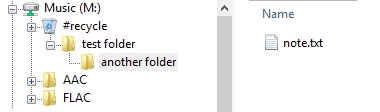
The "test folder" was created on the root of the mapped drive "M:". "test folder" is empty, no files in it. Only the "another folder" has a deleted file in it.
I think that this would be the best implementation, if it's possible to do it like this. It would be simple for the user, seeing the trash in the same way that normal folder/notes are shown. Note folder structure would be retained (as it was when deleted), this is important information too, and if something in normal folders gets deleted/moved/renamed it doesn't affect trash.
Does this make any sense?
Perkolator
on 14 Apr 2020
Hey there, it looks like there has been no activity on this issue recently. Has the issue been fixed, or does it still require the community's attention? This issue may be closed if no further activity occurs. You may comment on the issue and I will leave it open. Thank you for your contributions.
![stale[bot] picture](https://avatars3.githubusercontent.com/in/1724?v=4&s=40) stale[bot]
on 29 May 2020
stale[bot]
on 29 May 2020
Keep it open..
Perkolator
on 29 May 2020
Yes sorry, I've added it to the backlog now so it will stay open.
laurent22
on 29 May 2020
Related issues
 christianlupus
·
3Comments
christianlupus
·
3Comments
 v-marinkov
·
3Comments
v-marinkov
·
3Comments
 deftdawg
·
3Comments
deftdawg
·
3Comments
 jurgenhaas
·
3Comments
jurgenhaas
·
3Comments
 Dharmesh-Poddar
·
3Comments
Dharmesh-Poddar
·
3Comments
Most helpful comment
Thanks for your quick response, you have made your point. Manually delete every file on the server is painful.
I believe data on the server shouldn't be real deleted just with one click, this operation need the ability to rollback.