09 March 2020 by @laurent22: The next version of Joplin will include an experimental WYSIWYG so I'm using this post to list the work that still needs to be done on it:
- [x] Add back support for external editing
- [x] Allow creating code blocks for Katex, Mermaid, Fountain, and for actual source code.
- [x] Allow creating checkboxes
- [x] Improve handling of non-standard Markdown plugins
- [x] Add "Insert date time" button
- [x] Add Tag button
- [x] Display tags below title
- [x] Add "Alarm" button
- [x] Add "Note Properties" button
- [x] Check that when clicking "Back" from note history, it goes back to WYSIWYG editor
- [x] Add "Content Properties" button
- [x] Clicking a link (internal or external) does not do anything, you have to right-click to get a menu "Link / Remove Link / Open Link" and "Open Link" does not work.
- [x] When creating link, remove option to set the target to "current window" or "new window"
- [x] Handle pasting note links (which are in Markdown) in editor
- [x] Fix printing
- [x] Check Export to PDF
- [x] Tables
- [x] Table lines are dashed not solid.
- [x] Toolbar button for creating tables
- [x] Context menu to add / remove columns & rows
- [x] Tables have "draggable corners" - remove it
- [x] Add support for userstyle.css
If you find any issue or bug please post here.
22 Jan 2018 by @poVoq: Original post:
Would be awesome if synergies with this great new WYSIWYG markdown editor could be utilized:
https://github.com/nhnent/tui.editor
 poVoq
poVoq
All 69 comments
Would be a great addition.
 janos-szenfner
on 24 Jan 2018
janos-szenfner
on 24 Jan 2018
Perhaps this is a little too soon to ask, but is this going to become a planned feature anytime soon?
 robotman3000
on 16 Feb 2018
robotman3000
on 16 Feb 2018
+1 for integrating a JS WYSIWYG. It would really help adoption of the app. I've read numerous negative comments about having to know Markdown to use it.
 crouthamela
on 18 Feb 2018
crouthamela
on 18 Feb 2018
It would be cool to have some kind of markdown syntax shortcuts too, eg. boostnote has buttons above keyboard to add checkboxes (instead of writing - [ ]), also for lists, cursive and other common syntax.
 rainbyte
on 15 Apr 2018
rainbyte
on 15 Apr 2018
Ure it could be good; though it's not a big missing feature on desktop (for me), it's really a need on iOS (associated to a markdown bar for links, quote, list… the simple bar of github forum would be great…
 semiopat
on 7 May 2018
semiopat
on 7 May 2018
The lack of a WYSIWYG editor is the reason I haven't yet migrated from CherryTree, which is an awesome app, but without Android support.
Edit: for my own reference: https://github.com/laurent22/joplin/issues/289
 teresaejunior
on 7 Jun 2018
teresaejunior
on 7 Jun 2018
+1 for WYSIWYG
 Murosic
on 7 Jun 2018
Murosic
on 7 Jun 2018
+1
 berkuse
on 21 Jun 2018
berkuse
on 21 Jun 2018
For information, I did manage to integrate the TUI Editor in this branch but the problem is that its API is very limited and so the functionalities required by Joplin (such as resources, math formula, etc.) cannot be integrated.
For now I don't see a WYSIWYG editor happening any time soon so, instead, features to make working with Markdown easier will be added, such as the recently added toolbar buttons. Maybe also helpers for example to create and edit tables, etc.
I leave the issue open for now anyway since it's the most up-voted one, and in case someone figures out some solution. The TUI Editor authors seem quite active so maybe it will improve enough to be usable in Joplin at some point.
 laurent22
on 21 Jun 2018
laurent22
on 21 Jun 2018
I really like the way Bear does it - you write in Markdown, but WYSIWYG, in a single pane, rather than an editing pane and a view pane. E.g., you type *this* and the stars are visible but also "this" is italics.
 dmd
on 1 Oct 2018
dmd
on 1 Oct 2018
WYSIWYG would rock! But keyboard shortcuts for all the current formatting buttons would help for a start.
 bernd-wechner
on 2 Oct 2018
bernd-wechner
on 2 Oct 2018
It would also make the interface cleaner and make more room for a TOC because two separate panes are not necessary anymore. It would be nice to see this make it more user-friendly for non-technical people.
 armaccloud
on 2 Nov 2018
armaccloud
on 2 Nov 2018
Just started using Joplin. I immediately wish there as a wysiwyg markdown editor option.
+1 for wysiwyg
 mrcybermac
on 6 Nov 2018
mrcybermac
on 6 Nov 2018
When I introduced a friend to this he didn't like the markdown editor since it was hard to remove bolded text and looked messy in the editor window. A WYSIWYG would go a long way.
 trymeouteh
on 30 Dec 2018
trymeouteh
on 30 Dec 2018
+1 for wysiwyg
 edencoxhead
on 9 Jan 2019
edencoxhead
on 9 Jan 2019
+1 for wysiwyg
Don't really like double pane but really love Jopline itself
 AlekseyMko
on 9 Jan 2019
AlekseyMko
on 9 Jan 2019
Another option is instead of implementing a single editor that can switch between WYSIWYG and markdown modes, you integrate two separate editors, one for markdown and one for WYSIWYG. Then the user can decide which editor to use in the settings.
I'm not sure how difficult this would be to implement though.
edencoxhead
on 14 Jan 2019
+1
I add the keywords Rich Text Editor or Rich Markdown Editor, so that others can find easier this issue.
Other relevant editors might be:
 nikolayhg
on 22 Jan 2019
nikolayhg
on 22 Jan 2019
+1
I have been trying out different note taking applications, and while Joplin is the best i have found so far, WYSIWYG would make it even better.
I just looked at the previously mentioned HyperMD, and while i don't know how feasible it is, its certainly a unique and beautiful way to edit/preview.
https://github.com/laobubu/hypermd/
Also, Leannote https://github.com/leanote/leanote, "solves" the problem by offering "simple" and "advanced" notes, with two different editors.
Not the most elegant solution, but its a different approach.
 marquis-de-muesli
on 4 Mar 2019
marquis-de-muesli
on 4 Mar 2019
well I'm putting my vote here, but I don't mind which WYSIWYG editor, as long as I get one =)
Many thanks!
 horizonbrave
on 14 Apr 2019
horizonbrave
on 14 Apr 2019
A good WYSIWYG for Desktop and Mobile will put this app above Evernote.
trymeouteh
on 15 Apr 2019
Tools>General Options>Text Editor Command Path: /path/to/WYSIWYG/editor
 rcrx
on 16 Apr 2019
rcrx
on 16 Apr 2019
Tools>General Options>Text Editor Command Path: /path/to/WYSIWYG/editor
Which WYSIWYG will work for Joplin? Quill?
Also this is not possible for mobile devices and I would prefer to have a universal WYSIWYG editor for desktop and mobile that comes with Joplin and is enabled by default. I do not mind if there a way to change the WYSIWYG editor on desktop via Tools>General Options>Text Editor or those who are more tech savvy.
trymeouteh
on 18 Apr 2019
+1 for a WYSIWYG editor (like the one we're using to put this comment into Github!).
What about CKEditor's Markdown output? :
https://ckeditor.com/docs/ckeditor5/latest/features/markdown.html
 sunrez
on 18 Apr 2019
sunrez
on 18 Apr 2019
I've been writing in "markdown" since before markdown was a thing. No problems at all to write/edit in that fashion. I can also write in C, Perl, PHP, Python and damn, I used to be able to do straight 68k op-code assembly.
But all of that's besides the point. No WYSIWYG editing and Joplin is a complete non-starter. Not just for me, but for pretty much 100% of the potential market. However many users exist now, the potential number with direct styled editing is multiple orders of magnitude more.
I can't think of a single person I know who will stop using Evernote for a program where you have to toggle a markdown editor or do side x side editing. I like the OPTION of viewing in markdown, but having it as a requirement is very much 1999. But this is 2019.
 HVR88
on 9 May 2019
HVR88
on 9 May 2019
I just found Joplin today and downloaded 1.0.93, was thinking this would be perfect if it had wyswig like vnote... 10 hours later this preview drops, and it's very nice and quite usable.
Here are some adds for your todo-list:
- [ ] Code Blocks - Toolbar button for creating code blocks
- [ ] Code Blocks - Drop down for changing code block syntax (a drop down with all supported syntaxes when the block edit dialog is open would be awesome)
- [ ] Tables - Toolbar button for creating tables
- [ ] Tables - Context menu to add / remove columns & rows
- [ ] Tables - Tab to add column, Enter to add row? (this is debatable, but might be nice)
- [ ] Tables - Pad each table cell with spaces to the length of longest cell in the column in the markdown source (editing any table will remove all extra white space)
 deftdawg
on 14 Mar 2020
deftdawg
on 14 Mar 2020
Joplin 1.0.194 Portable (prod, win32)
Revision: 92bee549 (master)
Windows 10 Pro x64 (VM)
Posting here as requested rather than the forum.
This is what I have found after a quick test. I understand that some features have still to be implemented and they may be the reason some of the below was found.
- Does not display existing picture resources, just a "broken image link" icon (works in standard viewer pane). If the image is unnamed (like in the default notes) there is not even a broken image link icon.
- Uploading a picture using the WYSIWYG editor adds an absolute path to the resource and retains the file extension. For example

instead of

(neither work for WYSIWYG editor, second one does for standard viewer pane) - Clicking a link (internal or external) does not do anything, you have to right-click to get a menu "Link / Remove Link / Open Link" and "Open Link" does not work.
- When using WYSIWYG to create hyperlinks to external sites there is an option whether set the target to "current window" or "new window". Not clear what this will do. If it did work would it open "current window" links IN the Joplin rendered note pane? Where would "new window" open? Is this option one that should not be available as it should open in the default browser?
- Copying a Markdown link from another note and pasting it into the WYSIWYG editor pastes the link text, escaping the
[ ]symbols. Links can only be made "live" by going into the Markdown editor and removing the escape characters. I can see why this happens as the editor does not know if you want to paste it as text or a link. Even so after editing you cannot follow them (see above). Link works in standard viewer pane. - Removing a link sometimes does not. For example a note contained a WYSIWYG created link
[Joplin](https://joplinapp.org)which when removed became[Joplin](https://joplinapp.org "https://joplinapp.org") - Cannot apply
codeformat using WYSIWYG editor toolbar (not present) - Table lines are dashed not solid.
- Cannot add a table using WYSIWYG editor toolbar (not present)
- Tables cannot be edited (add row, add column etc.)
- Tables have "draggable corners" to enable them to be enlarged but this is forgotten if the note is left and returned to. I guess this means that the draggable corners should not be there rather than having scalable tables support?
- Does not support userstyle.css though this was somewhat expected :)
 dpoulton-github
on 14 Mar 2020
dpoulton-github
on 14 Mar 2020
Does not display existing picture resources, just a "broken image link" icon (works in standard viewer pane). If the image is unnamed (like in the default notes) there is not even a broken image link icon.
It should handle resources. How does your link look like?
Uploading a picture using the WYSIWYG editor adds an absolute path to the resource and retains the file extension. For example
instead of(neither work for WYSIWYG editor, second one does for standard viewer pane)
That's strange, I've just tried adding a picture and it works fine. Maybe it's the Windows path that's not supported properly yet.
Otherwise, I've added these issues to the list.
laurent22
on 14 Mar 2020
Apologies for the graphics heavy post. It also appears that Joplin will automatically convert corrected resource links back to incorrect ones.
Joplin 1.0.194 Portable (prod, win32)
Revision: 92bee549 (master)
Windows 10 Pro x64 (VirtualBox VM)
Default new "install". Default notes are the only notes. No customisations. No non-default plugins activated.
In split view picture resource link is OK and picture displays

Switch to WYSIWYG

Give the resource a name in markdown editor

Switch to WYSIWYG

Add a picture from the desktop using WYSIWYG

View in split mode. Note path for new picture, also the path for the existing picture has changed

Manually edit the paths back to required format.

Switch to WYSIWYG

Edit the note in WYSIWYG (added "EDITED" to first line of the note) and switch to split view. Paths have changed again.

dpoulton-github
on 14 Mar 2020
Joplin 1.0.194 (prod, darwin)
Revision: 92bee54 (master)
Mac 10.14.16
This is awesome! Thanks for working on it. Couple things I saw
Checklists
- While you can interact with checklists (checking and unchecking), there doesn't seem to be a way to insert checklist items. The only way I could insert was to copy a list of 2 or more and the 2nd one on would be a checklist. Also, entering a line above or below seems to remove the indents from nested checklists when you toggle back to markdown.
Headers
- I also had some trouble when I was playing with adding and removing headers using the tool bar. Say I have:
# header 1

## header 2

### header 3
Go to WYSIWYG view, put the cursor at the end of header 2 and click the H2 icon in the toolbar two times. The first time it removes the header, the second time, it applies the H2 to every item, ending up with
## header 1

## header 2

## header 3
In other cases, I've seen it end up
# header 1

header 2header 3
Images
I also see a broken image. Mine is trying to find the path ## 
. Removing the ../'s fixes it.
Also, agree with @dpoulton-github that support of userstyle.css would be great, but can see that it is probably not an MVP feature. :-)
 amandamcg
on 15 Mar 2020
amandamcg
on 15 Mar 2020
Joplin 1.0.194 Portable (prod, win32)
Revision: 92bee54 (master)
Windows 10 Pro x64
I noticed directory paths and typed markdown add extra backslash \
This is from WYSIWYG editor -> Markdown Editor

The good thing about this is if you removed the extra backlash, it will convert it properly into the correct format.

In the Markdown editor, once you remove the extra backlash and just leave the , when you Ctrl+L back to the WYSIWYG editor, it will format it **joplin
 subaru22b
on 15 Mar 2020
subaru22b
on 15 Mar 2020
- [ ] Table: Column alignment is not retained when files are edited
The following example is a table with columns having centre alignment, it is rendered correctly by the WYSIWYG layout, however if any part of the document changes, the alignment is scrubbed when the document is saved, changing all table columns to left-aligned.
| Setting | Value |
| :-: | :-: |
| X | 2 |
- [ ] Table: Column alignment selection control
deftdawg
on 15 Mar 2020
- [ ] Strikethrough is missing from formatting options (text surrounded with
~~on each side)example
deftdawg
on 17 Mar 2020
Got me beat, how are you switching to WYSIWYG editor?
bernd-wechner
on 19 Mar 2020
Got me beat, how are you switching to WYSIWYG editor?

 aviret
on 19 Mar 2020
aviret
on 19 Mar 2020
Hmm, that option visible on my 1.0.193 ... did it enter in 1.0.194?
bernd-wechner
on 19 Mar 2020
Hmm, that option visible on my 1.0.193 ... did it enter in 1.0.194?
Yes see here and you get it from here
Grettings
aviret
on 19 Mar 2020
I made some corrections to an existing note then hit the command+z button and the whole note just disappeared. Not exactly what I added but the previous note. If you proceed with this combination it switches to a completely different note, the one that was previously edited. This is kind of dangerous though, I think.
 andrewmakarskiy
on 25 Mar 2020
andrewmakarskiy
on 25 Mar 2020
This is fantastic, been waiting for this feature for a long time. My notes are usually pretty simple, so everything is working fine for me now.
The only issue I encountered is that when upgrading my notes to the new encryption, the cursor would not appear in WYSIWYG mode (but it would work fine in regular markdown mode). A simple restart solved the issue though. I'll keep using it in WYSIWYG mode and post back here if I find any bugs! Thanks for the update.
 joshsweaney
on 27 Mar 2020
joshsweaney
on 27 Mar 2020
Let me know if I'm reporting imperfections with wysiwyg in wrong place.
If you select text and right click in wysiwyg, you only have the option to create a link. In markdown you have: copy, paste and cut; In viewer copy.
Ctrl-c works, but I think there should be more options with the context menu.
 Mortimersnodgrass
on 31 Mar 2020
Mortimersnodgrass
on 31 Mar 2020
Fantastic update!
I am missing these icons in the WYSIWYG layout:

 dbogdanov
on 2 Apr 2020
dbogdanov
on 2 Apr 2020
Another request for the to-do list: Add an option (and a keyboard shortcut) to paste without formatting. Useful for copy-pasting from web documents.
dbogdanov
on 6 Apr 2020
Really need this!
 kaushalyap
on 9 Apr 2020
kaushalyap
on 9 Apr 2020
I don't know when is this WYSIWYG editor was introduced, but the function of the markdown table is a BIG plus. IMO editing table with markdown is always painful, this definitely helps a lot.
 noklam
on 11 Apr 2020
noklam
on 11 Apr 2020
Progress has been amazing so far! The tables editing ui is particularly nice 😄
Here's some stuff I found as of Joplin 1.0.200 (prod, darwin) Revision: 142976f (master):
- [ ] Table: Creating a table doesn't render an editable header row though when the document is saved an empty header row is prepended.
- [ ] Table: May wish to show an optional confirmation dialog when deleting a table, row or column... probably should have a don't show this again check box if that's done.
- [x] Code Blocks: Selection within a rendered code block is impossible, when clicking on it the whole block moves as if it were an image.
deftdawg
on 14 Apr 2020
I'm running:
Joplin 1.0.201 (prod, darwin)
Revision: e65af8c (master)
I've noticed that it seems like code blocks are having blank lines and spaces removed around them... it's causing lines to smash together and code blocks to break.
For example this is a shell code block and there used to only 3 back-ticks at the start of the code block and be an empty line before "Requirements Discussion" at the end:
# Create a launch.json w/ settings from  https://github.com/microsoft/vscode-recipes/tree/master/Angular-CLI

``````shell
# fix for: ERROR:root:code for hash md5 was not found.
curl https://raw.githubusercontent.com/Homebrew/homebrew-core/94d572a132a63651739fef1931f540404b7eaa31/Formula/python%402.rb > [email protected]
brew reinstall python\@2.rb

# Migration: Angular 6 to 9
npm i [email protected]
npm install --save-dev @angular-devkit/build-angular
```Requirements Discussion
deftdawg
on 23 Apr 2020
@deftdawg, I can't replicate this bug. Do you have a step by step example with Markdown sample that shows how to replicate it?
laurent22
on 4 May 2020
* [ ] Table: Creating a table doesn't render an editable header row though when the document is saved an empty header row is prepended.
Client:
Joplin 1.0.201 (prod, win32)
Revision: e65af8c1 (master)
I'm experiencing a seemingly similar bug @deftdawg described: new empty row of a table appearing after saving a note.
Steps:
- Create table in WYSIWYG
- Write any header of the table
- Change layout to markdown
- Change layout to WYSIWYG
- See the header to be empty whereas the header used in the second step moved down to the next row
I've recorded a quick illustration. Hope it helps

 graphit0
on 7 May 2020
graphit0
on 7 May 2020
Client:
Joplin 1.0.197 (prod, linux)
The [toc] functionality is gone and reverted in links to chapters when toggling between WYSIWYG and otther view.
Steps to reproduce:
- Add [toc] into a note
- Switch between other view and WYSIWYG
- Click on Link from toc
- Switch back
The result is that the [toc] function is gone
 TiberiusRegenschein
on 9 May 2020
TiberiusRegenschein
on 9 May 2020
I just upgraded to 1.0.207 and got the warning about using the WYSIWYG editor. I saw this line in the online help Experimental WYSIWYG editor in Joplin:
At the moment, the feature is a bit hidden. To enable it, go into the menu View => Layout button sequence, and choose "Split / WYSIWYG". Then click on the Layout button to toggle between modes.
None of the menu items were changing anything for me, and my button bar did not display a Layout button. Then, just by chance, I tried clicking the "Code View" item in the button bar, and now the Layout button appears. Clicking the Layout button repeated changes from one layout to another, including one showing the WYSIWYG editor. I like this editor so far in my limited testing.
OH!! Ok, finally I understand the purpose of the Layout button sequence menu item: in controls what alternatives appear during repeated clicking on the Layout button. A simple wording change in the online help will clarify:
"To switch between the WYSIWYG and standard editors, first click the Code View button. A new Layout button will appear in the button bar. Clicking the Layout button repeatedly will cycle through available layouts. To select available layouts, use the View menu, Layout button sequence."
 guy-rouillier
on 15 May 2020
guy-rouillier
on 15 May 2020
Hi, team, thank you for what are you doing,
Just report of issue with table content. When inserting text in a row - single name of python file - like filename.py , it becomes a link automaticly after save.
i'm running Joplin 1.0.209 (prod, darwin) on mac
 mira13
on 19 May 2020
mira13
on 19 May 2020
Just a user not a dev...
I believe that is because .py is the TLD for Paraguay so filename.py is seen as a URL. I have had to use html codes in python filenames to stop this happening. Something like:
filename<span>.</span>py
dpoulton-github
on 19 May 2020
The problem is not that it is automaticly inserted, but that no way to remove it, without tricks as
mira13
on 19 May 2020
This is such a huge update! I have been recommending Joplin to anyone who would listen, and the biggest complaint I've heard so far is the lack of WYSIWYG editor. Thank you so much for working on this!
 thelazyoxymoron
on 30 May 2020
thelazyoxymoron
on 30 May 2020
I don't know whether this is only on my installation, but I can't use Ctrl-z (undo) in the wysiwyg editor. Is this a bug?
armaccloud
on 5 Jun 2020
I don't know whether this is only on my installation, but I can't use Ctrl-z (undo) in the wysiwyg editor. Is this a bug?
I find that I can only undo the most recent cluster of keystrokes, and only within one second afterwards, or about the same as the minimum delay between keystroke clusters.
(Using Joplin-1.0.212.AppImage)
 jameskirkwood
on 5 Jun 2020
jameskirkwood
on 5 Jun 2020
I find that I can only undo the most recent cluster of keystrokes, and only within one second afterwards, or about the same as the minimum delay between keystroke clusters.
(Using Joplin-1.0.212.AppImage)
Ah, you are right, I was too slow with undoing a keystroke. However, this implementation seems somewhat limited and uncommon in my view. Is this something that can be configured to become more in line with how text editors normally behave?
armaccloud
on 5 Jun 2020
How to use the WYSWYG editor in the Android app?
Sorry I've been out of the loop for a while and always wanted this feature.
Thanks
On Fri, 5 Jun 2020, 6:41 pm Arno Mühren, notifications@github.com wrote:
I find that I can only undo the most recent cluster of keystrokes, and
only within one second afterwards, or about the same as the minimum delay
between keystroke clusters.(Using Joplin-1.0.212.AppImage)
Ah, you are right, I was too slow with undoing a keystroke. However, this
implementation seems somewhat limited and uncommon in my view. Is this
something that can be configured to become more in line with how text
editors normally behave?—
You are receiving this because you commented.
Reply to this email directly, view it on GitHub
https://github.com/laurent22/joplin/issues/176#issuecomment-639400621,
or unsubscribe
https://github.com/notifications/unsubscribe-auth/ACQJLC6MOWBXW7GH6JKOC3LRVDDV3ANCNFSM4EMZWDFA
.
horizonbrave
on 5 Jun 2020
EDIT: 1.0.218 resolved this issue
Feel like 1.0.217's switch to dark text on dark background is encouraging me to fully adopt 😆

deftdawg
on 7 Jun 2020
It seems that clicking on a hyperlink (no edit whatsoever) in the WYSIWYG view sets the timestamp of that note to the current date? Looks like a bug to me...
Other than that - great work!
 arminus
on 9 Jun 2020
arminus
on 9 Jun 2020
About undo: if undo doesn't work then the editor should let user choose when to save the note instead of saving instantly, or save multiple user-marked versions so that the user can restore to those versions.
In my experience (1.0.218 on Windows), I find that insertion or replacement (of a selected image) can't be undone at all (unlike text, which can be undone to a limited extent). If you replace an image by accident, it's forever lost immediately. Moreover, when you paste an image at the end of a document and press Down button, the cursor is moved to the beginning of the note. If you don't press Down and paste the image again, you still find that it's pasted to the beginning of the note.
I recently switched to Joplin after finding that the evil OneNote doesn't provide an option to store notes locally and my notes full of screenshots from Zoom seminars were eating up my OneDrive space. Good job and keep going!
 alreadydone
on 19 Jun 2020
alreadydone
on 19 Jun 2020
The unstable undo behavior is really an issue, I've occasionally lost some notes more than once. Undo should remember all recent changes since opening a note.
dbogdanov
on 20 Jun 2020
Yes, fixing undo is high on the priority list.
laurent22
on 20 Jun 2020
I'm closing this issue now as the biggest chunks of features have been implemented now. For new issues please create a new bug report as it will be easier to track.
laurent22
on 21 Jun 2020
The [toc] functionality is gone and reverted in links to chapters when toggling between WYSIWYG and otther view.
This also then prevents the TOC sidebar as per https://discourse.joplinapp.org/t/toc-as-the-sidebar/5979 from working
 Pete-C2
on 8 Jul 2020
Pete-C2
on 8 Jul 2020
Hi !
Thank you for that usefull functionnality... and for Joplin !
I use Joplin (Win10/Android) for my docs with syn on my Synology/WebDav.
For WYSYWIG cut/paste I use MarkText, but it seems like I'll not have to soon !
May I suggest you to simplify the "switch view" mode ?
When I'm in the WYSIWYG editor, I can't easily select a part of bloc code (for example to copy-pase it in my IDE).
For that, I have to be in "code mode" then to disable the "dual view" (because I don't want to see the code in that moment).
Perhaps the existing buttons "code" and "dual view" + a third one "edit" with a pen icon go in edition mode ? And with that it may avoid modifying the code accidentally too when the code editor is visible.
 fbroussais
on 24 Jul 2020
fbroussais
on 24 Jul 2020
Installation error!
Installed the normal app, realised it was markdown -bleh, wysiwyg+keyboard shortcuts ftw - and looked up if there was a wysiwyg version - there is! Woohoo, uninstalled normie markdown version, installed this one, but * audience sigh * got this:

Running win10 pro 1909 (not risking 2004 yet), otherwise all up to date, malwarebytes checked etc. Will try a reboot and see if that makes a difference.
Edit: nope, no diff, not even after running CCleaner registry tool - yeah, yeah I know (Piriform appears to have dropped troublesome add-ons and never install anyway), but wanted to double check. Tool did catch Joplin remnants, still got exact same error.
 jasonbrown1965
on 1 Sep 2020
jasonbrown1965
on 1 Sep 2020
A suggestion for working around the plug-in problem, and making sure that there is no way to create damaged notes: What if we never had to convert back from HTML to MD?
Wouldn't it be possible to edit the Markdown text in the background, and just have the MD->HTML conversion be used for rendering? So when you click anywhere in the visual representation, internally it jumps to that character in MD. If that's a plugin section, it opens the floating editor like it already does for some plugins. If it's not, typing will edit the underlying MD, which then gets converted to HTML on the fly as part of the rendering process.
This way, there's no way to corrupt the underlying MD text, and all plug-in specific text will stay intact.
 iFreilicht
on 21 Sep 2020
iFreilicht
on 21 Sep 2020
Joplin 1.3.11
Windows 10 20H2 19042.610
WYSIWYG editor
Tables:
When I delete columns from a table it looks fine in the WYSIWYG editor however when I switch to Viewer the previous, deleted columns are visible. The edit isn't saved.

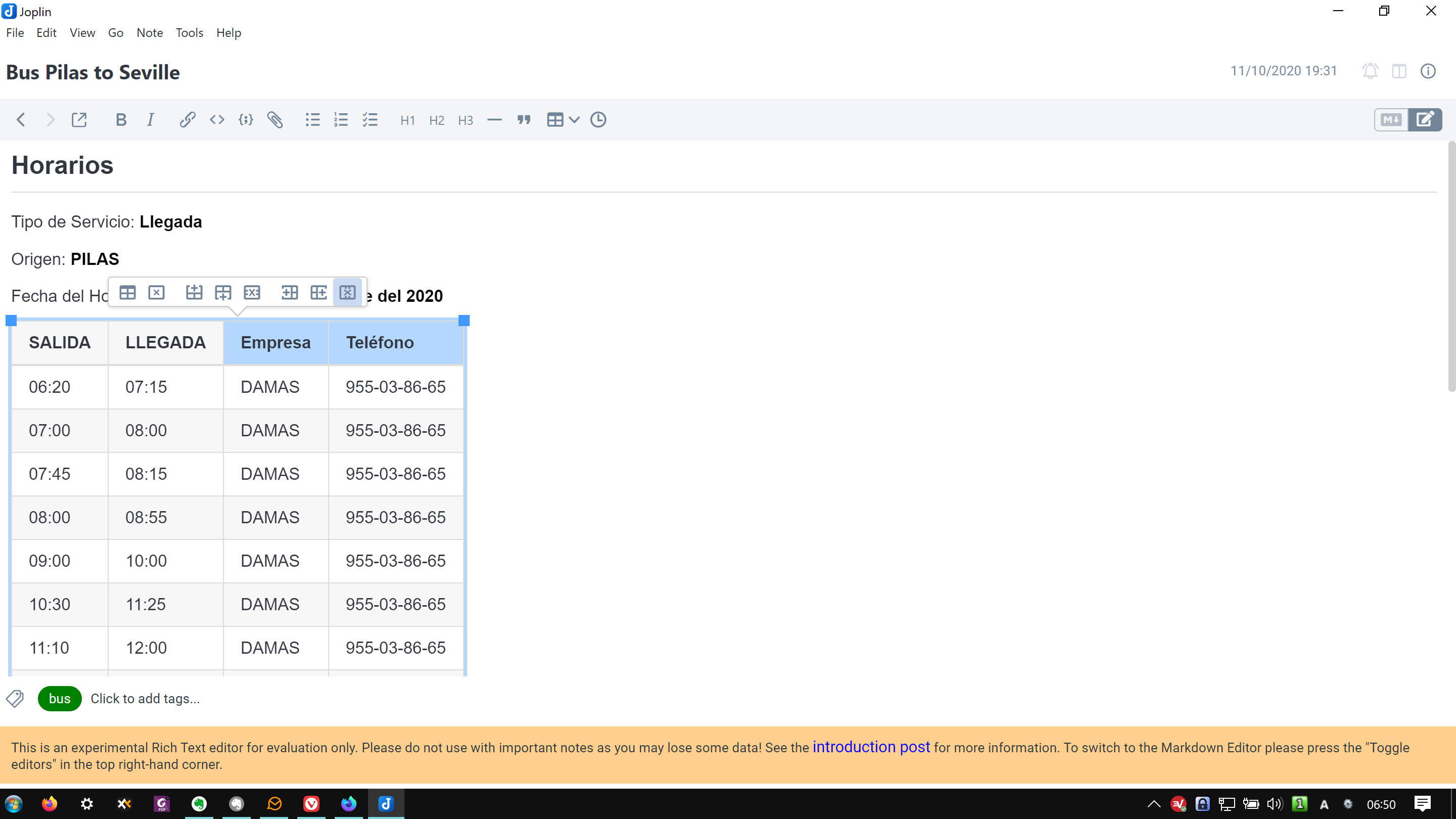
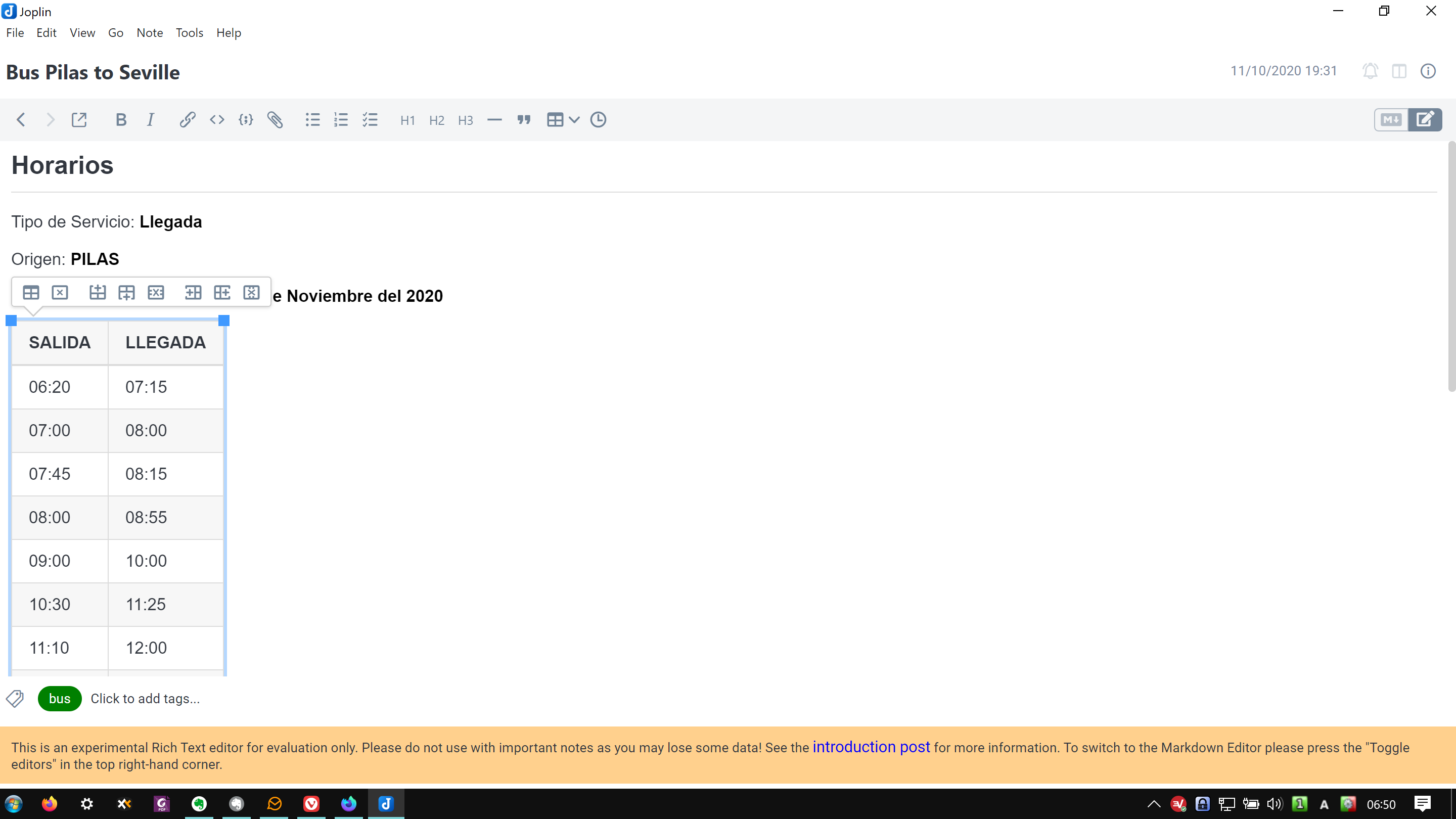

 rafikiphoto
on 1 Nov 2020
rafikiphoto
on 1 Nov 2020
Related issues
 GingerPapa
·
3Comments
GingerPapa
·
3Comments
 seagoj
·
3Comments
seagoj
·
3Comments
 hakim89
·
3Comments
hakim89
·
3Comments
 jmcastagnetto
·
3Comments
deftdawg
·
3Comments
jmcastagnetto
·
3Comments
deftdawg
·
3Comments
Most helpful comment
It would be cool to have some kind of markdown syntax shortcuts too, eg. boostnote has buttons above keyboard to add checkboxes (instead of writing
- [ ]), also for lists, cursive and other common syntax.