Joomla-cms: Media manager extremely slow
Steps to reproduce the issue
Create new article and add new image to the article (Tinymce+image xtd-editors button)
On a site with 1000 of folder and 10,000 images it can take up to 20 sec for the media manager to load in the modal.
Expected result
Faster loading time
Actual result
22 sec for the media manager to load
System information (as much as possible)
joomla 3.9.16
php 7.3.x
litespeed server with 8 cors and 8gb.
Additional comments
It's take the same amount of time to edit the TinyMce plugin. With JCE installed, the media manager is loaded in a breeze. It take the same amount of time (22 sec) to add an intro or full text image to an article.
 ch2856
All 30 comments

This comment was created with the J!Tracker Application at issues.joomla.org/tracker/joomla-cms/28392.
ch2856
on 18 Mar 2020
Is it the same when you access the media manager directly from the
Content>Media menu in the admin?
Do you have many images in the images/ folder
Do you have JCE set up to generate and use thumbnails
On Wed, 18 Mar 2020 at 21:34, ch2856 notifications@github.com wrote:
[image: screen shot 2020-03-18 at 21 34 43]
https://camo.githubusercontent.com/ee5d96ca4274cb13198a3b1cbd65df4f24e00cf6/68747470733a2f2f6973737565732e6a6f6f6d6c612e6f72672f75706c6f6164732f312f62373834633762373837336538666233383466653538373737333832376463302e6a7067
This comment was created with the J!Tracker Application
https://github.com/joomla/jissues at
issues.joomla.org/tracker/joomla-cms/28392.—
You are receiving this because you are subscribed to this thread.
Reply to this email directly, view it on GitHub
https://github.com/joomla/joomla-cms/issues/28392#issuecomment-600870341,
or unsubscribe
https://github.com/notifications/unsubscribe-auth/AAJ4P4KK6OUKFC57Z2446QDRIE475ANCNFSM4LO3BQJQ
.
--
Brian Teeman
Co-founder Joomla! and OpenSourceMatters Inc.
https://brian.teeman.net/ http://brian.teeman.net/
 brianteeman
on 18 Mar 2020
brianteeman
on 18 Mar 2020
Yes and yes. A lots of folders (inside stories folder) and more than 10,000 images, all arranged in folder structure.
I am not using JCE, I have only installed it to see if the issue is the same with JCE media manager, and it's not.
ch2856
on 18 Mar 2020
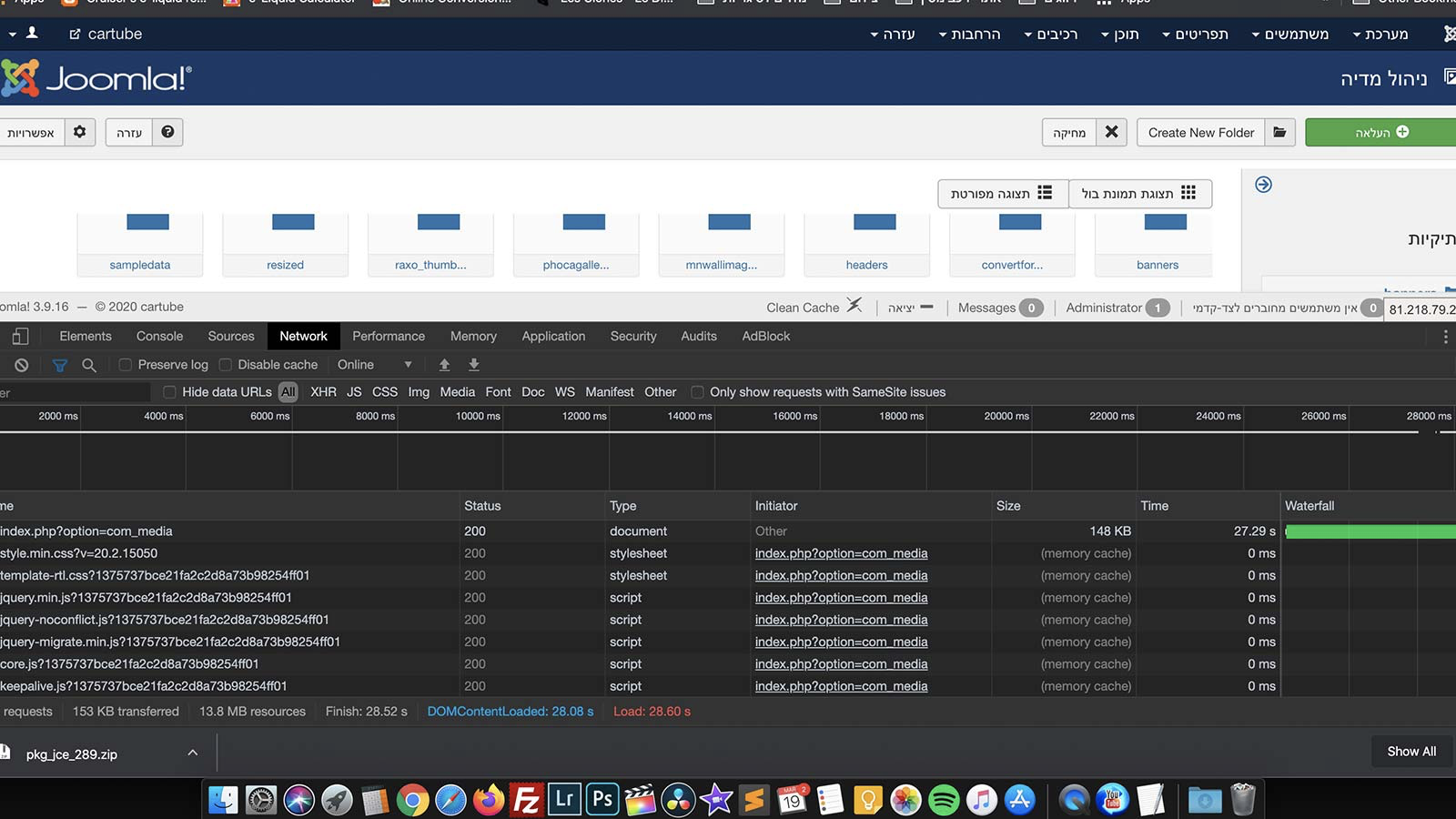
ch2856
on 18 Mar 2020
Related #21936 with large images.
 Quy
on 18 Mar 2020
Quy
on 18 Mar 2020
Almost, but here it's just a lot of folders and images, the max folder size is no more than 3-5MB
ch2856
on 18 Mar 2020
My questions about the number of images was specifically about the number of images in the root folder - by the sound of it thats not the problem
My question about jce was because it has a thumbnail option - again thats not the problem either
brianteeman
on 18 Mar 2020
Not a lot at all, maybe 20 images at the root folder and none of them is above 300kb. By the way It's even very slow to delete - about 22 sec again.
This comment was created with the J!Tracker Application at issues.joomla.org/tracker/joomla-cms/28392.
ch2856
on 18 Mar 2020
@ch2856 The solution to your problem is here - https://github.com/joomla/joomla-cms/issues/27761
My website has the same images problem
 sanek4life
on 19 Mar 2020
sanek4life
on 19 Mar 2020
it is nothing to do with lazy loading images
brianteeman
on 19 Mar 2020
This will always be a problem with PHP.
@brianteeman lazy loading wis not the only solution, but it will most definitely decrese the render blocking aspect of the media manager. The media manager doesn't generate thumbnails, so if you're uploading raw images (e.g 10mb per image and 1000 of them, you're looking at a very long time) without lazy loading.
 C-Lodder
on 19 Mar 2020
C-Lodder
on 19 Mar 2020
I am only talking about this specific user. They do not have a lot of images in the root folder. JCE media manager without thumbnails had no problem.
brianteeman
on 19 Mar 2020
it can take up to 20 sec for the media manager to load in the modal.
You have to wait 20 sec before the modal + mediamanger is loaded and before you can see and select folders and images and so on?
Or you have to wait 20 sec before you see all folder and image thumbnails (but the links are already there and you can use them)?
 ReLater
on 19 Mar 2020
ReLater
on 19 Mar 2020
20 sec for the interface to load or 20 sec of white background modal and only then the media manager start to load.
This comment was created with the J!Tracker Application at issues.joomla.org/tracker/joomla-cms/28392.
ch2856
on 19 Mar 2020
This is not an image data issue.
It is PHP bogging down while parsing that directory structure which it needs to do to generate the "Folder List" at the top of the Modal.
1000 directories and having 10000 files throughout is quite the load.
This comment was created with the J!Tracker Application at issues.joomla.org/tracker/joomla-cms/28392.
 GCLW
on 19 Mar 2020
GCLW
on 19 Mar 2020
20 sec for the interface to load or 20 sec of white background modal and only then the media manager start to load.
Just for the statistics.
Content > Media.
/images/ folder with 11.7GB - 95,863 files - 5,485 folders.
/images/stories/ folder with 6.9GB - 55,266 files - 4,175 direct subfolders (level 1).
Loading time, depending on subfolder size (files and level 1 subfolders), between 2.5 and 3.5 seconds. Thumbnail creation a little bit longer for some MB files.
Not a super turbo server.
Setting | Value
-- | --
PHP Built On | Linux dd25636 4.4.0-173-generic #203-Ubuntu SMP Wed Jan 15 02:55:01 UTC 2020 x86_64
Database Type | mysql
Database Version | 5.7.28-nmm1-log
Database Collation | latin1_swedish_ci
Database Connection Collation | utf8mb4_general_ci
PHP Version | 7.4.2
Web Server | Apache
WebServer to PHP Interface | fpm-fcgi
Joomla! Version | Joomla! 3.9.16 Stable [ Amani ] 10-March-2020 15:00 GMT
Joomla! Platform Version | Joomla Platform 13.1.0 Stable [ Curiosity ] 24-Apr-2013 00:00 GMT
User Agent | Mozilla/5.0 (Windows NT 10.0; Win64; x64; rv:74.0) Gecko/20100101 Firefox/74.0
ReLater
on 19 Mar 2020
I have about the same size of images/stories/
Running on LiteSpeed V7.5 php 7.3.15 5.5.5-10.4.12-MariaDB-log
Server with 8 cores and 8gb
It's a server i have moved to just few days ago but i had the same issue on nginx.
I will be happy with 2.5 sec for loading the media manager at content->media.
Can you share your php setting?
This comment was created with the J!Tracker Application at issues.joomla.org/tracker/joomla-cms/28392.
ch2856
on 19 Mar 2020
Can you share your php setting?
https://re-later.eu/systeminfo-2020-03-19T20_40_43+01_00.txt
ReLater
on 19 Mar 2020
this solution could help #26511
 Milglius
on 20 Mar 2020
Milglius
on 20 Mar 2020
Update: I have installed two media manager alternative (Quantum and ARK) with both, it's load in a breeze so it's clearly something with joomla media manager.
This comment was created with the J!Tracker Application at issues.joomla.org/tracker/joomla-cms/28392.
ch2856
on 20 Mar 2020
so it's clearly something with joomla media manager
Yes it is, as @GCLW wrote, that because Media manger scan all folders recursively,
And for 1000 fodlers and 10000 files it need a much time, even with fast file system
 Fedik
on 20 Mar 2020
Fedik
on 20 Mar 2020
this solution could help #26511
No. You don't understand the main problem here:
20 sec for the interface to load or 20 sec of white background modal and only then the media manager start to load.
ReLater
on 20 Mar 2020
And for 1000 fodlers and 10000 files it need a much time, even with fast file system
My test above with more folders and files is on a standard account at a standard host. So I wonder about the 15 seconds diff.
ReLater
on 20 Mar 2020
a standard host
It very depend from file system, SSD or HDD etc, file system connected via NFS or direct read/write etc
On some hosts I just not able to open media manager with a lot of files, it takes forever
The question why media manager doing it, even if requested to open 1 specific folder it still scan whole /images
Fedik
on 20 Mar 2020
Thanks for clarification.
ReLater
on 20 Mar 2020
I am using modern VPS server with SSD. The fact that the same directory is being read so much faster with other media manager extension, says it's something with they way joomla own media manager works.
This comment was created with the J!Tracker Application at issues.joomla.org/tracker/joomla-cms/28392.
ch2856
on 20 Mar 2020
I agree with your conclusion although the findings of @ReLater seem to be ok
brianteeman
on 20 Mar 2020
There is a solution for this documented here: https://github.com/joomla-projects/media-manager-improvement/issues/510
 dgrammatiko
on 24 Mar 2020
dgrammatiko
on 24 Mar 2020
That is not relevant to this issue which is for J3 and is about parsing the folder tree
brianteeman
on 24 Mar 2020
That is not relevant to this issue which is for J3 and is about parsing the folder tree
True the solution cannot be applied to v3.x but the same problem will exist also in v4 because the fundamental parsing of the files in the folders is basically the same
dgrammatiko
on 24 Mar 2020
Related issues
 solenthaler
·
4Comments
solenthaler
·
4Comments
 MartijnMaandag
·
6Comments
MartijnMaandag
·
6Comments
 Hils
·
5Comments
Hils
·
5Comments
 joomleb
·
3Comments
joomleb
·
3Comments
 Shazrina1994
·
4Comments
Shazrina1994
·
4Comments
Most helpful comment
This will always be a problem with PHP.
@brianteeman lazy loading wis not the only solution, but it will most definitely decrese the render blocking aspect of the media manager. The media manager doesn't generate thumbnails, so if you're uploading raw images (e.g 10mb per image and 1000 of them, you're looking at a very long time) without lazy loading.