If i go to the jitsi meet site i get the following errors
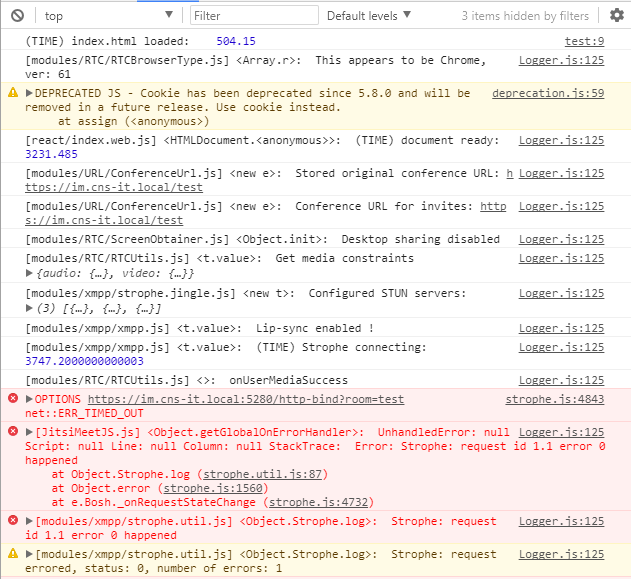
Does anybody know the issue
 Jdierssen
All 5 comments
Is im.cns-it.local the DNS you entered while installing jitsi-meet?
Your bosh setting inside meet seems wrong to me, by default it doesn't have any port and is the same as the address of your deployment (the DNS you enter during installation) with just http-bind at the end.
im.cns-it.local:5280 will try contacting directly prosody on a clear port, as I remember, but you are trying to access it using https. Even if you fix to access prosody using the secure port, prosody doesn't have the certificates that the web server has...
So I think you have a problem with configuring your deployment, did you install it using the quick-install guide?
 damencho
on 19 Sep 2017
damencho
on 19 Sep 2017
@damencho i removed jitsi-meet completly and i`ve followed the quick-install-guide but after i dit that i get these error messages
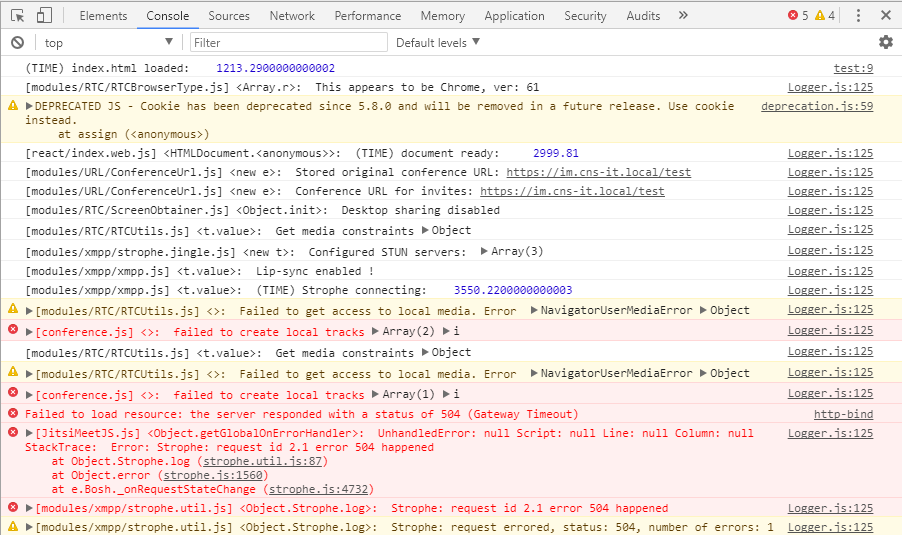
Edit: i got everything working except jitsi videobridge. i get the following error:
jitsi-videobridge.im.cns-it.local:component warn Component not connected, bouncing error for: <iq id='kse65-1801' type='get' to='jitsi-videobridge.im.cns-it.local' from='[email protected]/focus33300682460'
Jdierssen
on 20 Sep 2017
After a few tutorials i got everything working, Thanks
Jdierssen
on 20 Sep 2017
How did you fix this ?
 H7-25
on 3 Oct 2018
H7-25
on 3 Oct 2018
I seem to have a similar problem... anyone could give clues? thanks.
Edit:
I end up finding the why in my case it had to do with ssi not activated but then was missing a symlink
https://github.com/jitsi/jitsi-meet/issues/2639#issuecomment-465693734
 cantoute
on 20 Feb 2019
cantoute
on 20 Feb 2019
Related issues
 jans23
·
130Comments
jans23
·
130Comments
 ghost
·
39Comments
ghost
·
39Comments
 svtagt
·
55Comments
svtagt
·
55Comments
 quantumbeat
·
68Comments
quantumbeat
·
68Comments
 andres934
·
54Comments
andres934
·
54Comments