Hello...can you please provide steps for centos 6 64 bit installation ?
Thanks
 dipenpatel235
All 20 comments
Could be that a few things are missing, but this generally works for current Jitsi Meet on Centos/RHEL/Oracle Linux 7:
cd /
git clone https://github.com/jitsi/jitsi-meet.git
cd jitsi-meet/
yum install npm nodejs-legacy
npm install -g browserify
npm install -g exorcist
npm install -g uglifyjs
npm install -g browserify-shim
npm install -g clean-css
yum install npm nodejs-legacy
npm install
Edit Makefile:
NPM = npm
BROWSERIFY = /usr/bin/browserify
UGLIFYJS = /usr/bin/uglifyjs
EXORCIST = /usr/bin/exorcist
CLEANCSS = /usr/bin/cleancss
Perform the make:
make
 driesken
on 14 Jan 2016
driesken
on 14 Jan 2016
I tried Driesken guide, but there are too many broken and deprecated packages. I hope there could be added an installation guide for Centos 7. To integrate to the multiple pbx linux distros.
 williammahecha
on 23 Nov 2016
williammahecha
on 23 Nov 2016
I have been able to install it on centOS 7 using the official guide https://github.com/jitsi/jitsi-meet/blob/master/doc/manual-install.md.
You need npm installed as they explain it on npm site: https://nodejs.org/en/download/package-manager/#enterprise-linux-and-fedora. I supposed nodejs-legacy for debian to be version 6 for centos. I used Epel repository.
curl --silent --location https://rpm.nodesource.com/setup_6.x | sudo bash -
yum install nodejs git npm
cd /opt
git clone https://github.com/jitsi/jitsi-meet.git
mv jitsi-meet meet
cd meet
npm install
make
That's all, I didn't change the Makefile.
 vincent-collier
on 1 Aug 2017
vincent-collier
on 1 Aug 2017
Yep, that should be it!
 saghul
on 1 Aug 2017
saghul
on 1 Aug 2017
Sorry to bring this up again, but I am not able to install it on my CentOS 7 following both paths described above.
I am using most current of jitsi meet and CentOS.
The npm install throws errors, mainly they seem to suggest that I manually install react-native. I tried to do that in many ways, but it seems to be impossible, as it again asks for dependencies that are contradictory (when I install one it asks for another version of it and if I get that version it asks for the old one...)
When I continue with make it basically seem to accept, but the website doesnt work, as there are many javascript parts missing (so errors are thrown and screen remains a dark grey)
I am really at a loss with that, any experience on that?
Nodejs is installed as described above by vincent-collier, everything else was grabbed from yum repositories, updated to newest versions.
 WisdomCode
on 25 Sep 2017
WisdomCode
on 25 Sep 2017
Hello, i have tryed to install jitsi-meet on centos, building from code and throught rpm package, and both of them don't work, building the source i give this error:
./node_modules/.bin/webpack -p
make: * [compile] Killed
using rpm: i have a lot of java errors on start
someone have a working guide on centos for jitsi ?
Thank you
 emulk
on 30 Jun 2018
emulk
on 30 Jun 2018
Unfortunately, I wasn't able to compile it myself after several hours of trying. Maybe somebody else was able to resolve it, I wasn't
Am 30. Juni 2018, 18:22, um 18:22, Orgest Shehaj notifications@github.com schrieb:
Hello, i have tryed to install jitsi-meet on centos, building from code
and throught rpm package, and both of them don't work, building the
source i give this error:
./node_modules/.bin/webpack -p
make: * [compile] Killedusing rpm: i have a lot of java errors on start
someone have a working guide on centos for jitsi ?Thank you
--
You are receiving this because you commented.
Reply to this email directly or view it on GitHub:
https://github.com/jitsi/jitsi-meet/issues/446#issuecomment-401551058
WisdomCode
on 30 Jun 2018
I've recently compiled it on RHEL 7.4 from source and it is working fine. I'll try to post some instructions in the following days.
driesken
on 30 Jun 2018
Hi drieseken, thank you so mutch for your answer, can you post how have you done, i'm trying really hard here but seams impossible to install it on centos, i have installed jitsi on ubuntu in less then 5 minuts, i don't understand why is so different.
Please comment how have you done or email me at orgest.[email protected].
Thank you
emulk
on 30 Jun 2018
Get Outlook for Android
From: Dries De Gendt
Sent: Saturday 30 June, 18:31
Subject: Re: [jitsi/jitsi-meet] Centos installation steps (#446)
To: jitsi/jitsi-meet
Cc: Subscribed
I've recently compiled it 22on RHEL 7.4 from source and it is working fine. I'll try toe231? post some instructions in the following days.
—qqq212,
You are receiving this bewqw q cause you are subscribed to this thread.
Reply to this email directly, view it on GitHub, or mute the thread.
 avanderreest
on 30 Jun 2018
avanderreest
on 30 Jun 2018
Okay, so here are the commands I've used to compile and install Jitsi Meet, Jicofo, Videobridge etc. I don't know if anything has changed lately, but it should give you a start. I won't provide support since every setup is a bit of a struggle.
- Install latest version of Java
yum install java-1.8.0-openjdk
yum install java-1.8.0-devel
- Install Prosody (make sure you have installed npm)
> git clone https://github.com/bjc/prosody.git
> cd /prosody
> npm install node-stringprep
> ./configure
> make
> make install
> chown prosody:prosody *
> cd /var/run
> mkdir prosody
> chown prosody:prosody prosody/
> cd /var/log
> mkdir prosody
> chown prosody:prosody prosody/
- Install Luarock modules:
cd ~
wget http://luarocks.github.io/luarocks/releases/luarocks-2.4.3.tar.gz
tar zxvf luarocks-2.4.3.tar.gz
cd luarocks-2.4.3
./configure
make
make install
luarocks install luaexpat
luarocks install luadbi
luarocks install luadbi-sqlite3
luarocks install luafilesystem
luarocks install luasec OPENSSL_LIBDIR=/usr/lib64/
luarocks install luasocket
luarocks install lua-zlib
ln -s /usr/lib64/libevent-2.0.so.5 /usr/lib64/libevent.so (ols 7)
luarocks install luaevent EVENT_LIBDIR=/usr/lib64/ (possible error on missing event.h)
- Install lua-zlib (needed fo compression. Luarocks module threw an error)
> cd ~
> git clone https://github.com/brimworks/lua-zlib.git
> cd lua-zlib/
> make linux
> make install
Download Prosody modules (of kopieren uit ~/prosody-modules)
git clone https://github.com/andyet/otalk-server.git
cd otalk-server
cp -r mod* /prosody/modules (or where Prosody is)
- Download Apache Ant and Apache Maven and extract it to /tmp
cd /tmp
wget http://apache.cu.be//ant/binaries/apache-ant-1.10.2-bin.tar.gz
tar xvf apache-ant-1.10.2-bin.tar.gz
wget http://apache.belnet.be/maven/maven-3/3.5.2/binaries/apache-maven-3.5.2-bin.tar.gz
tar xvf apache-maven-3.5.2-bin.tar.gz
- Compile Jicofo and Videobridge (git clone to root for example)
cd /jicofo
/tmp/apache-maven-3.5.2/bin/mvn -U clean package -DskipTests
/tmp/apache-maven-3.5.2/bin/mvn dependency:get -DartifactId=maven-ant-tasks -DgroupId=org.apache.maven -Dversion=2.1.3
/tmp/apache-ant-1.10.2/bin/ant -lib ~/.m2/repository/org/apache/maven/maven-ant-tasks/2.1.3/maven-ant-tasks-2.1.3.jar dist.lin64
cp /tmp/jicofo/dist/linux/jicofo-linux-x64-build.SVN.zip /
- Install gcc
curl ftp://ftp.mirrorservice.org/sites/sourceware.org/pub/gcc/releases/gcc-4.9.2/gcc-4.9.2.tar.bz2 -O
yum install  gmp  gmp-devel  mpfr  mpfr-devel  libmpc  libmpc-devel
./configure --disable-multilib --enable-languages=c,c++
make -j 4
make install
- Install nodejs (I've used node-v8.9.4.tar.gz)
./configure
make
make install
ln -s /usr/local/lib64/libstdc++.so.6.0.20 /usr/lib64/libstdc++.so.6
- Install Jitsi meet
npm install npm@latest -g
git clone git://github.com/jitsi/jitsi-meet.git
cd jitsi-meet
npm install webpack -D
- To make the project you must force it to take the sources as 'npm update' will not do it.:
npm install
make (can take a long time)
It is unfortunate the above instructions are old and some things no longer work and I'm not sure I understand all the explanation here. I sure would love to get this working on centos7. If anyone has any other leads pleas share.
 gstlouisgit
on 23 Mar 2020
gstlouisgit
on 23 Mar 2020
Unfortunately same problem on centos7. rpm will be good.
 OlegMalyutin
on 5 Apr 2020
OlegMalyutin
on 5 Apr 2020
Successful installation on CentOS 8 with latest update!
Most of the problems was with Prosody.
 Pressyd
on 9 Apr 2020
Pressyd
on 9 Apr 2020
@Pressyd
could you share a little bit more here? Your steps, you problems with prosody? Once you got it install how did you start it up? In a browser like their example here https://meet.jit.si/
it would be a little more helpful then just saying succefull install
gstlouisgit
on 9 Apr 2020
I will, still doing tests!
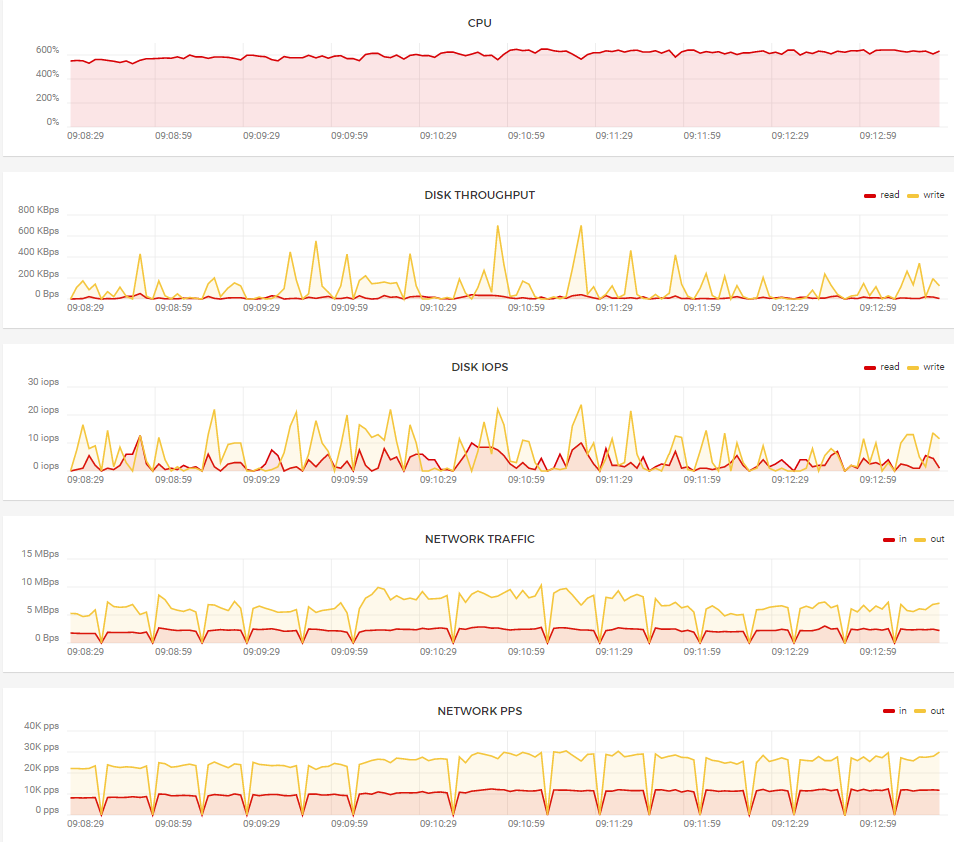
Stats on:
Centos 8, 8 VCPU,32 GB RAM,20 GB SSD, Nginx , all meetings are through API from outside server
193 Users, 24 meetings, 1 user in each meeting share a screen
Pressyd
on 15 Apr 2020
@Pressyd would love to know how about how you installed + set it up! I followed the instructions above on Fedora Server 31 (had to install lots of -devel packages to fulfill requirements, and was confused about the Jicofo and Videobridge step. Would you mind walking through how you got it up and running? Thanks so much in advance, glad it worked for you!
 RamZallan
on 15 Apr 2020
RamZallan
on 15 Apr 2020
@Pressyd , could you please share the script or please provide a walkthrough for the same, it would be very grateful.
 mrsid96
on 12 May 2020
mrsid96
on 12 May 2020
Since the issue has been closed for a long time, the discussion about CentOS installation should be forwarded to https://community.jitsi.org/
 luixxiul
on 25 May 2020
luixxiul
on 25 May 2020
@Pressyd is our only lead to get this working on centos. However this needs to be moved it would be nice to preserve our notifications if ever pressyd can get back to us... cross our fingers
gstlouisgit
on 25 May 2020
Related issues
 galvaniccoffee
·
3Comments
galvaniccoffee
·
3Comments
 mlelyakan
·
4Comments
mlelyakan
·
4Comments
 VogtAI
·
3Comments
VogtAI
·
3Comments
 532910
·
3Comments
532910
·
3Comments
 tanvir23
·
4Comments
tanvir23
·
4Comments
Most helpful comment
Okay, so here are the commands I've used to compile and install Jitsi Meet, Jicofo, Videobridge etc. I don't know if anything has changed lately, but it should give you a start. I won't provide support since every setup is a bit of a struggle.
Download Prosody modules (of kopieren uit ~/prosody-modules)