Jfoenix: JFXTabPane Header Area Alignment
In the Material Design Guidelines, it says the the Tab Layout should be "centered or aligned with left keyline",
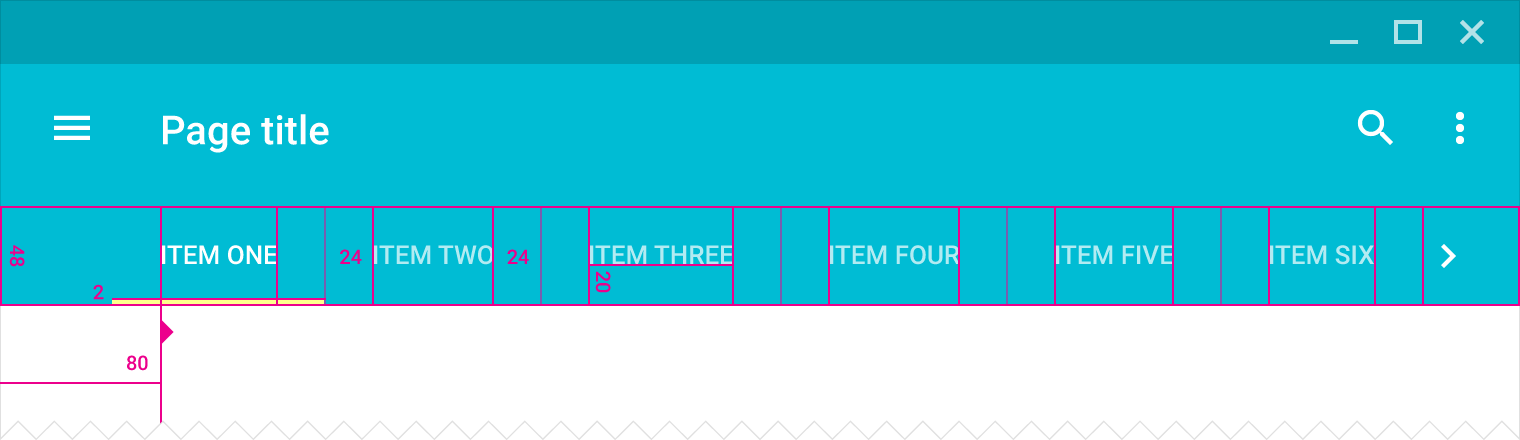
To try and align the tab pane, I tried adding padding to the .depth-container, .tab-header-area .headers-region and .tab-header-background without success.
Something unexpected happens when I add padding to the left side of the .tab-header-area. Instead of just getting padding on the left, it gets padding on the left, and bottom.

CSS:
.jfx-tab-pane .depth-container .tab-header-area {
    -fx-padding: 0 0 0 30;
}
Can this be fixed?
 TurekBot
All 5 comments
This issue is related to #623
 jfoenixadmin
on 11 Mar 2018
jfoenixadmin
on 11 Mar 2018

i want help , how can i change the width of this tabHeaderContainer so that it will look like this

 God-Hand
on 25 Apr 2018
God-Hand
on 25 Apr 2018
I have found a simple workaround for this issue. Simply add negative padding to the bottom that is equal to the padding you want on the left.
CSS:
.jfx-tab-pane .tab-header-area {
-fx-padding: 0 -50 0 50;
}
 RaisinBranCrunch
on 2 May 2018
RaisinBranCrunch
on 2 May 2018
@God-Hand #580
 skmedix
on 22 May 2018
skmedix
on 22 May 2018
This issue has been automatically marked as stale because it has not had recent activity. It will be closed if no further activity occurs. Thank you for your contributions.
![stale[bot] picture](https://avatars.githubusercontent.com/in/1724?v=4&s=40) stale[bot]
on 7 Jan 2019
stale[bot]
on 7 Jan 2019
Related issues
 ivanskodje
·
4Comments
ivanskodje
·
4Comments
 salwyn
·
3Comments
salwyn
·
3Comments
 MikeChav
·
3Comments
MikeChav
·
3Comments
 evillatoro
·
3Comments
evillatoro
·
3Comments
 alittwin
·
4Comments
alittwin
·
4Comments
Most helpful comment
I have found a simple workaround for this issue. Simply add negative padding to the bottom that is equal to the padding you want on the left.
CSS:
.jfx-tab-pane .tab-header-area {
-fx-padding: 0 -50 0 50;
}