This's a follow up for issue #484
Hello again,
Thanks for the effort for fixing the issue, but i've just noticed that the same problem happens with the (today / selected date / year) numbers when default color is white as shown below:
(Today is the 4th of nov, selected date is 3rd of nov)
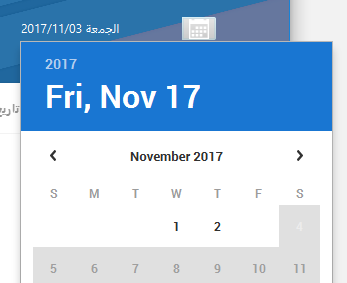
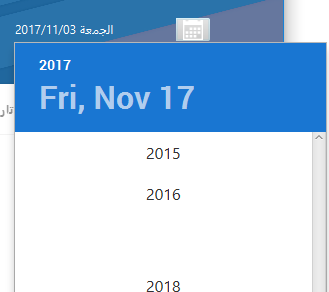
Also the date icon in the new release gets this weird white/silver background color when focused which didn't use to happen with the previous version i was using (1.7.0):
(focused)

(unfocused)

Best regards and thanks for the effort,
 AhmedMourad0
All 2 comments
Hello,
well changing the default color changes many nodes in date picker content.
It would be better solution to change the icon color instead of default color, however this can't be done due to some binding. Will remove the icon binding so it can be changed through css.
Regarding the silver background issue, it's already fixed however was not included in 1.10.0.
you can download the latest version of JFoenix from the website.
Regards,
 jfoenixadmin
on 7 Nov 2017
jfoenixadmin
on 7 Nov 2017
Hello,
I pushed the fix github, it will be pushed to maven central in the next release. meanwhile you can get it by downloading jfoenix jar from the website.
you can now change the icon color using:
.jfx-date-picker > .arrow-button > .jfx-svg-glyph{
    -fx-background-color: WHITE;
}
instead of changing the default color property
Regards,
jfoenixadmin
on 7 Nov 2017
Related issues
 alittwin
·
4Comments
alittwin
·
4Comments
 RodrigoSantiago
·
3Comments
RodrigoSantiago
·
3Comments
 DmitryZagr
·
3Comments
DmitryZagr
·
3Comments
 caoyanfeng
·
3Comments
caoyanfeng
·
3Comments
 riftshadow
·
4Comments
riftshadow
·
4Comments
Most helpful comment
Hello,
I pushed the fix github, it will be pushed to maven central in the next release. meanwhile you can get it by downloading jfoenix jar from the website.
you can now change the icon color using:
instead of changing the default color property
Regards,