Jetpack: Photon: Photon links for images inserted in editor when Site Accelerator is active
Steps to reproduce the issue
- With Site Accelerator disabled, create a new post and upload an image via the image block
- Switch to the HTML editor - note the
srcattribute of the image indicates the WordPress media file URL. - With Site Accelerator enabled, create a new post and upload an image via the image block
- Switch to the HTML editor and note the
srcattribute
What I expected
For the image added while Site Accelerator was active to also show the WordPress media URL.
What happened instead
The image shows the Photon URL in the editor (as opposed to being generated dynamically on the front end when the site loads.
After disabling Site Accelerator/disconnecting Jetpack completely, the src attribute for the image when viewing the post in a browser still shows the Photon URL, rather than the media file URL.
Screenshots
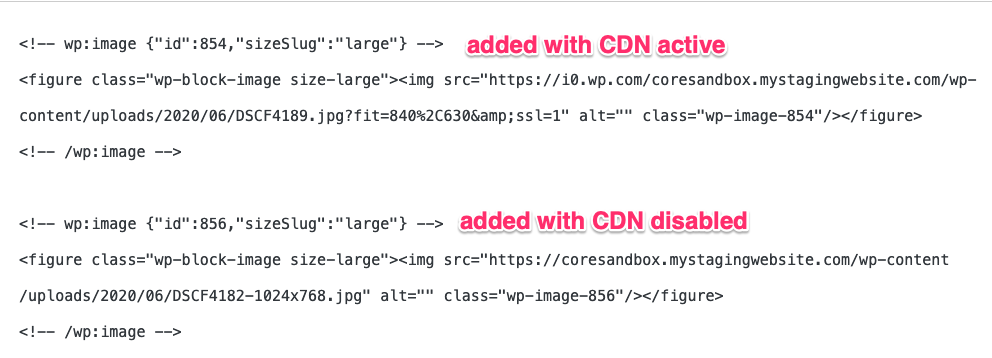
HTML view of images added with Site Accelerator enabled and disabled respectively:
Browser inspector showing HTML for image with Jetpack completely disabled on the site:

Reported in https://wordpress.org/support/topic/photon-inserting-https-i0-wp-com-images-in-post-content/
 KokkieH
All 6 comments
See https://github.com/Automattic/jetpack/issues/10580#issuecomment-637663083 for a potential way around this.
 jeherve
on 2 Jun 2020
jeherve
on 2 Jun 2020
I noticed this with the new image comparison plugin as well, just a FYI. It probably goes through the same code path .
 hubertnguyen
on 2 Jun 2020
hubertnguyen
on 2 Jun 2020
cc @kraftbj Do you think you could take a look at this this week, if you have the bandwidth?
Thank you!
jeherve
on 22 Jun 2020
I can't duplicate this behavior on either with trunk Jetpack with WP 5.4.2 or 5.4.2+Gutenberg 8.3.0. Asking for others to try to reproduce.
 kraftbj
on 23 Jun 2020
kraftbj
on 23 Jun 2020
Still working on exactly the repo steps. Images of a certain size will trigger it, but not others.
kraftbj
on 23 Jun 2020
@kraftbj , I saw your message on Wordpress org. Looks like you're onto it. Let me know you need me to try something. I often use 1000-1500px wide images.
Perhaps the issue happens with "large" but not "full" images?
hubertnguyen
on 23 Jun 2020
Related issues
 beaulebens
·
3Comments
beaulebens
·
3Comments
 kevinlisota
·
3Comments
jeherve
·
3Comments
kevinlisota
·
3Comments
jeherve
·
3Comments
 ockham
·
3Comments
ockham
·
3Comments
 Viper007Bond
·
3Comments
Viper007Bond
·
3Comments