Jetpack: Contact Info Widget: Error message displays but API field is missing
Steps to reproduce the issue
- Go to a WordPress.com site that has plugins installed
- Add the Contact Info & Map (Jetpack)
- Save the widget without adding an API key
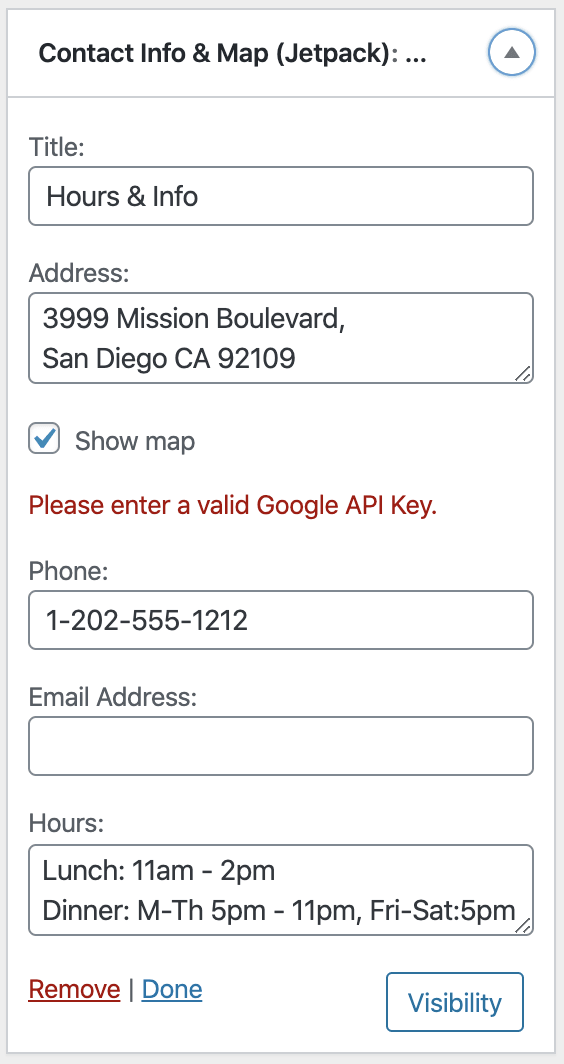
- See error
What I expected
I expected to see an error message and a field to enter a valid Google API key.
What happened instead
The error message "Please enter a valid Google API Key." appears but there is no field to enter the API key. I was only able to replicate this issue on a WordPress.com site with plugins installed, not a self-hosted site or WordPress.com simple site.
Screenshots
 jamiepalatnik
All 16 comments
The user encountered the same issue in the ticket - 2860971-zen
They see the error message but there is no field to add the API key.
 yamphoenix
on 9 Apr 2020
yamphoenix
on 9 Apr 2020
I can't seem to reproduce on my end. Does this happen on any Atomic site you try? Does this happen for new or existing widgets?
 jeherve
on 9 Apr 2020
jeherve
on 9 Apr 2020
I just reproduced it an a different Atomic site with a new Contact Info widget. The error appears only when reloading the Customizer after saving—sorry, it looks like I left that out of my original report.
jamiepalatnik
on 9 Apr 2020
Another report in #2860529-zen
User's site: https://cobralmetals.com.au
 sanjeev00733
on 9 Apr 2020
sanjeev00733
on 9 Apr 2020
The error appears only when reloading the Customizer after saving
That's helpful, thank you. Until we get this fixed, going to Appearance > Widgets should work as a work-around.
This is most likely linked to #13678. cc @codestor4 and @kbrown9 who recently worked on that widget.
jeherve
on 9 Apr 2020
@jeherve were you able to repro this? I couldn't on my local docker env. Is this something that only happens on Atomic setup?
 omkarscode
on 9 Apr 2020
omkarscode
on 9 Apr 2020
Oh I just read the original post again and found this:
I was only able to replicate this issue on a WordPress.com site with plugins installed, not a self-hosted site or WordPress.com simple site.
So it only happens on Atomic sites. I'll try to look into it but not quite familiar with Atomic setup.
omkarscode
on 9 Apr 2020
Problem
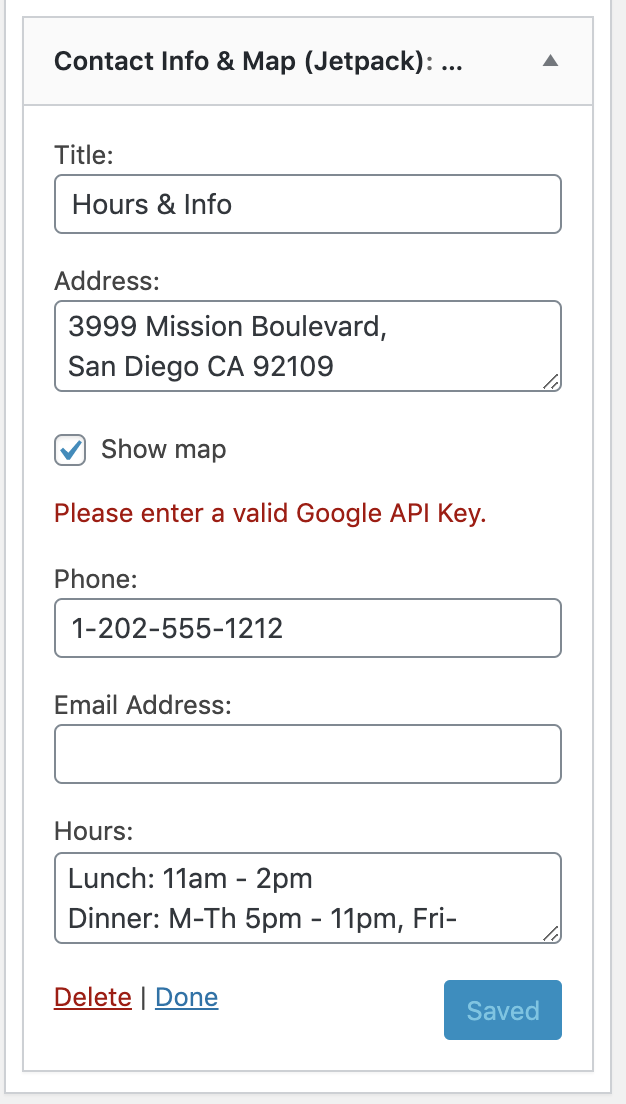
My theory (which I believe is most likely correct) is that Atomic sites are using jetpack_google_maps_api_key filter somewhere and that's breaking our newly implemented logic of "hiding the field if filter is active".
Because I get a similar result as OP if my filter is active:
Proposed Solution:
If there's a boolean func that returns whether a site is atomic or not, we could have a quick fix for this by disabling this new logic for atomic site.
cc: @jeherve @kbrown9 Any other ideas?
omkarscode
on 9 Apr 2020
My theory (which I believe is most likely correct) is that Atomic sites are using
jetpack_google_maps_api_keyfilter somewhere and that's breaking our newly implemented logic of "hiding the field if filter is active".
Yes, that's correct. Atomic sites use a filter.
Because I get a similar result as OP if my filter is active:
Is this on your local docker env? And is your API key valid?
 kbrown9
on 9 Apr 2020
kbrown9
on 9 Apr 2020
Is this on your local docker env? And is your API key valid?
Yes. Local docker env and I tried an incorrect API key to reproduce the issue.
I used this -
function jeherve_contact_info_google_key() {
        return '12345'; // Your API Key.
}
add_filter( 'jetpack_google_maps_api_key', 'jeherve_contact_info_google_key' );
That's helpful, thank you. Until we get this fixed, going to Appearance > Widgets should work as a work-around.
I just tested this and I'm getting the same error in Appearance > Widgets with no place to add the API key.
jamiepalatnik
on 10 Apr 2020
My theory (which I believe is most likely correct) is that Atomic sites are using
jetpack_google_maps_api_keyfilter somewhere and that's breaking our newly implemented logic of "hiding the field if filter is active".
I investigated this on an atomic site, and I confirmed that atomic sites do set a filter on jetpack_google_maps_api_key (the has_filter() call returns true), but that filter doesn't return anything.
If there's a boolean func that returns whether a site is atomic or not, we could have a quick fix for this by disabling this new logic for atomic site.
Good idea! It looks like we can use jetpack_is_atomic_site() to determine if the site is atomic. I did a quick test on an atomic site, and it seemed to solve the problem.
kbrown9
on 10 Apr 2020
Also reported in 18810706-hc
 susanjanec
on 15 Apr 2020
susanjanec
on 15 Apr 2020
Just following up on this, I noticed this issue is closed, but I am still seeing the same error. @jeherve would you be able to clarify if this is still being worked on? Thanks!
jamiepalatnik
on 11 May 2020
Just following up on this, I noticed this issue is closed, but I am still seeing the same error. @jeherve would you be able to clarify if this is still being worked on? Thanks!
@jamiepalatnik - This issue should be fixed. Are you testing using a widget that was created and displayed the error before the fix was released in v8.5? If so, could you try saving the widget or, if you're using the customizer, publishing then reloading the customizer page? That should clear the error message.
kbrown9
on 11 May 2020
Thanks @kbrown9, I see the map does appear when I edit the address or add a new widget, even with no API key added at all. This was reported by a user, so I'll let them know they need to edit or re-add that widget to resolve the issue. Thanks for clarifying!
jamiepalatnik
on 11 May 2020
Related issues
 abidhahmed
·
3Comments
abidhahmed
·
3Comments
 kevinlisota
·
3Comments
kevinlisota
·
3Comments
 ockham
·
3Comments
jeherve
·
3Comments
ockham
·
3Comments
jeherve
·
3Comments
 tyxla
·
3Comments
tyxla
·
3Comments