Jetpack: Comments: SSO login not working in Chrome
Steps to reproduce the issue
- In Chrome, visit a post with comments enabled and click on the comments field.
- If you're shown as logged into WordPress.com, click Log out or Change, and try logging in via Twitter, Facebook, or WordPress.com
What I expected
To show as logged into the comment form using the social media account, and able to comment.
What happened instead
The Connecting indicator appears, but the connection never completes.
The login only completes using the Google login option.
This only appears to happen in Chrome - I can login using those services without problem in Firefox and Safari. Tested on Chrome 80.0.3987.132 (Official Build) (64-bit) on Mac OS 10.14.6
I don't see any Console errors
I was able to replicate the issue on my own Jetpack site, but not on a WordPress.com simple site.
Screenshots
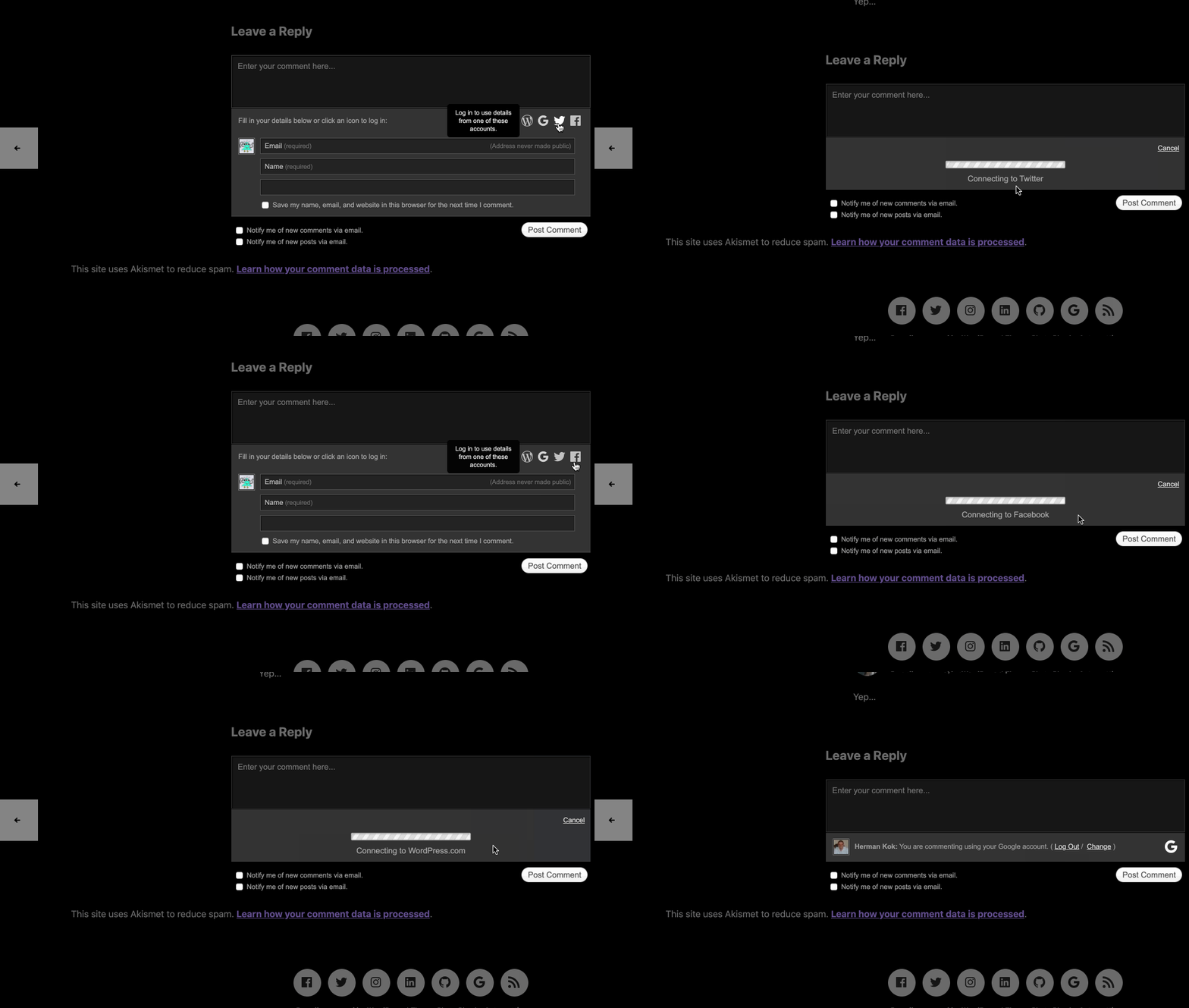
Reported in the forums at https://wordpress.org/support/topic/error-comentarios-jetpack/
 KokkieH
All 28 comments
Are you able to reproduce the issue on WordPress.com sites as well?
 jeherve
on 18 Mar 2020
jeherve
on 18 Mar 2020
@jeherve no, only on a Jetpack site. On a WordPress.com simple site I can connect without problems in Chrome.
KokkieH
on 18 Mar 2020
Do you happen to have a WordPress.com site with a mapped domain where you could test this? I'd like to confirm that this is indeed an issue with the changes to domain cookies added by Chrome last month.
jeherve
on 18 Mar 2020
I'd tested it on kokkieh.blog, so it does work with a mapped domain, yes. Also on a site with a free WordPress.com URL.
KokkieH
on 18 Mar 2020
Thank you! Can you reproduce here?
https://jeremy.hu/our-small-animals/
I can't seem to be able to reproduce at the moment.
jeherve
on 18 Mar 2020
I can, yes. Checked both in a regular Chrome session and incognito - the connecting indicator just keeps running.
Chrome has since updated to 80.0.3987.149 as well. No difference after a relaunch.
KokkieH
on 18 Mar 2020
I have the same problem. wouldn´t it be better to report a Jetpack?
 eduvalruiz
on 18 Mar 2020
eduvalruiz
on 18 Mar 2020
I have the same with the following messages:
- FB "Connecting to Facebook"
- Google "Error: Google failed to return an expected code."
System: Windows 10, build 1909 18363.720
Chrome: 80.0.3987.149
I have also tested with Firefox and I didn't get these error messages.
Link: https://wherewego.cz/indonesie-2011/
 michalpelc1
on 28 Mar 2020
michalpelc1
on 28 Mar 2020
We seem to have the same problem in Safari. @jeherve should I open a new issue for this or adding it here OK.
Safari desktop version is 13.1 but the problem seems to be happening on mobile too.
 bindlegirl
on 29 Apr 2020
bindlegirl
on 29 Apr 2020
should I open a new issue for this or adding it here OK.
Here is fine 👍
jeherve
on 29 Apr 2020
Same probelm with jetpack comments...
It gives the error message "Error: Google failed to return an expected code." when trying to comment using Google account.
Link: https://techinspec.com/artificial-intelligence-has-learned-how-to-make-perfect-sandwiches/
 AsifMahsud
on 3 Sep 2020
AsifMahsud
on 3 Sep 2020
Is there any progress on this? I'm facing the same issue as well.
Link: https://mutedmuse.com
 nithinmanne
on 5 Sep 2020
nithinmanne
on 5 Sep 2020
Experiencing this as well on a non-WP.com.
Firefox - no issues with more or less basic settings.
Safari - fix was to disable Prevent cross-site tracking - Safari --> Preferences --> Privacy, disable the "Prevent cross-site tracking" option.
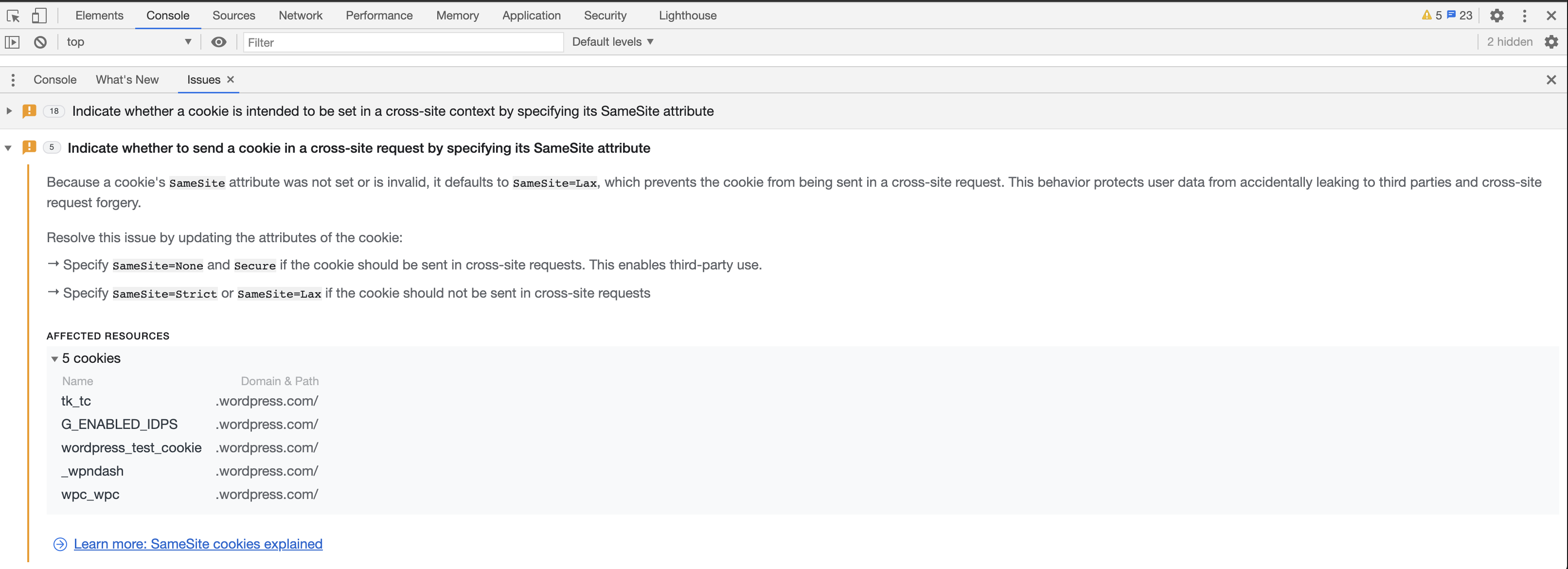
Chrome - can replicate in both incognito and non-incognito. Fiddling cookie/privacy settings does nothing. The loading icon simply stays on, reloading the page shows the login was successful. Console > Issues shows notes about cookie's SameSite attribute and suggests SameSite=None fix.
 hitolonen
on 7 Sep 2020
hitolonen
on 7 Sep 2020
Console > Issues shows notes about cookie's SameSite attribute and suggests SameSite=None fix.
Could you tell me more about this? What was the domain that was impacted by the warning, and at what point did you see it popping up?
jeherve
on 7 Sep 2020
@jeherve
Could you tell me more about this?
On page load Console > Issues shows 17/18 notices, 12/13 cookies, 11 requests.
Once the login process is happening, 5 new issues popup.
hitolonen
on 7 Sep 2020
Chrome workaround: Set SameSite by default cookies to disabled. This disables Chrome's default behavior of setting SameSite=Lax.
hitolonen
on 8 Sep 2020
This should now be fixed as of D49592-code. 🎉
If this keeps happening, let us know!
jeherve
on 17 Sep 2020
Still happening. Version 9.2.1
 MicahBurke
on 31 Dec 2020
MicahBurke
on 31 Dec 2020
@jeherve - it seems that this issue happens again.
I can replicate it with Jetpack 9.2.1 and the latest Chrome Version 87.0.4280.88 (Official Build) (x86_64):
Twitter https://d.pr/i/l2QZj0
Facebook https://d.pr/i/49xVAx
Google https://d.pr/i/UgSNEq
Reported here https://wordpress.org/support/topic/comment-error-google-failed-to-return-an-expected-code/
 htdat
on 4 Jan 2021
htdat
on 4 Jan 2021
Same happening in this one: https://markpshea.com/2021/01/09/my-friend-sherry-weddell-on-intentional-and-fruitful-discipleship/#comments
 leonbloy
on 15 Jan 2021
leonbloy
on 15 Jan 2021
Also reported here: https://wordpress.org/support/topic/infinite-load-facebook-social-login-jetpack-comment/
 danjjohnson
on 19 Jan 2021
danjjohnson
on 19 Jan 2021
Also in 3668688-zen
jeherve
on 21 Jan 2021
Reported in 122692-zen (VIP)
 anaemnesis
on 7 Feb 2021
anaemnesis
on 7 Feb 2021
Still happening. Version 9.4
 archzaiko
on 9 Feb 2021
archzaiko
on 9 Feb 2021
Also reported here: https://wordpress.org/support/topic/social-login-issue-2/
danjjohnson
on 26 Feb 2021
3773089-zen
danjjohnson
on 26 Feb 2021
This error is still there with my website and it gives me a prompt "Error: Google failed to return an expected code." Do we have a solution yet, or I shall disable the jetpack comment, I love this plugin but the comment error is hurting a lot. This is my website https://magdigit.com/ and I tested with the latest browser version of Chrome, Mozilla, Edge and Opera.
 magdigit
on 24 Mar 2021
magdigit
on 24 Mar 2021
3881522-zen
danjjohnson
on 8 Apr 2021
Related issues
 dougaitken
·
3Comments
dougaitken
·
3Comments
 chrisaldrich
·
3Comments
chrisaldrich
·
3Comments
 kraftbj
·
3Comments
jeherve
·
3Comments
kraftbj
·
3Comments
jeherve
·
3Comments
 beaulebens
·
3Comments
beaulebens
·
3Comments
Most helpful comment
I can, yes. Checked both in a regular Chrome session and incognito - the connecting indicator just keeps running.
Chrome has since updated to 80.0.3987.149 as well. No difference after a relaunch.