Jetpack: Markdown block: add footnotes support
Issue
Markdown block does not render/hyperlink footnotes as it should
Steps to reproduce
Create a site on WordPress.com, or .org site with Jetpack (Markdown enabled in settings)
Add markdown block
Paste in footnote markdown
e.g-
I have more [^1] to say up here.
[^1]: To say down here.
Preview/Publish
Expected Result
I expected something along the lines of https://www.markdownguide.org/extended-syntax/#footnotes
Actual Result
Seems to not render the footnote page jump links
WP.com

Jetpack site

 jjchrisdiehl
All 46 comments
Ref: 1762746-zen
 Robertght
on 1 Feb 2019
Robertght
on 1 Feb 2019
Related: #325 for the Classic Markdown feature.
 jeherve
on 3 Apr 2019
jeherve
on 3 Apr 2019
Another request 2003538-zen
 liviopv
on 5 May 2019
liviopv
on 5 May 2019
Also, a non-markdown solution for Footnotes is being discussed in core Gutenberg https://github.com/WordPress/gutenberg/pull/15267
liviopv
on 5 May 2019
Any development here? Any workaround to still have footnotes working with Markdown?
 vincenzo
on 29 Jun 2019
vincenzo
on 29 Jun 2019
Should've complied with https://en.support.wordpress.com/markdown-quick-reference/ -- it's the link shown as "support reference" for the markdown block.
vincenzo
on 30 Jun 2019
Any development here? Any workaround to still have footnotes working with Markdown?
We have made no progress on this so far, but will update this issue when we do.
Should've complied with en.support.wordpress.com/markdown-quick-reference -- it's the link shown as "support reference" for the markdown block.
The Markdown block currently relies on a different flavor of Markdown, thus causing those inconsistencies. See #11881 to find out more.
jeherve
on 3 Jul 2019
Another one came up here today about footnotes - 2285644-zen
 rickmgithub
on 19 Aug 2019
rickmgithub
on 19 Aug 2019
Requested via Twitter
 KokkieH
on 8 Sep 2019
KokkieH
on 8 Sep 2019
I wonder if this is something related to this issue but the footnotes appear to have completely stopped appearing for non Blocks Editor, Jetpack-powered blogs.
Jetpack still seems to be parsing them but not publishing them—the footnote text was just removed from the published post.
 adityabhaskar
on 18 Sep 2019
adityabhaskar
on 18 Sep 2019
@adityabhaskar Could you paste an example of a footnote you've tried to add to a post using the Classic editor, and where that footnote was not displayed on the site?
Thank you.
jeherve
on 19 Sep 2019
 - Love of a good dog[^1].

....

[^1]: Read as 'Love of a dog', _because they are all good dogs, Brant_.
It was on this post.
The footnote text was completely removed from the published post. For the moment, I have removed the square brackets marking the footnote to make it appear.
I just tested it again by adding the brackets to the footnote marker. The footnote was removed again.
I am using the classic editor in WordPress.com app for Mac
adityabhaskar
on 19 Sep 2019
It seems to work on my end:

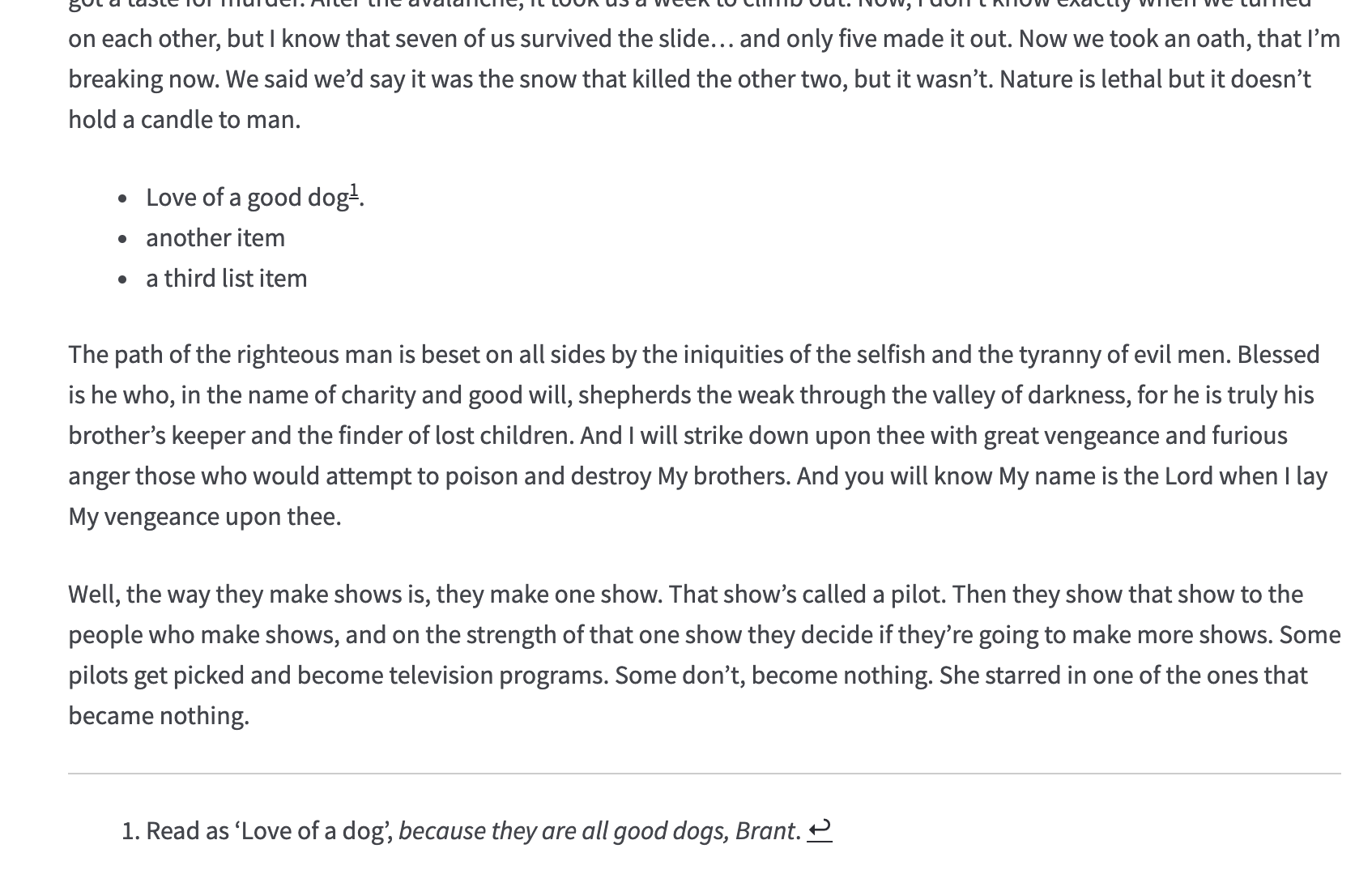
Could you give it another try, but while composing your post from the text editor instead of the visual editor?
jeherve
on 20 Sep 2019
Yes, it is working now.
I tested it by composing both from the text editor and the visual editor, and it worked. I even updated the reference post, and the footnote shows.
Thanks @jeherve !
adityabhaskar
on 20 Sep 2019
Another case here - #2400283-zen.
There is no option to edit as Text in Classic Block.

 kosiew
on 5 Oct 2019
kosiew
on 5 Oct 2019
There is no option to edit as Text in Classic Block.
You can pick the "Code Editor" option in the block editor's sidebar:

jeherve
on 7 Oct 2019
Just experienced this issue and wanted to add some thoughts. It seems to me that Footnotes shouldn't require a markdown block, and previously worked by just enabling markdown on a site in the Writing Settings
When adding a footnote, people generally won't be including a whole paragraph or sentence as markdown text to show that way. It's not how it works in the classic editor.
 msilbers
on 30 Oct 2019
msilbers
on 30 Oct 2019
Received another report of this issue in #16931073-hc
- Footnotes not appearing within Markdown block
- option enabled via WP Admin > Settings > Writing
 smithkyle45
on 27 Nov 2019
smithkyle45
on 27 Nov 2019
Another instance of this on a Premium Site, markdown enabled. Tried markdown block, paragraph block, code block but couldn't get it to show the footnotes:
17152867-hc
Followup - 2542691-zen
 gwensmithx
on 6 Dec 2019
gwensmithx
on 6 Dec 2019
Another one reported, user was unable to add footnotes. Markdown is enabled, tried paragraph block, markdown block, classic block but it did not work.
Chat: 17432713-hc
Follow-up: 2575189-zen
 sourourn
on 20 Dec 2019
sourourn
on 20 Dec 2019
Another user reported the issue. Markdown is enabled in wp-admin > Settings > Writing, but the footnote doesn't work in the block editor. Suggested them to use Page Jumps as an alternative for now.
Ticket: 2596298-zen
 fashuvo
on 1 Jan 2020
fashuvo
on 1 Jan 2020
Another user faced this issue here: 2625624-zen
 mriyazuddin
on 12 Jan 2020
mriyazuddin
on 12 Jan 2020
I have the same issue! I'm using Jetpack on a self-hosted blog and the Markdown block but foonotes are not working.
 llune
on 16 Feb 2020
llune
on 16 Feb 2020
I have a user on a simple site and footnotes are not working. Everything else is working fine in the markdown block and markdown is enabled. Tried using code block, editing via HTML, paragraph block, markdown block but couldn't get the footnotes to display.
2902657-zen
20467334-hc
gwensmithx
on 22 Apr 2020
Using other blocks or the Markdown block indeed won't work. Jetpack's Markdown block relies on the Markdown It library to parse content and create HTML. This library does not currently support footnotes, hence why the block using that library does not support footnotes either.
We could potentially add support for footnotes via an additional plugin for the library, as described in https://github.com/Automattic/jetpack/issues/11881#issuecomment-457610671
However, we're not currently working on the Markdown block. When we next iterate on this block however, we'll definitely consider it!
jeherve
on 22 Apr 2020
I am having the same problem. I tried everything but the footnotes are not parsed. Neither Code or Visual editors work. Any idea of when this could be sorted?
 monogenea
on 25 May 2020
monogenea
on 25 May 2020
I tried everything but the footnotes are not parsed. Neither Code or Visual editors work.
To use Markdown footnotes right now, and until they are supported in Jetpack's Markdown block, I would recommend using the Classic editor.
jeherve
on 26 May 2020
@jeherve working now. Note that reverting a post from the modern to the classic editor disables Markdown (at least did not render footnotes for me). A new draft from the classic editor did enable footnotes and the usual markdown features. I look forward to use the updated modern editor with full functionality. Thank you
monogenea
on 26 May 2020
Another report here 22169373-hc. The workaround works but they would really like to see this added by default to our platform in the Block Editor.
 joweber123
on 30 Jun 2020
joweber123
on 30 Jun 2020
Another report: 3104440-zen. I suggested them to switch to Classic Editor, but it would be nice to see the feature added by default on Block Editor.
 retnonindya
on 30 Jun 2020
retnonindya
on 30 Jun 2020
Another report: 3104440-zen. I suggested them to switch to Classic Editor, but it would be nice to see the feature added by default on Block Editor.
This user came back at 22276497-hc. I am checking for a workaround on the Block Editor using HTML anchors. Shal update this comment once I find something.
UPDATE: A long, but working workaround on the Block editor is to use HTML id attribute and lists. Here's a video on how it works: https://d.pr/v/Nb2tyT/rKqKrOr25w
 otpidusprime
on 30 Jun 2020
otpidusprime
on 30 Jun 2020
Another report: 3117587-zen
 rinazrina
on 10 Jul 2020
rinazrina
on 10 Jul 2020
Another report in 3117587-zen. It is not working on the classic editor either. Not only on the user's post but also on one of my test sites with the classic editor.
 carladoria
on 13 Jul 2020
carladoria
on 13 Jul 2020
Another request in 3209017-zen
 eduardozulian
on 9 Aug 2020
eduardozulian
on 9 Aug 2020
Another 23315797-hc
 mikeicode
on 14 Aug 2020
mikeicode
on 14 Aug 2020
I discovered through a support interaction that Footnotes syntax does not work, even though we say it's supported (via Markdown Extra) here.
This wasn't a user-reported issue, but discovered in the context of an interaction.
I've tested and confirmed on a simple WordPress.com Site, an Atomic Site, and a Jetpack-connected self-hosted site to confirm.
 chrisfromthelc
on 20 Aug 2020
chrisfromthelc
on 20 Aug 2020
User reporting this issue in 23501739-hc
 dhackneya8c
on 20 Aug 2020
dhackneya8c
on 20 Aug 2020
Hopping in to say this is happening for me as well. Footnotes using the [^x] shortcut do not work in the new editor. Was told to use markdown but that doesn't work either. tried everything. This is stupid.
 badger732
on 27 Aug 2020
KokkieH
on 2 Sep 2020
badger732
on 27 Aug 2020
KokkieH
on 2 Sep 2020
Another report: 3357048-zen
 poojashetty18
on 29 Sep 2020
poojashetty18
on 29 Sep 2020
Another report here. Tried both in classic block and in Markdown block. Neither worked.
Chat: 11315242-hc
Follow-up: 3399389-zen
 thesacredpath
on 13 Oct 2020
KokkieH
on 19 Oct 2020
thesacredpath
on 13 Oct 2020
KokkieH
on 19 Oct 2020
@jeherve working now. Note that reverting a post from the modern to the classic editor disables Markdown (at least did not render footnotes for me). A new draft from the classic editor did enable footnotes and the usual markdown features. I look forward to use the updated modern editor with full functionality. Thank you
Again not working. Why is WP rushing into the blocks thing and discarding the classic editor? It does not work with neither Classic or Markdown blocks after setting WP Admin > Writing > Enable Markdown.
monogenea
on 27 Oct 2020
I ran into another customer asking how to use Footnotes during a Quick Start session. After some testing, I found that in the Block Editor, if you start with regular blocks, there's no way to get the Footnote feature to work.
But if you start in the Block Editor and switch it to the Code Editor, creating a Footnote will work. It ends up creating the text as a Classic Block. You are then able to convert that to Regular Blocks to continue adding new blocks wherever desired.
Here's a recording of the process: https://d.pr/v/FYBiyN
However, you can't add a Classic Block to a page with Regular Blocks to get the same result and you can't switch a page using Regular Blocks to the Code Editor to then add the Footnote markdown - it doesn't work.
You have to start a new page, use the Code Editor, add the Footnote markdown, then convert to Regular Blocks and carry on. If you miss adding the Footnote markdown initially, it can't be added later.
@jeherve Since this has been an open issue for over a year, should we perhaps be editing the support documentation to either reflect this information or remove the information that it's even possible? It's not really a reasonable work around for most customers.
 tanjoymor
on 17 Nov 2020
tanjoymor
on 17 Nov 2020
Is there any progress in fixing this?
 swamidass
on 4 Jan 2021
swamidass
on 4 Jan 2021
Another site owner had this issue in chat today. Both classic and block editor. I even tried the Code Editor, and it seemed to not work for me.
3640581-zen
22995021-hc
 sbathompson-he
on 12 Jan 2021
sbathompson-he
on 12 Jan 2021
Related issues
 MichaelArestad
·
3Comments
MichaelArestad
·
3Comments
 ockham
·
3Comments
ockham
·
3Comments
 crunnells
·
3Comments
jeherve
·
3Comments
crunnells
·
3Comments
jeherve
·
3Comments
 aheckler
·
3Comments
aheckler
·
3Comments
Most helpful comment
This user came back at 22276497-hc. I am checking for a workaround on the Block Editor using HTML anchors. Shal update this comment once I find something.
UPDATE: A long, but working workaround on the Block editor is to use HTML
idattribute and lists. Here's a video on how it works: https://d.pr/v/Nb2tyT/rKqKrOr25w