Jetpack: Gutenberg / Classic / Jetpack: wp.me short link is not accessible
I was just investigating an issue that a customer was having. With the wp 5.0 update / gutenberg now being the primary editor, any one who previously used our wp.me shortlinks is unable to get their short link in wp-admin.
They either have to revert to the classic editor or view their site using the calypso interface in order to get a short link for a post
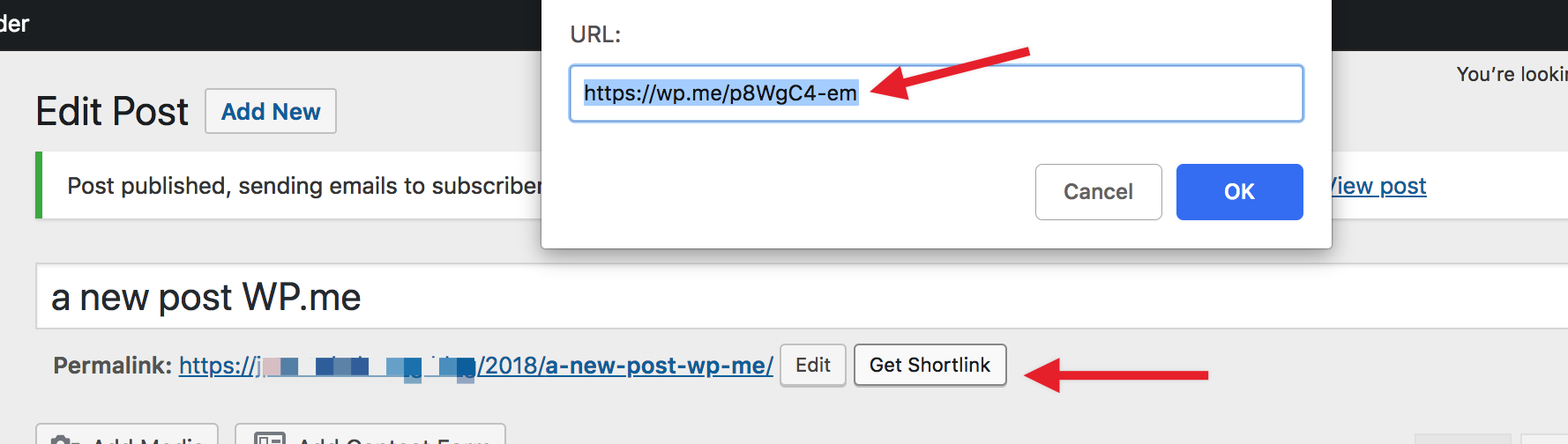
Before Gutenberg / wp 5.0:

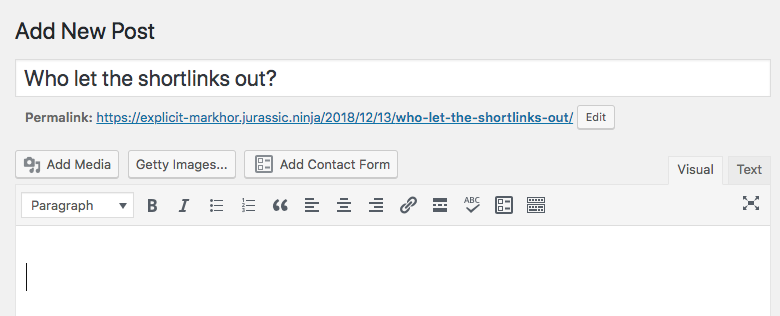
After Gutenberg / wp 5.0

As a Jetpack UX bonus:
The moment a customer publishes a post we should display the wp.me short link in the "what's next" column (jetpack branded of course)

cc @MichaelArestad @davidakennedy
 jeffgolenski
All 11 comments
Thanks for creating this issue. We will get to this, but we have limited resources and higher priority blocks/integrations to build first.
 MichaelArestad
on 11 Dec 2018
MichaelArestad
on 11 Dec 2018
Related on Calypso: https://github.com/Automattic/wp-calypso/issues/29221
 arunsathiya
on 11 Dec 2018
arunsathiya
on 11 Dec 2018
This is actually impacting the classic editor too as reported in 1643873-zen and I've reproduced. I'm switching this to high because this impacts all JP users using the feature, and it not working in Calypso either per @arunsathiya linked issue.
 bikedorkjon
on 14 Dec 2018
bikedorkjon
on 14 Dec 2018
Another
@bikedorkjon - it's working for me in Classic Editor in a Pressable testing site. Is there any chance you was not enabling "WP.me Shortlink" module when testing?
Another report: 1646640-zen
 htdat
on 17 Dec 2018
htdat
on 17 Dec 2018
We're adding this in https://github.com/Automattic/wp-calypso/pull/29475 and it will most likely be part of the next Jetpack version.
 tyxla
on 18 Dec 2018
tyxla
on 18 Dec 2018
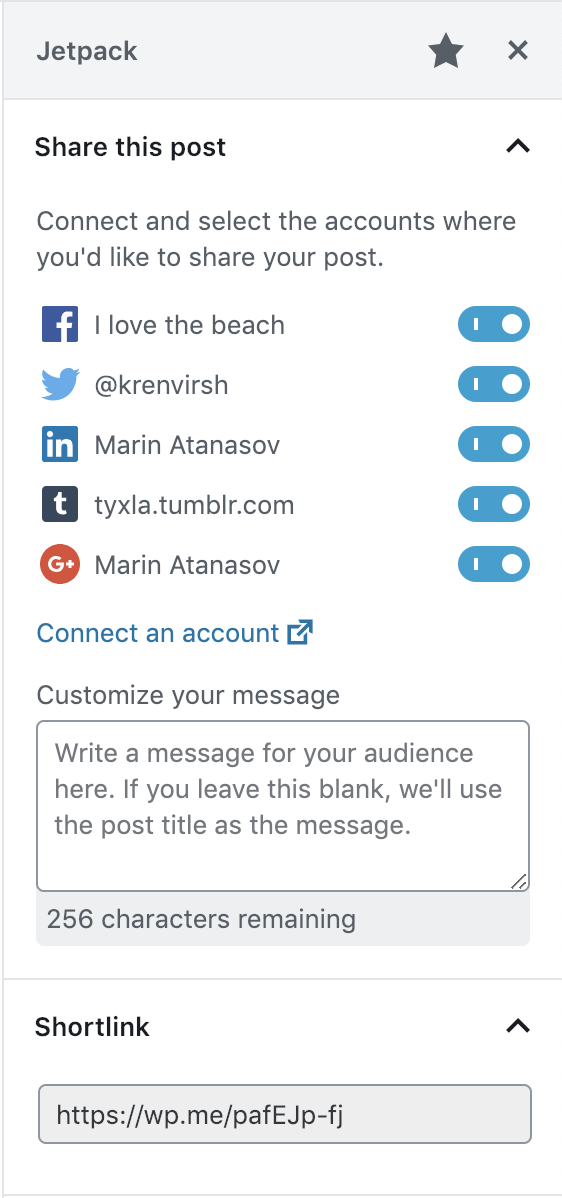
29475 has been merged. Shortlinks will appear under the Publicize panel in the Jetpack sidebar from the next Jetpack release on:
tyxla
on 18 Dec 2018
Still don't have it, at least for podcast
 asm0dey
on 28 Jun 2019
asm0dey
on 28 Jun 2019
@asm0dey Do you rely on a Custom Post Type to store and display your podcasts? If so, you would need to declare support for shortlinks like so:
https://jetpack.com/support/wp-me-shortlinks/#cpt
 jeherve
on 3 Jul 2019
jeherve
on 3 Jul 2019
I'm using seriously simple podcasting plugin and I don't have any idea about post types it uses
asm0dey
on 3 Jul 2019
@asm0dey This plugin uses the podcast post type, so you would have to add Shortlinks support for that custom post type on your site, by following the instructions I posted earlier. This can help too:
https://jetpack.com/support/adding-code-snippets/
jeherve
on 3 Jul 2019
[Solved]
Seems like I had missed the settings to turn on the URL shortener in Jetpack. Was looking for something like this under Sharing and not Traffic.
Hi,
I don't see this on my site. I am not using custom posts. I have Gutenberg 6.5.0 and have been desperately searching for this feature ever since I moved from Classic editor. Using other shorteners takes a lot of effort plus my other one from Google closed.Is there a setting I am missing somewhere.
 garikaib
on 22 Sep 2019
garikaib
on 22 Sep 2019
Related issues
jeherve
·
3Comments
 Viper007Bond
·
3Comments
MichaelArestad
·
3Comments
Viper007Bond
·
3Comments
MichaelArestad
·
3Comments
 ockham
·
3Comments
ockham
·
3Comments
 BinaryMoon
·
3Comments
BinaryMoon
·
3Comments
Most helpful comment
[Solved]
Seems like I had missed the settings to turn on the URL shortener in Jetpack. Was looking for something like this under Sharing and not Traffic.
Hi,
I don't see this on my site. I am not using custom posts. I have Gutenberg 6.5.0 and have been desperately searching for this feature ever since I moved from Classic editor. Using other shorteners takes a lot of effort plus my other one from Google closed.Is there a setting I am missing somewhere.