Jetpack: Content Options: Images in blocks are not used as featured images
Steps to reproduce the issue
- On a self-hosted site with Gutenberg installed, activate a theme that supports Content Options for automatic featured images, and that shows featured images as post thumbnails on the site's front page, e.g. Photo Blog, Cubic, AltoFocus, Apostrophe 2
- Go to Customize ->Content Options, and ensure the option to use the first image in a post as featured image is selected.
- Using Gutenberg, create a new post. Include an image block or an inline image in a paragraph block of sufficient size to be used as a featured image for the theme.
What I expected
For the published post to use the included image as the front page thumbnail, as it does for posts published in the Classic Editor or Calypso, and for the featured image to be displayed on the single post view, depending on the theme.
What happened instead
The post is displayed on the front page as if there is no featured image set, and no featured images displays in the single post view either.
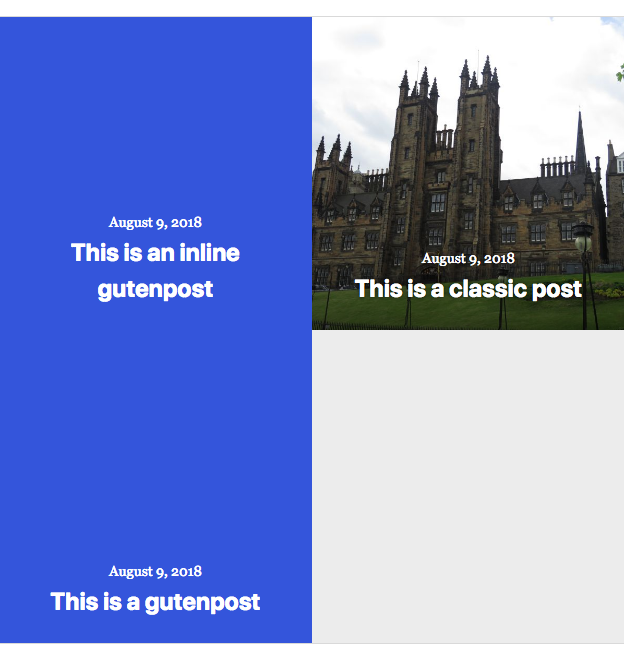
Additional details
This appears to only happen in Core - I'm not able to replicate this on a WordPress.com site with Gutenberg enabled.
Issue found during general Gutenberg testing.
 KokkieH
All 6 comments
I dug into this issue a bit after chatting about it recently with @alaczek after she ran into it during some development work.
In testing, I found:
- Using
Jetpack_PostImages::from_htmlisn't returning anything on the Gutenberg side, so it's definitely related to theJetpack_PostImagesclass, not Content Options itself. - This may be because of the way Gutenberg stores images.
Next steps
- I'll talk to a few folks deep in Gutenberg to see what the possible causes could be and report back.
 davidakennedy
on 11 Sep 2018
davidakennedy
on 11 Sep 2018
@davidakennedy any progress on this yet?
 MichaelArestad
on 19 Sep 2018
MichaelArestad
on 19 Sep 2018
I've noticed on the Photo Blog theme that images added in Gutenberg also won't trigger the fullbleed class that makes images and galleries display larger in the Modern style pack. I haven't reported it yet as I still wanted to do more testing to confirm, but might that be caused by the same issue?
KokkieH
on 20 Sep 2018
That is because the markup of images inserted via a Gutenberg block is different from the markup used with the classic editor.
When using Gutenberg and an image block
<!-- wp:image {"id":12375} -->
<figure class="wp-block-image"><img src="https://mysite.com/wp-content/uploads/2018/09/dora-reis-249014-unsplash.jpg" alt="" class="wp-image-12375"/></figure>
<!-- /wp:image -->
Insert the same image using the classic editor:
<img src="https://mysite.com/wp-content/uploads/2018/09/dora-reis-249014-unsplash.jpg" alt="" width="3008" height="2000" class="alignnone size-full wp-image-12375" />
The big difference here is that Gutenberg does not include any width or height tags. That is a problem here, because Jetpack relies on those tags to figure out if an image is large enough to be used elsewhere (in theme tools like Content Options, but also in Open Graph Meta Tags, Related Posts, Publicize, ...).
Since Jetpack does not know how big the image is, it ignores it.
This difference between the classic editor and Gutenberg was highlighted here:
https://github.com/WordPress/gutenberg/issues/6652
And a PR was created to add those tags back to Gutenberg:
https://github.com/WordPress/gutenberg/pull/9421
Once that PR is merged, I believe our problem should be solved.
I'll close this issue since it seems to be something that will be fixed in Gutenberg directly.
 jeherve
on 20 Sep 2018
jeherve
on 20 Sep 2018
Noting that for now, one can bypass this issue by adding the following to a functionality plugin:
add_filter( 'jetpack_postimages_ignore_minimum_dimensions', '__return_true' );
It forces Jetpack to consider all images as good, even when it does not know their dimensions.
jeherve
on 20 Sep 2018
@KokkieH it's not the same issue as this ticket, although still related to Gutenberg image output. The script used in Photo Blog is looking for .size-full class being added to the image, and makes those images slightly larger. I moved it to a ticket, where we can discuss further: 2484-wpcom-premium-themes
 alaczek
on 21 Sep 2018
alaczek
on 21 Sep 2018
Related issues
 BinaryMoon
·
3Comments
BinaryMoon
·
3Comments
 ockham
·
3Comments
ockham
·
3Comments
 chrisaldrich
·
3Comments
MichaelArestad
·
3Comments
chrisaldrich
·
3Comments
MichaelArestad
·
3Comments
 NicktheGeek
·
3Comments
NicktheGeek
·
3Comments
Most helpful comment
That is because the markup of images inserted via a Gutenberg block is different from the markup used with the classic editor.
When using Gutenberg and an image block
Insert the same image using the classic editor:
The big difference here is that Gutenberg does not include any
widthorheighttags. That is a problem here, because Jetpack relies on those tags to figure out if an image is large enough to be used elsewhere (in theme tools like Content Options, but also in Open Graph Meta Tags, Related Posts, Publicize, ...).Since Jetpack does not know how big the image is, it ignores it.
This difference between the classic editor and Gutenberg was highlighted here:
https://github.com/WordPress/gutenberg/issues/6652
And a PR was created to add those tags back to Gutenberg:
https://github.com/WordPress/gutenberg/pull/9421
Once that PR is merged, I believe our problem should be solved.
I'll close this issue since it seems to be something that will be fixed in Gutenberg directly.