song.link is a service to allow an easy way to link to all of the various streaming/purchasing sites for songs.
It is operated by a passionate team aiming to help the music community, particularly indie artists, easily spread their music.
I have not been able to find documentation specifically on the oembed endpoint nor have I examined the embed for security. Currently they lack an API http://help.song.link/faq/does-songlink-have-an-api and I'd want to check out those URLs against the URL scheme to ensure oembed doesn't fire on a song.link non-song URLs.
URL scheme: https://song.link/*
oEmbed API endpoint: https://song.link/oembed
Additional details at p7fD6U-1A6-p2 and 1281031-zen.
 kraftbj
All 18 comments
Hey @kraftbj thanks for filing this issue. It's true that our URL scheme is very broad and there will be some URLs that are not supported by an embed experience, e.g. https://song.link/slack
However, there's no easy way for me to define all of the embed URLs more specifically. This is because you can "compose" valid Songlink song/album URLs from other streaming URLs, such as Spotify URLs. For instance, this is a valid Songlink URL:
https://song.link/https://open.spotify.com/track/0FgNSsaSZTvbLXUumSO8LQ?si=PPi6lUoMRrmLLJCA92AKoQ
In this way, we have an almost "API via URL" that can render our pages/embeds.
Do you have any suggestions for how we could improve this, or potentially elaborate more on your concerns about our current URL scheme? To add: we do implement <link> tags for discovery of valid oEmbed URLs, as discussed here: https://oembed.com/#section4
 kweiberth
on 2 Aug 2018
kweiberth
on 2 Aug 2018
This issue has been marked as stale. This happened because:
- It has been inactive in the past 6 months.
- It hasn’t been labeled `[Pri] Blocker`, `[Pri] High`.
No further action is needed. But it's worth checking if this ticket has clear reproduction steps and it is still reproducible. Feel free to close this issue if you think it's not valid anymore — if you do, please add a brief explanation.
![stale[bot] picture](https://avatars.githubusercontent.com/in/1724?v=4&s=40) stale[bot]
on 7 Feb 2019
stale[bot]
on 7 Feb 2019
Hello @kraftbj, hope all is well! We're still growing and reaching more artists. Currently, we have over 5,000 artists per month sharing their songs and albums using our links. We've also had a bunch of them reach out about embedding their Songlinks on their Wordpress.com sites. I've told them to reach out to your support channels and "vote" for us, so I'm hoping they did.
Any way that we can be reconsidered for integration on the Jetpack and Wordpress.com sites?
kweiberth
on 8 Feb 2019
Any way that we can be reconsidered for integration on the Jetpack and Wordpress.com sites?
We're definitely open for changes, no changes there.
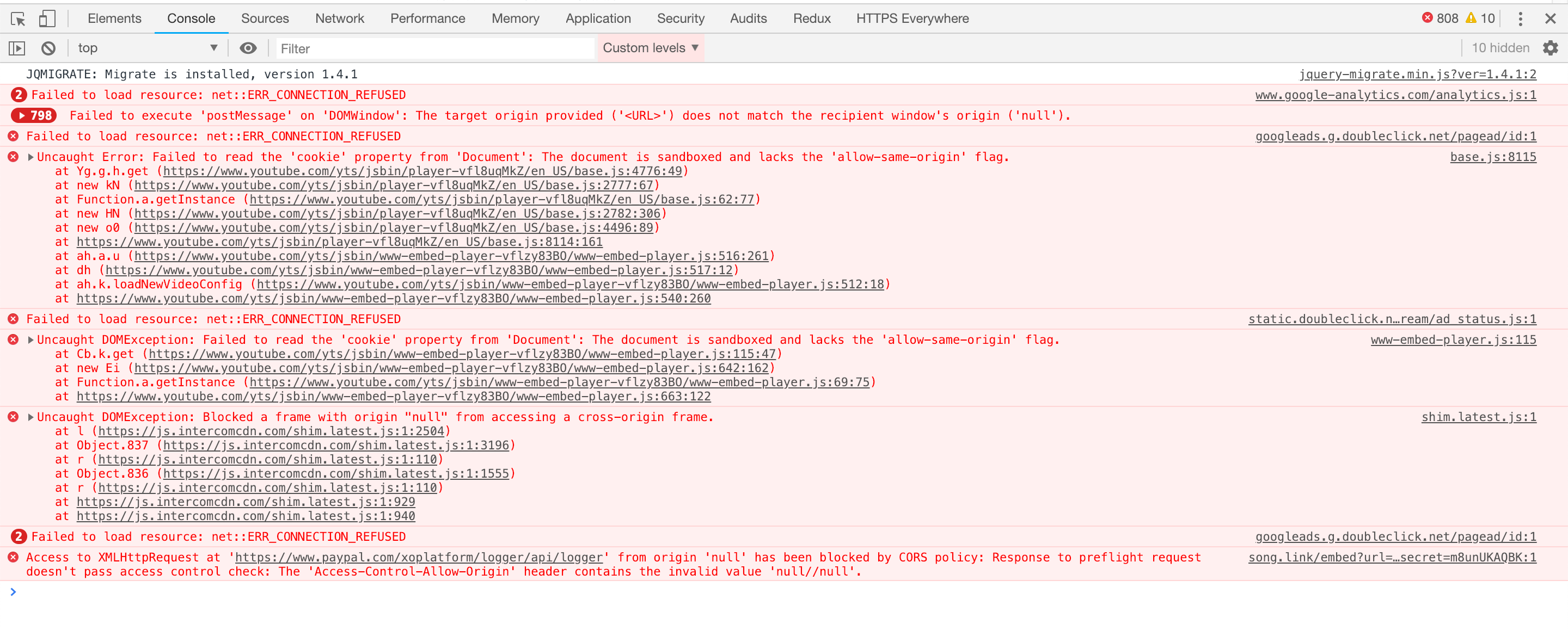
As a first step, and to help with the integration, I would recommend that you run tests on your end by adding a Song.link oEmbed provider to a test WordPress site, like so:
function jeherve_add_songlink_oembed() {
    wp_oembed_add_provider( 'https://song.link/*', 'https://song.link/oembed', true );
}
add_action( 'plugins_loaded', 'jeherve_add_songlink_oembed' );
You may find that your embeds do not always work properly, due to the contents of the iFrames.
You can find out more about this here:
https://core.trac.wordpress.org/changeset/28748
 jeherve
on 8 Feb 2019
jeherve
on 8 Feb 2019
Hey @jeherve, thanks for the quick reply! I've seen this before from some of our Wordpress users. I'll be able to fix a couple of those errors. However, I'm not sure I'll be able to fix the YouTube one. We embed a YouTube video within our embed (you can see examples of our embeds here: https://song.link/iframe), so I'm wondering if that one will be a hard one to change.
Overall, I'm a little confused as to the best next steps for me. Can you clarify a couple questions for me?
Are these errors on Wordpress or Wordpress.com sites? Before, I was under the impression that Songlink embeds didn't work at all on Wordpress.com sites. Are these errors you're showing a Wordpress.com site?
Relatedly, I have no experience with Wordpress or Wordpress.com sites. What is the best way for me to get set up with a dev/test account so I can debug these issues?
Thanks for your help 🙏
kweiberth
on 8 Feb 2019
I'm not sure I'll be able to fix the YouTube one. We embed a YouTube video within our embed (you can see examples of our embeds here: song.link/iframe), so I'm wondering if that one will be a hard one to change.
It may indeed be a tough one to solve, since you're in a bit of a special situation where you have embeds within embeds.
This may help:
- Are these errors on Wordpress or Wordpress.com sites?
Those happen on a self-hosted site where I applied the code snippet I mentioned above. They would happen on WordPress.com sites as well if we were to enable Song.link oEmbeds there.
- I have no experience with Wordpress or Wordpress.com sites. What is the best way for me to get set up with a dev/test account so I can debug these issues?
This will depend on your personal preference. You could use something like VVV, or MAMP (Mac)/ XAMPP (Mac or Windows). Another alternative is to use Docker; that is what we recommend for Jetpack development for example. You can find out more about our recommendations here:
https://github.com/Automattic/jetpack/tree/master/docker
jeherve
on 11 Feb 2019
hey @jeherve apologies for the super slow response on this. Thanks for providing more context and information. The Docker solution will likely be a great way for us to test. The embed within embed might be difficult, but we'll figure it out.
Separately, we've been working on a v2 of our embed, so we'll make sure that everything is squared away and working properly for Wordpress with the new embed. Once this launches, I'll ping you again.
Thanks again 🙏
kweiberth
on 21 Feb 2019
Hi @jeherve,
Hope you’re doing well. I’ve been working on v2 of our embed (mentioned above) and things are going well! We’re getting closer to launch, and we have worked to address some of the errors you pointed out to us earlier.
We are now working on addressing the YouTube errors but could use your help in clarifying some of the issues we are seeing.
First, we are having trouble testing any changes we make to our embed as the code snippet you provided doesn’t seem to be working as intended. Thus, we can’t “point” our embed to the local changes we are working on. Wordpress loads from our production oembed every time. Any reason this might be happening? Right now, I am placing the code snippet in the functions.php file. Are there other ways you suggest we test our local changes we make to our embed product in wordpress?
Second, while the snippet does not seem to have an effect, the embed functionality seems to be working on our local wordpress setup (through docker) with or without the code snippet. i.e. if I put a regular Songlink url into the “embed” block of a wordpress post, it resolves it to its appropriate embed (rendered from our production embed, not the embed we are working on locally). This is confusing to us, as all indications were that oembed should not be working for Songlink links unless we add that snippet. Does this mean that our embed’s are now functional for Wordpress.com and Jetpack-powered sites?
The good news is that even without the code snippet, we are able to reproduce the YouTube errors, and we think we have come up with a solution. We think we can add sandbox="allow-same-origin allow-scripts" flag in our oembed response, and thus populate the iframe with the appropriate flag. Do you have any concerns with this approach? Will jetpack recognize that we’ve added the sandbox attribute and leave the allow-same-origin flag?
Thank you for all your assistance as we work to remedy this issue.
 nags432
on 9 May 2019
nags432
on 9 May 2019
the embed functionality seems to be working on our local wordpress setup (through docker) with or without the code snippet
That happens thanks to oEmbed discovery; the tags you've added to your pages let third-parties (like WordPress) know that you support oEmbed:
https://oembed.com/#section4
WordPress, however, applies some restrictions to such embeds. Unless an embed has been whitelisted (through wp_oembed_add_provider like I mentioned earlier), WordPress filters embeds as explained here:
https://codex.wordpress.org/Embeds#What_About_oEmbed_Discovery.3F
You can see how that happens here:
https://github.com/WordPress/WordPress/blob/5.2/wp-includes/embed.php#L832-L911
As a result, if you want the most complete embed experience possible, it's best to whitelist your embed.
- This is something we can add to the Jetpack plugin and to all WordPress.com-hosted sites for you, and that is what we've been discussing in this issue.
- This is something that can also be done in WordPress directly. If that happens, every WordPress site owner, regardless of where they are hosted and what plugin they use, would benefit from the change. You can suggest that your embed be whitelisted, as explained here:
- You can find a few examples of some services doing just that in the WordPress bug tracker:
- You can find a few examples of some services doing just that in the WordPress bug tracker:
We think we can add sandbox="allow-same-origin allow-scripts" flag in our oembed response, and thus populate the iframe with the appropriate flag. Do you have any concerns with this approach?
I would recommend that you run some tests; if that works, it should be alright.
we are having trouble testing any changes we make to our embed as the code snippet you provided doesn’t seem to be working as intended. Thus, we can’t “point” our embed to the local changes we are working on.
I am not familiar with the way you develop new changes, but the best way to test something like this would be to deploy it on a staging environment, accessible via a different domain. This way you would be able to add something like:
wp_oembed_add_provider( 'https://stagingsong.link/*', 'https://stagingsong.link/oembed', true );
That should allow you to test your changes.
I hope this clarifies things a bit.
jeherve
on 10 May 2019
Hey @jeherve thanks again for providing more context and information for us. We are understanding better how the Wordpress environments handle embeds and oembeds.
Great idea about deploying to staging and using the wp_oembed_add_provider function to test. We're going to try this; we think we're really close with removing all the errors and making our experience smoothly.
Hopefully we can test and confirm everything soon. Then we'll be deploying our embed v2, then we'll reach back out and try to get our embed more officially in both Jetpack-powered sites and Wordpress directly.
Talk soon!
kweiberth
on 12 May 2019
Hey @jeherve, I think we may have made giant leaps. 💪 🙏 Last week we released a new version of our embed. You can see the experience here on this example page: https://song.link/i/1051394215?embed=1
Here's documentation on our embed, how it works, and what we support: https://github.com/songlink/docs/blob/master/embed.md
This new embed loads faster, loads less scripts, and scrolls better, amongst other things. We also made sure that we were developing with Jetpack/Wordpress in mind and taking care of the errors we had in the old experience.
To that end, I think we've accomplished this. I spun up Jetpack/WP locally and I can add the HTML iframe code manually and our embed loads great:
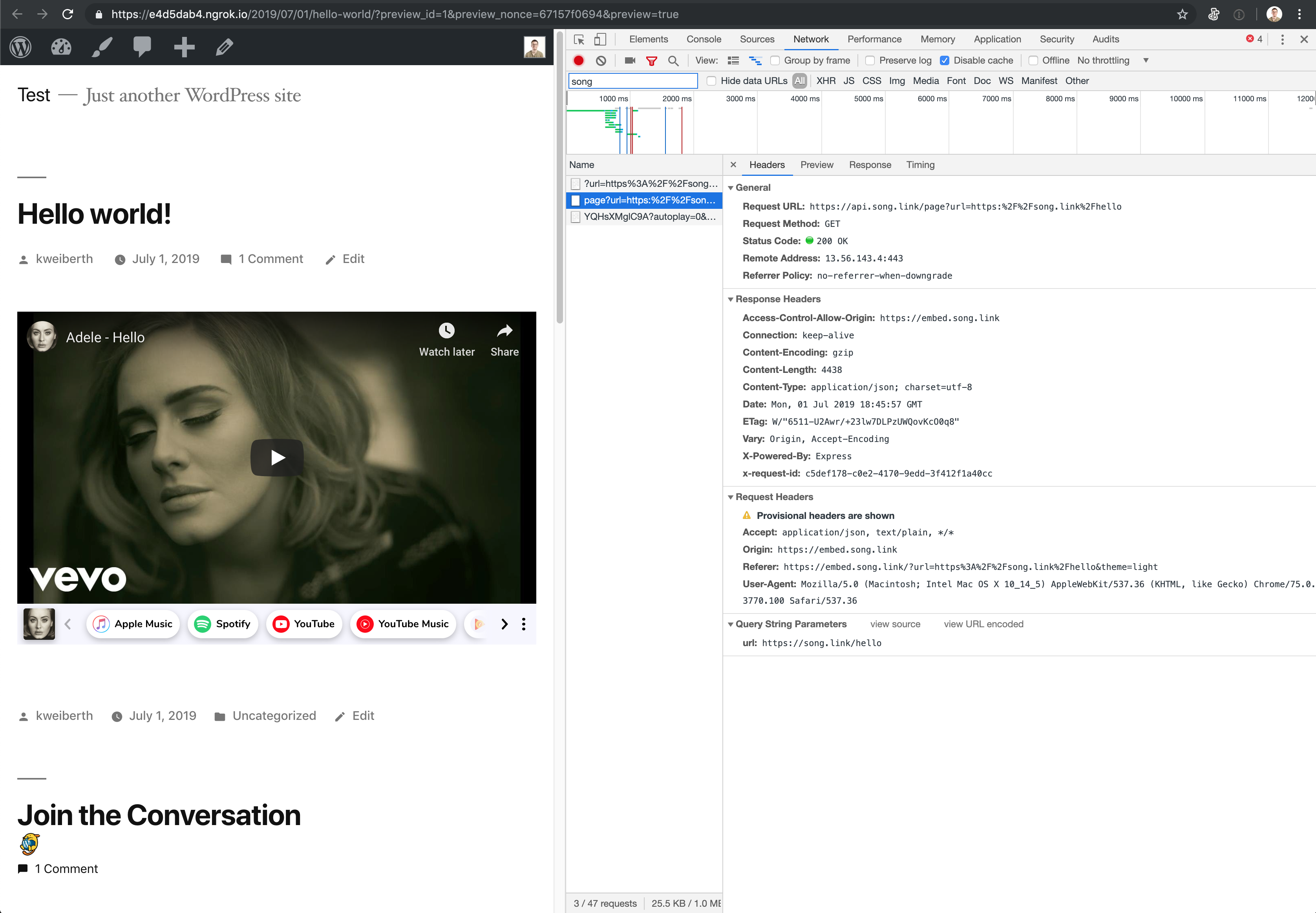
One thing to note here is that the Origin request header is correctly https://embed.song.link. Unfortunately, when I load our embed via a URL, it doesn't load properly due to CORS preflight errors due to the Origin header being null:
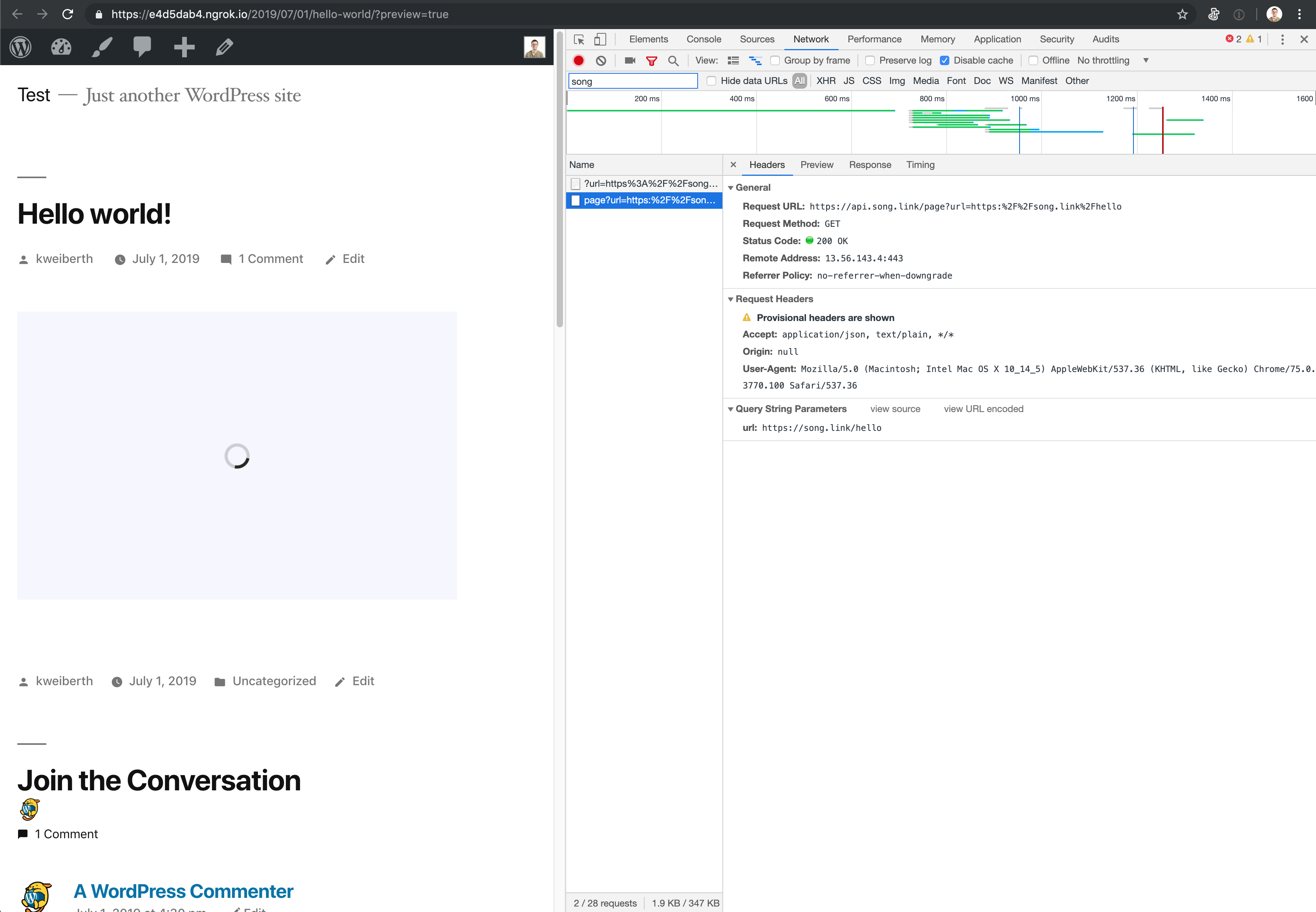
Is Jetpack and/or WP modifying the auto-created embed and intercepting/modifying network requests? If yes, then is that why we'd want to be whitelisted by you and WP?
Thanks again for all your help. I think, hope 🤞we're close.
kweiberth
on 1 Jul 2019
when I load our embed via a URL, it doesn't load properly due to CORS preflight errors due to the Origin header being null:
I believe that is something you'd have to tweak on your end. You are requesting data from api.song.link, but from a different subdomain, embed.song.link. The Access-Control-Allow-Origin CORS Header should allow you to allow requests between the 2 subdomains on your server.
Could you give that a try?
jeherve
on 3 Jul 2019
Hey @jeherve, thanks for the quick response. I am populating the Access-Control-Allow-Origin header from api.song.link server. It allows requests with this code:
app.use(
  cors({
    origin: [/http:\/\/localhost:.*/, /https:\/\/(.*\.)?song\.link/],
  }),
);
I know this is working bc our embeds (which are at embed.song.link) can communicate with api.song.link and load properly.
For some reason, it appears that the auto-populated/modified iframe from WP/Jetpack (sorry if I'm off with how it all works together) is modifying requests. I've added a red box to the screenshot below to show you that the request Origin header is null, and thus api.song.link doesn't allow for CORS.
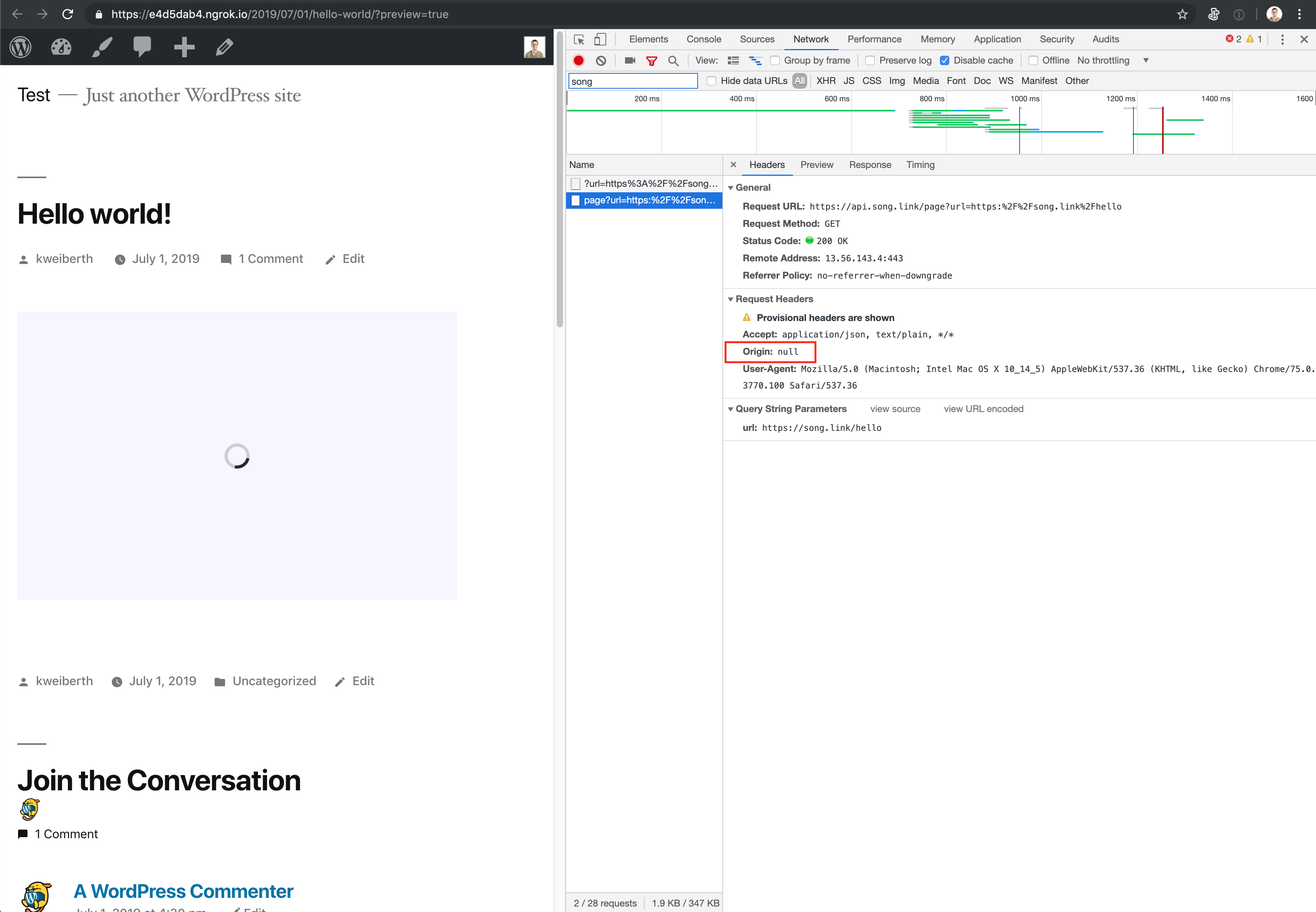
I could potentially allow all domains access to api.song.link by using a * wildcard, but that's not something I want to do.
Can you briefly explain why the auto-populated embed changes requests?
kweiberth
on 3 Jul 2019
The CORS errors are because WordPress adds a sandbox attribute to embed iframes:
The sandbox attribute turns off a bunch of "insecure" iframe features, and allows those features to be turned back on one by one via the space-separated values for that attribute.
WordPress only turns on one of those features: the allow-scripts feature. In particular, WordPress does not turn on the allow-same-origin feature, so, despite being loaded from the https://embed.song.link, the iframe's origin is deliberately made "unique" (i.e., not the "same" as https://embed.song.link). This is why you see Origin: null. See also:
- https://html.spec.whatwg.org/multipage/origin.html#sandboxed-origin-browsing-context-flag
- https://html.spec.whatwg.org/multipage/origin.html#concept-origin-opaque
If it's possible for the Songlink embed to work within these sandbox restrictions, that'd be great: it will be more compatible with other (non-WordPress) platforms that also enforce the sandbox attribute.
If not, adding Songlink to WordPress' list of more-trusted embeds will remove that sandbox enforcement:
function songling_add_oembed() {
    wp_oembed_add_provider( 'https://song.link/*', 'https://song.link/oembed', false );
}
add_action( 'plugins_loaded', 'songling_add_oembed' );
(Note that this code snippet corrects a typo we found in the previous one mentioned above. The third parameter in the wp_oembed_add_provider() call specifies whether the format string (the first parameter) is a regular expression or not.)
I'm late to the party here, but I think that @kraftbj is proposing that Jetpack take responsibility for adding Songling to WordPress' list of more-trusted embeds. If that's the case, the code snippet is something you can use to test how Songlink interacts with WordPress/Jetpack but is something that we'd ship in our plugin eventually (soon?).
 mdawaffe
on 3 Jul 2019
mdawaffe
on 3 Jul 2019
@mdawaffe this makes a lot of sense, thanks for the context. I don't think we'll be able to modify our infrastructure to work with these sandbox attributes. There are two main reasons for this:
We've set up our infrastructure so that matching logic/data lives at
api.song.linkandembed.song.linkdoes minimal work (basically just returns index.html, which then loads JS app) and then the JS app requests the data fromapi.song.link. We're working on adding a CDN for this endpoint via Fastly to get faster loading of the matching data.Our embed renders a YouTube embed inside of it. 🤯😅 When testing locally, I had set
api.song.linkto accept requests from all domains with a wildcard"*". However, the YouTube embed inside our embed was then unable to load due to the lack ofallow-same-originand subsequent CORS errors. I assume YouTube embeds normally don't have issues bc they have been whitelisted as a more-trusted embed?
It would be great if we could move forward with getting on to the list of more-trusted embeds. I remember there were some requirements around size of user base and "staying power"/influence/notoriety of our platform. All I can say is that we keep showing up every day and our platform keeps growing. Happy to help in any way or get you any information you might need.
kweiberth
on 4 Jul 2019
It would be great if we could move forward with getting on to the list of more-trusted embeds.
Let's try to test this! #12954
jeherve
on 4 Jul 2019
@kweiberth We've now whitelisted Song.link for all WordPress.com sites, and I've merged the PR that will bring whitelisting for all Jetpack sites in the fist week of August.
That will allow all WordPress.com and Jetpack users to use your service from now on. Your next step could be to ask for WordPress Core to whitelist your service, as explained here:
https://make.wordpress.org/core/handbook/contribute/design-decisions/#whitelisting-oembed-providers
You can post your request here:
https://core.trac.wordpress.org/
jeherve
on 19 Jul 2019
@jeherve @mdawaffe @kraftbj thank you for your support and help throughout this process. We are excited to be integrated into WordPress.com and Jetpack. We're looking forward to telling our users (many of whom are recording artists who have Wordpress sites) that it's much easier to embed us.
Especially want to shout out to @jeherve for answering all of my long-winded and persistent questions! 😅🙏
I will definitely now post a request to WordPress Core 👍
kweiberth
on 19 Jul 2019
Related issues
 aheckler
·
3Comments
aheckler
·
3Comments
 beaulebens
·
3Comments
beaulebens
·
3Comments
beaulebens
·
3Comments
beaulebens
·
3Comments
 BinaryMoon
·
3Comments
jeherve
·
3Comments
BinaryMoon
·
3Comments
jeherve
·
3Comments