Jetpack: VideoPress: add option to select video thumbnail
Update: This issue remains but the workaround below is no longer valid due to the refactor of VideoPress. Leaving the text for historical reference.
Original Post:
At the moment, if you want to change the video thumbnail of a video you just uploaded to VideoPress, you have to follow these steps:
- Log in to WordPress.com
- Go to the WordPress.com site where you've purchased the VideoPress upgrade
- Go to Media > Library in your dashboard
- Select a video you want to edit
- Change the thumbnail.
It'd be nice if this option were available under Media > VideoPress in dashboards where the VideoPress module is active.
Suggested here:
 jeherve
All 15 comments
On AT sites it is not possible to change the thumbnail as the WordPress.com library cannot be accessed
 kriskarkoski
on 10 Apr 2017
kriskarkoski
on 10 Apr 2017
@kriskarkoski Correct. It's not possible on any other Jetpack site either since VideoPress videos are now linked to the Jetpack site, and not to a WordPress.com site using a VideoPress upgrade.
Luckily the work we've done in #6631 will soon allow one to change a video poster directly from Calypso, once this PR will be complete and merged:
https://github.com/Automattic/wp-calypso/pull/11653
jeherve
on 20 Apr 2017
requested here: 3265255-t
 seejacobscott
on 14 Jun 2017
seejacobscott
on 14 Jun 2017
634025-zen
 aheckler
on 14 Aug 2017
aheckler
on 14 Aug 2017
Looks like this is now possible via https://github.com/Automattic/jetpack/pull/6631 but I've just found that it doesn't seem to show the selected thumbnail in Safari. Or rather it shows it briefly, then reverts back to the first frame of the video.
Steps to reproduce:
- Upload a video to a page/post and select a frame to use as the thumbnail, via https://wordpress.com/media/
- View the page/post in Chrome and you'll see the selected frame.
- View the page/post in Safari and you'll see the selected frame for a second, then the first frame.
cc: @donnapep as you worked on the PRs for this I believe.
Reported in 701879-zen
 danjjohnson
on 25 Sep 2017
danjjohnson
on 25 Sep 2017
cc @dbtlr here ^^^ since that sounds a lot like the issue you just dug into for me.
aheckler
on 25 Sep 2017
@danjjohnson This is due to the removal of autoplay from Safari for ads. We've removed most of the VideoPress interface from Safari at the moment while I investigate how we can be compliant with this change in Safari and elsewhere. You can find more in 43-gh-guardians
 dbtlr
on 25 Sep 2017
dbtlr
on 25 Sep 2017
Also in 937460-zen
jeherve
on 5 Feb 2018
Brought up for an AT site in 1255946-zen
 sdixon194
on 3 Jul 2018
sdixon194
on 3 Jul 2018
5456690-hc
kriskarkoski
on 3 Aug 2018
At the moment the only solution to modify the thumbnail is via WordPress.com, and not in WP Admin. Is there a possible option here to add this capability (particularly with the introduction of Gutenberg)?
A WordPress.com VIP client is querying (they don't use Calypso). Ticket - #83274-z
 dartiss
on 25 Sep 2018
dartiss
on 25 Sep 2018
@dartiss That is not yet possible, no. As you mentioned the only workaround at the moment would be to use the Media editor on WordPress.com.
jeherve
on 25 Sep 2018
1862405-zen
 anaemnesis
on 9 Mar 2019
anaemnesis
on 9 Mar 2019
12090515-hc
 sarahcada
on 15 Apr 2019
sarahcada
on 15 Apr 2019
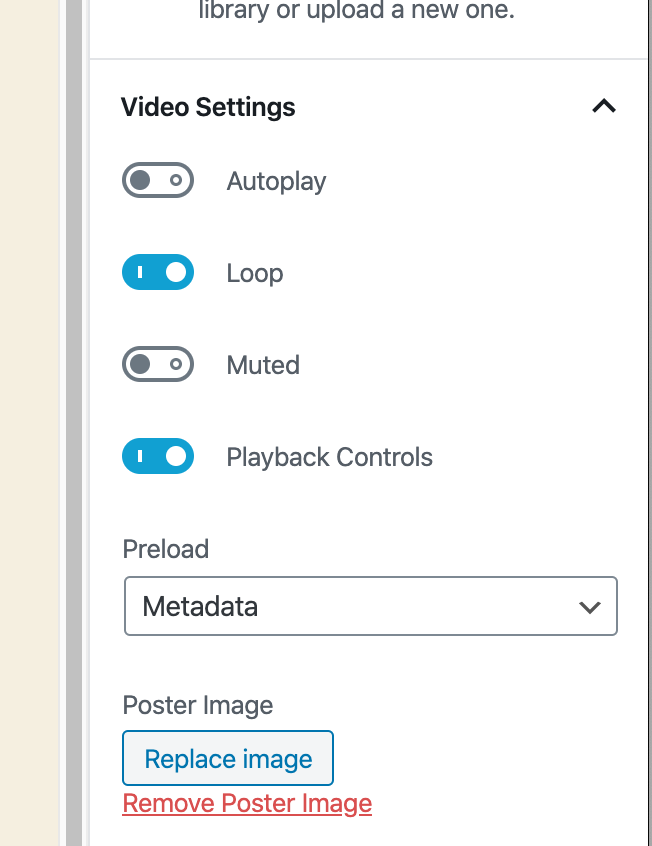
Closing as the option is now available in the post editor:
jeherve
on 6 Mar 2020
Related issues
 ockham
·
3Comments
ockham
·
3Comments
 beaulebens
·
3Comments
beaulebens
·
3Comments
 MichaelArestad
·
3Comments
MichaelArestad
·
3Comments
 BinaryMoon
·
3Comments
BinaryMoon
·
3Comments
 kevinlisota
·
3Comments
kevinlisota
·
3Comments
Most helpful comment
@dartiss That is not yet possible, no. As you mentioned the only workaround at the moment would be to use the Media editor on WordPress.com.