Jetpack: Admin Menu Icon broken in 5.6
It seems the admin menu icon is broken on some sites since updating Jetpack to 5.6.
I do have WordPress installed in a subdirectory, and I spun up a test install with a conventional directory structure and it was fine so this might be the cause
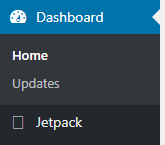
Update: SOLUTION: The situation described here is solved by a hard reload of any wp-admin page. Please see this comment on how one can do this on most popular browsers without having to clear the browser's cache — @oskosk.
 cameronjonesweb
All 15 comments
Hi,
I have the same issue, and my WordPress installed in a subdirectory, too.
 Pseric
on 6 Dec 2017
Pseric
on 6 Dec 2017
I can't seem to be able to reproduce the issue, on a site where WordPress lives in a subdirectory. Do you use a caching service or plugin on your sites? If so, could you try to flush cache and let me know if it helps?
If that does not help, could you let me know what browser you are using?
Thanks!
Related to the logo change in #8305
 jeherve
on 6 Dec 2017
jeherve
on 6 Dec 2017
Clearing my cloudflare cache seems to have fixed it.
cameronjonesweb
on 6 Dec 2017
Hi, I'm seeing the same issue, however it also happens on a root installation of WordPress. I cleaned up the server and cdn caches, but it still didn't work. Then I opened WP Admin in private browsing mode and the icon showed up as it should. Well, it seems to be a browser cache issue, because if I change the css of the icon to f102 instead of f100 in the non-private browser window, the icon shows up.
 zigasancin
on 6 Dec 2017
zigasancin
on 6 Dec 2017
it seems to be a browser cache issue
It does indeed seem like flushing your browser cache should help.
jeherve
on 6 Dec 2017
There's a strong caching mechanism for font files in browsers and in this release we swapped to a new file introducing a new symbol for an already used character.
Hard refreshing the page should help here:
- ctrl + shift + R in Windows/Linux.
- cmd + shift + R in Mac.
 oskosk
on 6 Dec 2017
oskosk
on 6 Dec 2017
Closing this for now.
jeherve
on 6 Dec 2017
The same issue has been reported in the JP forum, some users have figured out already how to fix it, but I linked this issue anyway to stay on the safe side :)
 StefMattana
on 6 Dec 2017
StefMattana
on 6 Dec 2017
Is there a way for us to force a refresh on the font files? Could we modify the build process so that, when there is a change to the jetpack.* font files, we change a query string or something, or we rename the file (jetpack-20171207.*) whenever we make changes to it?
It's not a great impression when updating to see something broken, causes support load, etc.
 kraftbj
on 7 Dec 2017
kraftbj
on 7 Dec 2017
833815-zen
 htdat
on 8 Dec 2017
htdat
on 8 Dec 2017
+1 for this. Shouldn't require every WordPress user to have to clear their cache in order to not see buggy behavior.
 smerriman
on 18 Dec 2017
smerriman
on 18 Dec 2017
@smerriman there's no need to clear the cache. A simple hard reload of any wp-admin page does the trick.
Chrome:
Windows/Linux:
- Hold down Ctrl and click the Reload button.
- Or, Hold down Ctrl and press F5.
Mac:
- Hold ⇧ Shift and click the Reload button.
- Or, hold down ⌘ Cmd and ⇧ Shift key and then press R.
Mozilla Firefox and Related Browsers:
Windows/Linux:
- Hold the Ctrl key and press the F5 key.
- Or, hold down Ctrl and ⇧ Shift and then press R.
Mac:
- Hold down the ⇧ Shift and click the Reload button.
- Or, hold down ⌘ Cmd and ⇧ Shift and then press R.
Internet Explorer:
- Hold the Ctrl key and press the F5 key.
- Or, hold the Ctrl key and click the Refresh button.
Safari
- Hold ⇧ Shift and click the Reload button.
- Or, hold down ⌘ Cmd and ⇧ Shift key and then press R.
oskosk
on 18 Dec 2017
Yes, I know that; I was referring to the cached information that is cleared with a hard refresh, not the full browser cache. But non-developers shouldn't be required to know + perform that. WordPress and other plugins version these types of files to ensure that doesn't happen, so it should be simple for Jetpack to do the same.
smerriman
on 18 Dec 2017
@smerriman Thanks for your feedback!
Jetpack does the same too. The thing here is that the font file is referenced from inside a CSS asset which is actually using the mechanism you describe to be loaded. This file is loaded as jetpack-icons.min.css?ver=5.6 but the url of the font is not versioned inside the jetpack-icons file.
As a note, this change in the logo is not something that will happen in the near future again. Probably won't happen for several years from now.
@dereksmart what are your thoughts on this?
oskosk
on 18 Dec 2017
Closing this for now because of the lack of activity on this. We can always reopen in the future if needed.
jeherve
on 13 Sep 2018
Related issues
 chrisaldrich
·
3Comments
chrisaldrich
·
3Comments
 beaulebens
·
3Comments
beaulebens
·
3Comments
 abidhahmed
·
3Comments
abidhahmed
·
3Comments
 NicktheGeek
·
3Comments
NicktheGeek
·
3Comments
 BinaryMoon
·
3Comments
BinaryMoon
·
3Comments
Most helpful comment
There's a strong caching mechanism for font files in browsers and in this release we swapped to a new file introducing a new symbol for an already used character.
Hard refreshing the page should help here: